
Sarrera
Thank you for choosing the T'nB FMCT10 Bluetooth FM Transmitter. This device allows you to stream music from your smartphone, make hands-free calls, and charge your devices directly through your vehicle's audio system. It features Bluetooth 5.0, multiple charging ports (USB-C 30W, USB-A 18W, USB-A 5W), and a noise-cancelling microphone for clear communication. Please read this manual carefully before use to ensure proper operation and to maximize your experience.
Segurtasun Informazioa
- Ez desmuntatu edo aldatu gailua.
- Keep away from water, moisture, and extreme temperatures.
- Saihestu gailua denbora luzez eguzki-argia zuzenaren eraginpean jartzea.
- Ez erabili produktu kimiko gogorrik edo garbigailu urratzailea.
- Ensure the device is securely plugged into the cigarette lighter socket to prevent dislodgement during driving.
- Always prioritize safe driving. Do not operate the device in a way that distracts you from the road.
Paketearen edukia
- T'nB FMCT10 Bluetooth FM Transmitter
- Erabiltzailearen eskuliburua
Produktua amaituview
The T'nB FMCT10 is designed to enhance your in-car audio experience and connectivity. It integrates several functions into one compact device.
Ezaugarri nagusiak:
- Bluetooth 5.0 for stable wireless connection.
- Hands-free calling with noise-cancelling microphone.
- Multiple charging ports: USB-C (30W PD), USB-A (18W QC3.0), USB-A (5W).
- Music playback via Bluetooth, USB drive (up to 64GB), or AUX input.
- Automatic FM station search (87.6-107.8 MHz).
- Bass Boost function for enhanced audio.

Irudia: Amaituview of the T'nB FMCT10 FM Transmitter, showing the cigarette lighter plug, the central control knob, and the three charging ports (USB-C PD30W, USB QC3.0, and a standard USB port).
Konfigurazioa
- Sartu autoaren entxufean: Plug the FMCT10 into your vehicle's 12V-24V cigarette lighter socket. The device will power on automatically.
- Ezarri FM maiztasuna:
- Tune your car radio to an empty FM frequency (one with no strong broadcast signal).
- On the FMCT10, press the "CH" button (or similar frequency adjustment button) and then use the navigation buttons (or rotary knob) to match the frequency displayed on the transmitter to your car radio's frequency. The device also supports automatic station search.

Irudia: Illustration showing a smartphone pairing with "FMCT10" via Bluetooth, and a hand adjusting the car radio frequency to match the transmitter's display.
- Parekatu Bluetootha:
- Gaitu Bluetooth-a zure telefonoan edo beste audio gailu batean.
- Bilatu available devices and select "FMCT10" to pair. Once paired, a voice prompt will confirm the connection.
- Mikrofonoaren kokapena: The external magnetic microphone can be attached to a convenient location in your vehicle for optimal voice pickup during calls. Use the adhesive backing to secure it.

Irudia: Close-up of the magnetic noise-cancelling microphone, showing its compact design and indicating its noise reduction capability.
Funtzionamendu-argibideak
Musika erreproduzitzea
The FMCT10 supports three modes for music playback: Bluetooth, USB drive, and AUX input.

Irudia: Diagram illustrating the three connection modes: Bluetooth for wireless streaming, USB-A port for music via USB drive, and AUX input for wired audio connection.
- Bluetooth bidezko erreprodukzioa: Once paired with your smartphone, music will automatically stream through your car's speakers via the selected FM frequency. Use your phone or the transmitter's buttons to control playback (play/pause, next/previous track).
- USB unitateko erreprodukzioa: Insert a USB flash drive (up to 64GB) containing MP3/WMA/WAV/FLAC files into the designated USB-A port (often marked with a music note icon). The device will automatically detect and play music from the drive.
- AUX sarrera: Connect an audio device (e.g., MP3 player) to the AUX port on the FMCT10 using a 3.5mm audio cable.
Esku libreko deiak
When your phone is connected via Bluetooth, you can manage calls directly through the FMCT10.
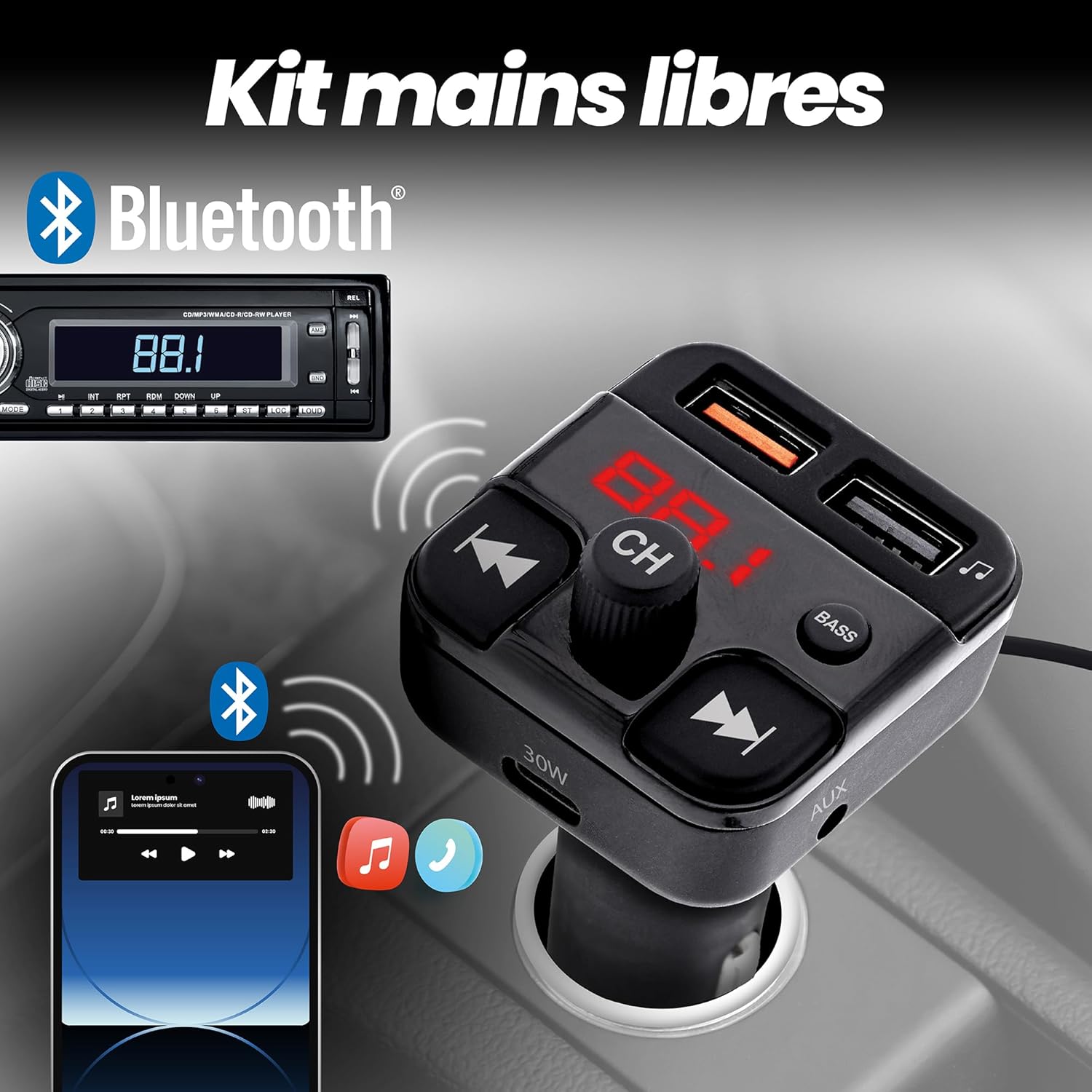
Irudia: Depiction of the FMCT10 in a car, showing a smartphone connected via Bluetooth for hands-free calls and music playback through the car's radio.
- Deia erantzun/amaitu: Press the multi-function button (usually the central knob or a dedicated phone button) once to answer an incoming call or end an ongoing call.
- Deia baztertu: Sakatu eta eutsi funtzio anitzeko botoia sarrerako dei bat baztertzeko.
- Berriro markatzea: Double-press the multi-function button to redial the last number.
Kargatzeko gailuak
The FMCT10 is equipped with three charging ports to power your devices.
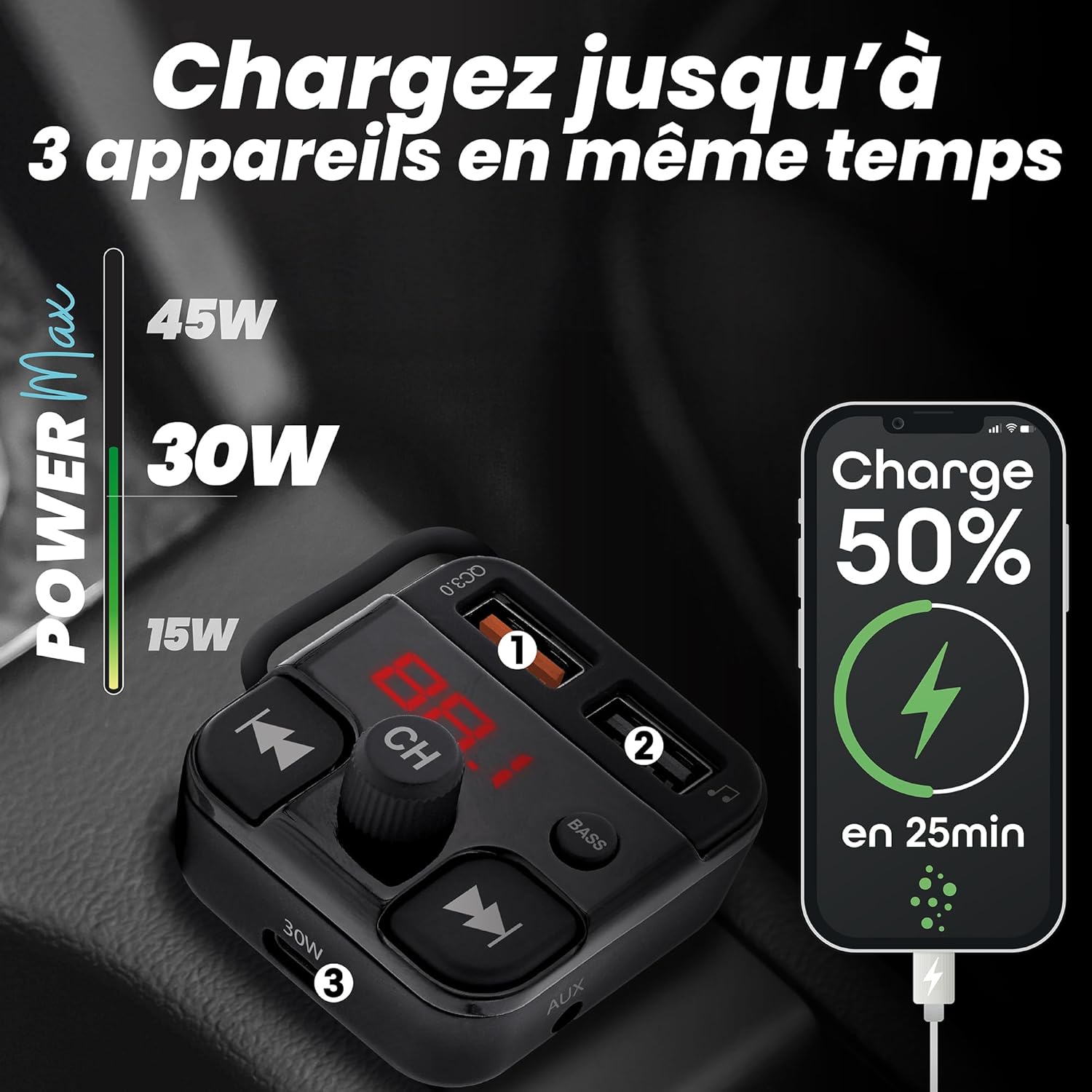
Irudia: Visual representation of the FMCT10 charging three devices simultaneously, highlighting the fast charging capabilities (e.g., 50% charge in 25 minutes).
- USB-C PD 30W: Kargatze azkarreko gailu bateragarrietarako.
- USB-A QC 18W: For Quick Charge compatible devices.
- USB-A 5W: Standard charging port.
All functions of the product can be used while charging your phone.
Baxuaren indartze funtzioa
Press the "BASS" button on the transmitter to activate or deactivate the bass boost feature for a more dynamic listening experience.

Irudia: Close-up of the "BASS" button on the FMCT10, with an illustration of sound waves indicating enhanced bass.
Mantentzea
- Garbitu gailua zapi leun eta lehor batekin.
- Do not use liquid cleaners or sprays.
- Ensure the cigarette lighter socket and USB ports are free of dust and debris.
Arazoak konpontzea
| Arazoa | Kausa posiblea | Irtenbidea |
|---|---|---|
| No power to the transmitter. | Loose connection; vehicle's cigarette lighter socket is faulty; vehicle's fuse is blown. | Ensure the transmitter is firmly plugged in. Check if the car's cigarette lighter socket is working with another device. Check the vehicle's fuse box. |
| Audio kalitate eskasa/estatikoa. | FM frequency interference; volume too low/high; Bluetooth connection issue. | Find a clearer FM frequency on your car radio and transmitter. Adjust volume on both the transmitter and car radio. Re-pair Bluetooth. |
| Bluetooth-a ez da konektatzen. | Bluetooth-a ez dago gaituta telefonoan; gailua ez dago parekatze moduan; interferentziak. | Ensure Bluetooth is enabled on your phone. Restart the transmitter and your phone. Try pairing again. |
| Kargatzea motela da edo ez du funtzionatzen. | Cable issue; device not compatible with fast charging; port malfunction. | Use a different charging cable. Ensure your device supports the fast charging protocols (PD/QC). Try a different charging port. |
Zehaztapenak
- Ereduaren izena: FMCT10
- Marka: T'nB
- Energia iturria: Electric (12V-24V car cigarette lighter socket)
- Bluetooth bertsioa: 5.0
- FM maiztasun gama: 87.6-107.8 MHz
- USB-C irteera: 30W-ko potentzia-ematea (PD)
- USB-A Output 1 (QC3.0): 18W-ko karga azkarra
- USB-A 2. irteera: 5W
- Potentzia maximo totala: 38W
- USB Drive Support: Gehienez 64 GB
- Konektibitatea: Bluetooth, USB Type A, USB Type C, AUX
- Portu kopurua: 3 (2x USB-A, 1x USB-C)
- Ezaugarri bereziak: Hands-free kit, Noise-cancelling microphone, Bass Boost, Automatic station search
- Jatorrizko herrialdea: Txina
Bermea
Produktu hau a 2 urteko fabrikatzailearen bermeaGorde erosketaren egiaztagiria bermearen erreklamazioetarako. Bermeak materialen eta fabrikazioaren akatsak estaltzen ditu erabilera normalaren pean. Ez ditu estaltzen erabilera okerrak, istripuek, baimenik gabeko aldaketek edo higadura normalak eragindako kalteak.
Laguntza
For technical support, troubleshooting assistance, or warranty inquiries, please contact T'nB customer service. You can typically find contact information on the official T'nB webgunea edo zure dendariaren bidez.
T'nB Official Webgunea: www.tnb.com (Please note: This is a generic placeholder. Refer to your product packaging or official brand channels for the most accurate support contact information.)