
Sarrera
Eskerrik asko erosketagatik.asing the YESHOMY Vanity Desk with Mirror and Stool. This manual provides essential information for the safe assembly, operation, and maintenance of your new vanity desk. Please read these instructions thoroughly before beginning assembly and retain them for future reference.
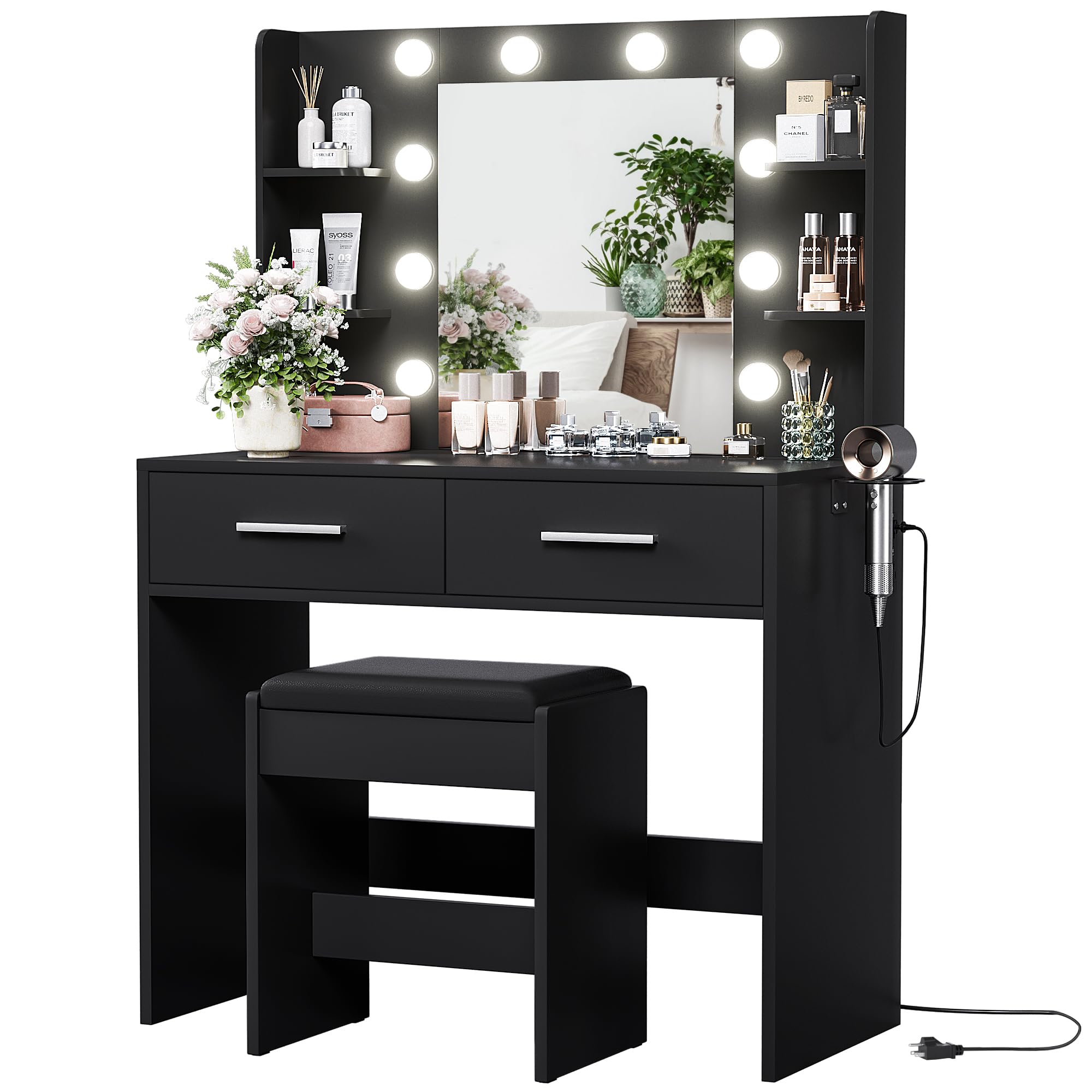
Figure 1: YESHOMY Pure Black Vanity Desk with Mirror and Stool.
Segurtasun informazio garrantzitsua
- Jarraitu beti muntatzeko argibideak arretaz.
- Erabili aurretik, ziurtatu torloju eta lotura guztiak ondo estutu direla. Aldian-aldian egiaztatu eta berriro estutu behar izanez gero.
- Do not overload drawers or shelves. Refer to specifications for weight limits if provided in the detailed assembly guide.
- Keep electrical components (lights, power outlet) away from water to prevent electric shock.
- Erabili iraultzearen aurkako gailua komoda horman finkatzeko, batez ere haurrak bertan badaude.
- Produktu hau barrualdean erabiltzeko bakarrik dago pentsatuta.
Paketearen edukia
Before assembly, verify that all components listed in the included installation manual are present and undamaged. Typically, the package includes:
- Vanity Desk components (wood panels, hardware)
- Mirror with LED lights
- Aulkiaren osagaiak
- Power outlet unit
- Ile-lehorgailuaren euskarria
- Muntaketa-osagaiak (torlojuak, takoak, etab.)
- Installation and usage manual
Konfigurazioa eta Muntaketa
Assembly of the YESHOMY Vanity Desk requires careful attention to the provided step-by-step instructions in the separate installation manual. It is recommended to have two people for assembly to ensure stability and ease of handling larger components.
- Piezak desontziratu eta identifikatu: Lay out all components on a clean, soft surface to prevent scratches. Identify each part using the labels in the manual.
- Mahaiaren egitura muntatu: Follow the diagrams to connect the main desk panels using the provided hardware.
- Tiraderak instalatu: Assemble the two large drawers and install them into the desk frame. Ensure drawer slides are correctly aligned for smooth operation.
- Ispilu-unitatea erantsi: Secure the mirror unit to the desk top. Connect the LED light wiring as instructed.
- Instalatu entxufea eta ile-lehorgailuaren euskarria: Attach the power outlet unit and hair dryer holder to the side of the vanity desk.
- Aulkia muntatu: Put together the stool according to its specific instructions.
- Secure with Anti-Tipping Device: For safety, attach the anti-tipping device to the back of the vanity and secure it to a wall stud.

Figure 2: Product dimensions for planning and assembly.
Funtzionamendu-argibideak
LED Ispilu Argiak
The vanity mirror features adjustable LED lights with three color modes and dimmable brightness. A touch control button is typically located on the mirror or an accessible cable.
- Piztu/Itzali: Tap the touch control button to turn the lights on or off.
- Kolore modua aldatu: Tap the button repeatedly to cycle through the three color modes: Cool Light (6000K), Natural Light (4000K), and Warm Light (3000K).
- Doitu distira: Press and hold the touch control button to adjust the brightness level within the selected color mode. Release when the desired brightness is achieved.
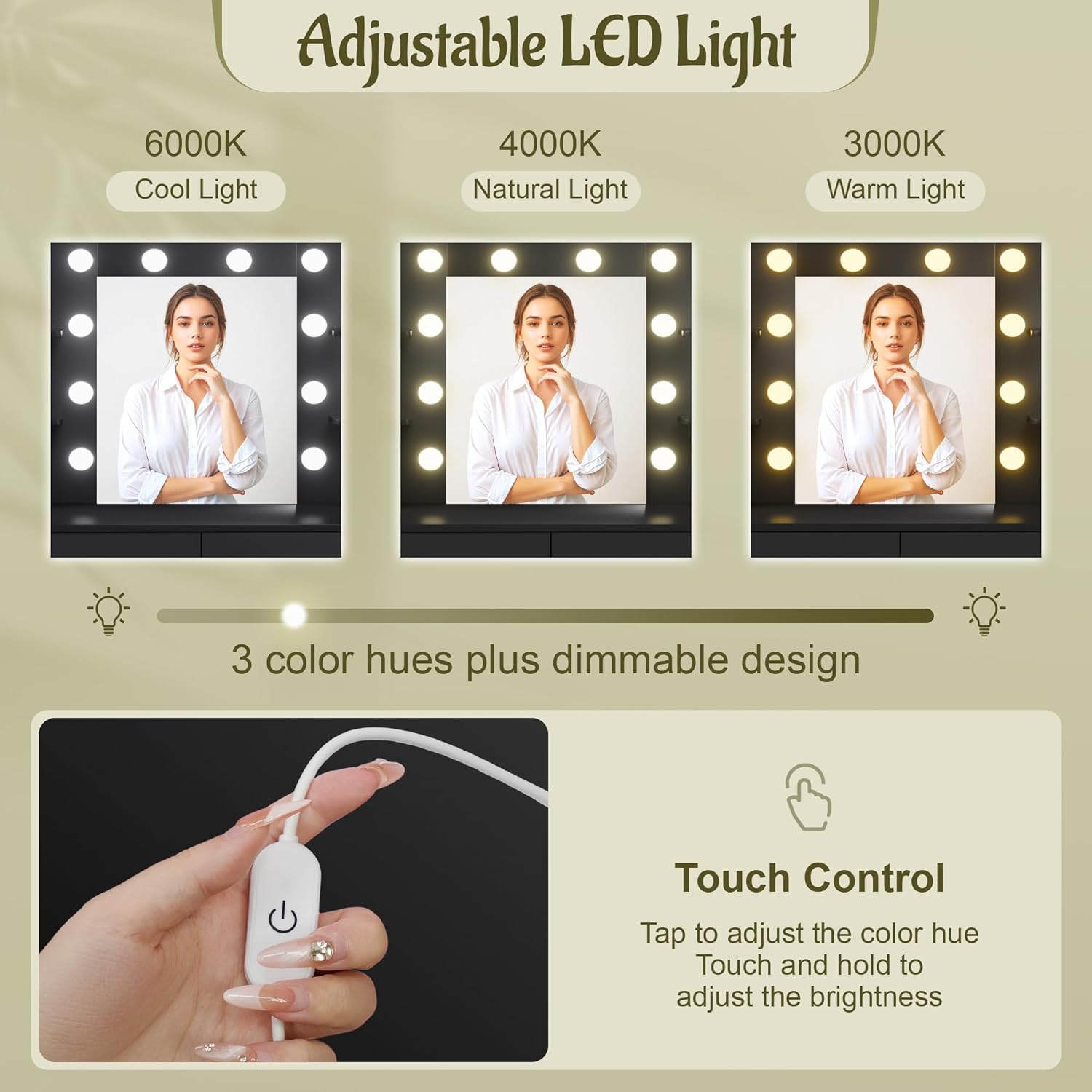
Figure 3: Adjustable LED light modes and touch control.
Entxufea eta USB atakak
The vanity desk is equipped with a built-in power outlet and USB ports for convenient charging and powering of your devices.
- Konektatu komodaren elikatze-kable nagusia hormako entxufe estandar batera.
- Erabili 2 korronte alternoko entxufeak ile-lehorgailuetarako, curllisaburdinak edo beste tresna elektriko batzuk.
- Erabili 2 USB atakak telefonoak, tabletak edo beste USB gailuak kargatzeko.

Figure 4: Integrated power outlet, USB ports, and hair dryer holder.
Biltegiratze Ezaugarriak
Mahai-apaindegiak eskaintzen du ample storage with two large drawers and six open shelves.
- Tiraderak: Utilize the two spacious drawers for storing cosmetics, jewelry, accessories, or other personal items.
- Apalategi irekiak: The six open compartments provide easy access and display space for frequently used items, lotions, perfumes, or decorative pieces.

5 Irudia: Gainetikview of storage features and stool.
Produktua amaituview Bideoa
1. bideoa: Orokorra amaitu daview of the YESHOMY Makeup Vanity Desk with Mirror, showcasinbere ezaugarriak eta diseinua g.
Mantentzea
- Azalera garbitzea: Garbitu egurrezko gainazalak zapi leun batekin,amp oihal. Saihestu akabera kaltetu dezaketen produktu kimiko gogorrak edo garbitzaile urratzaileak.
- Ispiluaren zaintza: Garbitu ispilua beira-garbitzaile batekin eta zapi lihorik gabeko batekin. Ez ihinztatu garbitzailea zuzenean ispiluan; aplikatu lehenik zapi gainean.
- Osagai elektrikoak: Ensure the vanity is unplugged before cleaning near electrical outlets or lights. Do not attempt to disassemble electrical parts.
- Hardwarearen egiaztapena: Aldian-aldian egiaztatu torloju eta lotura guztiak ondo estututa daudela ziurtatzeko. Behar izanez gero, berriro estutu egonkortasuna mantentzeko.
Arazoak konpontzea
- Muntaketa Zailtasunak: If you encounter issues during assembly, such as misaligned parts or difficulty fitting components, double-check the part numbers against the manual's diagrams. Ensure you are using the correct hardware for each step. Sometimes, parts may appear similar but have subtle differences (e.g., left vs. right drawer sides).
- LED argiak ez funtzionatzen: Check if the vanity's main power cord is securely plugged into a working wall outlet. Ensure all light connections are firm. If individual bulbs are replaceable, check if any need replacement (refer to the specific assembly manual for bulb type).
- Power Outlet/USB Ports Not Functioning: Verify the main power cord is plugged in. Test the wall outlet with another device to ensure it is functional. If the issue persists, ensure all internal wiring connections for the power unit are secure (only if accessible and safe to check per manual).
- Wobbly Desk/Stool: Ensure all screws and bolts are fully tightened. If the floor is uneven, use furniture pads or shims under the legs to stabilize.
Zehaztapenak
| Ezaugarri | Xehetasuna |
|---|---|
| Modelo zenbakia | Ya ः- 0497 |
| Kolorea | Beltz hutsa |
| Materiala | Egurra |
| Produktuaren neurriak | 15.8" L x 31.5" W x 53.8" H |
| Elementuaren pisua | 67 kilo |
| Muntaia Beharrezkoa | Bai |
| Ispilu Argiak | Adjustable LED, 3 Color Modes (6000K, 4000K, 3000K), Dimmable |
| Potentzia-saltokiak | 2 korronte alternoko entxufe, 2 USB ataka |
Bermearen informazioa
Specific warranty details for the YESHOMY Vanity Desk (Model YH-0497) are not provided in this document. Please refer to your purchase receipt, product packaging, or contact the retailer/manufacturer directly for comprehensive warranty information.
Bezeroarentzako Arreta
If you have any questions, require assistance with assembly, or need to report missing/damaged parts, please contact YESHOMY customer support through the following channels:
- Fabrikatzailea Webgunea: Visit the official YESHOMY weblaguntza baliabideen gunea.
- Txikizkako laguntza: Jarri harremanetan produktua erosi zenuen dendariarekin.
- Helbide elektronikoa/Telefonoa: Refer to the contact information provided in your product packaging or the separate installation manual.
Please have your model number (YH-0497) and purchase details ready when contacting support.