
1. Sarrera
This manual provides comprehensive instructions for the Maxwest Gravity G64 Smartphone. It covers setup, operation, maintenance, and troubleshooting to help you maximize your device's capabilities. Please read this manual thoroughly before using your new smartphone.
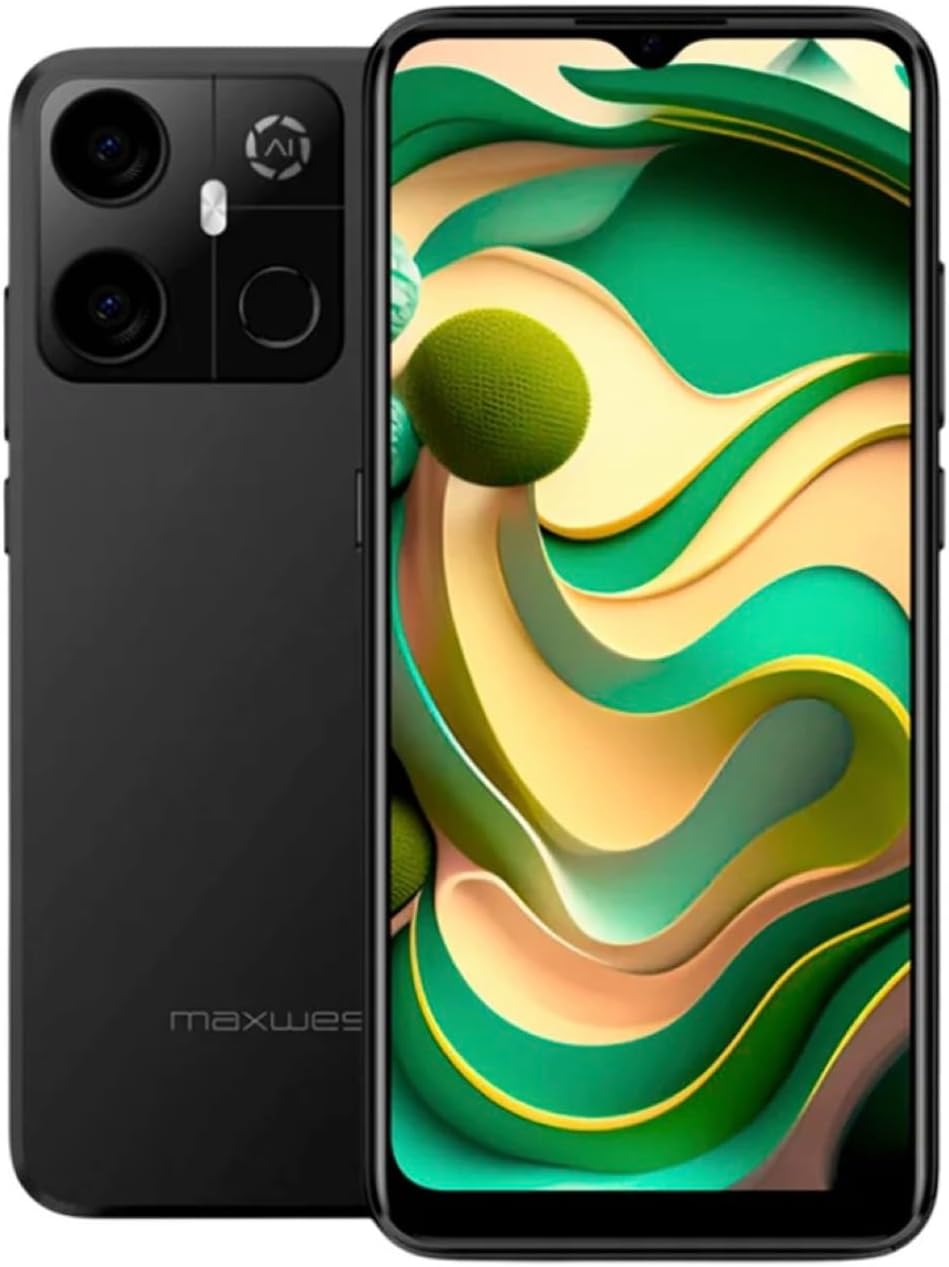
Image: Maxwest Gravity G64 Smartphone, front and back view. The front displays a vibrant screen, while the rear highlights the camera module and Maxwest branding.
2. Konfigurazioa
2.1. Zer dago kutxan
- Maxwest Gravity G64 Smartphone
- Elikatze-moldagailua
- Battery (1 C battery, included)
2.2. SIM txartelaren eta memoria txartelaren instalazioa
Locate the SIM card tray on the side of your device. Use the provided SIM ejector tool to open the tray. Insert your Nano-SIM card(s) and/or microSD card into the designated slots. Ensure the cards are correctly oriented before reinserting the tray firmly into the phone.
2.3. Hasierako piztea eta kargatzea
Press and hold the power button located on the side of the phone until the Maxwest logo appears. For first-time use, it is recommended to fully charge the device. Connect the USB Type-C cable to the phone's charging port and the power adapter to a wall outlet. The battery indicator will show charging status.
3. Funtzionamendua
3.1. Oinarrizko nabigazioa
The Gravity G64 features a responsive touchscreen. Swipe up, down, left, or right to navigate through menus and home screens. Tap icons to open applications. Use pinch-to-zoom gestures for images and web orrialdeak.
3.2. Pantailaren ezaugarriak
The 6.57-inch HD+ display with a 60Hz refresh rate provides clear visuals and smooth scrolling. Adjust brightness and display settings via the 'Settings' menu under 'Display'.
3.3. Kameraren erabilera
Launch the Camera application to utilize the 16MP AI Camera system. Tap to focus, pinch to zoom, and use the on-screen shutter button to capture photos. Explore various modes like Portrait, Panorama, and Night mode for enhanced photography.
3.4. Segurtasun Ezaugarriak
Your Gravity G64 offers dual security options: Fingerprint Sensor and Face Unlock. To set these up, navigate to 'Settings' > 'Security & privacy' > 'Device unlock'. Follow the on-screen instructions to register your fingerprint(s) and face data.
3.5. Konektibitatea
- 4G zelularra: Insert a compatible SIM card to access 4G networks. Manage mobile data settings in 'Settings' > 'Network & internet'.
- Wi-Fi: Connect to wireless networks via 'Settings' > 'Network & internet' > 'Wi-Fi'. Select your desired network and enter the password if required.
- Bluetootha: Pair with Bluetooth devices (headphones, speakers) through 'Settings' > 'Connected devices' > 'Bluetooth'.
3.6. Sistema eragilea
The device runs on Android 14, providing access to the latest features, security updates, and a vast ecosystem of applications available on the Google Play Store.
4. Mantentzea
4.1. Bateria zaintzea
To prolong battery life, avoid extreme temperatures. Use only the provided power adapter and USB Type-C cable for charging. Avoid completely draining the battery frequently.
4.2. Software eguneraketak
Regularly check for software updates to ensure optimal performance and security. Go to 'Settings' > 'System' > 'System update' to check for and install available updates.
4.3. Zure gailua garbitzea
Erabili oihal leun eta pelusik gabeko bat telefonoaren pantaila eta gorputza garbitzeko. Saihestu gailua kaltetu dezaketen produktu kimiko gogorrak edo material urratzaileak erabiltzea.
5. Arazoak
- Gailua ez da pizten: Ziurtatu bateria kargatuta dagoela. Konektatu kargagailua eta saiatu berriro.
- Aplikazioak huts egiten edo blokeatzen: Close and reopen the app. If the issue persists, restart the phone. Clear app cache or reinstall the app.
- Sare seinale eskasa: Check your SIM card installation. Move to an area with better coverage. Contact your carrier if issues persist.
- Hatz-marka/Aurpegi bidezko desblokeoa ez dabil: Ensure your fingers are clean and dry, or your face is clearly visible. Re-register your biometric data if necessary.
- Fabrikaren berrezarpena: As a last resort, you can perform a factory reset. Go to 'Settings' > 'System' > 'Reset options' > 'Erase all data (factory reset)'. Warning: This will erase all data on your phone. Back up important data first.
6. Zehaztapenak
| Ezaugarri | Xehetasuna |
|---|---|
| Ereduaren izena | Gravity G64 |
| Bistaratzea | 6.57-inch HD+ (60Hz Refresh Rate) |
| Prozesadorea | Octa-Core Engine |
| RAM | 8 GB |
| Barne Biltegiratzea | 64 GB |
| Atzeko kamera | 16MP AI Camera System |
| Sistema eragilea | Android 14 |
| Bateria Edukiera | 4000 mAh |
| Konektibitatea | 4G, Bluetooth, Wi-Fi, USB Type-C |
| Segurtasuna | Hatz-marken sentsorea, aurpegia desblokeatzea |
| Neurriak | 6.43 x 3.31 x 0.35 hazbete |
| Pisua | 1.21 kilo |
7. Bermea eta Laguntza
7.1. Bermearen informazioa
For detailed warranty information, please refer to the warranty card included with your product or visit the official Maxwest webgunea. Gorde erosketaren egiaztagiria bermearen erreklamazioetarako.
7.2. Bezeroarentzako arreta
If you encounter any issues not covered in this manual, please contact Maxwest customer support. Contact details can typically be found on the Maxwest official webgunean edo produktuaren ontzian.