
1. Sarrera
Thank you for choosing the Schneider 43A1 4K UHD LED TV. This television combines advanced display technology with smart features to provide an immersive viewing experience. Featuring a 4K Ultra High Definition display, QLED-LCD technology with Direct LED backlighting, and the VIDAA Smart TV platform, your new TV offers vibrant colors, deep blacks, and access to a wide range of entertainment.
This manual provides essential information for the safe and efficient use of your television. Please read it thoroughly before operating the device and retain it for future reference.
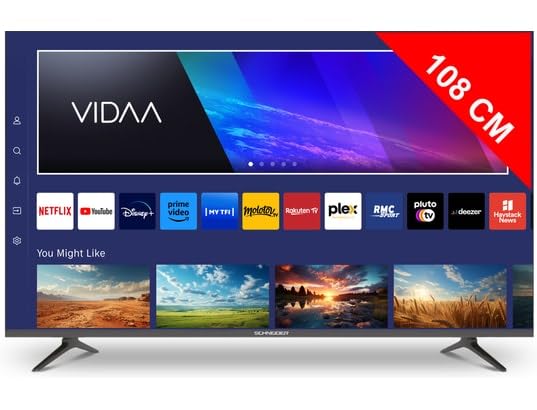
1.1. irudia: Aurrealdea view of the Schneider 43A1 TV with VIDAA interface.
2. Segurtasun informazioa
Funtzionamendu segurua bermatzeko eta kalteak saihesteko, jarraitu segurtasun neurri hauek:
- Lekua: Position the TV on a stable, level surface. Avoid placing it in direct sunlight, near heat sources, or in environments with high humidity or dust.
- Aireztapena: Ensure adequate ventilation around the TV. Do not block ventilation openings. Maintain a minimum distance of 10 cm from walls or other objects.
- Elikatze-iturria: Erabili zehaztutako elikadura-iturria soiliktage. Ensure the power cord is not pinched or walked on. Disconnect the power plug during lightning storms or when unused for extended periods.
- Garbiketa: Deskonektatu telebista garbitu aurretik. Erabili zapi leun eta lehor bat. Ez erabili garbitzaile likido edo aerosolik.
- Likidoak: Do not expose the TV to dripping or splashing liquids. Do not place objects filled with liquids, such as vases, on the TV.
- Haurrak: Zaindu haurrak telebistara edo altzarietara igo ez daitezen.
- Horman muntatzea: If wall-mounting, use a VESA compatible bracket (200 x 200 mm) and ensure proper installation by qualified personnel to prevent injury.
3. Paketearen edukia
Mesedez, egiaztatu elementu guztiak bertan daudela eta egoera onean daudela:
- Schneider 43A1 4K UHD LED TV
- Urruneko Kontrola
- Elikatze-kablea
- Telebista-euskarria (2 pieza)
- Telebista-euskarrirako torlojuak
- Erabiltzailearen eskuliburua (dokumentu hau)
4. Konfigurazioa
4.1 Paketatzea
Carefully remove the TV from its packaging. It is recommended to keep the original packaging for potential future transport or service needs.
4.2 Standaren instalazioa
If you are not wall-mounting the TV, attach the included stand pieces to the bottom of the TV using the provided screws. Ensure the stand is securely fastened before placing the TV upright.
4.3 Horman muntatzea (aukerakoa)
The Schneider 43A1 is compatible with VESA 200 x 200 mm wall mounts. For safe installation, it is highly recommended to use a professional installer. Refer to your wall mount's instructions for specific details.
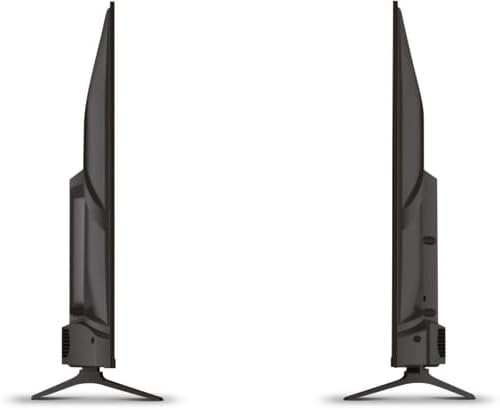
4.1 irudia: Albokoa view of the Schneider 43A1 TV, illustrating its profile for placement or wall mounting.
4.4 Kanpoko gailuak konektatzea
Zure telebistak hainbat konexio aukera eskaintzen ditu:
- HDMI: Konektatu gehienez hiru HDMI 2.0 gailu (adibidez, Blu-ray erreproduzitzailea, joko kontsola, set-top box) HDMI ataketara.
- USBa: Two USB ports are available for connecting USB storage devices to play media.
- AV/Audio Input: For older devices requiring composite video and stereo audio.
- Irteera koaxiala: Kanpoko audio-sistema batera konektatzeko.
- Antena/kable sarrera: Connect your antenna or cable TV signal for DVB-T/T2/C/S2 reception.
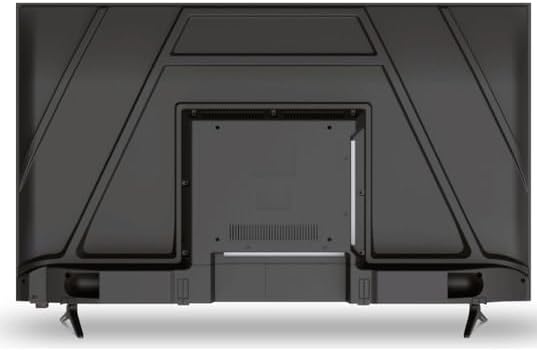
4.2. irudia: Atzekoa view of the Schneider 43A1 TV, highlighting connection ports.
4.5 Potentzia konektatzea
Plug the power cable into the TV's power input, then into a suitable wall outlet.
4.6 Hasierako konfigurazio-morroia
Upon first power-on, the TV will guide you through an initial setup process. This includes selecting your language, connecting to a Wi-Fi network, and scanning for available channels (DVB-T/T2/C/S2).
5. Funtzionamendua
5.1 Urruneko kontrolaren funtzioak
The remote control allows you to navigate the TV's features:
- Pizteko botoia: Telebista pizten edo itzaltzen du.
- Bolumena igo/behera: Soinu maila doitzen du.
- Kanal gora/behera: Telebistako kateak aldatzen ditu.
- Sarrera/Iturria: Selects the input source (HDMI, USB, TV Tuner).
- Nabigazio botoiak: Menu nabigaziorako.
- Telebista adimendunaren botoiak: Direct access to popular apps like Netflix, Prime Video, YouTube.
5.2 Smart TV (VIDAA)
The integrated VIDAA Smart TV platform provides access to a variety of applications and streaming services. Connect your TV to the internet via Wi-Fi to enjoy features like Netflix, Prime Video, and YouTube. Bluetooth connectivity allows for wireless connection to compatible audio devices.

5.1 irudia: Aurrealde angeluatua view of the Schneider 43A1 TV, displaying the VIDAA Smart TV interface.
5.3 Sarrera hautatzea
Press the 'Input' or 'Source' button on your remote control to switch between connected devices (HDMI 1, HDMI 2, HDMI 3, USB, AV, TV Tuner).
5.4 Irudi eta soinu ezarpenak
Access the TV's menu to adjust picture and sound settings. The 4K UHD resolution, QLED-LCD technology, and Direct LED backlighting ensure a high-quality visual experience. The TV also features upscaling to enhance lower-resolution content. Audio is delivered via 2 x 8 W RMS stereo speakers with Dolby Audio support.
5.5 PC Monitor Mode
The TV can be used as a PC monitor by connecting your computer via an HDMI cable. This mode optimizes the display for computer use.
6. Mantentzea
6.1 Telebista garbitzea
Before cleaning, ensure the TV is unplugged from the power outlet.
- Pantaila: Garbitu pantaila astiro-astiro zapi leun eta pelusik gabeko batekin. Orbanik egoskorrak izanez gero, garbitu astiro-astiro.ampGarbitu oihal bat urarekin edo pantaila-garbitzaile espezializatu batekin (ez ihinztatu zuzenean pantailan).
- Kanpoaldea: Erabili zapi leun eta lehor bat telebista garbitzeko.asing. Saihestu garbitzaile edo disolbatzaile urratzaileak.
6.2 Software eguneraketak
Your TV may receive software updates to improve performance and add new features. Ensure your TV is connected to the internet to receive these updates automatically or check for them manually through the settings menu.
7. Arazoak
Telebistarekin arazoak badituzu, jo ezazu honako arazo eta irtenbide ohikoenei:
- Potentziarik gabe:
- Egiaztatu kablea telebistara eta hormako entxufera ondo konektatuta dagoen.
- Ziurtatu hormako entxufea funtzionatzen duela (probatu beste gailu batekin).
- Sakatu urrutiko agintean edo telebistan bertan pizteko botoia.
- Irudi/soinurik ez:
- Egiaztatu sarrera-iturri zuzena hautatuta dagoela (adibidez, HDMI 1, telebista).
- Egiaztatu telebistaren eta kanpoko gailuen arteko kable-konexio guztiak.
- Ziurtatu bolumena ez dagoela isilarazita edo gutxienekoan ezarrita.
- Antena bat erabiltzen baduzu, egiaztatu antenaren konexioa eta egin kanalen eskaneatzea.
- Urruneko kontrola ez dabil:
- Ordeztu bateriak urrutiko agintean.
- Ziurtatu urrutiko agintearen eta telebistaren IR sentsorearen artean oztoporik ez dagoela.
- Smart TV/Network Issues:
- Egiaztatu zure Wi-Fi bideratzailea eta Interneteko konexioa.
- Go to the TV's network settings to re-connect to your Wi-Fi network.
- Restart the TV and your router.
Irtenbide hauek probatu ondoren arazoa konpontzen ez bada, jarri harremanetan bezeroarentzako arreta-zerbitzuarekin.
8. Zehaztapenak
| Ezaugarri | Zehaztapena |
|---|---|
| Eredua | Schneider 43A1 |
| Bistaratzeko tamaina | 109 cm (43 hazbete) |
| Ebazpena | 4K Ultra HD (3840 x 2160 pixel) |
| Bistaratzeko Teknologia | QLED-LCD with Direct LED Backlight |
| Kontraste-erlazioa | 1100:1 |
| Distira | 200 cd/m² |
| Audio Irteera | 2 x 8 W RMS Stereo |
| Audio Teknologia | Dolby Audio |
| HDMI atakak | 3 (HDMI 2.0) |
| USB atakak | 2 |
| Beste sarrera batzuk | AV/Audio Input |
| Irteerak | Irteera koaxiala |
| Sintonizatzailea | DVB-T/T2/C/S2 |
| Smart TV Plataforma | VIDAA (Netflix, Prime Video, YouTube) |
| Haririk gabeko konexioa | Wi-Fi, Bluetootha |
| VESA bateragarritasuna | 200 x 200 mm |
| Pisua | 7.5 kilogramo |


