1. Sarrera
Thank you for choosing the Generic Smart Stylus (2nd Generation). This stylus is designed to enhance your experience with compatible tablets, offering precision, comfort, and advanced features for writing, drawing, and navigation. Please read this manual carefully to ensure proper use and maintenance of your device.
Gailu bateragarriak:
- Xiaomi Pad 5 Series
- Xiaomi Pad 6 Series
2. Paketearen edukia
Egiaztatu elementu guztiak zure paketean daudela:
- Generic Smart Stylus (2nd Generation)
- USB-C kargatzeko kablea
- Replacement Stylus Tips (multiple)
- Erabiltzailearen eskuliburua
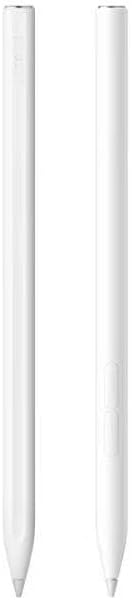
Image: The stylus and its included accessories, such as the USB-C charging cable and replacement tips, neatly arranged within the product packaging.
3. Konfigurazioa eta hasierako erabilera
Stylus kargatzea:
- Locate the USB-C charging port on the stylus.
- Connect the provided USB-C charging cable to the stylus and a compatible USB power source.
- A full charge takes approximately 40 minutes. The indicator light will show charging status.
Piztu/Itzaltzea:
The stylus features touch control for easy activation. Simply touch the designated area (often the top cap) to power it on or off. No complicated pairing process is required; the stylus is ready for use immediately upon activation with compatible devices.
4. Funtzionamendu-argibideak
Idazketa eta marrazketa:
The stylus offers a smooth and responsive experience with no noticeable lag. Its 1.5mm fine tip provides high precision for detailed work, making it ideal for handwriting, note-taking, and digital art.

Image: A hand holding the stylus, actively writing on a tablet screen, demonstrating its use for note-taking or drawing.
Palmondoaren errefusa:
This stylus features advanced palm rejection technology, allowing you to rest your hand comfortably on the tablet screen while writing or drawing without creating unintended marks. This mimics the natural feel of writing on paper.
Pantaila-argazkiaren funtzioa:
To capture a screenshot, long-press the auxiliary part (typically a button or touch-sensitive area) on the stylus. Refer to your tablet's specific settings for screenshot saving locations.
Video: This video demonstrates the stylus in action, showcasing its smooth writing capabilities, magnetic attachment feature, and overall compatibility with various devices.
5. Mantentzea
Replacing Stylus Tips:
Over time, the stylus tip may wear down. To replace it:
- Gently twist and pull the old tip to remove it.
- Insert a new tip from the provided replacements and push it firmly until it clicks into place.
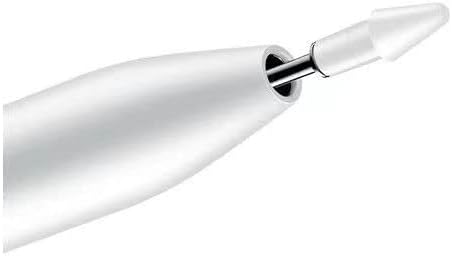
Irudia: Xehetasun zehatza view of the stylus tip, illustrating the process of removing and replacing the fine point for continued optimal performance.
Arreta orokorra:
- Mantendu arkatza garbi zapi leun eta lehor batekin garbituz.
- Avoid exposing the stylus to extreme temperatures or moisture.
- Store the stylus in a safe place to prevent damage to the tip.
6. Arazoak
Estilistak ez du erantzuten:
- Ziurtatu arkatza guztiz kargatuta dagoela.
- Confirm the stylus is powered on (check indicator light).
- Verify your tablet is compatible with the stylus.
- Berrabiarazi tableta.
Inaccurate or Skipping Input:
- Check if the stylus tip is securely attached and not worn out. Replace if necessary.
- Ziurtatu tabletaren pantaila garbi eta hondakinik gabe dagoela.
- Disable any other active styluses or input devices.
7. Zehaztapenak
| Marka | Generikoa |
| Eredua | Stylus (2nd generation) |
| Materiala | Plastikoa |
| Kolorea | Zuria |
| Battery Average Life (Writing) | 7 ordu |
| Bateriaren batez besteko iraupena (itxaropena) | 0-150 ordu |
| Kargatzeko Denbora | 40 minutu inguru |
| Kargatzeko estiloa | Type-C, Magnetic Suction |
| Gailu bateragarriak | Tablet (Xiaomi Pad 5/Pad 6 series) |
| Minimum Required OS | Android 11.0 |
8. Bermea eta Laguntza
Bermeari buruzko informazioa eta bezeroarentzako laguntza lortzeko, erosketa unean emandako dokumentazioa kontsultatu edo zure saltzailearekin harremanetan jarri. Gorde erosketaren frogagiria bermearen erreklamazioetarako.


