
1. Sarrera
Thank you for choosing the MONODEAL CD401 Portable HiFi Stereo CD Player. This versatile device combines classic CD playback with modern connectivity options, including Bluetooth, FM radio, USB, and AUX input. Enjoy high-fidelity audio with built-in speakers, dynamic RGB lighting, and convenient remote control. This manual provides essential information for setup, operation, and maintenance to ensure optimal performance.
2. Zer dago kutxan
- 1x MONODEAL CD401 CD Player
- 1x Erabiltzailearen eskuliburua
- 1x Urruneko Kontrola
- 1x 3.5 mm-ko audio kablea
- 1x Charging Cable and Plug
3. Produktua amaitu daview
The MONODEAL CD401 is designed for both portability and desktop use, offering a blend of classic and contemporary audio features. Its compact design includes integrated speakers and a clear display for easy navigation.
1. irudia: Aurrealdea view of the MONODEAL CD401 Portable CD Player, showcasing its compact design and central display.
Ezaugarri nagusiak:
- Multi-Color RGB Lighting: Dynamic lighting effects that change color to the beat of the music, enhancing visual and auditory experience.
- Bluetooth 5.3: Functions as both a Bluetooth transmitter (to headphones/speakers) and receiver (from phones/tablets).
- Integrated 4*HIFI Speakers: Provides surround sound for an immersive listening experience.
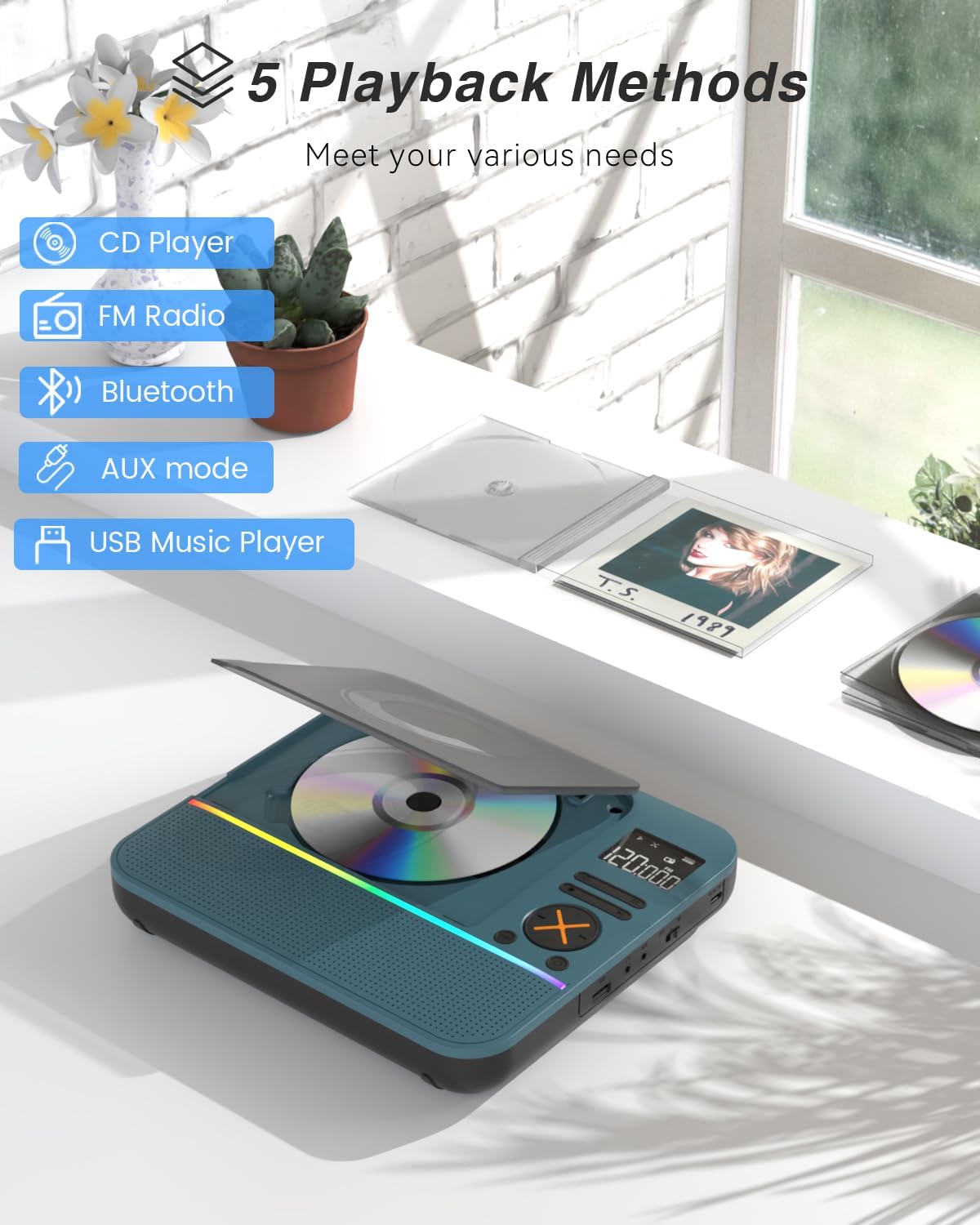
- Erreprodukzio modu anitz: Easily switch between CD, Bluetooth, FM Radio, AUX, and USB modes via a large LCD screen.
- Wide CD Compatibility: CD, CD-R, CD-RW, MP3 eta WMA formatuak onartzen ditu.
- Soinu efektuak: Choose from five equalizer presets: Flat, Rock, Pop, Jazz, and Classic.
- FM irratia: Access FM frequencies from 76MHz to 108MHz.
- USB & AUX Connectivity: Play music from a USB flash drive or connect external devices via the 3.5mm AUX cable.
- Bateria kargagarria: Built-in 3000mAh battery offers up to 8 hours of continuous playback.
- Lo egiteko tenporizadorea: Customizable sleep timer from 10 to 90 minutes.

Figure 2: The MONODEAL CD401 displaying its multi-color RGB lighting effects, which synchronize with the music.
Kontrolak eta Portuak:
The device features intuitive controls on its top panel and essential ports on the side for easy access.

Figure 3: Top panel of the CD player showing playback controls, mode selection, and display.

Figure 4: The side panel of the CD player, illustrating the AUX input, USB port, and charging port.
Produktuaren bideo ofiziala:
Video 1: Official product video from MonoDeals showcasing the Desktop CD Player with Bluetooth and RGB Light features.
Video 2: Official product video from MonoDeals demonstrating the Desktop Player's Bluetooth functionality and colorful lighting effects.
4. Konfigurazioa
4.1 Gailua kargatzea
- Connect the provided USB charging cable to the charging port on the side of the CD player.
- Plug the other end of the USB cable into a compatible USB power adapter (included) or a computer's USB port.
- The battery indicator on the LCD screen will show charging status. A full charge provides up to 8 hours of playback.
4.2 CD bat sartzea
- Ireki CDaren konpartimentuaren estalkia astiro-astiro.
- Place the CD with the label side facing up onto the spindle. Ensure it clicks into place.
- Itxi ondo CDaren konpartimentuaren estalkia, sartu arte.
4.3 Piztu/Itzaltzea
- To power on, slide the ON/OFF switch to the 'ON' position. The LCD screen will light up.
- Itzaltzeko, irristatu ON/OFF etengailua 'OFF' posiziora.
5. Funtzionamendu-argibideak
5.1 Modu hautaketa
Sakatu MODUA button on the device or remote control to cycle through the available modes: CD, Bluetooth, FM, AUX, and USB.

Figure 5: The CD player's display indicating the five available playback methods: CD, FM Radio, Bluetooth, AUX mode, and USB Music Player.
5.2 CD erreprodukzioa
- Insert a compatible CD (CD, CD-R, CD-RW, MP3, WMA).
- Select 'CD' mode. The player will automatically start reading the disc.
- Erabili Erreproduzitu/Pausatu, Hurrengo Pista, eta Aurreko Pista erreprodukzioa kontrolatzeko botoiak.
- Sakatu ERREPIKATU button to cycle through repeat options (e.g., repeat one, repeat all).
- Sakatu EQ button to select desired sound effects (Flat, Rock, Pop, Jazz, Classic).
5.3 Bluetooth modua
The CD401 supports both Bluetooth transmission (BT TX) and reception (BT RX).
- Bluetooth Receiver (BT RX): Select 'Bluetooth' mode. The device will enter pairing mode. On your phone/tablet, search for 'CD401' and connect. Audio from your device will play through the CD player's speakers.
- Bluetooth Transmitter (BT TX): Select 'Bluetooth' mode. Press and hold the BT TX button. The CD player will search for nearby Bluetooth headphones or speakers. Once connected, CD audio will transmit to the external Bluetooth device.

Figure 6: Illustration of the CD player's dual Bluetooth functionality, allowing it to receive audio from a phone (RX) or transmit to headphones (TX).
5.4 FM Irratia
- Select 'FM' mode.
- Erabili Hurrengo Pista eta Aurreko Pista buttons to scan for radio stations.
- FM maiztasun-tartea 76 MHz-tik 108 MHz-ra bitartekoa da.
5.5 AUX sarrera
- Select 'AUX' mode.
- Connect an external audio device (e.g., smartphone, computer) to the AUX IN port using the provided 3.5mm audio cable.
- The CD player will now act as a wired speaker for the connected device.
- Note: Bluetooth connectivity is not supported in cars; use the 3.5mm AUX cable for car audio.
5.6 USB erreprodukzioa
- Select 'USB' mode.
- Sartu MP3 edo WMA audioa duen USB flash drive bat files USB atakan sartu.
- The player will automatically detect and begin playing the audio files.
5.7 Bolumen kontrola
Adjust the volume using the dedicated volume buttons on the device or the remote control.
5.8 Lo egiteko tenporizadorea
- Sakatu LO urrutiko aginteko botoia.
- Cycle through the available sleep timer durations (10, 20, 30, 40, 50, 60, 70, 80, 90 minutes).
- The device will automatically power off after the selected time.

Figure 7: The CD player featuring its sleep timer function, allowing users to set automatic shutdown after a specified duration.
6. Mantentzea
6.1 Garbiketa
- Garbitu gailua zapi leun eta lehor batekin. Ez erabili garbitzaile likidorik edo material urratzailerik.
- Mantendu CDaren konpartimentua garbi eta hautsik gabe.
6.2 Biltegiratzea
- Store the CD player in a cool, dry place away from direct sunlight and extreme temperatures.
- Remove any CDs or USB drives before storing for extended periods.
7. Arazoak
| Arazoa | Kausa posiblea | Irtenbidea |
|---|---|---|
| Gailua ez da pizten | Bateria baxua edo etengailua itzalita dago. | Kargatu gailua guztiz. Ziurtatu ON/OFF etengailua 'ON' posizioan dagoela. |
| Bozgorailuen soinurik ez | Volume is too low or incorrect mode selected. | Increase volume. Verify correct playback mode (CD, Bluetooth, FM, AUX, USB). |
| CDa ez da erreproduzitzen | CDa zikinduta, urratuta edo gaizki sartuta dago. | Clean the CD. Check for scratches. Reinsert the CD correctly with the label side up. |
| Ezin izan da Bluetooth parekatzea | Device is not in pairing mode or too far from the source. | Ensure the CD player is in Bluetooth pairing mode. Move devices closer. Disconnect from other Bluetooth devices. |
8. Zehaztapenak
| Ezaugarri | Xehetasuna |
|---|---|
| Modelo zenbakia | CD401 |
| Marka | MONODEALA |
| Konektibitate Teknologia | Bluetooth 5.3 |
| Hizlari mota | 4*HIFI Stereo |
| Bateria Edukiera | 3000 mAh (Barnekoa) |
| Erreprodukzio-denbora | Gehienez 8 ordu (karga osoa dagoenean) |
| Onartutako disko formatuak | CD, CD-R, CD-RW |
| Onartutako audio formatuak | MP3, WMA |
| FM maiztasun sorta | 76MHz eta 108MHz artean |
| Paketearen neurriak | 10.83 x 9.13 x 1.93 hazbete |
| Elementuaren pisua | 2.48 kilo |
9. Bermea eta Laguntza
For warranty information, technical support, or customer service inquiries, please refer to the contact details provided in your product packaging or visit the official MONODEAL webgunea. Gorde erosketa-agiria berme-erreklamazioetarako.