
1. Sarrera
The Huepar SW-T100 is a versatile 3-in-1 measurement tool designed for various applications in construction, home improvement, and DIY projects. It integrates a laser distance meter, a green cross line laser level, and a traditional tape measure into a single compact device. This manual provides detailed instructions for safe and effective operation of your device.
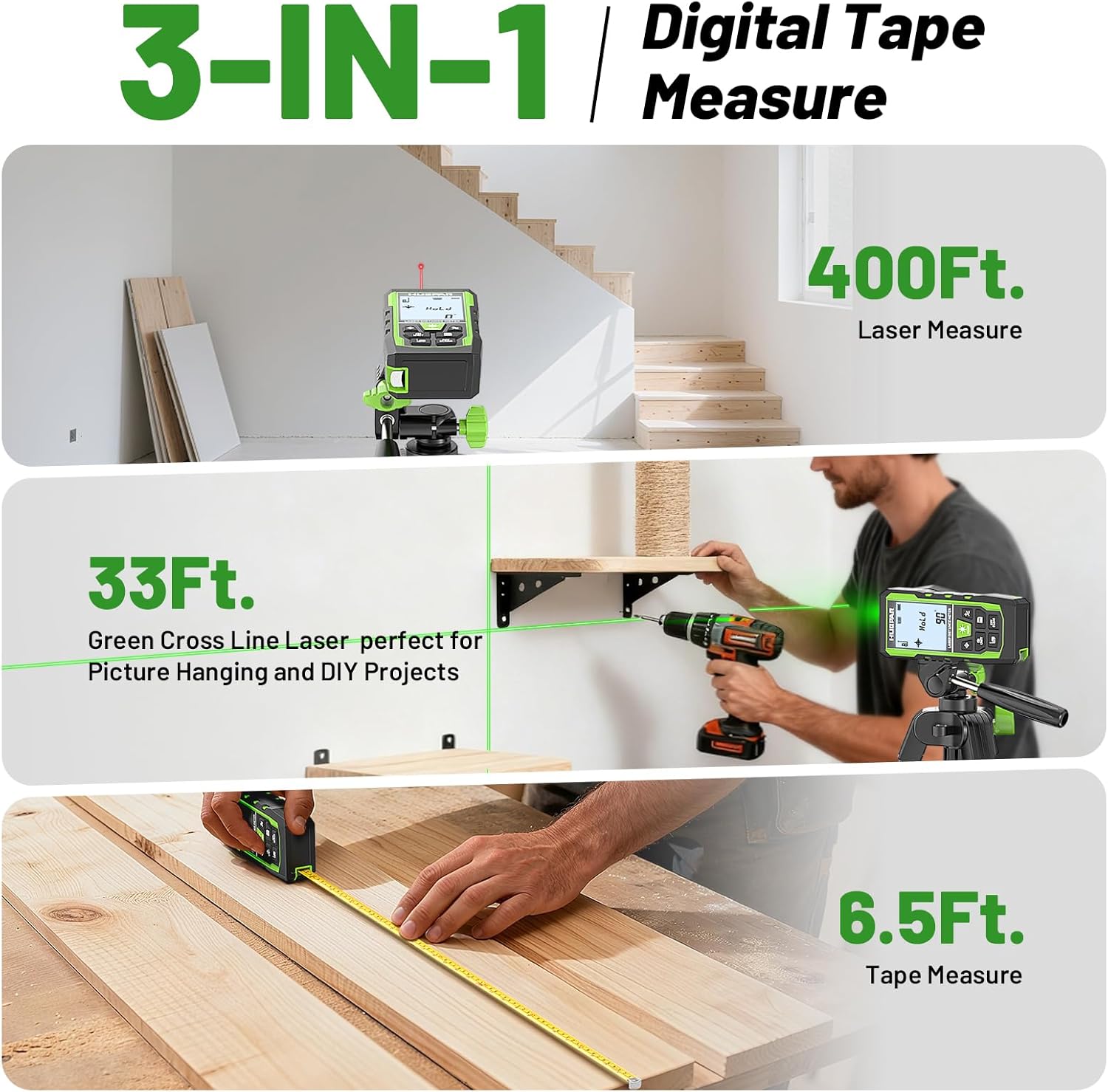
Image 1.1: The Huepar SW-T100 demonstrating its three core measurement functions.
2. Segurtasun informazioa
This device uses a Class 2 laser (490-560nm, <1mW). Observe the following safety precautions:
- Ez begiratu zuzenean laser izpiari.
- Avoid directing the laser beam at other people or reflective surfaces.
- Do not disassemble the device; laser radiation exposure may occur.
- Mantendu gailua haurren eskura.
- Use only the specified Type-C charging cable.
3. Paketearen edukia
Egiaztatu elementu guztiak zure paketean daudela:
- 1x Huepar SW-T100 3-in-1 Laser Measurement Tool
- 1x C motako kargatzeko kablea
- 1x Poltsa eramangarria
- 1x Eskuko uhala
- 1x Auxiliary Measuring Target Plate
- 1x Erabiltzailearen eskuliburua (dokumentu hau)
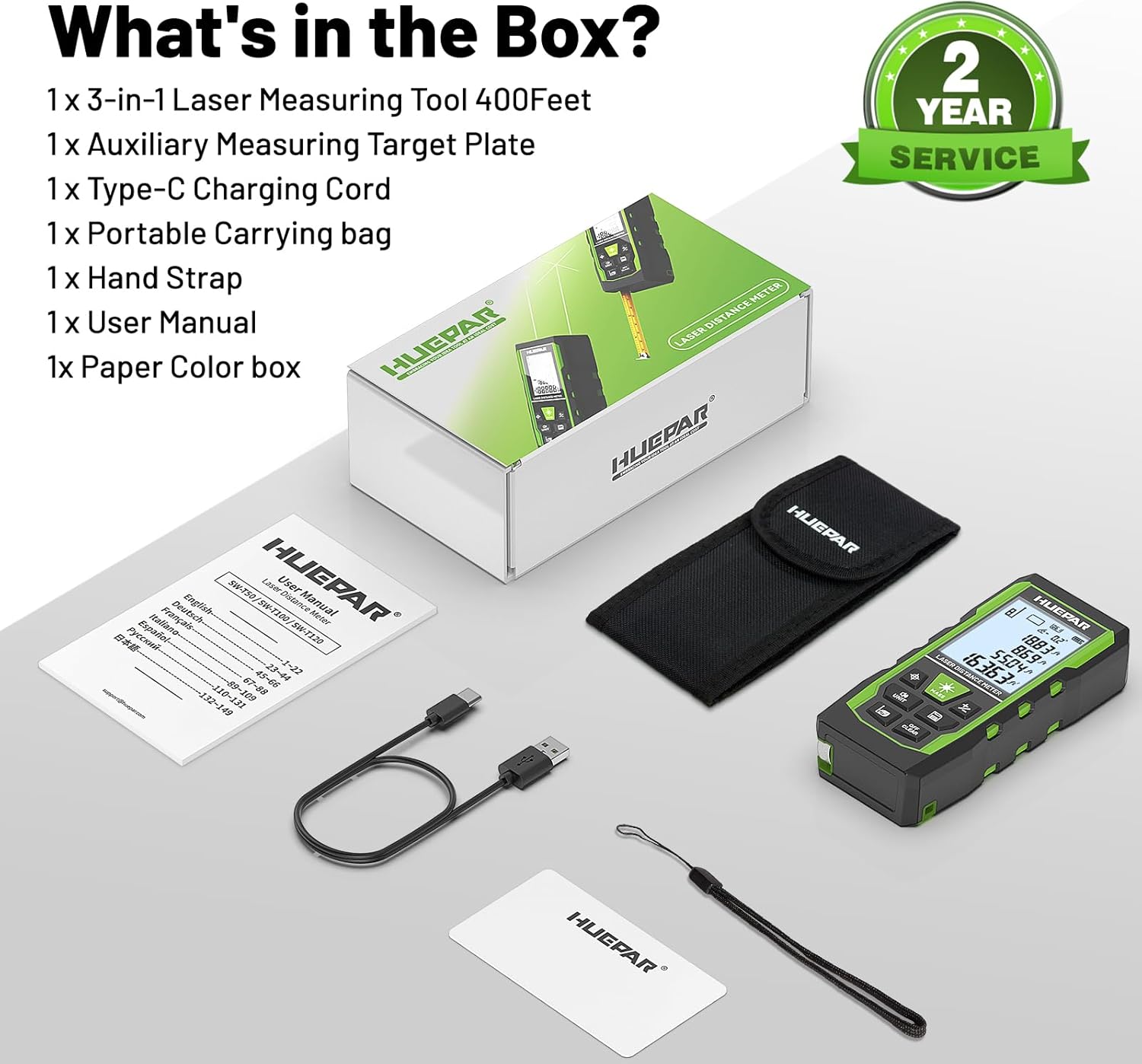
Image 3.1: All components included in the Huepar SW-T100 product box.
4. Konfigurazioa
4.1. Gailua kargatzea
The device is equipped with a built-in 3.7V / 600mAh Lithium-Ion rechargeable battery. Before first use, fully charge the device.
- Konektatu emandako C motako kargatzeko kablea gailuaren kargatzeko atakara.
- Konektatu kablearen beste muturra USB egokitzaile estandar batera (ez dago barne).
- Pantailan kargatzeko adierazleak kargatzeko egoera erakutsiko du.
- Karga oso batek normalean ordu batzuk behar ditu.

Image 4.1: The device being charged via its Type-C port.
4.2. Hasierako piztea
Sakatu Power ON/Measure button to turn on the device. The display will illuminate, and the device will be ready for use.
5. Funtzionamendu-argibideak
5.1. Kontrol Orokorrak
The device features several buttons for various functions:
- Power ON/Measure Button: Turns the device on/off and initiates measurements.
- Laser Level Mode Button: Activates the green cross line laser.
- Unit Switch/Sound Button: Changes measurement units and controls voice broadcast.
- Benchmark/Mode Switch Button: Selects measurement reference points and different measurement modes.
- Addition/Subtraction Buttons: Adds or subtracts measurements.
- Data Saving Button: Saves current measurement data.
- Turn off/Clear Button: Clears the last measurement or turns off the device with a long press.
5.2. Laser Distance Measurement Mode
This mode provides precise distance measurements up to 330ft/100M with an accuracy of ±1/16 inch.
- Sakatu Power ON/Measure button to activate the laser.
- Zuzendu laserra helburu-punturantz.
- Sakatu Power ON/Measure button again to take a measurement. The result will be displayed on the screen.
Neurketa motak:
The device supports various measurement functions:
- Distantzia neurketa: Single point-to-point distance.
- Eremuaren neurketa: Calculates the area of a surface.
- Bolumenaren neurketa: Calculates the volume of a space.
- Indirect Height (Pythagoras): Calculates height using two or three measurements.
- Horma Eremua: Hainbat horma-multzoren azalera osoa kalkulatzen du.
- Etengabeko neurketa: Gailua mugitzen duzun heinean distantziaren eguneraketak denbora errealean ematen ditu.

Image 5.1: Visual representation of the 9 available measurement modes.
Reference Points:
You can select the measurement reference point:
- Front-based: Measures from the front edge of the device.
- Rear-based: Measures from the rear edge of the device.
- Screw-hole based: Measures from the tripod screw hole.
Ahots-emisioa:
The device features real-time voice feedback for measurements, enhancing readability and efficiency, especially in challenging conditions or for users with limited vision.
- Luze sakatu Unit Switch/Sound button to switch between Chinese voice, English voice, or to turn off the sound.
- Note: The device does not broadcast voice while charging.

Image 5.2: The voice broadcast feature in action, providing audible measurement readings.
Datuen memoria:
The device can store up to 100 readings, allowing you to recall past measurements without manual notes.
5.3. Green Cross Line Laser Level Mode
This mode projects bright green horizontal and vertical cross lines, ideal for tasks like picture hanging, shelf installation, and tile alignment. Accuracy is ±1/9 inch.
- Sakatu Laser Level Mode button to activate the green cross lines.
- Place the device on a stable surface or mount it on a tripod using the 1/4"-20 threaded mount.
- The screen displays angles from -90° to +90° horizontally.
- If the angle is > ±4°, the 'Out' indicator will flash on the screen, and the laser line will flash rapidly, indicating the device is not level.

Image 5.3: Using the green cross line laser for leveling tasks.
5.4. Tape Measure Function
The integrated digital tape measure extends up to 6.5ft/2M for traditional short-distance measurements.
- Pull out the tape measure from the side of the device.
- The tape measure features both imperial and metric markings.
5.5. Unitateen aldaketa
Sakatu Unit Switch/Sound button to cycle through available measurement units (m, cm, mm, ft, ft+inches, ft+fractions).
5.6. Itzaltze automatikoa
To conserve battery life, the device will automatically shut off after 150 seconds of inactivity. This setting cannot be changed.
6. Mantentzea eta Zainketa
- Garbiketa: Garbitu gailua leun batekin, damp oihal. Ez erabili produktu kimiko gogorrak edo garbitzaile urratzaileak.
- Biltegiratzea: Store the device in its portable carry bag in a cool, dry place when not in use.
- Diseinu malkartsua: The device features a tough TPE housing, providing resistance against drops, dust, and light water spray (IP54 rated). While durable, avoid intentional exposure to harsh conditions.

Image 6.1: The device's robust construction and tripod mounting option.
7. Arazoak
- Gailua ez da pizten: Ensure the battery is charged. Connect to the Type-C charger and try again.
- Inaccurate laser measurements: Ensure the laser lens is clean. Verify the correct reference point is selected. Ensure the target surface is flat and reflective enough. Use the auxiliary target plate if needed.
- Laser line flashing in level mode: This indicates the device is outside its self-leveling range (> ±4°). Adjust the device's position until the flashing stops.
- Ahots-emisioa ez dabil: Check if the voice broadcast is turned off by long-pressing the Unit Switch/Sound button. Voice broadcast is also disabled during charging.
- Auto shut-off too fast: The device is designed to shut off after 150 seconds of inactivity to save battery. This duration is fixed and cannot be adjusted.
8. Zehaztapenak
| Ezaugarri | Zehaztapena |
|---|---|
| Marka | Huepar |
| Eredua | SW-T100 |
| Measuring Range (Laser) | 330 oin / 100 m |
| Laser neurketaren zehaztasuna | ± 1/16 hazbete |
| Laser Level Accuracy | ± 1/9 hazbete |
| Laser Klasea | 2. klasea |
| Laser mota | 490-560 nm, <1 mW |
| Tape Measure Length | 6.5 oin / 2 m |
| Bateria | 3.7V / 600mAh Lithium-Ion (Rechargeable) |
| Kargatzeko ataka | C motakoa |
| Materiala | Acrylonitrile Butadiene Styrene, TPE |
| Elementuaren pisua | 200 gramo |
| IP balorazioa | IP54 (Dust and light water spray resistant) |
| Itzaltze automatikoa | 150 seconds (laser), 150 seconds (device) |
9. Bermea eta Laguntza
9.1. Bermea
This Huepar laser measurement tool comes with a 2-year quality assurance. In the event of a product fault, free repair or replacement will be provided.
9.2. Laguntza Teknikoa
Huepar is committed to providing best-in-class service to our customers. We offer:
- 24/7 Service Team (response within 24 hours & solution within 48 hours).
- Bizitza osorako laguntza teknikoa.
- Worldwide Maintenance Center for faster repair or replacement.
For support, please visit the official Huepar website or contact our customer service team directly.
10. Produktuaren bideoaview
Ikusi bideo hau azkar ikustekoview of the Huepar 3-in-1 Laser Measurement Tool's features and functions.
Video 10.1: An official product video demonstrating the key features and usage scenarios of the Huepar SW-T100 3-in-1 Laser Measurement Tool. This video highlights the voice broadcast, distance measurement, laser leveling, and tape measure functions.


