
Sarrera
Welcome to the user manual for your new HP OMEN 16-ae0002TX Gaming Laptop. This document provides essential information to help you set up, operate, maintain, and troubleshoot your device. Designed for high-performance gaming and demanding tasks, this laptop features a 14th Gen Intel Core i7 processor, NVIDIA GeForce RTX 4060 graphics, 16GB DDR5 RAM, and a 1TB SSD, all presented on a vibrant 16.1-inch FHD 165Hz display.
1. Hasierako konfigurazioa
1.1 Unpacking Your Laptop
Kontu handiz atera osagai guztiak paketetik. Ziurtatu elementu hauek daudela:
- HP OMEN 16-ae0002TX Gaming Laptop
- Elikatze-moldagailua
- Elikatze kablea
- Erabiltzailearen eskuliburua (dokumentu hau)
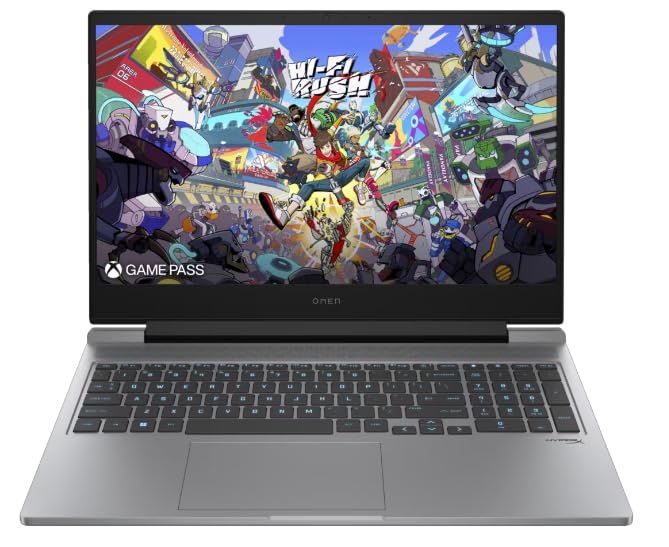
Figure 1: HP OMEN 16-ae0002TX Gaming Laptop overview.
1.2 Energia-egokitzailea konektatzea
- Konektatu korronte-kablea korronte-moldagailura.
- Entxufatu korronte-egokigailua hormako entxufe batera.
- Connect the adapter's output plug to the power port on your laptop.
It is recommended to fully charge the laptop before initial use.
1.3 Lehenengo abiaraztea eta Windows konfigurazioa
Press the power button located on the laptop chassis. The laptop will boot up, and you will be guided through the Windows 11 Home setup process. Follow the on-screen instructions to configure your operating system, network settings, and user account.
1.4 Kanpoko gailuak konektatzea
Your HP OMEN laptop provides various ports for connecting external devices:
- USB atakak: Saguetarako, teklatuetarako, kanpoko biltegiratzeetarako eta beste USB gailu batzuetarako.
- HDMI ataka: Kanpoko pantailetara edo telebistetara konektatzeko.
- Audio Jack: Entzungailuetarako edo kanpoko bozgorailuetarako.
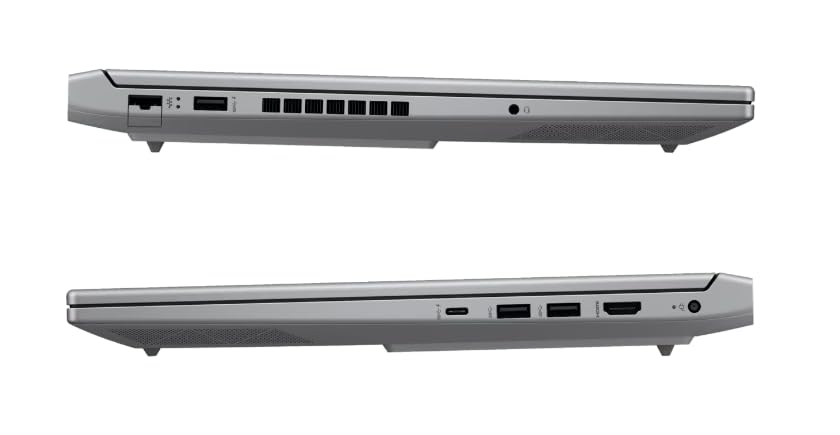
2. irudia: Aldea view illustrating available ports.
2. Zure ordenagailu eramangarria erabiltzea
2.1 Piztea/Itzaltzea eta lo modua
- Piztu: Sakatu pizteko botoia.
- Itzali: Egin klik Windows-eko Hasi botoian, eta ondoren hautatu Energia > Itzali.
- Lo egiteko modua: Itxi tapa edo hautatu Energia > Lo Hasi menuan.
2.2 Teklatua eta ukipen-panela
The laptop features a 1-zone RGB backlit full-size keyboard with HyperX tactile feedback for an enhanced gaming and typing experience. The integrated touchpad supports multi-touch gestures for navigation.
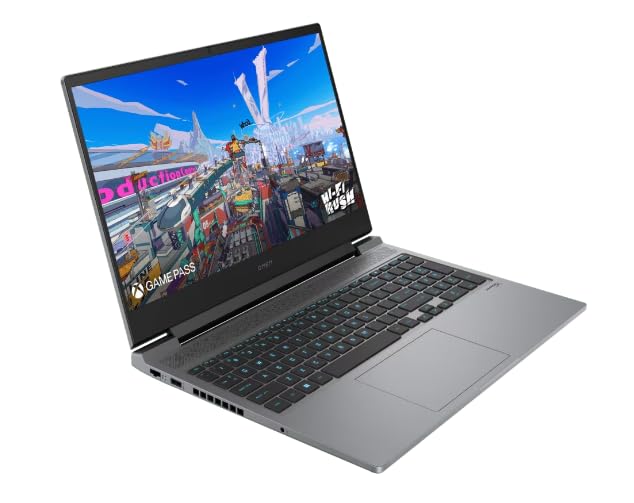
3. irudia: Teklatuaren eta ukipen-panelen diseinua.
2.3 Bistaratzeko Ezaugarriak
The 16.1-inch FHD (1920 x 1080) IPS display offers a 165Hz refresh rate and 7ms response time, providing smooth and responsive visuals for gaming and multimedia. Adjust brightness and display settings through Windows display options.
2.4 Sare eta haririk gabeko konexioa
- Wi-Fi: Connect to wireless networks via the Windows network settings.
- Bluetootha: Pair Bluetooth-enabled devices such as headphones, mice, or game controllers.
2.5 HP True Vision 1080p FHD Camera
The integrated 1080p FHD webcam is suitable for video calls, online meetings, and streaming. Ensure proper lighting for optimal image quality.
3. Mantentzea eta Zainketa
3.1 Garbiketa orokorra
- Pantaila: Erabili lipurrik gabeko zapi leun bat dampUrarekin edo pantaila-garbitzaile batekin garbitu. Saihestu produktu kimiko gogorrak.
- Teklatua eta txasisa: Use a soft cloth. For dust, use compressed air.
- Ziurtatu ordenagailu eramangarria itzalita eta deskonektatuta dagoela garbitu aurretik.
3.2 Bateria zaintzea
The laptop is equipped with a Lithium Ion battery. To maximize battery lifespan:
- Saihestu muturreko tenperaturak.
- Do not let the battery completely discharge frequently.
- Ordenagailu eramangarria denbora luzez gordetzen baduzu, ziurtatu bateria % 50 inguru kargatuta dagoela.
3.3 Software eguneraketak
Regularly update your Windows operating system, drivers, and HP software to ensure optimal performance, security, and compatibility. These updates often include performance enhancements and bug fixes.
4. Ohiko arazoak konpontzea
This section addresses common issues you might encounter. For more complex problems, refer to the HP support webgunea.
4.1 Energia arazoak
- Ordenagailu eramangarria ez da pizten: Ziurtatu korronte-egokitzailea ondo konektatuta dagoela ordenagailu eramangarrira eta funtzionatzen duen entxufe batera. Egiaztatu korronte-egokitzailearen adierazle-argia piztuta dagoen.
- Bateria ez da kargatzen: Verify the power adapter connection. Try a different outlet.
4.2 Bistaratzeko arazoak
- Ez dago irudirik pantailan: Ensure the laptop is powered on. Try connecting an external monitor to check if the issue is with the laptop's display.
- Irudi keinukaria edo desitxuratua: Eguneratu grafikoen kontrolatzaileak. Doitu pantailaren freskatze-tasa Windows ezarpenetan.
4.3 Konexio arazoak
- Wi-Fia ez da konektatzen: Egiaztatu Wi-Fi gaituta dagoen Windows ezarpenetan. Berrabiarazi zure bideratzailea eta ordenagailu eramangarria.
- Bluetooth gailua ez da parekatzen: Ziurtatu Bluetooth gailua parekatze moduan dagoela eta irismen-eremuan dagoela. Egiaztatu Bluetooth ezarpenak zure ordenagailu eramangarrian.
5. Produktuaren zehaztapenak
| Ezaugarri | Zehaztapena |
|---|---|
| Marka | HP |
| Ereduaren izena | HP laptopOMEN (ae0002tx) |
| Prozesadorea | 14th Gen Intel® Core™ i7-14650HX (up to 5.2 GHz) |
| RAM Memoria | 16 GB DDR5 (Max 32 GB) |
| Biltegiratzea | 1 TB SSD (egoera solidoko unitatea) |
| Txartel grafikoa | NVIDIA GeForce RTX 4060 (8 GB GDDR6 Dedicated) |
| Bistaratzea | 16.1-inch FHD (1920 x 1080) IPS, 165Hz, 7ms, 300 nits |
| Sistema eragilea | Windows 11 Home |
| Teklatua | 1-zone RGB Backlit, HyperX tactile feedback |
| Webkamara | HP True Vision 1080p FHD |
| Konektibitatea | Wi-Fi, Bluetootha |
| Portuak | USB (Total: 1), HDMI (Total: 1) |
| Dimensions (L x W x Thickness) | 30L x 25W x 6Th Centimeters |
| Elementuaren pisua | 1.9 kilogramo |
| Bateria mota | Lithium Ion (2.6 Watt Hours) |
6. Bermearen informazioa
Your HP OMEN 16-ae0002TX Gaming Laptop comes with an onsite warranty. Please retain your proof of purchase for warranty claims. For detailed terms and conditions, refer to the warranty card included with your product or visit the official HP support webgunea.
7. Bezeroarentzako arreta
For technical assistance, service, or further inquiries, please contact HP customer support:
- Fabrikatzailea / Inportatzailea: HP India Sales Pvt. Ltd., 24 Salarpuria Arena, Hosur Main Road, Adugodi, Bangalore-560030
- Lineako laguntza: Bisitatu ofiziala HP laguntza Webgunea gidariak, eskuliburuak eta arazoak konpontzeko gidak lortzeko.