
1. Sarrera
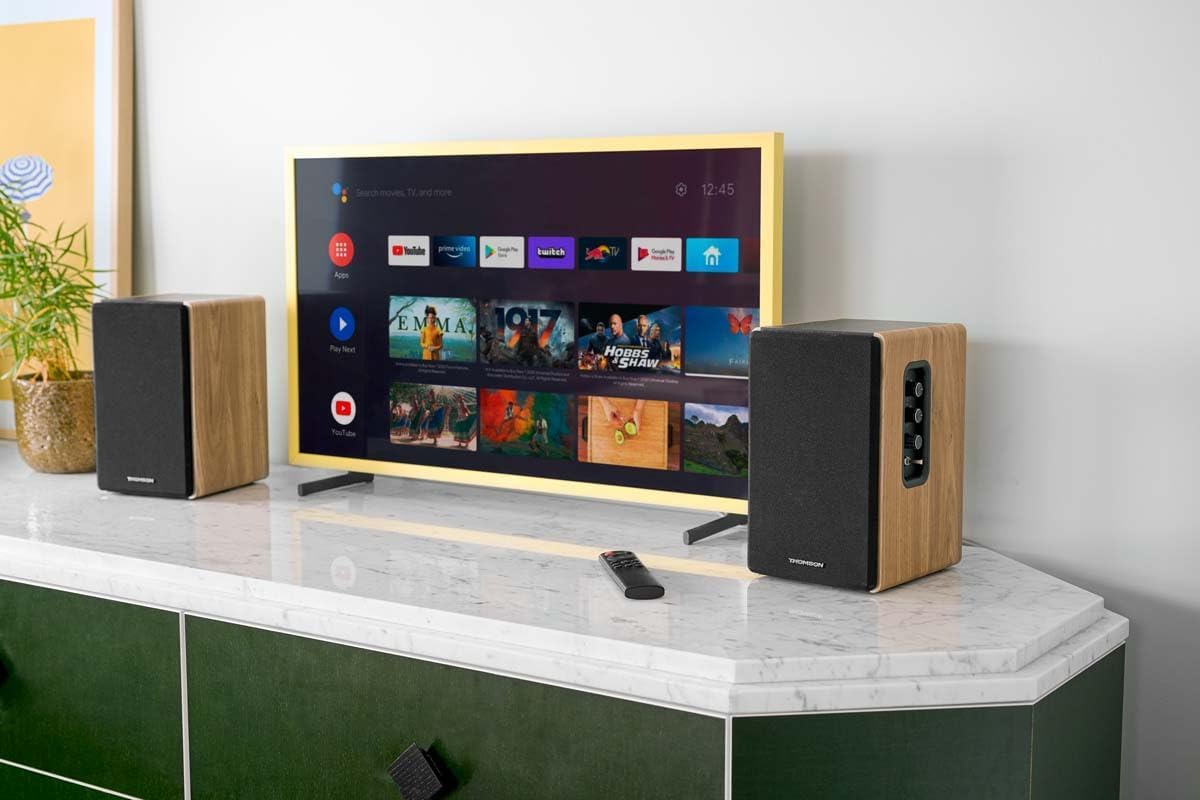
Thank you for choosing the THOMSON WS902DUO Cosy Bookshelf Speakers. These active stereo speakers deliver a powerful 150W audio experience with deep bass from two 10 cm woofers. They offer versatile connectivity options including Bluetooth 5.3, Optical, HDMI (ARC), RCA, and USB playback. The included remote control and side panel adjustments provide precise control over your audio. Please read this manual carefully before use to ensure proper operation and to maximize your listening experience.

Image 1.1: THOMSON WS902DUO Bookshelf Speakers in a living space, showcasing their elegant wood finish.
2. Segurtasun-argibide garrantzitsuak
- Irakurri arretaz argibide hauek produktua erabili aurretik.
- Gorde jarraibide hauek etorkizuneko erreferentzia izateko.
- Kontuan izan produktuaren eta funtzionamendu-argibideetako abisu guztiak.
- Jarraitu argibide guztiak.
- Ez erabili aparatu hau uraren ondoan.
- Garbitu zapi lehor batekin bakarrik.
- Ez blokeatu aireztapen-irekidurak. Instalatu fabrikatzailearen argibideen arabera.
- Ez instalatu bero-iturri inongo ondoan, esate baterako, erradiadoreak, bero-erregistroak, sukaldeak edo beste aparatu batzuk (barne ampberoa sortzen duten argitzaileak).
- Ez zapaldu polarizatutako edo lurreko entxufearen segurtasun-helburua. Entxufe polarizatu batek bi pala ditu, bata bestea baino zabalagoa dutenak. Lurreratze motako entxufe batek bi pala eta lurreko hirugarren ahoa ditu. Pala zabala edo hirugarren ahoa zure segurtasunerako eskaintzen dira. Emandako entxufea zure entxufean sartzen ez bada, kontsultatu elektrizista bati zaharkitutako entxufea ordezkatzeko.
- Babestu korronte-kablea oinez ibiltzetik edo atxilotzetik, batez ere entxufeetan, erosotasun-harguneetan eta aparatutik irteten diren puntuetan.
- Erabili soilik fabrikatzaileak zehaztutako eranskinak/osagarriak.
- Erabili fabrikatzaileak zehaztutako edo aparatuarekin saltzen den saskiarekin, euskarria, tripodea, euskarria edo mahaiarekin soilik. Orga bat erabiltzen denean, kontuz ibili saskia/aparatuaren konbinazioa mugitzean, iraultzeagatik zauririk ez izateko.
- Deskonektatu aparatu hau tximista-ekaitzetan edo denbora luzez erabiltzen ez duzunean.
- Jarri zerbitzu-zerbitzu guztiak zerbitzu-pertsonal kualifikatuari. Zerbitzua behar da aparatua edozein modutan hondatu denean, hala nola, elikatze-kablea edo entxufea hondatuta dagoenean, likidoa isuri denean edo objektuak aparatura erori direnean, aparatua euria edo hezetasuna jasan duenean, ez du normalean funtzionatzen. , edo erori egin da.
3. Paketearen edukia
Mesedez, egiaztatu behean zerrendatutako elementu guztiak zure paketean sartuta daudela:
- THOMSON WS902DUO Bookshelf Speakers (2 units)
- Urruneko Kontrola
- Elikatze-kablea
- Bozgorailuaren konexio kablea
- 3.5mm Jack to RCA Adapter Cable
- Erabiltzailearen eskuliburua (dokumentu hau)

Image 3.1: Packaging of the THOMSON WS902DUO Bookshelf Speakers.
4. Produktua amaitu daview
4.1. Side Control Panel (Active Speaker)
The active speaker features a side control panel for easy access to essential functions.

Image 4.1: Side control panel.
- Baxuen kontrola: Maiztasun baxuko irteera doitzen du.
- Treble Kontrola: Maiztasun handiko irteera doitzen du.
- Bolumen kontrola: Soinuaren bolumen orokorra doitzen du.
- Switch potentziala: Bozgorailuak piztu edo itzaltzen ditu.
- LED adierazlea: Shows the current status or selected input.
4.2. Atzeko panela (bozgorailu aktiboa)
The rear panel of the active speaker provides all necessary input and output connections.
4.2 irudia: Atzeko panelaren konexioak.
- Sarrera optikoa: For connecting digital audio sources like TVs, game consoles, or Blu-ray players.
- Aux sarrera (RCA): For connecting analog audio sources such as turntables, CD players, or PCs. A 3.5mm jack adapter is provided.
- TV Audio (HDMI ARC): For connecting to a TV's HDMI ARC port, allowing TV remote control of the speaker volume.
- USB Play: MP3 erreproduzitzeko. files zuzenean USB flash drive batetik.
- Sub Out: For connecting an external active subwoofer for enhanced bass.
- Bozgorailuaren irteera: Connects to the passive speaker.
- Potentzia sarrera: Energia-iturri nagusira konektatzen da.
4.3. Urruneko kontrola
The remote control provides convenient access to all speaker functions from a distance.

Image 4.3: Remote control.
- Pizteko botoia: Turns the speakers on/off.
- Mututu botoia: Soinua isilarazi/aktibatzen du.
- +/- bolumena: Bolumen-maila doitzen du.
- Erreprodukzio-kontrolak (Erreproduzitu/Pausatu, Saltatu): USB bidezko erreprodukziorako.
- Source Selection Buttons (OPT, BT, ARC, USB, LINE): Audio sarrerako iturria hautatzen du.
- EQ Mode Buttons (MOVIE, MUSIC, DIALOG): Selects preset equalization modes.
5. Konfigurazioa
5.1. Hizlaria jartzea
Place the speakers on a stable, flat surface such as a bookshelf, desk, or speaker stands. For optimal stereo imaging, position the speakers equidistant from your listening position and at ear level. Ensure there is adequate space around the speakers for ventilation.
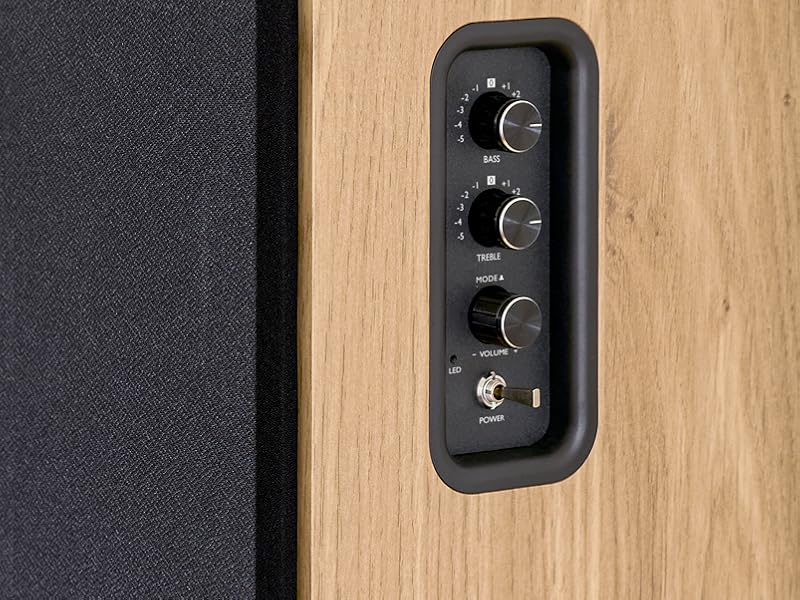
Image 5.1: Recommended speaker placement on a desk.
5.2. Bozgorailuak konektatzea
- Identify the active speaker (with controls and inputs) and the passive speaker.
- Connect the included speaker cable from the speaker output terminals on the active speaker to the input terminals on the passive speaker. Ensure correct polarity (+ to + and - to -).
5.3. Audio iturriak konektatzea
Connect your desired audio sources to the active speaker using the appropriate cables.
- Sarrera optikoa: Use an optical cable to connect your TV, game console, or Blu-ray player to the OPTICAL IN port.
- HDMI (ARC) Input: Use an HDMI cable to connect your TV's HDMI ARC port to the TV AUDIO (HDMI) port on the speaker. This allows your TV remote to control the speaker volume.
- RCA (AUX) Input: Use an RCA cable (or the provided 3.5mm jack to RCA adapter) to connect devices like a turntable, CD player, or PC to the AUX IN (RCA) ports.
- USB Sarrera: Sartu MP3a duen USB flash drive bat files into the USB PLAY port.

Image 5.2: Speakers connected to a television via HDMI ARC.
5.4. Bluetooth parekatzea
- Ziurtatu bozgorailuak piztuta daudela.
- Press the 'BT' button on the remote control or the side panel to select Bluetooth input. The LED indicator will flash, indicating pairing mode.
- Zure telefonoan, tabletan edo ordenagailuan, gaitu Bluetooth eta bilatu eskuragarri dauden gailuak.
- Select "THOMSON WS902DUO" from the list of devices.
- Once paired, the LED indicator will stop flashing and remain solid. You can now stream audio wirelessly.
5.5. Subwoofer Connection (Optional)
If you wish to enhance bass further, connect an active subwoofer to the 'Sub Out' port on the rear panel of the active speaker using an RCA cable.
6. Funtzionamendu-argibideak
6.1. Piztu/Itzali
Use the power switch on the side control panel or the power button on the remote control to turn the speakers on or off.
6.2. Iturriaren hautaketa
Press the corresponding source button on the remote control (OPT, BT, ARC, USB, LINE) to switch between connected audio inputs. The LED indicator will change to reflect the selected source.
6.3. Bolumenaren kontrola
Adjust the volume using the 'Volume' knob on the side control panel or the 'VOL+/-' buttons on the remote control.
6.4. Audio-doikuntzak
Fine-tune the sound to your preference:
- Baxuak/Agudoak: Use the 'Bass' and 'Treble' knobs on the side control panel to adjust the low and high frequencies.
- EQ moduak: Press the 'MOVIE', 'MUSIC', or 'DIALOG' buttons on the remote control to select preset equalization settings optimized for different content types.
6.5. USB erreprodukzioa
When a USB flash drive with MP3 files is inserted and USB source is selected, the speakers will automatically begin playing. Use the playback control buttons on the remote control (Play/Pause, Skip) to manage your music.
6.6. Bluetooth funtzionamendua
After successful pairing (see Section 5.4), you can stream audio from your Bluetooth device. Use your device's controls or the speaker's remote control for playback and volume adjustments.
7. Mantentzea
Mantentze egokiak zure bozgorailuen iraupena eta errendimendua bermatzen ditu.
- Garbiketa: Wipe the speaker surfaces with a soft, dry cloth. Do not use liquid cleaners or abrasive materials.
- Aireztapena: Ziurtatu aireztapen-zuloak ez daudela blokeatuta, gehiegi berotzea ekiditeko.
- Biltegiratzea: If storing the speakers for an extended period, unplug them from the power outlet and store them in a cool, dry place.
- Saihestu hezetasuna: Keep the speakers away from water and high humidity.
8. Arazoak
Arazoren bat aurkitzen baduzu, ikusi arazoak konpontzeko gida hau:
| Arazoa | Kausa posiblea | Irtenbidea |
|---|---|---|
| Botererik ez | Power cable not connected; Power switch off; Wall outlet not working. | Ensure power cable is securely connected. Turn on the power switch. Test the wall outlet with another device. |
| Soinurik ez | Incorrect input source selected; Volume too low; Mute function active; Audio cable not connected properly. | Select the correct input source. Increase volume. Press Mute button on remote. Check all audio cable connections. |
| Bluetooth parekatzeak huts egin du | Speakers not in pairing mode; Device too far; Bluetooth disabled on source device. | Ensure speakers are in Bluetooth pairing mode (flashing LED). Move device closer to speakers. Enable Bluetooth on your source device. |
| USB erreprodukzioa ez da funtzionatzen | USB drive not formatted correctly; Files not MP3; USB drive not inserted properly. | Ensure USB drive is FAT32 formatted. Verify files are in MP3 format. Re-insert USB drive firmly. |
| Soinuaren distortsioa | Volume too high; Source audio quality poor; Bass/Treble settings too extreme. | Lower the volume. Test with a different audio source. Adjust Bass and Treble controls. |
9. Zehaztapenak
| Ezaugarri | Zehaztapena |
|---|---|
| Marka | THOMSON |
| Modelo zenbakia | WS902DUO |
| Bozgorailuen irteerako potentzia maximoa | 150 Watt |
| Maiztasun Erantzuna | 60 Hz |
| Konektibitate Teknologia | Bluetooth, HDMI (ARC), Optical, RCA, USB |
| Bluetooth bertsioa | 5.3 |
| Audio irteera modua | Stereo (2.0 channels) |
| Sarrera boltage | 230 voltio (AC) |
| Muntatze Mota | Apalategia |
| Hizlari mota | Multimedia Bookshelf |
| Ezaugarri bereziak | Stereo Pairing, USB Port, Sub-Out, Remote Control, EQ Modes |
| Gomendatutako Erabilerak | Smartphone, Tablet, PC, TV, Game Console, DVD Player, Turntable |
| Kolorea | Egur Naturalaren akabera |
| Kontrol-metodoa | Remote Control, Side Panel Knobs |
| Woofer tamaina | 10 zentimetro |
| Neurriak (H x W x D) | 28 cm x 24 cm x 47 cm (approximate, per speaker) |
| Pisua | 5048 Grams (total for pair) |
| Elementu kopurua | 2 |
| Jatorrizko Herrialdea | Txina |
10. Bermearen informazioa
This THOMSON WS902DUO product comes with a 1 urteko berme mugatua erosketa-datatik aurrera. Berme honek fabrikazio-akatsak eta eskulanaren funtzionamendua estaltzen ditu erabilera normalaren pean. Ez ditu estaltzen erabilera okerrak, istripuek, baimenik gabeko aldaketek edo higadura normalak eragindako kalteak. Gorde erosketaren egiaztagiria berme-erreklamazioetarako.
11. Bezeroarentzako arreta
For technical assistance, warranty claims, or any questions regarding your THOMSON WS902DUO speakers, please contact your retailer or visit the official THOMSON support website. Please have your model number (WS902DUO) and proof of purchase ready when contacting support.
Lineako laguntza: www.thomsonconsumer.com (Please check for regional support contacts)