
1. Sarrera
Thank you for choosing the SGIN C10 10.1-inch Kids Tablet. This device is designed to provide an engaging and safe digital experience for children, featuring parental controls and educational content. This manual will guide you through the setup, operation, and maintenance of your tablet to ensure optimal performance and user safety.
2. Produktua amaitu daview
2.1 Paketearen edukia
Despaketatzean, ziurtatu behean zerrendatutako elementu guztiak daudela:
- SGIN C10 10.1-inch Tablet
- Babes-zorroa
- Kargagailua
- USB kablea
- Argibide eskuliburua

Image: Diagram showing the tablet's ports and buttons, along with the included accessories: tablet, protective case, charger, USB cable, and instruction manual.
2.2 Tabletaren osagaiak
Familiarize yourself with the physical components of your SGIN C10 tablet:
- Pizteko botoia: Located on the side, used to turn the tablet on/off or put it to sleep.
- Bolumen-botoiak: Doitu audio irteerako maila.
- Aurikularrak Jack: Kable bidezko entzungailuak konektatzeko.
- USB ataka: Kargatzeko eta datuak transferitzeko.
- TF txartelaren zirrikitua: For expanding storage with a microSD card.
- Aurrealdeko kamera: Bideo-deietarako eta selfieetarako.
- Atzeko kamera: Argazkiak eta bideoak ateratzeko.
- Hizlariak: Audio irteerarako.
- 10.1 hazbeteko HD IPS ukipen-pantaila: Elkarrekintzarako pantaila nagusia.
- Protective Case with Stand: Provides protection and allows for hands-free viewing.
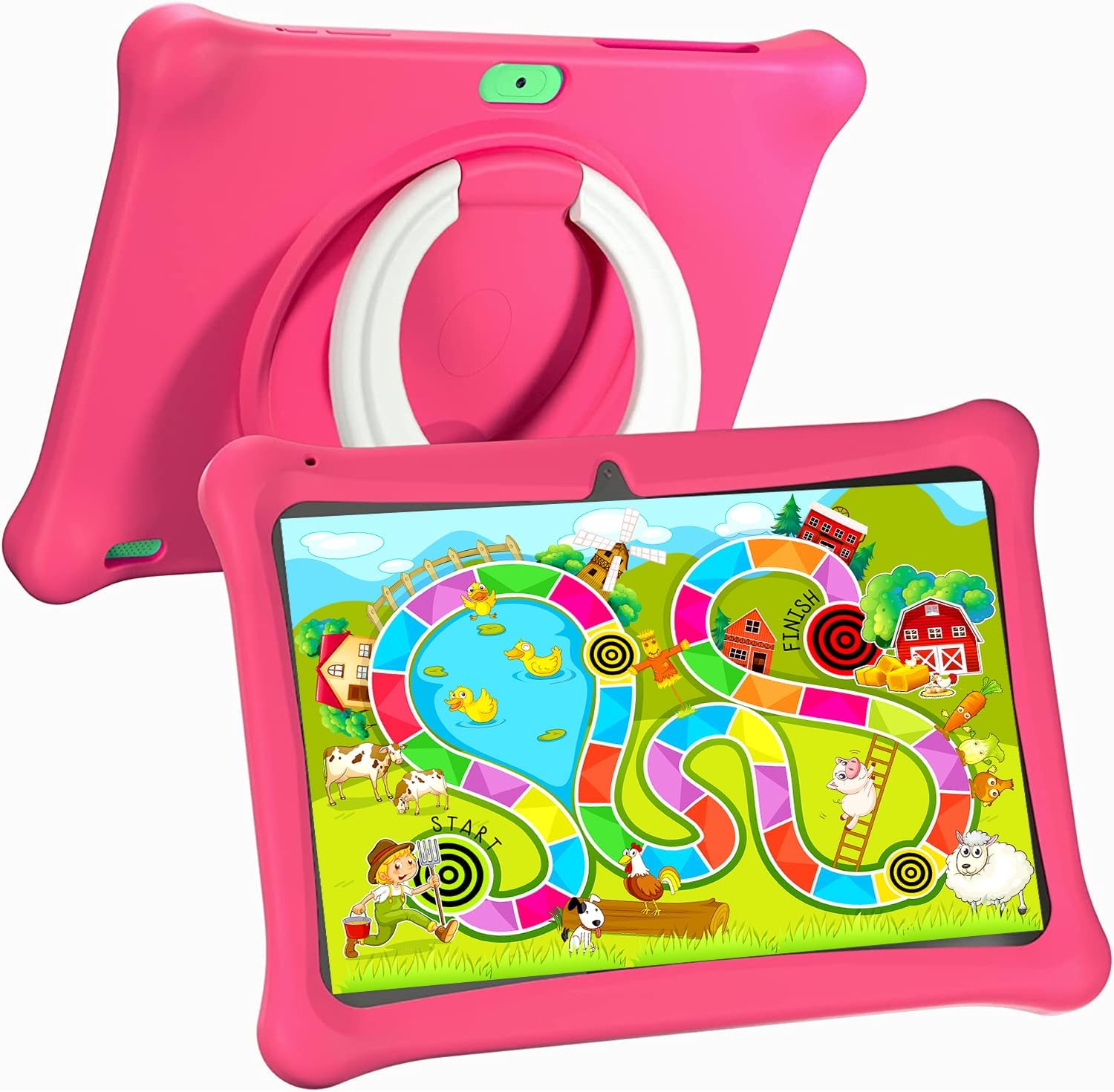
Image: The SGIN C10 tablet in its pink protective case, displaying a colorful educational game on its screen. The rear of the tablet shows the integrated stand.
2.3 Ezaugarri nagusiak
- Errendimendu handia: Equipped with a 1.6GHz quad-core processor, 2GB RAM, and 32GB ROM (expandable up to 32GB via TF card).
- Kid-Proof Case: Durable pink case designed to protect against dust, bumps, and drops, with heat dissipation features.
- Pre-installed iWawa Kid's Software: Offers a safe and entertaining environment with thousands of free educational games and apps.
- Parental Control System: Allows parents to manage screen time, content, and user accounts.
- Bateriaren iraupen luzea: 5000mAh lithium battery provides 6-8 hours of usage.
- Eye Protection Screen: 1280*800 HD IPS touch screen for vibrant colors and comfortable viewing.
- Kamera bikoitza: 2MP front camera and 5MP rear camera for photos and videos.

Image: Icons representing key features of the SGIN C10 tablet: Android 12, Quad-core processor, Dual Camera, 5000mAh battery, WiFi, HD Display, 2GB RAM + 32GB storage, 10 Inch screen, and Parental Control.

Image: Visual representation of the tablet's 2GB RAM and 32GB ROM (expandable via TF card), alongside a diagram of the 1.6 GHz Quad-core Processor.

Image: The 10-inch HD display showing vibrant content, and a close-up of the protective case's rotatable stand.

Image: A child using the tablet, highlighting the 5000mAh Lithium Battery, and a close-up of the tablet's dual camera system.
3. Konfigurazioa
3.1 Hasierako karga
- Connect the USB cable to the tablet's USB port.
- Konektatu USB kablearen beste muturra emandako kargagailura.
- Entxufatu kargagailua korronte-hartune batera.
- Utzi tableta guztiz kargatzen lehen aldiz erabili aurretik. Pantailan dagoen bateriaren adierazleak kargatze-egoera erakutsiko du.
3.2 Piztu/Itzaltzea
- Pizteko: Press and hold the Power Button until the SGIN logo appears on the screen.
- Itzaltzeko: Press and hold the Power Button until a menu appears. Select "Power off" and confirm.
- Lo egiteko/esnatzeko: Sakatu labur pizteko botoia tableta lo moduan jartzeko edo esnatzeko.
3.3 Wi-Fira konektatzea
- Hasierako pantailatik, irristatu hatza goitik behera Ezarpen Azkarrak panela irekitzeko.
- Sakatu eta eutsi Wi-Fi ikonoari Wi-Fi ezarpenak irekitzeko.
- Aktibatu Wi-Fia itzalita badago.
- Hautatu nahi duzun Wi-Fi sarea zerrendatik.
- Sareko pasahitza idatzi behar baduzu, eta ondoren sakatu "Konektatu".
3.4 Initial iWawa Setup
The SGIN C10 tablet comes with iWawa Kid's software pre-installed. Follow the on-screen prompts to set up the child-friendly environment and parental controls during the first launch.
4. Funtzionamendu-argibideak
4.1 Oinarrizko nabigazioa
- Ukitu: Sakatu ikono edo aukera bat hautatzeko.
- Pasatu hatza: Arrastatu hatza pantailan zehar orrialdeetan edo zerrendetan zehar mugitzeko.
- Pixka bat: Erabili bi hatz irudiak handitu edo txikitzeko edo web orrialdeak.
- Hasierako botoia: Returns you to the home screen.
- Atzera botoia: Aurreko pantailara itzultzen zaitu.
- Azken aplikazioen botoia: Shows recently used applications.
4.2 Kamera erabiltzea
- Ireki Kamera aplikazioa hasierako pantailatik edo aplikazioen tiraderatik.
- Sakatu kameraren etengailuaren ikonoa aurreko eta atzeko kameren artean txandakatzeko.
- Sakatu obturadorearen botoia argazkia ateratzeko.
- Tap the video icon to switch to video recording mode, then tap the record button to start/stop recording.
4.3 Installing/Uninstalling Apps
- Aplikazioak instalatzea: Within the iWawa environment, access the Kids Store to download free games and educational applications. Parents can also approve apps from the Google Play Store via parental controls.
- Aplikazioak desinstalatzea: From the parental control interface, select the app management option to uninstall unwanted applications.
4.4 Ezarpenak doitzea
- Bolumena: Use the physical Volume Buttons on the side of the tablet.
- Distira: Swipe down from the top of the screen to access Quick Settings and adjust the brightness slider. More detailed display settings are available in the main Settings app.
- Beste ezarpen batzuk: Access the main Settings app for Wi-Fi, Bluetooth, display, sound, storage, and other system configurations.
5. Gurasoen kontrola
The SGIN C10 tablet features a robust parental control system integrated with the iWawa Kid's software, allowing you to create a safe and customized environment for your child.
5.1 Gurasoen Kontrolak sartzea
To access parental control settings, you will typically need to exit the iWawa Kid's interface and enter a password-protected parent mode. Follow the on-screen instructions within the iWawa app to set up and manage this access.
5.2 Key Parental Control Features
- Ezarri pasahitzak: Establish a secure password to prevent children from exiting the iWawa environment or altering settings.
- Screen Time Limits: Define daily usage limits and specific time periods when the tablet can be used.
- Edukien kudeaketa: Control access to apps, games, videos, and websites. You can whitelist appropriate websites and block unwanted content.
- App Approval: Manage which applications your child can access, including those downloaded from the Kids Store or Google Play Store.
- Multiple User Accounts: Sortu profesional bereiziafiles for each child, allowing personalized settings and content for individual users.
- Ad Elimination: The system helps eliminate unwanted advertisements within the child's environment.
6. Mantentzea
6.1 Gailua garbitzea
- Always power off the tablet before cleaning.
- Erabili zapi leun eta lihorik gabeko bat pantaila eta gorputza garbitzeko.
- Orban egoskorretarako, apur bat dampGarbitu zapi bat urarekin edo pantailarako segurua den garbitzaile batekin. Saihestu produktu kimiko gogorrak.
- Ensure no moisture enters ports or openings.
6.2 Bateria zaintzea
- Saihestu bateria maiz erabat deskargatzea.
- Do not expose the tablet to extreme temperatures.
- Erabili emandako kargagailua eta kablea soilik.
6.3 Software eguneraketak
Periodically check for system updates in the tablet's Settings menu under "System" or "About tablet." Keeping your software updated ensures optimal performance and security.
6.4 Biltegiratze kudeaketa
To manage storage, you can:
- Ezabatu erabiltzen ez diren aplikazioak eta files.
- Move photos and videos to a computer or cloud storage.
- Insert a TF (microSD) card into the designated slot to expand storage capacity up to 32GB.
7. Arazoak
| Arazoa | Irtenbide posiblea |
|---|---|
| Tableta ez da pizten. | Ziurtatu bateria kargatuta dagoela. Konektatu kargagailua eta itxaron minutu batzuk berriro pizten saiatu aurretik. |
| Pantailak ez du erantzuten. | Restart the tablet by holding the Power Button for about 10 seconds until it powers off, then power it on again. |
| Ezin da wifira konektatu. | Check if Wi-Fi is enabled. Ensure the password is correct. Restart your Wi-Fi router. |
| Aplikazioak huts egiten ari dira edo poliki dabiltza. | Close background apps. Clear app cache (Settings > Apps > [App Name] > Storage > Clear cache). Ensure sufficient storage space. |
| Parental controls are not working as expected. | Re-enter the parental control settings and verify all configurations (time limits, content filters, app approvals). Ensure the correct child profile aktibo dago. |
8. Zehaztapenak
| Ezaugarri | Zehaztapena |
|---|---|
| Marka | SGIN |
| Ereduaren izena | C10 |
| Sistema eragilea | Android |
| Pantailaren tamaina | 10 hazbete |
| Gehienezko pantailaren bereizmena | 1280 pixel |
| Prozesadorea | 1.6GHz Quad-core (Intel Processor Brand) |
| RAM | 2 GB |
| Barne biltegiratzea (ROM) | 32 GB |
| Biltegiratze zabalgarria | TF txartela 32 GB arte |
| Aurrealdeko kamera | 2MP |
| Atzeko kamera | 5MP |
| Bateria Edukiera | 5000mAh |
| Konektibitatea | WiFi, Bluetooth |
| Elementuaren pisua | 2.35 kilo |
| Produktuaren neurriak | 1 x 1 x 1 hazbete |
9. Bermea eta Laguntza
For warranty information and technical support, please refer to the documentation included with your purchase or visit the official SGIN website. If you encounter issues not covered in this manual, please contact SGIN customer service for assistance.