
1. Sarrera
The CUBOT Kingkong 11 is a rugged 5G smartphone designed for durability and high performance. It features a powerful processor, extensive memory, a large battery, and an advanced camera system, all housed in a robust, water-resistant, and dustproof body.
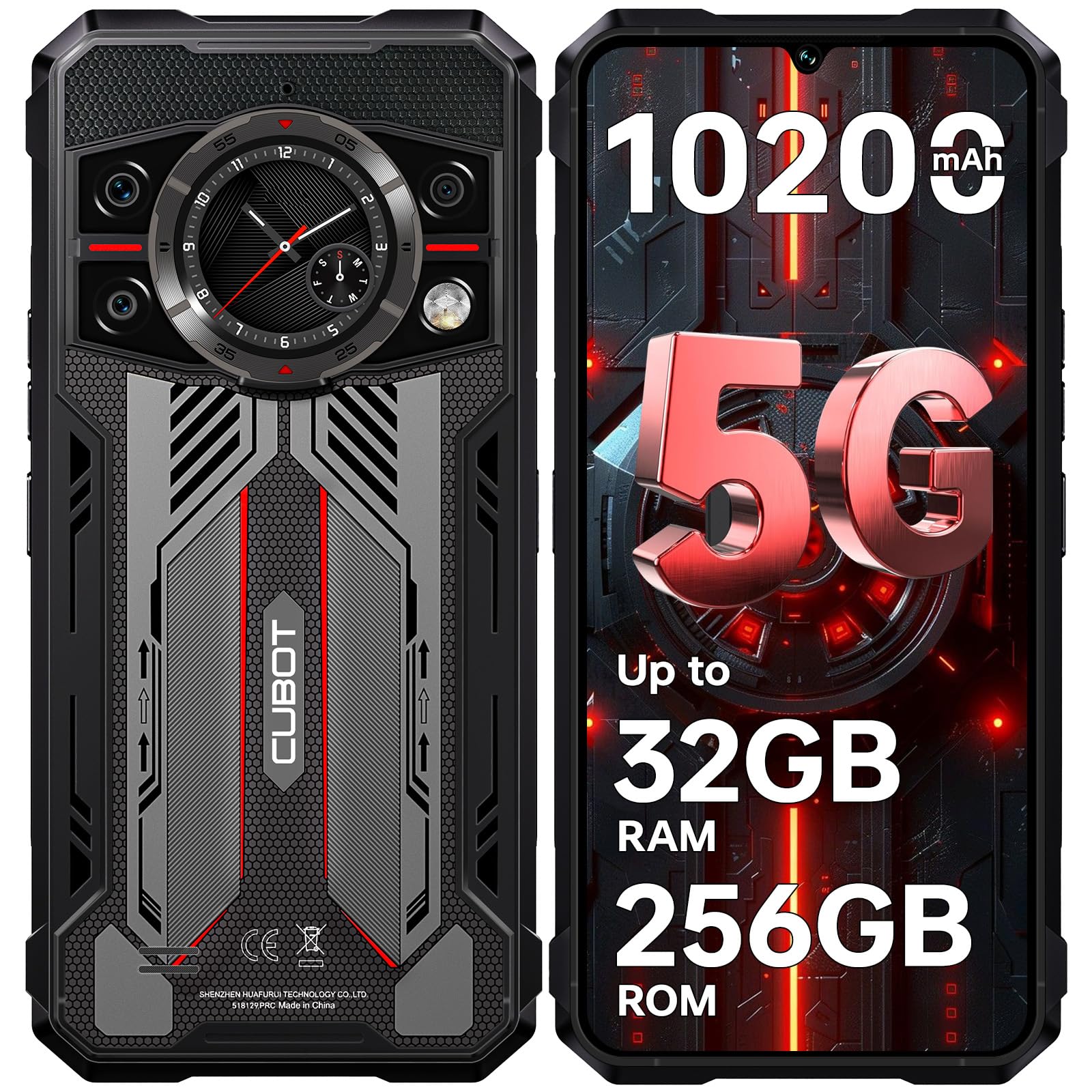
Irudia: Aurrealdea eta atzealdea view of the CUBOT Kingkong 11 5G smartphone, highlighting its rugged design.
2. Hasierako konfigurazioa
2.1. SIM txartelak eta MicroSD txartela sartzea
The CUBOT Kingkong 11 supports dual SIM cards and a MicroSD card for expanded storage.
- Bilatu SIM txartelaren erretilua gailuaren alboan.
- Erabili SIM txartelaren kanporatzeko tresna erretilua irekitzeko.
- Carefully place your Nano-SIM cards and/or MicroSD card into the designated slots. Ensure correct orientation.
- Sartu erretilua astiro-astiro gailuan, alboarekin berdindu arte.

Image: Close-up of the CUBOT Kingkong 11 showing the SIM card tray with waterproof seals.
2.2. Piztea eta hasierako kargatzea
- Press and hold the power button located on the side of the device until the CUBOT logo appears.
- For first-time use, it is recommended to fully charge the device. Connect the USB-C cable to the phone and the 33W fast charger to a power outlet.
- Pantailan dagoen bateriaren adierazleak kargatze-egoera erakutsiko du.

Image: Illustration of the 10200mAh battery capacity and 33W fast charging capability of the CUBOT Kingkong 11.
2.3. Softwarearen konfigurazioa
Follow the on-screen prompts to complete the initial setup, including language selection, Wi-Fi connection, Google account login, and security settings (Face ID/Fingerprint).
3. Funtzionamendua
3.1. Android 15 sistema eragilea
The CUBOT Kingkong 11 runs on Android 15, offering an intuitive user interface and enhanced features. Navigate through apps, customize settings, and utilize smart functions for an optimized experience.

Image: Screenshot of the Android 15 operating system interface on the CUBOT Kingkong 11.
3.2. Main Display (6.72" FHD+ 120Hz)
The 6.72-inch FHD+ display provides vibrant visuals with a 120Hz refresh rate for smooth scrolling and gaming. The 1080x2400 resolution ensures clear and detailed content viewing.

Image: Visual representation of the 6.72-inch FHD+ display with 120Hz refresh rate on the CUBOT Kingkong 11.
3.3. Rear Smart Display (1.46")
The 1.46-inch rear smart display provides quick access to essential information such as time, notifications, battery status, and compass without activating the main screen. This feature is useful for quick glances during activities.

Image: The 1.46-inch rear smart display of the CUBOT Kingkong 11, showing widgets for clock, camera, music, battery, calls, compass, and alarm.
3.4. Kamera sistema
The device features a versatile quad-camera system:
- 108MP-ko kamera nagusia: Captures high-resolution photos with impressive detail.
- 32MP-ko aurrealdeko kamera: For high-definition selfies and video calls.
- 24MP gaueko ikusmen kamera: Equipped with infrared LEDs for clear imaging in complete darkness.
- 8MP makro lentea: Allows for close-up photography, capturing intricate details of small subjects.

Irudia: Gainetikview of the CUBOT Kingkong 11's quad-camera system, including the 108MP main, 32MP front, 24MP night vision, and 8MP macro lenses, with exampargazkiak.
3.5. Konexioa eta nabigazioa
The Kingkong 11 supports 5G full-band connectivity for fast data speeds. It includes NFC for contactless payments and data transfer, and a quadruple positioning system (GPS+GLONASS+BeiDou+Galileo) for accurate navigation.

Image: Graphic illustrating the CUBOT Kingkong 11's 5G ultra-fast global coverage and connectivity features.
4. Mantentzea
4.1. Iraunkortasuna eta Babesa
The CUBOT Kingkong 11 is certified with IP68/IP69K for dust and water resistance, and MIL-STD-810H for shock resistance. It can withstand submersion in water up to 5 meters for 30 minutes.
- Uraren erresistentzia: Ensure all ports (USB-C, SIM tray) are properly sealed before exposing the device to water. After exposure to water, dry the device thoroughly before charging.
- Hautsaren Erresistentzia: The device is designed to prevent dust ingress. Clean any accumulated dust from ports and crevices using a soft, dry brush.
- Shock Erresistentzia: While rugged, avoid intentional drops or impacts from extreme heights to preserve the device's integrity.

Image: Visual representation of the CUBOT Kingkong 11's IP68, IP69K, and MIL-STD-810H certifications for water, dust, and shock resistance.
4.2. Garbiketa
Use a soft, lint-free cloth to clean the screen and body of the phone. For stubborn smudges, a slightly damp oihal bat erabil daiteke, eta ondoren berehala lehortu.
5. Arazoak
5.1. Gailua ez da pizten
- Ziurtatu bateria kargatuta dagoela. Konektatu kargagailua eta itxaron minutu batzuk berriro pizten saiatu aurretik.
- Berrabiarazte behartua egiteko, sakatu eta eutsi pizteko botoia gutxienez 10-15 segundoz.
5.2. Poor Performance/Lag
- Itxi behar ez diren atzeko planoko aplikazioak.
- Garbitu maiz erabiltzen diren aplikazioen cache datuak.
- Ziurtatu biltegiratze leku nahikoa dagoela. Kontuan hartu tamaina handikoak mugitzea files to the MicroSD card or cloud storage.
- Berrabiarazi gailua aldian-aldian.
5.3. Kargatzeko arazoak
- Egiaztatu kargatzeko kablea eta egokitzailea ondo konektatuta daudela eta kalterik gabe daudela.
- Try using a different compatible charger and cable.
- Check the USB-C port for any debris or obstruction.
5.4. Sarearen konexio arazoak
- Ziurtatu SIM txartelak behar bezala sartuta eta aktibatuta daudela.
- Check network settings (e.g., APN settings) with your service provider.
- Hegazkin modua piztu eta itzali.
- Berrabiarazi gailua.
6. Zehaztapenak
| Ezaugarri | Xehetasuna |
|---|---|
| Marka | CUBOT |
| Eredua | CUBOT KINGKONG 11 |
| Sistema eragilea | Android 15 |
| Prozesadorea | 5G Dimensity 7025 Octa-Core |
| RAM | Up to 32 GB (16 GB physical + 16 GB extended) |
| Barne Biltegiratzea | 256 GB |
| Biltegiratze zabalgarria | Up to 1 TB via MicroSD card |
| Pantaila nagusia | 6.72 inches FHD+ (1080x2400), 120Hz refresh rate, 450 nits brightness |
| Atzeko pantaila | 1.46 inches Smart Display |
| Kamera Nagusia | 108 MP |
| Aurrealdeko kamera | 32 MP |
| Gaueko Ikusmen Kamera | 24 MP with IR LED |
| Lente makroa | 8 MP |
| Bateria Edukiera | 10200 mAh |
| Kargatzen | 33W-ko karga azkarra, OTG alderantzizko karga |
| Konektibitatea | 5G, NFC, SIM bikoitza |
| Nabigazioa | GPS+GLONASS+BeiDou+Galileo |
| Iraunkortasuna | IP68/IP69K, MIL-STD-810H (Water resistant up to 5m for 30 min) |
| Segurtasuna | Aurpegi IDa, hatz-marken sentsorea |
| Neurriak | 22.4 x 17.3 x 4.2 cm (Paketea) |
| Pisua | 700 g (Paketea) |

Image: Energy label for the CUBOT Kingkong 11, showing battery life and durability ratings. View EPREL Produktuaren Informazio Orria
7. Bermea eta Laguntza
CUBOT offers a comprehensive support package for the Kingkong 11:
- Itzulketak: Erosketa egin eta 30 eguneko epean arazorik gabeko itzulketak.
- Bermea: A two-year warranty covers manufacturing defects.
- Laguntza teknikoa: Epe luzerako laguntza teknikoa eskuragarri dago.
- Bezeroarentzako arreta: 24/7 online customer service is provided for any inquiries during your ownership.
For assistance, please contact CUBOT customer service through their official channels.