
Sarrera
Eskerrik asko erosketagatik.asing the UPERFECT 23.8-inch 120Hz Portable Touch Monitor. This device is designed to enhance your productivity and entertainment experience with its large display, high refresh rate, and versatile connectivity. Please read this manual carefully before use to ensure proper operation and to maximize the monitor's potential.
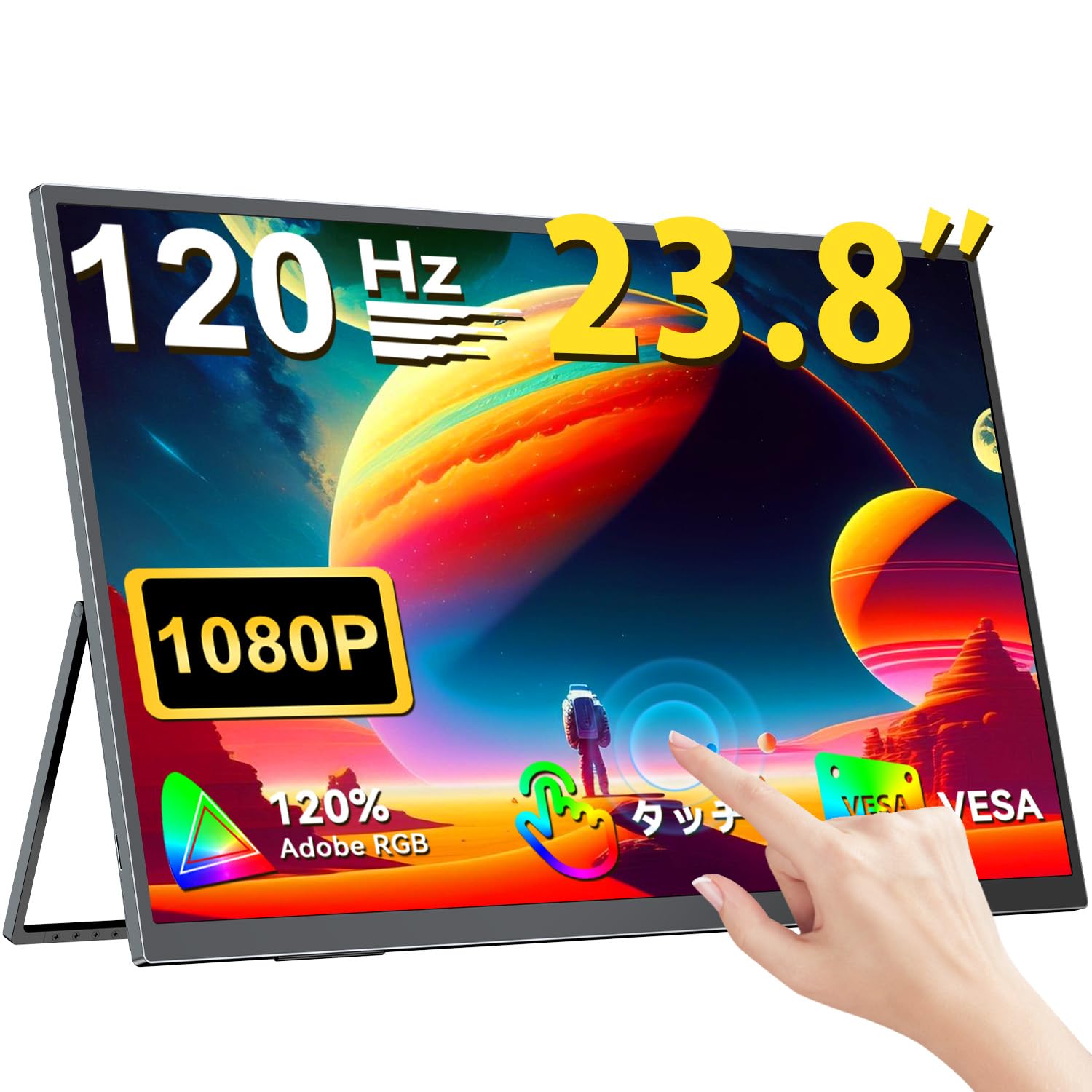
The UPERFECT 23.8-inch 120Hz Portable Touch Monitor.
Segurtasun Informazioa
To prevent damage and ensure safe operation, observe the following precautions:
- Ez jarri monitoreari euriari, hezetasunari edo muturreko tenperaturei.
- Ez jarri objektu astunak monitorean.
- Erabili emandako korronte-moldagailua eta kableak soilik.
- Do not attempt to disassemble or repair the monitor yourself. Contact customer support for assistance.
- Ziurtatu aireztapen egokia monitorearen inguruan, gehiegi berotu ez dadin.
- When adjusting the stand, ensure the monitor is stable to prevent tipping.

Recommended ergonomic viewing angles for comfortable use. Avoid upward viewing angles to prevent tipping and eye strain.
Paketearen edukia
Egiaztatu elementu guztiak paketean daudela:
- UPERFECT 23.8-inch Portable Touch Monitor
- Elikatze-moldagailua
- USB Type-C Cable (Full-featured)
- Mini HDMI tik HDMI kablea
- USB-A to USB-C Cable (for power/OTG)
- Erabiltzailearen eskuliburua
Produktua amaituview
Monitorearen ezaugarriak
- 23.8 hazbeteko IPS panela: Large display with 178° wide viewangeluak.
- 120 Hz freskatze-abiadura: Provides smooth visuals, ideal for gaming and fast-paced content.
- 10-Point Multi-Touch: Intuitive interaction with supported devices.
- % 120ko sRGB kolore-gama: Kolore biziak eta zehatzak eskaintzen ditu.
- Euskarri integratua: Adjustable from 0° to 180° for flexible viewposizioak egitea.
- VESA muntaia bateragarria: Supports 75x75mm VESA standard for alternative mounting options.
- Non-Glare Screen: Reduces reflections for comfortable long-term use.
- Bozgorailu integratuak: Audio irteerarako.
Portuak eta Botoiak

Amaituview of the monitor's ports and control buttons.
- Entzungailuen kablea: 3.5 mm-ko audio irteera.
- Menuko botoia: Pantailan bistaratzeko (OSD) menura sartzen da.
- Gehi/Ken botoiak: Navigate OSD menu, adjust volume/brightness.
- Potentzia adierazlea: Potentzia-egoera erakusten du.
- Pizteko/Itzuli botoia: Powers the monitor on/off, or returns to previous OSD menu.
- C motako atakak (x2): Full-featured USB-C for power, video, and touch signal.
- Mini HDMI ataka: Bideo sarrera.
- Micro USB-B OTG Port: For connecting peripherals like mouse or keyboard.
Konfigurazioa
Gailuetara konektatzen
The monitor supports various devices including laptops, desktops, smartphones, and gaming consoles (PS4, PS5, Xbox, Nintendo Switch).

The monitor can be connected to various devices using a single Type-C cable for power and display, provided the device supports DP Alt Mode.
- USB C motako konexioa: Connect a full-featured USB Type-C cable from your device (laptop, smartphone, Switch) to one of the monitor's Type-C ports. If your device supports DP Alt Mode, a single cable can transmit video, audio, touch, and power. If your device does not support DP Alt Mode, or for stable power delivery, connect the included power adapter to the other Type-C port.
- Mini HDMI konexioa: Connect a Mini HDMI to HDMI cable from your device (PC, game console) to the monitor's Mini HDMI port. For power, connect the included power adapter to one of the monitor's Type-C ports.
- OTG ataka: Use the Micro USB-B OTG port to connect a mouse or keyboard for enhanced control, especially when using the monitor with a smartphone in desktop mode.
Ohar garrantzitsua:
- For optimal performance, especially when increasing contrast, brightness, or color saturation, always connect the monitor to an external power source using the provided power adapter.
- If your device's USB-C port does not support DP Alt Mode, a Type-C cable alone cannot transmit video. Refer to your device's specifications for compatibility.
Stand Adjustment and VESA Mounting

The monitor features a smart integrated stand for flexible positioning and VESA compatibility for arm mounts.
- Euskarri integratua: The monitor features a durable aluminum alloy integrated stand. Adjust the viewing angle freely within a 0° to 180° range. The base includes anti-slip rubber pads for stability.
- VESA muntaketa: The monitor is compatible with VESA 75x75mm mounts (M4*4mm screw holes). This allows for attachment to monitor arms or wall brackets for a customized setup.
Funtzionamendu-argibideak
Piztu/Itzali
Press the Power/Return button to turn the monitor on or off.
Pantailako pantailan (OSD) menua
Press the Menu button to access the OSD menu. Use the Plus/Minus buttons to navigate and adjust settings such as brightness, contrast, color temperature, and input source.
Ukitu Funtzionalitatea

The monitor supports 10-point multi-touch gestures for intuitive control. For MacBook connections, 2-point gestures (pinch zoom/rotate) are supported.
The monitor supports 10-point multi-touch for Windows and Android devices. For MacBook connections, 2-point gestures (pinch zoom/rotate) are fully supported. This allows for direct interaction with the screen for tasks like sketching, document navigation, and presentations.
Bistaratzeko moduak

Easily switch between horizontal (landscape) and vertical (portrait) display modes to suit your content and workflow. Portrait mode settings are configured on your PC.
Monitoreak hainbat bistaratze modu onartzen ditu zure beharretara egokitzeko:
- Modu hedatua: Extend your PC desktop across both screens for increased workspace.
- Bikoiztu modua: Mirror your PC screen for presentations or shared viewing.
- Erretratu modua: Rotate the monitor vertically for document review or coding. (Settings for portrait mode are typically configured on the connected PC).
Joko Ezaugarriak

The monitor supports FreeSync technology to eliminate screen tearing and stuttering during gaming.
- 120 Hz freskatze-abiadura: Experience smoother gameplay and action sequences compared to standard 60Hz displays.
- FreeSync laguntza: Compatible with FreeSync technology to reduce screen tearing and stuttering, providing a more fluid gaming experience.
- Erantzun denbora azkarra: Enjoy a quick response time of 1ms, minimizing motion blur.
Mantentzea
Follow these guidelines to maintain your monitor:
- Pantaila garbitzea: Garbitu pantaila astiro-astiro zapi leun eta pelusik gabeko batekin. Orba egoskorrak izanez gero, garbitu apur batampGarbitu zapia urarekin edo pantaila garbitzeko soluzio batekin. Ez ihinztatu likidoa zuzenean pantailan.
- C garbiketaasing: Erabili zapi leun eta lehor bat monitorearen garbiketa egiteko.asing. Saihestu garbitzaile edo disolbatzaile urratzaileak.
- Biltegiratzea: Denbora luzez erabiltzen ez baduzu, gorde monitoreak leku fresko eta lehor batean, eguzki-argitik eta muturreko tenperaturetatik urrun.
- Hatz-marken aurkako erresistentzia: The screen features an anti-fingerprint coating to help maintain cleanliness in business environments.
Arazoak konpontzea
Arazoak badituzu, jo ezazu honako arazo eta irtenbide ohikoenei:
| Arazoa | Kausa posiblea | Irtenbidea |
|---|---|---|
| Ez dago pantailarik/ez dago seinalerik | Incorrect input source selected; Cable not connected properly; Device not outputting signal; Insufficient power. | Check cable connections; Select correct input source via OSD; Ensure device is powered on and configured to output to external display; Connect external power adapter to monitor. |
| Ukipen funtzioa ez dabil | USB-C cable not full-featured; Device does not support touch output; Driver issue (Windows); Cable connection issue. | Ensure a full-featured USB-C cable is used; Verify device compatibility with touch output; Reconnect USB-C cable; For Windows, ensure touch drivers are installed (usually automatic). |
| Screen flickering/Unstable image | Cable issue; Graphics card issue; Refresh rate mismatch; Insufficient power. | Try a different cable; Update graphics drivers; Adjust refresh rate in device settings; Ensure external power is connected. |
| No audio from monitor speakers | Volume too low; Muted; Incorrect audio output selected on device. | Adjust monitor volume via OSD; Check device's audio output settings. |
| Monitor keeps restarting | Potentzia nahikoa ez. | Ensure the monitor is connected to the provided power adapter for stable power delivery. |
Zehaztapenak
| Ezaugarri | Zehaztapena |
|---|---|
| Marka | PERFECTUA |
| Modelo zenbakia | M238T02 |
| Pantailaren tamaina | 23.8 hazbetekoa |
| Ebazpena | FHD 1080p (1920 x 1080) |
| Aspektu-erlazioa | 16:9 |
| Panel mota | IPS LCD |
| Pantailaren gainazala | Ez distira |
| Kontraste-erlazioa | 1000:1 |
| Freskatze tasa | 120 Hz |
| Erantzun Denbora | 1 ms |
| Viewangelua | 178 gradu |
| Kolore Gamut balioa | %120 sRGB |
| Konektibitatea | 2x USB Type-C (Full-featured), 1x Mini HDMI, 1x Micro USB-B (OTG), 1x 3.5mm Audio Jack |
| VESA bateragarritasuna | 75x75mm (M4*4mm screws) |
| Neurriak (L x W x H) | 1.7 x 54.5 x 32.7 cm |
| Sinkronizazio egokitzailea | FreeSync |
Bermea eta Laguntza
UPERFECT provides comprehensive support for your product:
- Fabrikatzailearen bermea: This product comes with a 2-year manufacturer's warranty.
- 90 eguneko gogobetetasun bermea: If you are not completely satisfied within 90 days, a full refund is available.
- Laguntza dedikatua: Contact our dedicated support team for any questions or issues.
- Free Accessory Replacement: Genuine cables and adapters are provided free of charge for life.
- PSE Certified: The product is PSE certified, ensuring safety standards.
For any inquiries or if you encounter an initial defect within the warranty period, please contact us through your order history. We are committed to providing the best possible assistance.