
EZVIZ H6C Pro
EZVIZ H6C Pro 1080p Wi-Fi Pan & Tilt Smart Camera User Manual
Model: H6C Pro
Sarrera
This manual provides detailed instructions for the installation, operation, and maintenance of your EZVIZ H6C Pro 1080p Wi-Fi Pan & Tilt Smart Camera. Please read this manual carefully before using the product and retain it for future reference.
Produktua amaituview
Familiarize yourself with the components and features of your EZVIZ H6C Pro camera.
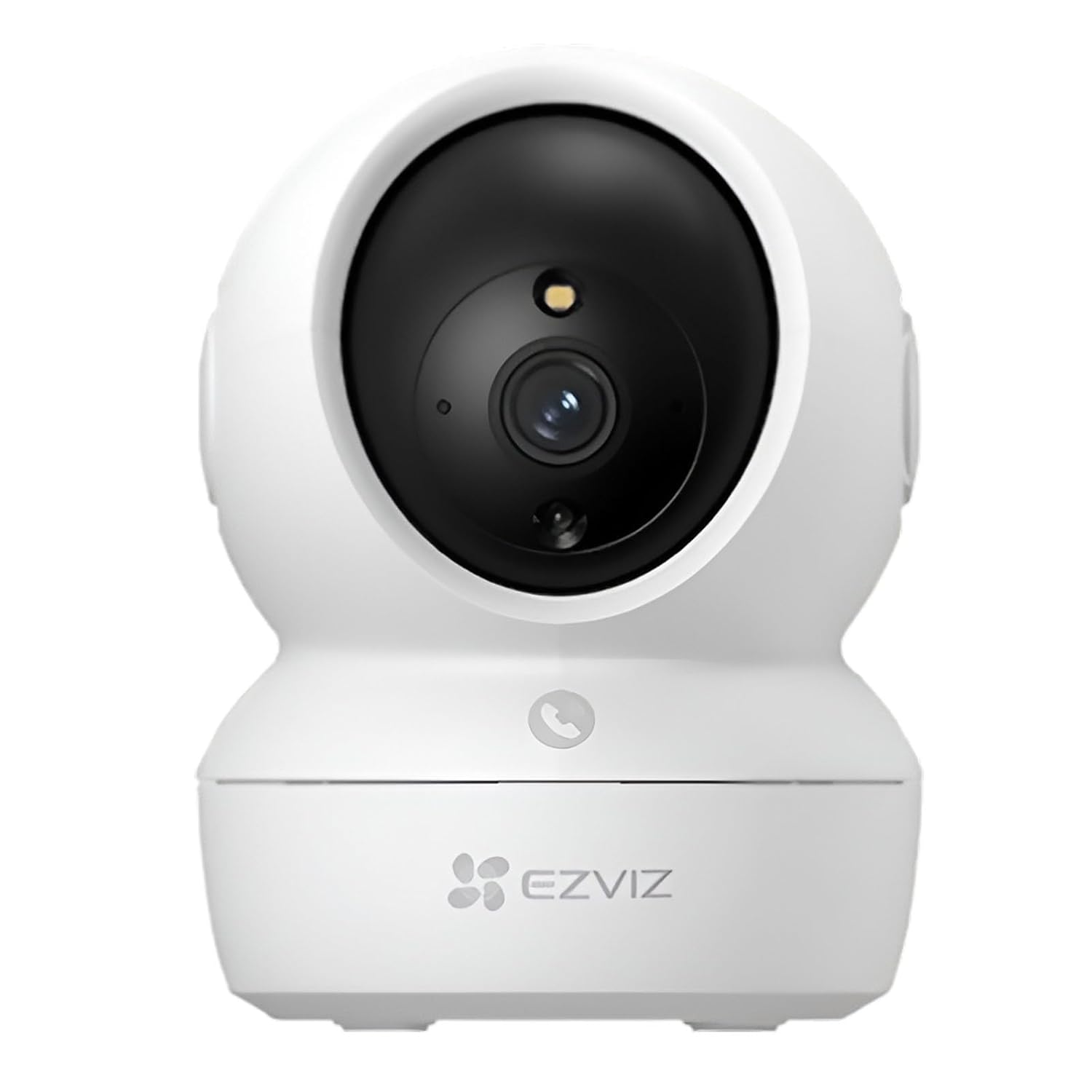
1.1. irudia: Aurrealdea view of the EZVIZ H6C Pro camera, showing the lens, indicator light, and microphone.

1.2. irudia: Angelukoa view of the EZVIZ H6C Pro camera, highlighting its compact design and pan-tilt base.

1.3. irudia: The One-Touch Call Button located on the front of the camera, enabling quick two-way communication.

1.4. irudia: Illustration of the camera's 360-degree horizontal pan and vertical tilt functionality, providing comprehensive room coverage.

1.5. irudia: Demonstration of the camera's Smart Color Night Vision, showing both color and traditional black-and-white infrared views argi gutxiko baldintzetan.

1.6. irudia: A smartphone display illustrating the Smart Tracking feature, where the camera automatically follows detected motion.

1.7. irudia: Comparison of the camera's Sleep Mode, showing the monitoring status when off and the privacy protection when on.
Konfigurazioa
- Kamera deskonprimitu: Carefully remove the camera and all accessories from the packaging. Ensure all components are present: camera unit, power adapter, mounting plate, screw kit, and quick start guide.
- Piztu: Connect the power adapter to the camera's power port and plug it into a power outlet. The camera will power on and the indicator light will flash blue.
- Download EZVIZ App: Deskargatu EZVIZ aplikazioa App Store-tik (iOS) edo Google Play Store-tik (Android).
- Sortu kontua: Ireki EZVIZ aplikazioa eta jarraitu pantailan agertzen diren argibideei erabiltzaile-kontu berri bat sortzeko edo lehendik duzun batean saioa hasteko.
- Gehitu gailua: In the EZVIZ app, tap the "+" icon to add a new device. Scan the QR code located on the bottom of the camera or on the cover of the quick start guide.
- Sarearen konfigurazioa: Follow the app's instructions to connect the camera to your Wi-Fi network. Ensure your Wi-Fi network is 2.4 GHz.
- Muntatzea (aukerakoa): If mounting, choose a suitable location. Use the provided mounting plate as a template to drill holes. Secure the mounting plate with screws, then attach the camera to the plate.
Funtzionamendu-argibideak
Zuzenean View eta Pan/Tilt kontrola
Open the EZVIZ app and select your H6C Pro camera from the device list to access the live view. Use the on-screen joystick or swipe gestures to control the camera's pan (horizontal) and tilt (vertical) movements.
Two-Way Talk and Calling
- Bi norabideko hitzaldia: Zuzenean view, tap the microphone icon to initiate two-way audio. Speak into your phone's microphone to communicate through the camera's speaker. Tap the icon again to end.
- One-Touch Call Button: A person near the camera can press the call button on the camera itself to initiate a call to your EZVIZ app. You will receive a notification and can answer the call directly from the app.
Mugimenduaren jarraipena
Enable the "Smart Tracking" feature in the camera settings within the EZVIZ app. When enabled, the camera will automatically detect and follow moving objects within its field of view, ensuring continuous recording of the activity.
Gaueko Ikusmena
The H6C Pro automatically switches to night vision mode in low-light conditions. You can configure the night vision mode (e.g., Smart Color Night Vision, Black & White) in the camera settings to suit your preferences.
Biltegiratze-aukerak
- MicroSD txartela: Insert a microSD card (up to 256GB, not included) into the designated slot on the camera for local storage of recordings.
- EZVIZ CloudPlay: Subscribe to EZVIZ CloudPlay for encrypted cloud storage of your video recordings. Access recordings anytime, anywhere via the app.
Mantentzea
- Garbiketa: Erabili zapi leun eta lehor bat kameraren lentea eta gorputza garbitzeko. Ez erabili produktu kimiko gogorrik edo garbitzaile urratzailerik.
- Firmware eguneraketak: Regularly check for and install firmware updates via the EZVIZ app to ensure optimal performance and security.
- Potentzia-zikloa: If the camera becomes unresponsive, disconnect the power adapter, wait 10 seconds, and then reconnect it to power cycle the device.
Arazoak konpontzea
| Arazoa | Kausa posiblea | Irtenbidea |
|---|---|---|
| Kamera konexiorik gabe | Argindarrik ez; Wi-Fia deskonektatuta; Routerraren arazoa. | Check power connection; Restart camera and router; Ensure camera is within Wi-Fi range. |
| Bideoaren kalitate eskasa | Insufficient bandwidth; Dirty lens; Low light. | Check internet speed; Clean the lens; Ensure adequate lighting or enable night vision. |
| Mugimendu-hautemateak ez du funtzionatzen | Feature disabled; Sensitivity too low; Obstructions. | Enable motion detection in app settings; Adjust sensitivity; Clear obstructions from camera's view. |
| Bi norabideko audio arazoak | Microphone/speaker muted; App permissions; Network latency. | Egiaztatu audio ezarpenak aplikazioan; eman mikrofonoaren baimenak; ziurtatu sareko konexio egonkorra. |
Zehaztapenak
| Eredua | H6C Pro |
| Ebazpena | 1080p Full HD (1920 x 1080) |
| Panorama/Tilt barrutia | Panorama: 360°, Inklinazioa: 75° |
| Gaueko Ikusmenaren Distantzia | Gehienez 10 metro (33 oin) |
| Wi-Fi estandarra | IEEE 802.11b/g/n (2.4 GHz) |
| Tokiko biltegiratzea | MicroSD txartelaren zirrikitua (256 GB arte) |
| Audioa | Two-way talk with built-in microphone and speaker |
| Bateragarritasuna | Amazon Alexa, Google Laguntzailea |
Bermea eta Laguntza
For warranty information, please refer to the warranty card included with your product or visit the official EZVIZ website. For technical support, frequently asked questions, and additional resources, please visit the EZVIZ support page or contact their customer service directly.
EZVIZ laguntza Webgunea: www.ezviz.com/support
Erlazionatutako dokumentuak - H6C Pro
 |
EZVIZ C8C Lite Kamera: Konfigurazioa, Instalazioa eta Erabiltzailearen Gida EZVIZ C8C Lite segurtasun kamera konfiguratzeko eta instalatzeko gida osoa. Paketearen edukia, oinarrizko funtzioak, piztea, internet konexioa (Wi-Fi/kable bidez), SD txartelaren instalazioa eta muntatzeko aukerak biltzen ditu. |
 |
EZVIZ H8c 4G LTE 2K Kameraren Erabiltzaile Eskuliburua EZVIZ H8c 4G LTE kameraren erabiltzailearen eskuliburua, konfigurazioa, instalazioa, gailuen kudeaketa eta arazoak konpontzea azaltzen dituena. |
 |
EZVIZ E6 Segurtasun Kameraren Erabiltzailearen Eskuliburua EZVIZ E6 Segurtasun Kameraren erabiltzailearen eskuliburua, Amazon Alexa eta Google Assistant bezalako laguntzaile adimendunekin konfigurazioa, instalazioa, funtzionamendua eta integrazioa jorratzen dituena. Arazoak konpontzea eta produktuaren erabilera ekimenak barne hartzen ditu. |
 |
EZVIZ HB90 2K+ Lente Bikoitzeko Wi-Fi Pan&Tilt Kameraren Erabiltzailearen Eskuliburua Erabiltzailearen eskuliburu honek EZVIZ HB90 2K+ Lente Bikoitzeko Wi-Fi Pan&Tilt Kamera konfiguratzeko, instalatzeko eta erabiltzeko argibide osoak eskaintzen ditu. Gailuaren oinarriak, aplikazioen integrazioa, kameraren instalazioa, zuzeneko irudiak eta bestelakoak lantzen ditu. view, ezarpenak eta etxe adimendunaren konexioa Amazon Alexa eta Google Assistant-ekin. |
 |
EZVIZ H90 2K+ Wi-Fi Pan & Tilt Kameraren Erabiltzailearen Eskuliburua | Instalazioa, Konfigurazioa eta Ezaugarriak EZVIZ H90 2K+ Wi-Fi Pan & Tilt kameraren erabiltzailearen eskuliburu osoa. Konfigurazioa, instalazio gida, aplikazioaren funtzionamendua, arazoak konpontzea eta etxe adimendunaren integrazioa Alexa eta Google Assistant-ekin barne hartzen ditu. |
 |
EZVIZ C8W Pro WiFi Security Camera User Manual Comprehensive user manual for the EZVIZ C8W Pro WiFi security camera, covering setup, installation, app operations, and smart home integration with Amazon Alexa and Google Assistant. |
Ask a question about this manual
Ask about setup, troubleshooting, compatibility, parts, safety, or missing instructions. Manuals+ will review the question and use this page’s manual context to help answer it.