
1. Sarrera
This manual provides essential information for setting up, operating, and maintaining your NIMO 17.3" IPS FHD Gaming Laptop. Designed for both productivity and entertainment, this laptop features an AMD Ryzen 7 8745HS processor, 64GB DDR5 RAM, and a 2TB PCIe 4.0 SSD, ensuring a responsive and powerful user experience.
Image 1.1: NIMO 17.3" FHD Gaming Laptop overview, ezaugarri nagusiak nabarmenduz.
2. Zer dago kutxan
Please verify that all items are present upon unboxing:
- 1 x NIMO N177 Laptop
- 1 x Type-C 100W PD Fast Charger
- 1 x Erabiltzailearen eskuliburua
- Windows 11 Home (Pre-installed)
3. Hasierako konfigurazioa
3.1 Piztea eta kargatzea
- Connect the provided 100W Type-C PD Fast Charger to the laptop's USB-C port and a power outlet.
- Ireki ordenagailu eramangarriaren tapa. Baliteke ordenagailu eramangarria automatikoki piztea, edo pizteko botoia sakatu behar izatea.
- Allow the battery to charge fully before initial use. A 15-minute charge can provide approximately 2 hours of use.

Image 3.1: Illustration of the laptop charging process and battery life.
3.2 Windows 11 Configuration
Follow the on-screen prompts to complete the Windows 11 setup process. This includes selecting your region, connecting to a Wi-Fi network, and creating a user account.
3.3 Hatz-marken irakurgailuaren konfigurazioa
For enhanced security and quick login, set up the integrated fingerprint reader:
- Joan Windows Ezarpenak > Kontuak > Saioa hasteko aukerak atalera.
- Select 'Fingerprint recognition (Windows Hello)' and follow the instructions to register your fingerprint.

Image 3.2: The backlit keyboard and fingerprint sensor for secure login.
4. Zure ordenagailu eramangarria erabiltzea
4.1 Errendimendua eta zeregin anitzak
Your NIMO laptop is equipped with an AMD Ryzen 7 8745HS processor (8-core/16-thread, up to 4.9GHz) and 64GB DDR5 RAM, providing robust performance for demanding applications, gaming, and seamless multitasking. The 2TB PCIe 4.0 SSD ensures fast boot times and rapid data access.

Image 4.1: Details of the AMD Ryzen 7 8745HS processor.

Image 4.2: Laptop demonstrating seamless multitasking with ample storage and RAM.
4.2 Bistaratzea
The 17.3" FHD (1920x1080) IPS anti-glare display offers immersive visuals with vibrant colors and wide viewing angles. The ultra-thin bezel design provides an 85% screen-to-body ratio for an expansive viewesperientzia.

Image 4.3: The 17.3" FHD IPS display for visual clarity.
4.3 Teklatua eta ukipen-panela
The full-size keyboard includes a numeric keypad and features backlighting for comfortable typing in various lighting conditions. The precision gesture touchpad allows for intuitive navigation and supports multi-touch gestures.
4.4 Webkamara
2MP integratua. webcam is suitable for video calls and online meetings. For privacy, the laptop includes a physical privacy switch to disable the webkamera erabiltzen ez denean.

Image 4.4: Privacy-focused camera convenience with a built-in switch.
5. Konektibitatea
5.1 Portuak eta interfazeak
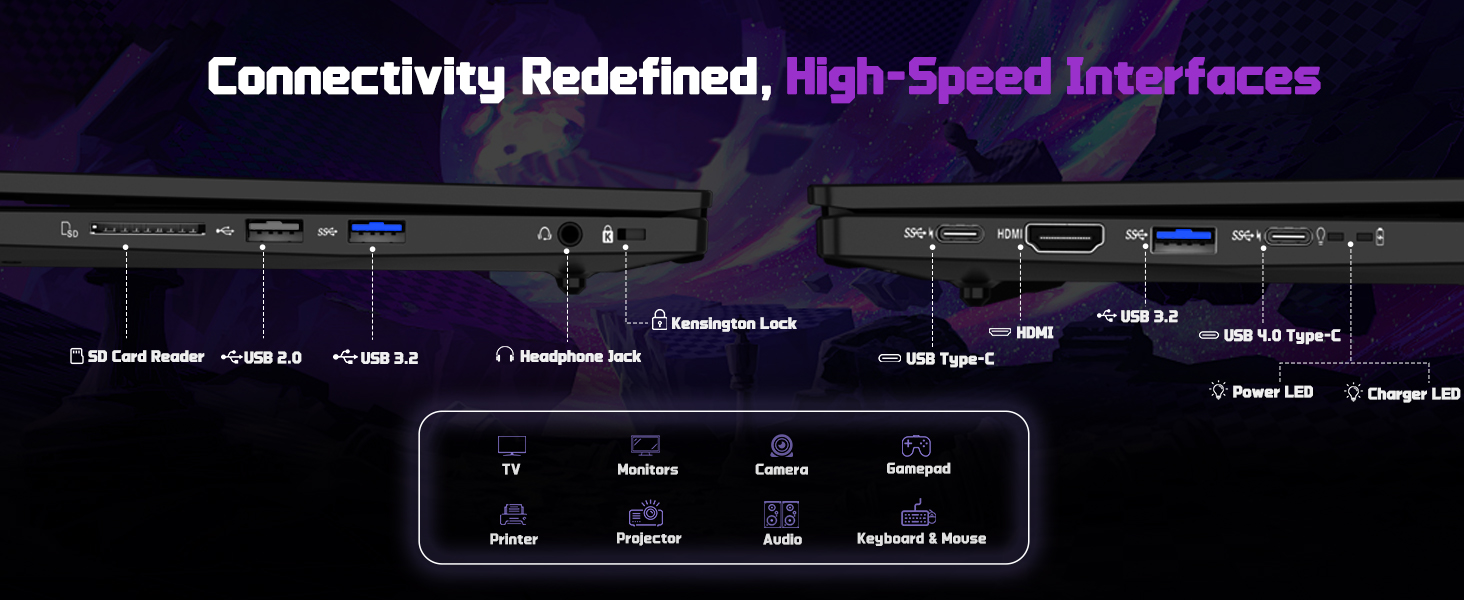
The NIMO N177 laptop offers a variety of ports for connecting peripherals and external displays:
- 1 x USB 2.0 ataka
- 3 x USB 3.0 ataka
- 1 x USB 4.0 Type-C Port (supports 100W PD charging, data transfer, and display output)
- 1 x HDMI ataka
- 1 x Aurikularretarako Jack
- 1 x SD txartel irakurgailua
- 1 x Kensington blokeo zirrikitua

Image 5.1: Detailed diagram of the laptop's high-speed interfaces.
5.2 Haririk gabeko konexioa
The laptop supports 802.11a/b/g/n/ac Wi-Fi for reliable wireless internet access and Bluetooth for connecting wireless accessories.
6. Mantentzea
6.1 Garbiketa
- Erabili zapi leun eta lihorik gabeko bat pantaila eta kanpoko gainazalak garbitzeko.
- Saihestu produktu kimiko gogorrak edo material urratzaileak erabiltzea.
- For the screen, use a specialized screen cleaner and a microfiber cloth.
6.2 Software eguneraketak
Regularly check for and install Windows updates and driver updates to ensure optimal performance and security. You can find driver updates on the NIMO official webgunea.
6.3 Biltegiratzea eta manipulazioa
Store the laptop in a cool, dry place. Avoid exposing it to extreme temperatures, direct sunlight, or excessive moisture. Handle the laptop with care to prevent physical damage.
7. Arazoak
If you encounter issues with your NIMO laptop, try the following common troubleshooting steps:
- Potentziarik gabe: Ensure the charger is securely connected to both the laptop and a working power outlet. Check if the power adapter's LED indicator is on.
- Bistaratzeko arazoak: Pantaila hutsik badago, saiatu kanpoko monitore bat konektatzen ordenagailu eramangarria funtzionatzen duen egiaztatzeko. Doitu pantailaren ezarpenak Windows-en.
- Errendimendu motela: Itxi beharrezkoak ez diren aplikazioak, egiaztatu atzeko planoan dauden prozesuak eta ziurtatu biltegiratze leku nahikoa dagoela.
- Konektibitate arazoak: For Wi-Fi issues, restart your router and the laptop. For peripheral issues, ensure drivers are updated and connections are secure.
- Sistemak ez du erantzuten: Sakatu eta eutsi pizteko botoia 10-15 segundoz itzaltzeko, eta ondoren berrabiarazi ordenagailu eramangarria.
For persistent issues, refer to the support section or contact NIMO customer service.
8. Zehaztapenak
| Ezaugarri | Zehaztapena |
|---|---|
| Marka | NIMO |
| Ereduaren izena | NIMO N177L |
| Pantailaren tamaina | 17.3 hazbete |
| Pantailaren bereizmena | 1920 x 1080 pixel (FHD IPS) |
| Prozesadorea | AMD Ryzen 7 8745HS (8 Cores, up to 4.9 GHz) |
| RAM | 64 GB DDR5 (4800 MHz) |
| Disko gogorra | 2 TB-ko SSDa (PCIe 4.0) |
| Koprozesadore grafikoa | AMD Radeon 780M (Integratua) |
| Sistema eragilea | Windows 11 Home |
| Haririk gabeko mota | 802.11a/b/g/n/ac |
| USB atakak | 1 x USB 2.0, 3 x USB 3.0, 1 x USB 4.0 C motakoa |
| Ezaugarri bereziak | Backlit Keyboard, Fingerprint Reader, HD Audio, Numeric Keypad |
| Bateriaren batez besteko iraupena | 15.5 Hours (75Wh) |
| Elementuaren pisua | 3.84 kilo |
| Produktuaren neurriak | 15.66 x 9.99 x 0.74 hazbete |
| Kolorea | Beltza |
9. Bermea eta Laguntza
9.1 Bermearen informazioa
Your NIMO laptop is backed by a 2 urteko bermea. This warranty covers manufacturing defects and ensures your satisfaction. The product also includes partial U.S. assembly.
9.2 Itzulketa politika
NIMO offers hassle-free 90 eguneko itzulketak from the date of purchase. Please refer to your purchase documentation for detailed return instructions.
9.3 Bezeroarentzako laguntza
Our dedicated support team is available to assist you with any questions or issues. You can contact us via:
- Posta elektronikoa: service@nimopc.com
- Gure ofiziala website or product page (for contact details).
We aim to provide quick solutions and a worry-free experience.
9.1. irudia: Amaituview of NIMO's customer commitment and support.