
1. Sarrera
This manual provides essential information for the safe and efficient operation of your Tornado 65UA5300E 65-inch 4K Frameless Android Smart TV. Please read it thoroughly before using the product and retain it for future reference.

1.1. irudia: Aurrealdea view of the Tornado 65UA5300E Smart TV, showcasing its frameless design and included stand.
2. Segurtasun informazioa
Jarraitu beti oinarrizko segurtasun neurriak telebista hau erabiltzean sute, deskarga elektriko eta lesio arriskua murrizteko.
- Ez jarri telebista euri edo hezetasunera.
- Ziurtatu aireztapen egokia; ez blokeatu aireztapen-irekidurak.
- Ez jarri telebista orgak, euskarri, tripode, euskarri edo mahai ezegonkor baten gainean.
- Deskonektatu telebista tximista-ekaitzetan edo denbora luzez erabili gabe dagoenean.
- Jarri zerbitzu-zerbitzu guztiak zerbitzu-pertsonal kualifikatuari.
3. Paketearen edukia
Egiaztatu elementu guztiak paketean daudela:
- Tornado 65UA5300E 65-inch 4K Frameless Android Smart TV
- Urruneko Kontrola
- Elikatze-kablea
- Telebista-euskarria (2 pieza)
- Euskarri muntaketarako torlojuak
- Erabiltzailearen eskuliburua (dokumentu hau)
4. Konfigurazioa
4.1 Paketatzea
Kontu handiz atera telebista bere paketetik. Gomendagarria da jatorrizko ontzia gordetzea etorkizunean garraiatzeko edo konpontzeko.
4.2 Standa lotzea
If you are not wall-mounting the TV, attach the included stand pieces. Place the TV face down on a soft, flat surface to prevent screen damage. Align each stand piece with the corresponding slots on the bottom of the TV and secure them with the provided screws.
4.1 irudia: Behealdea view of the TV, illustrating the designated areas for stand attachment.
4.3 Horman muntatzea
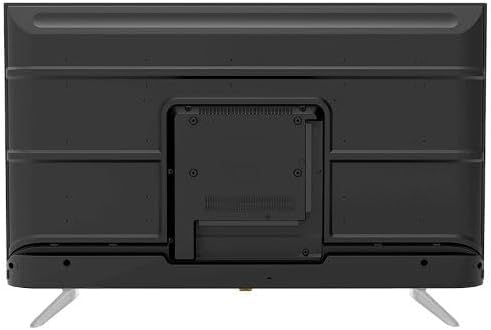
For wall mounting, remove the stand (if attached). Use a VESA-compatible wall mount (not included) that supports the TV's weight and dimensions. Consult a professional for wall mounting to ensure safety and proper installation.

4.2. irudia: Atzekoa view of the TV, highlighting the VESA mounting pattern and various input/output ports.
4.4 Periferikoak konektatzea
Konektatu kanpoko gailuak telebistara ataka egokiak erabiliz:
- HDMI: For high-definition devices like Blu-ray players, gaming consoles, or set-top boxes. The TV has 3 HDMI ports, one with ARC support.
- USBa: For connecting USB storage devices to play media (video, photos, music). The TV has 2 USB ports.
- LAN: Interneteko kable bidezko konexio baterako.
- RF sarrera: For connecting an antenna or satellite dish for the built-in digital receiver.
- Audio irteera digitala (optikoa): Kanpoko audio-sistema batera konektatzeko.
- Aurikularretarako Jack (3.5 mm): Entzungailuak konektatzeko.

4.3 irudia: Albokoa view of the TV, illustrating the accessible side input ports.
4.5 Hasierako piztea eta konfigurazio-morroia
After connecting the power cable, press the power button on the remote control or TV. The TV will guide you through an initial setup wizard, including language selection, network connection (Wi-Fi or LAN), channel scanning, and Google account setup for Android TV features.
5. Telebistaren funtzionamendua
5.1 Urruneko kontrola baino gehiagoview
The included remote control allows you to navigate the TV's functions. It features dedicated buttons for power, volume, channel, input selection, smart TV apps (Netflix, YouTube, Prime Video, Disney+), Google Assistant voice search, and menu navigation.
5.2 Oinarrizko funtzioak
- Piztu/Itzali: Sakatu pizteko botoia.
- Bolumen kontrola: Erabili bolumena igotzeko/jaisteko botoiak.
- Kanalaren hautaketa: Use the Channel Up/Down buttons or numeric keypad.
- Sarrera iturria: Press the 'Input' button to select between HDMI, AV, TV, etc.
5.3 Telebista adimendunaren ezaugarriak (Android 11)
Your TV runs on Android 11, providing access to a wide range of smart features:
- Aplikazioak: Access pre-installed apps like Netflix, YouTube, Prime Video, Disney+, Shahid VIP, and download more from the Google Play Store.
- Google Laguntzailea: Erabili ahots-komandoak urrutiko agintearen bidez bilaketa, kontrola eta informazioa lortzeko.
- Chromecast integratua: Edukia zure telefonotik edo tabletetik zuzenean telebistara igorri.
- Web Arakatzailea: Arakatu Interneten zuzenean zure telebistan.
- Bluetooth 5.0: Connect wireless headphones, speakers, or other Bluetooth devices.
5.4 Irudi eta soinu ezarpenak
Pertsonalizatu zure viewtelebistaren ezarpenen menuaren bidez entzuteko eta entzuteko esperientzia:
- Irudi moduak: Select from Dynamic, Game, Sports, Cinema, or User-defined modes.
- Kolore Tenperatura: Adjust to Normal, Cool, or Warm.
- Soinu moduak: Choose from Smart, User, Game, Movie, Music, or News.
- Dolby Digital Plus: Enhanced audio processing for compatible content.
6. Mantentzea
6.1 Telebista garbitzea
- Pantaila: Garbitu pantaila astiro-astiro zapi leun eta pelusik gabeko batekin. Orban egoskorrak lortzeko, erabili telebistetarako bereziki diseinatutako pantaila-garbitzaile bat, zapiari aplikatuz, ez zuzenean pantailari.
- Gorputza: Wipe the TV's frame and back panel with a soft, dry cloth. Do not use abrasive cleaners or solvents.
6.2 Software eguneraketak
Ensure your TV's software is up to date for optimal performance and security. Connect the TV to the internet and check for updates periodically through the settings menu.
7. Arazoak
Arazoak badituzu, jo ezazu honako ohiko irtenbide hauetara:
| Arazoa | Irtenbide posiblea |
|---|---|
| Botererik ez | Check if the power cable is securely plugged into the TV and the wall outlet. Ensure the outlet is functional. |
| Ez dago irudirik, baina soinua badago | Egiaztatu sarrera-iturria. Ziurtatu kanpoko gailuak piztuta eta behar bezala konektatuta daudela. |
| Soinurik ez, baina irudia badago | Check the volume level and mute status. Verify audio settings and external audio connections. |
| Urruneko kontrola ez dabil | Aldatu bateriak. Ziurtatu ez dagoela oztoporik urrutiko agintearen eta telebistaren IR sentsorearen artean. |
| Ezin da wifira konektatu | Egiaztatu zure bideratzailea eta modema. Idatzi berriro Wi-Fi pasahitza. Saiatu telebista eta bideratzailea berrabiarazten. |
Arazoak jarraitzen badu, jarri harremanetan bezeroarentzako laguntzarekin.
8. Zehaztapenak
| Ezaugarri | Xehetasuna |
|---|---|
| Modelo zenbakia | 65UA5300E |
| Pantailaren tamaina | 65 hazbete |
| Bistaratzeko Teknologia | LED |
| Ebazpena | 4K UHD (3840 x 2160) |
| Aspektu-erlazioa | 16:9 |
| Viewangelua | 178 gradu |
| Distira | 250 cd/m² |
| Freskatze tasa | 50/60 Hz |
| HDR euskarria | HDR10, HLG |
| Audio Teknologia | Dolby Digital Plus, Surround Sound |
| Audio Irteerako Potentzia | 10W x 2 |
| Sistema eragilea | Android 11 |
| Barne Memoria | 16 GB |
| Konektibitatea | Wi-Fi, Bluetooth 5.0, LAN |
| Sarrerak | RF Input (Digital) x1, Video Input x1, HDMI x3 (ARC), USB x2, LAN x1 |
| Irteerak | Digital Audio Output (Optical) x1, Headphone Jack (3.5mm) x1 |
| Elikatze Hornidura | AC 90-240V / 50Hz |
| Egoneko potentzia | 0.5W |
| Neurriak (W x H x D) euskarririk gabe | 1446 x 832 x 84 mm |
| Neurriak (W x H x D) euskarriarekin | 1446 x 892 x 305 mm |
| Pisu garbia | 15.32 kg |
| Pisu Gordina | 21.32 kg |
| Jatorrizko Herrialdea | Egipto |
9. Bermea
This Tornado TV comes with a 3-year full free warranty. Please retain your proof of purchase for warranty claims. For specific terms and conditions, refer to the warranty card included with your product or contact Tornado customer service.
10. Laguntza
For further assistance, technical support, or service inquiries, please contact Tornado customer service. Contact details can typically be found on the manufacturer's official webgunean edo berme-txartelean.