
1. Sarrera
This manual provides essential information for the safe and efficient use of your iiyama G-Master GB3290QSU-B1 31.5-inch QHD Gaming Monitor. Please read these instructions thoroughly before operating the device and retain them for future reference. This monitor features a 31.5-inch QHD (2560x1440) IPS panel with a 240Hz refresh rate and 1ms response time, designed for high-performance gaming and professional use.
2. Segurtasun informazioa
- Elikatze-iturria: Use only the power cord provided with the monitor. Ensure the power outlet is properly grounded.
- Aireztapena: Ez blokeatu aireztapen-irekidurak. Utzi nahikoa leku monitorearen inguruan aire-fluxu egokia izan dadin eta gehiegi berotzea saihesteko.
- Lekua: Place the monitor on a stable, flat surface. Avoid direct sunlight, heat sources, and excessive moisture.
- Garbiketa: Disconnect the power cord before cleaning. Use a soft, dry cloth. Do not use liquid or aerosol cleaners directly on the screen.
- Manipulazioa: Avoid dropping or subjecting the monitor to strong impacts. Do not attempt to disassemble or repair the monitor yourself. Refer all servicing to qualified personnel.
3. Paketearen edukia
Egiaztatu elementu guztiak paketean daudela:
- iiyama G-Master GB3290QSU-B1 Monitor
- Monitorearen euskarria (oinarria eta lepoa)
- Elikatze kablea(k)
- HDMI kablea
- DisplayPort kablea
- USB motako kablea
- USB Upstream kablea
- Quick Start Guide / Safety Guide

Image: Included power, HDMI, USB Type-C, and DisplayPort cables.
4. Konfigurazioa
4.1 Standa muntatzea
- Carefully remove the monitor from its packaging, keeping it protected.
- Lotu euskarriaren lepoa monitorearen atzealdean. Ziurtatu ondo sartzen dela klik eginez edo torlojuekin lotuta dagoela, hala badagokio.
- Lotu euskarriaren oinarria euskarriaren lepoari, emandako torlojuarekin finkatuz.
- Jarri muntatutako monitorea gainazal egonkor batean.

Irudia: Atzealdea view of the monitor with the stand attached, showing the VESA mount area and port locations.
4.2 Monitorea konektatzea
- Potentzia-konexioa: Connect the power cable to the monitor's AC IN port and then to a power outlet.
- Bideo-konexioa: Connect one end of the HDMI, DisplayPort, or USB Type-C cable to the corresponding port on your computer's graphics card and the other end to the monitor. For optimal performance, use DisplayPort or USB Type-C for 240Hz QHD resolution.
- USB Hub Connection (Optional): To use the monitor's integrated USB hub, connect the USB upstream cable (USB-A to USB-B) from your computer to the monitor's USB upstream port.
- Audio-konexioa (aukerakoa): Connect external speakers or headphones to the 3.5mm audio output jack on the monitor.

Irudia: Gertuko planoa view of the monitor's main connectivity ports, including HDMI, DisplayPort, and USB ports.

Irudia: Xehetasun handikoa view of the monitor's side ports, including USB Type-C and 3.5mm audio jack.
5. Funtzionamendu-argibideak
5.1 Piztu/Itzali
Sakatu monitorearen gainean dagoen pizteko botoia pizteko edo itzaltzeko. Pizteko adierazlearen argia piztuko da monitore aktibo dagoenean.
5.2 Pantailan bistaratzeko (OSD) menua
The OSD menu allows you to adjust various monitor settings. Use the control buttons (typically located on the back or bottom right of the monitor) to navigate the menu.
- Accessing the OSD: Press one of the OSD buttons to bring up the main menu.
- Nabigazioa: Use the directional buttons to move through menu options.
- Hautaketa: Sakatu hautatzeko botoia azpimenu batera sartzeko edo ezarpen bat berresteko.
- Irteera: Use the exit button to go back to the previous menu or close the OSD.
5.3 Irudi ezarpenak
Key settings you can adjust in the OSD menu include:
- Distira/Kontrastea: Doitu luminantzia orokorra eta kontraste-erlazioa.
- Kolore ezarpenak: Aldatu kolore-tenperatura, gamma eta banakako RGB mailak.
- Sarrera hautatzea: Manually switch between HDMI, DisplayPort, and USB Type-C inputs.
- Freskatze-tasa: Ensure your graphics card and monitor are set to 240Hz for the smoothest experience.
- Erantzun denbora: Adjust overdrive settings for optimal pixel response.
5.4 Adaptive Sync (FreeSync)
The iiyama G-Master GB3290QSU-B1 supports FreeSync technology. To enable it:
- Ensure your graphics card supports FreeSync and has the latest drivers installed.
- Connect the monitor using a DisplayPort or compatible HDMI cable.
- Enable FreeSync in the monitor's OSD menu (if available as an option).
- Enable FreeSync in your graphics card control panel (e.g., AMD Radeon Software).
6. Mantentzea
6.1 Pantaila garbitzea
Garbitu pantaila astiro-astiro zapi leun eta pelusik gabeko batekin. Orbanik egoskorrak izanez gero, garbitu astiro-astiro.ampen the cloth with water or a specialized screen cleaner, then wipe dry immediately. Avoid applying pressure to the screen.
6.2 C garbitzeaasing
Erabili zapi leun eta lehor bat monitorearen c garbitzeko.asing. Do not use abrasive cleaners or solvents, as these can damage the finish.
7. Arazoak
- Irudirik ez: Check if the power cable is securely connected and the monitor is turned on. Verify that the video cable (HDMI, DisplayPort, USB-C) is properly connected to both the monitor and the computer. Ensure the correct input source is selected in the OSD menu.
- Irudi keinukaria: Check the video cable connection. Ensure the refresh rate is set correctly in your computer's display settings. Try a different video cable.
- Kolore okerrak: Reset color settings to factory defaults in the OSD menu. Check your graphics card drivers.
- Soinurik ez: Ensure speakers or headphones are properly connected to the monitor's audio output. Check the volume settings on both the monitor and your computer.
8. Zehaztapenak
| Ezaugarri | Zehaztapena |
|---|---|
| Marka | iiyama |
| Modelo zenbakia | GB3290QSU-B1 |
| Pantailaren tamaina | 31.5 hazbete |
| Ebazpena | QHD zabala 1440p (2560 x 1440 pixel) |
| Freskatze tasa | 240 Hz |
| Erantzun Denbora | 1 milisegundo |
| Bistaratzeko Teknologia | LED, IPS technology |
| Aspektu-erlazioa | 16:9 |
| Konektibitatea | HDMI, DisplayPort, USB, 3.5mm audio, USB 3.2 Gen 1, USB Type C |
| Sinkronizazio egokitzailea | FreeSync |
| Elementuaren neurriak (L x W x H) | 11.42" L x 28.11" W x 18.03" H |
| Kolorea | Beltza |

Image: EU Energy Label for GB3290QSU-B1 monitor. For more details, visit the official EPREL database: EPREL Produktuaren Orria
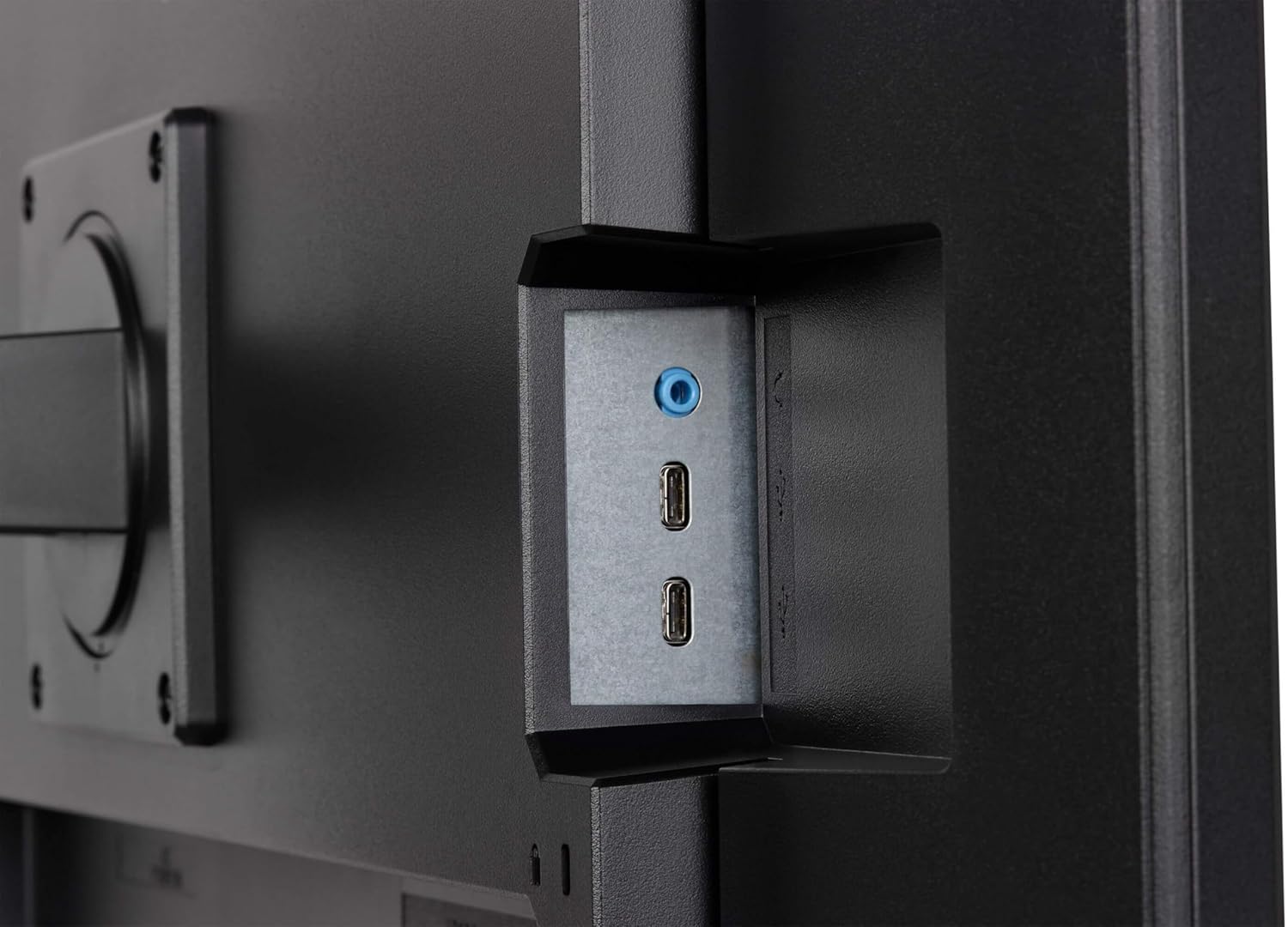
Image: Product Information Sheet for GB3290QSU-B1 monitor. Further details available via the EPREL link: EPREL Produktuaren Orria
9. Bermea eta Laguntza
Your iiyama G-Master GB3290QSU-B1 monitor is covered by a manufacturer's warranty. Please refer to the warranty card included in your package or visit the official iiyama webzure eskualdeko berme-baldintza zehatzak ikusteko, bisitatu webgunea.
For technical support, customer service, or further inquiries, please contact iiyama directly:
- Ofiziala Webgunea: https://www.iiyama.com/
- Bezeroarentzako arretarako posta elektronikoa: annie.hsu@iiyama.com