
1. Produktua amaitu daview
The Kaiser KSB-4008 is a versatile portable Bluetooth speaker designed for powerful audio output and dynamic lighting effects. It features an 8-inch woofer, 2.5-inch tweeter, and mid-range drivers, delivering 40W RMS of balanced sound. Integrated RGB LED lighting enhances the atmosphere for various events. With KSR-Link technology, you can wirelessly connect another compatible speaker for an expanded sound experience. The speaker includes a rechargeable battery, Bluetooth connectivity, and supports USB and Micro SD inputs for diverse music playback options. Its robust and portable design makes it suitable for both indoor and outdoor use.
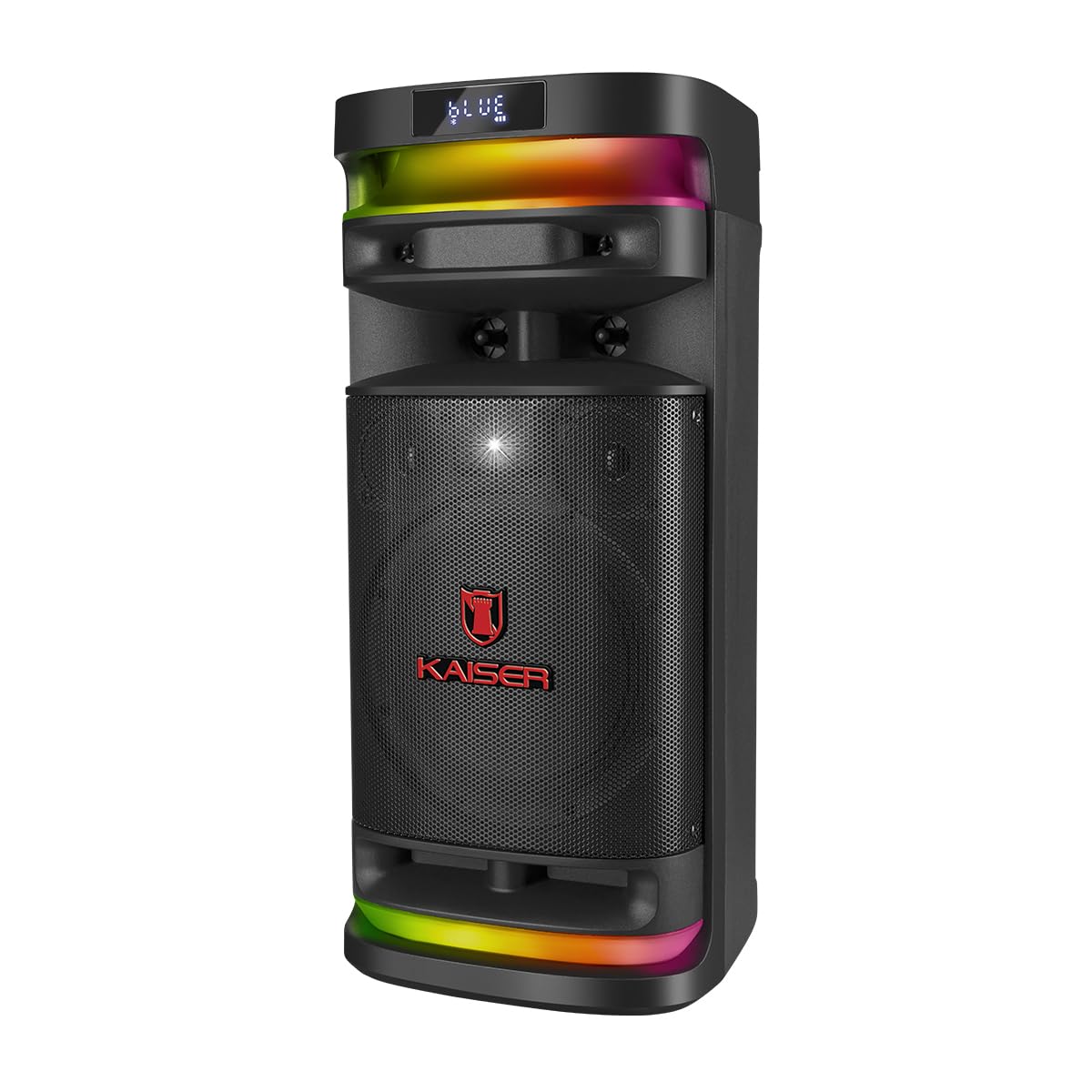
1.1. irudia: Aurrealdea view of the Kaiser KSB-4008 Portable Bluetooth Speaker, showcasing its speaker grille and RGB LED light strips.
Ezaugarri nagusiak:
- 40W RMS Power: Provides powerful and balanced audio output.
- Full Speaker Configuration: Includes an 8-inch woofer, 2.5-inch tweeter, and mid-range for comprehensive sound reproduction.
- RGB LED Light Effect: Multi-color lighting creates a vibrant atmosphere.
- KSR-Link Technology: Allows wireless connection to another compatible speaker for ampsoinu argitua.
- Konektibitate polifazetikoa: Supports Bluetooth, USB, and Micro SD for various audio sources.
- Bateria kargagarria: Enables extended use without constant power connection.
- Portable and Sturdy Design: Easy to transport for indoor or outdoor events.
2. Paketearen edukia
Mesedez, markatu laukitxoa elementu hauetarako:
- Kaiser KSB-4008 Portable Bluetooth Speaker
- Haririk gabeko mikrofonoa
- Charging Cable (for microphone)
- Erabiltzailearen eskuliburua (dokumentu hau)

2.1. irudia: Included wireless microphone and its USB charging cable.
3. Segurtasun-argibideak
To ensure safe operation and prevent damage, please read and follow these safety guidelines:
- Ez jarri bozgorailua uraren, hezetasunaren edo muturreko tenperaturen eraginpean.
- Avoid placing the speaker near heat sources or in direct sunlight for extended periods.
- Ziurtatu aireztapen egokia dagoela; ez blokeatu aireztapen-irekidurak.
- Use only the specified charging cables and power adapters.
- Do not attempt to open, modify, or repair the speaker yourself. Refer all servicing to qualified personnel.
- Mantendu bozgorailua haurrengandik eta maskotakengandik urrun.
- Operate the speaker within its specified voltage eta korronte mugak.
- Entzumen-kalteak saihesteko, saihestu denbora luzez bolumen altuegietan entzutea.
4. Produktuaren osagaiak eta kontrolak
Familiarize yourself with the various parts and controls of your KSB-4008 speaker.
4.1. irudia: Top Control Panel Layout.
Kontrol panelaren funtzioak:
- POWER switch: Turns the speaker ON/OFF.
- CARGA (Charge) Indicator: Lights up when charging.
- AUX sarrera: 3.5 mm-ko konektorea kanpoko audio gailuetarako.
- USB ataka: USB flash unitateetarako.
- Mikro SD zirrikitua: Mikro SD txarteletarako.
- Mikroaren sarrera: 6.35mm jack for wired microphone (if used).
- GUIT Input: 6.35mm jack for guitar (if used).
- VOL MIC (Microphone Volume): Adjusts the volume of the microphone.
- VOLUMEN (Master Volume): Bozgorailuen bolumen orokorra doitzen du.
- LED botoia: Controls the RGB LED light effects.
- GRAB Button: For recording audio (functionality may vary).
- MIC PRIO (Microphone Priority): Prioritizes microphone audio over music.
- REPETIR (Repeat) Button: Uneko abestia edo erreprodukzio-zerrenda errepikatzen du.
- Previous Track / Rewind Button: Skips to previous track or rewinds.
- Erreproduzitu/Pausatu botoia: Audioaren erreprodukzioa erreproduzitzen edo pausatzen du.
- Next Track / Fast Forward Button: Skips to next track or fast forwards.
- MODO BT (Mode/Bluetooth) Button: Switches between input modes (Bluetooth, USB, Micro SD, AUX) and initiates Bluetooth pairing.
5. Konfigurazioa eta hasierako erabilera
5.1 Bozgorailua kargatzea
- Connect the speaker to a power outlet using a compatible charging cable (not explicitly listed but implied).
- The 'CARGA' indicator light on the control panel will illuminate during charging.
- Once fully charged, the indicator light may change color or turn off. Disconnect the speaker from the power source.
5.2 Piztu/Itzaltzea
- To turn ON the speaker, toggle the BOTEREA switch to the 'ON' position.
- To turn OFF the speaker, toggle the BOTEREA 'OFF' posiziora aldatu.
5.3 Haririk gabeko mikrofonoaren konfigurazioa
- Ensure the wireless microphone is charged. Use the provided USB charging cable if necessary.
- Turn on the microphone using its power button.
- The microphone should automatically pair with the speaker. If not, refer to the microphone's specific instructions for pairing.
- Doitu mikrofonoaren bolumena erabiliz VOL MIC knob on the speaker's control panel.
6. Funtzionamendu-argibideak
6.1 Bluetooth konexioa
- Piztu bozgorailua.
- Sakatu MODO BT button repeatedly until 'BLUE' or 'BT' appears on the display, indicating Bluetooth mode. The speaker will enter pairing mode.
- Zure gailu mugikorrean, gaitu Bluetootha eta bilatu eskuragarri dauden gailuak.
- Select 'Kaiser KSB-4008' (or similar name) from the list.
- Once connected, the speaker will confirm with an audible prompt, and the display will show a stable Bluetooth icon.
6.2 USB / Mikro SD erreprodukzioa
- Insert a USB flash drive or Micro SD card into the respective port/slot.
- Bozgorailuak automatikoki USB edo Mikro SD modura aldatu eta audioa erreproduzitzen hasi beharko luke. files. Bestela, sakatu MODO BT button to select the correct input mode.
- Use the Play/Pause, Previous Track, and Next Track buttons to control playback.
6.3 AUX sarrera
- Konektatu kanpoko audio gailu bat (adibidez, telefono adimenduna, MP3 erreproduzitzailea) AUX input using a 3.5mm audio cable.
- Sakatu MODO BT button to select AUX input mode.
- Kontrolatu erreprodukzioa konektatutako gailutik.
6.4 KSR-Link Technology (True Wireless Stereo)
KSR-Link allows you to connect two KSB-4008 speakers wirelessly for a stereo sound experience.
- Ensure both KSB-4008 speakers are powered on and in Bluetooth mode, but not connected to any device.
- Bozgorailuetako batean (hau izango da bozgorailu nagusia), sakatu eta eutsi botoiari MODO BT button for a few seconds until you hear a confirmation tone, indicating KSR-Link pairing mode.
- Bi bozgorailuak automatikoki konektatuko dira elkarri. Konektatu ondoren, beste baieztapen-tonu bat entzungo duzu.
- Orain, konektatu zure gailu mugikorra bozgorailu nagusira Bluetooth bidez, 6.1 atalean azaltzen den bezala.
- Audioa estereoan erreproduzituko da orain bi bozgorailuetatik.
6.5 RGB LED Light Control
- Sakatu LED button on the control panel to cycle through different light modes or to turn the lights off.
6.6 Bolumenaren doikuntza
- Adjust the overall speaker volume using the BOLUMENA botoia.
- Adjust the wireless microphone volume using the VOL MIC botoia.
7. Mantentzea
7.1 Garbiketa
- Always turn off the speaker and disconnect it from power before cleaning.
- Erabili zapi leun eta lehor bat kanpoko gainazalak garbitzeko.
- Ez erabili garbitzaile, argizari edo disolbatzaile urratzailerik, akabera kaltetu baitezakete.
- Saihestu hezetasuna irekiduretan sartzea.
7.2 Biltegiratzea
- Gorde bozgorailua leku fresko eta lehor batean, eguzki-argitik eta muturreko tenperaturetatik babestuta.
- Denbora luzez gordetzen baduzu, kargatu bateria % 50 ingurura hilabete batzuk behin bateriaren osasuna mantentzeko.
8. Arazoak
If you encounter issues with your KSB-4008 speaker, refer to the following common problems and solutions:
| Arazoa | Kausa posiblea | Irtenbidea |
|---|---|---|
| Bozgorailuak ez du pizten. | Bateria agortuta dago. Etengailua itzalita dago. | Kargatu bozgorailua. Ziurtatu POWER etengailua 'ON' posizioan dagoela. |
| Ez dago soinu irteerarik. | Bolumena baxuegia da. Sarrera modu okerra. Gailua ez dago behar bezala konektatuta. | Handitu BOLUMENA botoia. Sakatu MODO BT to select the correct input. Reconnect your audio source. |
| Bluetooth gailua ezin da parekatu. | Bozgorailua ez dago parekatze moduan. Gailua urrunegi dago. Interferentziak. | Ensure speaker is in Bluetooth pairing mode (display shows 'BLUE' or 'BT'). Move device closer to speaker. Turn off other Bluetooth devices. |
| Wireless microphone not working. | Microphone battery low. Microphone not turned on. VOL MIC is low. | Charge the microphone. Turn on the microphone. Increase the VOL MIC botoia. |
| KSR-Link connection fails. | Speakers already connected to a device. Incorrect pairing procedure. | Ensure both speakers are not connected to any Bluetooth device. Follow KSR-Link pairing steps carefully. |
9. Zehaztapenak
Technical specifications for the Kaiser KSB-4008 Portable Bluetooth Speaker:

9.1. irudia: Kaiser KSB-4008 Speaker Dimensions.
| Ezaugarri | Zehaztapena |
|---|---|
| Marka | Kaiser |
| Eredua | KSB-4008 |
| Hizlari mota | Atmosferikoa |
| Peak Power Handling (RMS) | 40 Watt |
| Woofer tamaina | 8 hazbetekoa |
| Tweeter tamaina | 2.5 hazbetekoa |
| Konektibitatea | Bluetooth, USB, Mikro SD, AUX |
| Ezaugarri bereziak | RGB LED Light, KSR-Link Technology, Rechargeable Battery |
| Produktuaren neurriak (LxWxH) | 37.4 x 36.2 x 80 cm (Note: Image shows 56.7 x 26.5 x 25 cm, please verify actual dimensions) |
| Elementuaren pisua | 500 g |
| Dakarten osagaiak | Haririk gabeko mikrofonoa |
Note: Product dimensions from specifications (37.4 x 36.2 x 80 cm) differ from the provided image (56.7 x 26.5 x 25 cm). Please refer to the product packaging for the most accurate dimensions.
10. Bermea eta Laguntza
For warranty information and technical support, please refer to the warranty card included with your product or visit the official Kaiser webgunea. Gorde erosketa-agiria erosketaren frogagiri gisa, berme-erreklamazioetarako.