1. Sarrera
This manual provides instructions for the operation and maintenance of your LIGE FV26-F Smartwatch. Please read this manual carefully before using the device to ensure proper function and to maximize its features. The smartwatch is designed for women, featuring a round display, silver stainless steel band with diamond accents, and a silicone strap option.
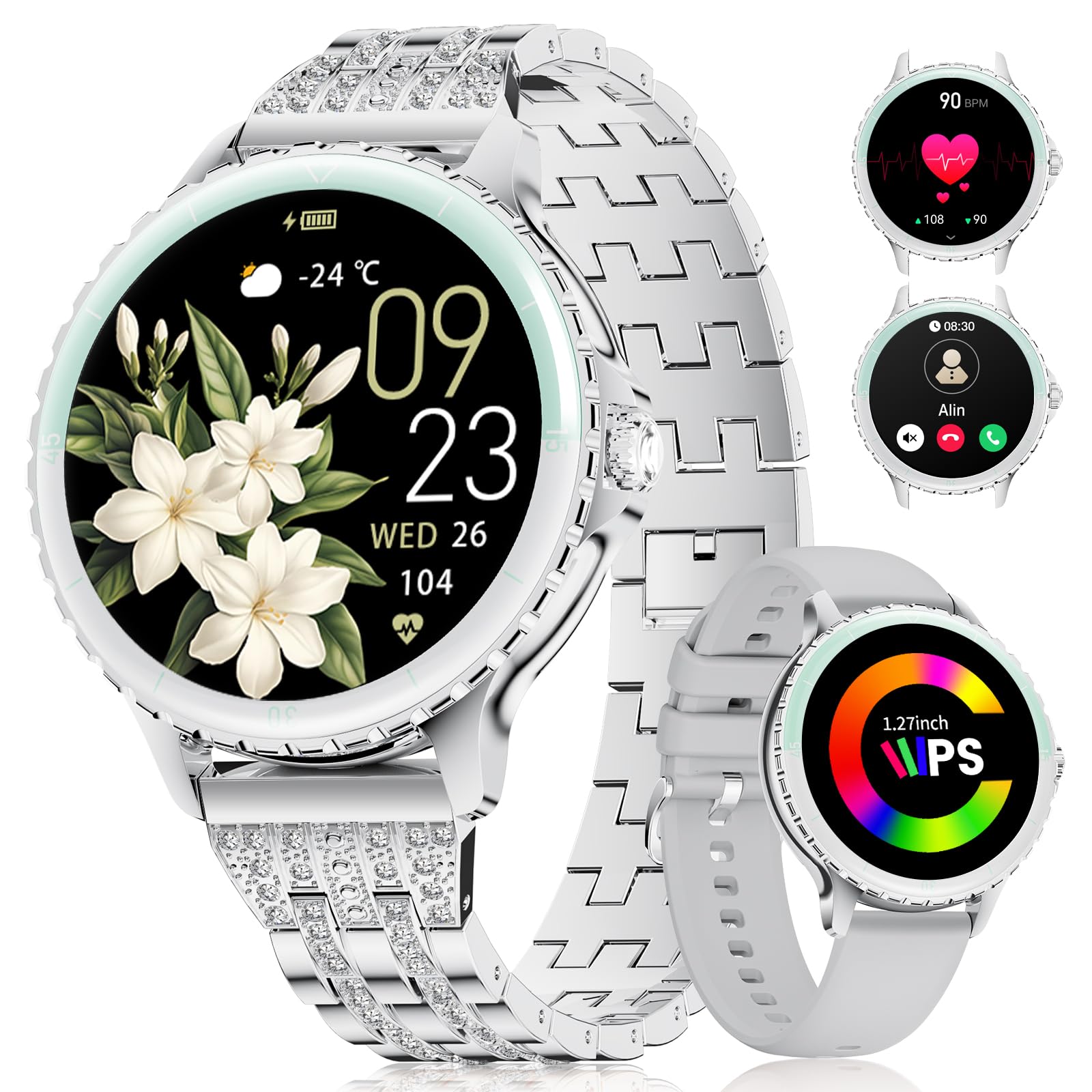
Image: LIGE FV26-F Smartwatch displaying its elegant design with both stainless steel and silicone strap options.
2. Konfigurazioa
2.1 Erloju adimenduna kargatzea
- Konektatu kargatzeko kablea erloju adimendunaren atzealdeko kargatzeko atakara.
- Konektatu kablearen USB muturra USB elikatze-egokitzaile estandar batera (ez dago barne) edo ordenagailuaren USB ataka batera.
- Ensure the charging pins are properly aligned with the smartwatch's contacts.
- A charging indicator will appear on the screen. Allow approximately 2-3 hours for a full charge.
2.2 Aplikazioaren instalazioa eta parekatzea
- Deskargatu FitcloudPro application from your smartphone's app store (Google Play Store for Android, Apple App Store for iOS).
- Ensure your smartphone meets the compatibility requirements: Android 6.0 or higher, or iOS 9.0 or higher.
- Gaitu Bluetootha zure telefonoan.
- Open the FitcloudPro app and follow the on-screen instructions to create an account or log in.
- In the app, navigate to the device pairing section and search for your LIGE FV26-F smartwatch.
- Select your smartwatch from the list of available devices to initiate the pairing process. Confirm any pairing requests on both your phone and the smartwatch.
Once paired, the smartwatch will synchronize data with the app, and you can customize settings.
3. Funtzionamendu-argibideak
3.1 Oinarrizko nabigazioa
- Ukipen-pantaila: Irristatu ezkerrera, eskuinera, gora edo behera menuetan eta funtzioetan nabigatzeko. Sakatu aukera bat hautatzeko.
- Alboko botoia: Typically used to return to the home screen or to power on/off the device (long press).
3.2 Bluetooth deiak
- After successful Bluetooth pairing, you can make and receive calls directly from your wrist.
- The smartwatch supports contact uploading from your phone and displays call history.
- Utilize the integrated AI voice assistant for hands-free control of your phone's calling functions.
3.3 Denbora errealeko jakinarazpenak
- Receive alerts for incoming calls, messages, WhatsApp, and other application activities.
- The smartwatch will gently vibrate to notify you.
- Note for WhatsApp: To ensure WhatsApp notifications are received, set your WhatsApp notification settings on your phone to "Show comments - Always show." If your software is connected to a computer, the watch may not send messages.
3.4 Osasunaren Zaintza
- Bihotz-taupadak: Continuous 24/7 heart rate measurement.
- SpO2: Blood oxygen saturation measurement (data for reference only).
- Emakumeen Osasuna: Features include menstrual cycle prediction, pregnancy preparation mode, and pregnancy mode.
- Loaren jarraipena: Tracks and analyzes sleep patterns.
- Alerta sedentarioa: Jarduerarik gabeko aldi baten ondoren mugitzeko gogorarazten dizu.
- Arnasketa ariketak: Erlaxaziorako arnasketa ariketa gidatuak.
3.5 Kirol Modu
- The smartwatch supports over 100 sport modes.
- Ten built-in sports include yoga, cycling, running, and badminton.
- Use the "Sport Push" function in the FitcloudPro app to transfer additional sport modes to your watch.
- During workouts, the watch provides comprehensive data such as steps, training time, distance, calories burned, and heart rate (data for reference only).
3.6 Camera Remote and Music Control
- Kameraren urrunekoa: Kontrolatu zure telefonoaren kamera urrunetik argazkiak ateratzeko.
- Musika kontrola: Erreproduzitu, pausatu, saltatu abestiak eta doitu bolumena zure telefono konektatutaan erreproduzitzen ari den musikarako.
3.7 Erloju aurpegi pertsonalizagarriak
- Personalize your smartwatch by setting photos from your phone (e.g., family, pets) as watch faces through the FitcloudPro app.
4. Mantentzea
- Garbiketa: Wipe the smartwatch and straps regularly with a soft, dry cloth. Avoid harsh chemicals.
- Bateria zaintzea: The 300 mAh battery provides approximately 3 to 5 days of usage depending on feature use. Charge the device before the battery is completely depleted to prolong its lifespan.
- Biltegiratzea: Gorde erloju adimenduna leku fresko eta lehor batean erabiltzen ez duzunean.
5. Arazoak
- Konektibitate arazoak: If the smartwatch disconnects from your phone, ensure Bluetooth is enabled on both devices and that the FitcloudPro app is running in the background. Try restarting both the smartwatch and your phone.
- Jaso ez diren jakinarazpenak: Verify that app notifications are enabled in your phone's settings and within the FitcloudPro app. For WhatsApp, ensure the specific setting "Show comments - Always show" is active.
- Osasun-datu okerrak: Ensure the smartwatch is worn snugly on your wrist, but not too tight. Environmental factors and movement can affect sensor readings. Health data is for reference only and not for medical diagnosis.
- Pantailak ez du erantzuten: Try restarting the smartwatch by long-pressing the side button. If the issue persists, ensure the device is charged.
6. Zehaztapenak
| Ezaugarri | Zehaztapena |
|---|---|
| Marka | LIGE |
| Modelo zenbakia | FV26-F |
| Kolorea | Zilarrezkoa |
| Sistema eragilea | iOS, Android |
| Pantailaren tamaina | 1.27 hazbete |
| Forma | Biribila |
| Konektibitate Teknologia | Bluetootha |
| Haririk gabeko komunikazio estandarra | Bluetootha |
| Ezaugarri bereziak | Phone Call, Voice Control, Email, Notification, Touchscreen |
| Gailu bateragarriak | Smartphone |
| Bateria Edukiera | 300 mAh |
| Bateriaren konposizioa | Litio-polimeroa |
| Bateria kargagarria | Bai |
| Memoria Biltegiratzeko Ahalmena | 256 MB |
| GPSa | GPS via smartphone |
7. Bermea eta Laguntza
Specific warranty information for the LIGE FV26-F Smartwatch is not provided in the product data. Please refer to the manufacturer's official website or your point of purchase for detailed warranty terms and conditions.
For technical support, software updates, or further assistance, please consult the FitcloudPro application or visit the LIGE official support channels.