
1. Sarrera
Thank you for choosing the T-Wolf T61 60% Wired Mechanical Gaming Keyboard. This manual provides detailed instructions for setting up, operating, and maintaining your keyboard to ensure optimal performance and longevity. Please read this manual carefully before using the product.
2. Produktua amaitu daview
2.1 Ezaugarri nagusiak
- Etengailu mekanikoak: Delivers precise tactile feedback and long-lasting performance.
- USB konexio kableatua: Stable USB 2.0 plug-and-play interface; no drivers required.
- % 60ko diseinu trinkoa: Functional design that saves space while maintaining key usability.
- Multi-Key Rollover: Supports simultaneous key presses without input errors, ensuring precise performance during intense typing or gaming sessions.
- RGB Backlit: Customizable vibrant RGB backlighting for enhanced aesthetics.
- Zarata gutxiko funtzionamendua: Moderate sound level suitable for various environments.
- Isurien aurkako diseinua: Helps protect against light spills (not waterproof).
2.2 Paketearen edukia
- 1 x T-Wolf T61 60% Wired Mechanical Gaming Keyboard
- 1 x Erabiltzailearen eskuliburua (dokumentu hau)
2.3 Teklatuaren diagrama
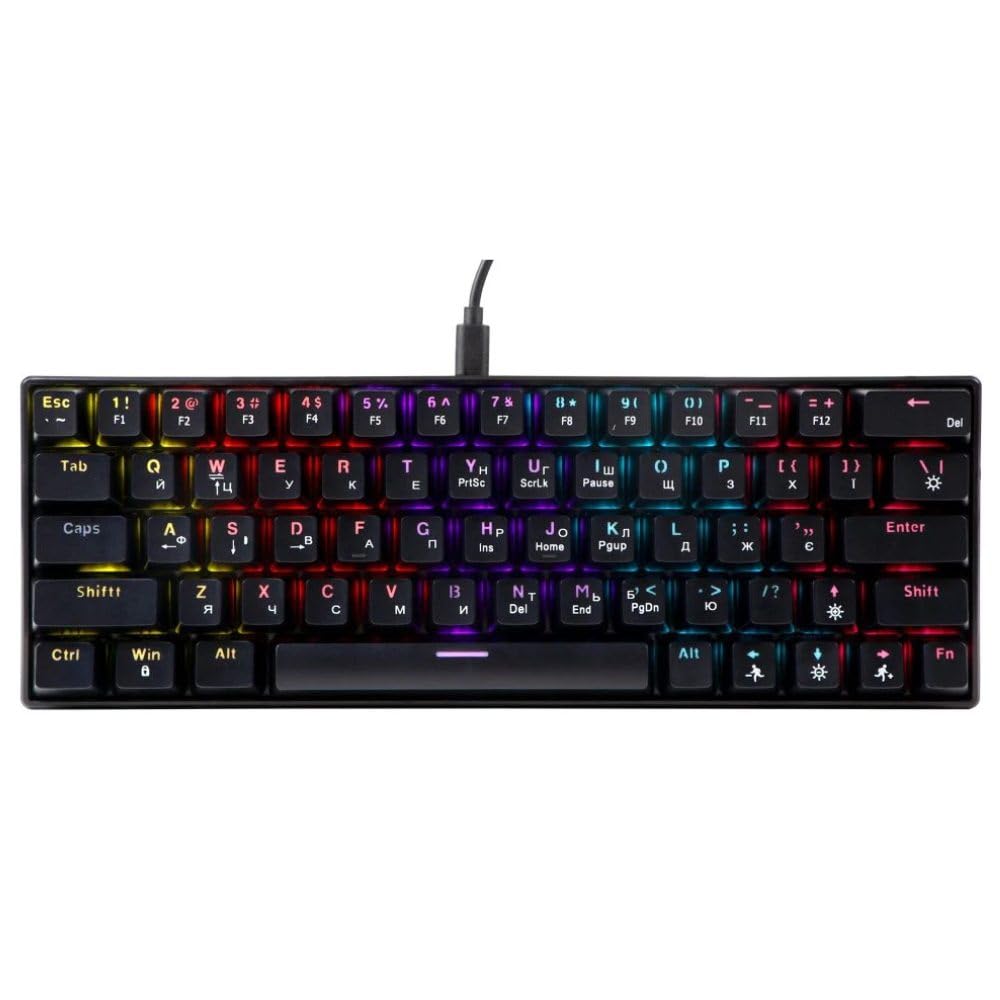
An image showing the T-Wolf T61 60% Wired Mechanical Gaming Keyboard, highlighting its compact layout and design.
3. Konfigurazioa
- Deskonprimitu teklatua: Kontu handiz atera teklatua eta osagarri guztiak paketetik.
- Konektatu zure gailura: Locate an available USB port on your computer (PC, laptop) or gaming console. Insert the USB connector of the T-Wolf T61 keyboard into the USB port.
- Gidariaren instalazio automatikoa: The keyboard is plug-and-play. Your operating system will automatically detect and install the necessary drivers. This process may take a few moments.
- Erabiltzeko prest: Behin kontrolatzaileak instalatuta, teklatua berehala erabiltzeko prest dago.
4. Funtzionamendu-argibideak
The T-Wolf T61 keyboard functions as a standard QWERTY layout keyboard. Its 60% compact design means some functions are accessed via key combinations.
4.1 RGB atzeko argiztapenaren kontrola
The keyboard features customizable RGB backlighting. Specific key combinations are used to change lighting modes and effects. Refer to the keyboard's function layer markings for exact controls, typically involving the Fn key combined with other keys (e.g., Fn + \| for mode changes, Fn + [{ or Fn + ]} for brightness/speed adjustments).
- Argiztapen moduak aldatzea: Sakatu Fn + \| to cycle through various RGB lighting effects.
- Distira doitzea: Erabili Fn + [{ to decrease brightness and Fn + ]} distira handitzeko.
- Abiadura doitzea: Erabili Fn + ;: to decrease effect speed and Fn + '" to increase effect speed.
4.2 Multi-Key Rollover
The T61 keyboard supports multi-key rollover, allowing multiple keys to be pressed simultaneously without ghosting or missed inputs. This feature is particularly beneficial for fast typing and complex gaming commands.
5. Mantentzea
Mantentze egokiak zure teklatuaren iraupena eta errendimendua bermatzen ditu.
- Garbiketa: Use a soft, dry cloth to wipe the surface of the keyboard. For deeper cleaning, use a can of compressed air to remove dust and debris from between the keycaps. For stubborn dirt, a slightly damp Garbiketa-soluzio leun batekin egindako zapi bat erabil daiteke, likidorik teklatuan sartzen ez dela ziurtatuz.
- Isurien aurkako diseinua: While the keyboard features a spill-resistant design to protect against light spills, it is ez iragazgaitza. In case of a spill, immediately disconnect the keyboard from your device, gently wipe away any liquid, and allow it to air dry completely before reconnecting.
- Biltegiratzea: Gorde teklatua leku fresko eta lehor batean, eguzki-argitik eta muturreko tenperaturetatik babestuta.
6. Arazoak
If you encounter issues with your T-Wolf T61 keyboard, please refer to the following common solutions:
- Teklatuak ez du erantzuten:
- Ziurtatu USB kablea ondo konektatuta dagoela teklatura eta gailura.
- Saiatu teklatua beste USB ataka batera konektatzen.
- Probatu teklatua beste ordenagailu batean gailu espezifiko bateko arazo bat baztertzeko.
- Berrabiarazi ordenagailua.
- RGB atzeko argiztapena ez dabil/okerra da:
- Ziurtatu teklatua behar bezala piztuta dagoela.
- Cycle through the RGB modes using the designated key combinations (e.g., Fn + \|).
- Adjust brightness settings (e.g., Fn + [{ / Fn + ]}).
- Giltzak ez dira erregistratzen edo bi aldiz idazten ari dira:
- Clean the affected keycap and switch area using compressed air to remove any debris.
- Ensure no software conflicts are present (e.g., other keyboard drivers or utilities).
Urrats hauek probatu ondoren arazoa konpontzen ez bada, jarri harremanetan bezeroarentzako arreta-zerbitzuarekin.
7. Zehaztapenak
| Ezaugarri | Deskribapena |
|---|---|
| Marka | T-OTSOA |
| Eredua | T61 |
| Konektibitate Teknologia | USB kableduna |
| Teklatuaren deskribapena | Mekanikoa |
| Gako kopurua | 65 |
| Teklatuaren diseinua | QWERTY |
| Ezaugarri bereziak | RGB Backlit, Multi-Key Rollover, Low-Noise Operation, Spill-Resistant Design |
| Gailu bateragarriak | PC, laptop, gaming consoles |
| Materiala | Metala, Plastikoa |
| Kolorea | Beltza |
| Jatorrizko Herrialdea | Txina |
8. Bermea eta Laguntza
The T-Wolf T61 keyboard comes with a standard manufacturer's warranty. Please refer to the warranty card included with your purchase or contact your retailer for specific warranty terms and conditions.
For technical support, troubleshooting assistance, or warranty claims, please contact the retailer where you purchased the product or visit the official T-Wolf weblaguntza baliabideen gunea.