
1. Sarrera
Thank you for choosing the Temtop W100 Lite Professional Weather Station. This device provides real-time monitoring of indoor and outdoor temperature and humidity, atmospheric pressure, weather forecasts, moon phases, and includes an alarm clock function. This manual will guide you through the setup, operation, and maintenance of your weather station to ensure optimal performance.
2. Paketearen edukia
Mesedez, egiaztatu paketearen edukia kutxa irekitzean:
- Eguraldi Estazioaren Unitate Nagusia
- Kanpoko sentsorea
- Elikatze-moldagailua
- Erabiltzailearen eskuliburua

Image: Contents of the Temtop W100 Lite package, showing the main weather station unit, the outdoor sensor, and the power adapter.
3. Produktua amaitu daview
Familiarize yourself with the main components and display features of your Temtop W100 Lite Weather Station.
3.1 Main Unit Display

Irudia: Aurrealdea view of the Temtop W100 Lite Weather Station, displaying various weather parameters and time information.
The main unit features a clear color display that shows the following information:
- Kanpoko tenperatura eta hezetasuna
- Barruko tenperatura eta hezetasuna
- Weather Forecast (Sunny, Partially Sunny, Cloudy, Rainy, Snowy)
- Ordua eta data
- Ilargi Fasea
- Presio atmosferikoa
- Comfort Level Indicator (Wet, Comfort, Dry)
- Sunrise and Sunset Times (for selected city)
3.2 Main Unit Buttons and Outdoor Sensor

Irudia: Xehetasun handikoa view of the weather station display with labels indicating each data field.
Irudia: Atzealdea view of the weather station, highlighting the battery compartment, power input, and control buttons.
The main unit features several control buttons on the back for settings adjustment:
- SET botoia: Enters/confirms settings.
- UP/CH Button: Adjusts values upwards, changes channels.
- DOWN/MEM Button: Adjusts values downwards, accesses min/max memory.
- ALERT Button: Sets temperature alerts.
- ALARM botoia: Sets alarm time.
- CITY Button: Selects city for sunrise/sunset times.
The outdoor sensor transmits temperature and humidity data wirelessly to the main unit.
4. Konfigurazioa
4.1 Gailua piztea
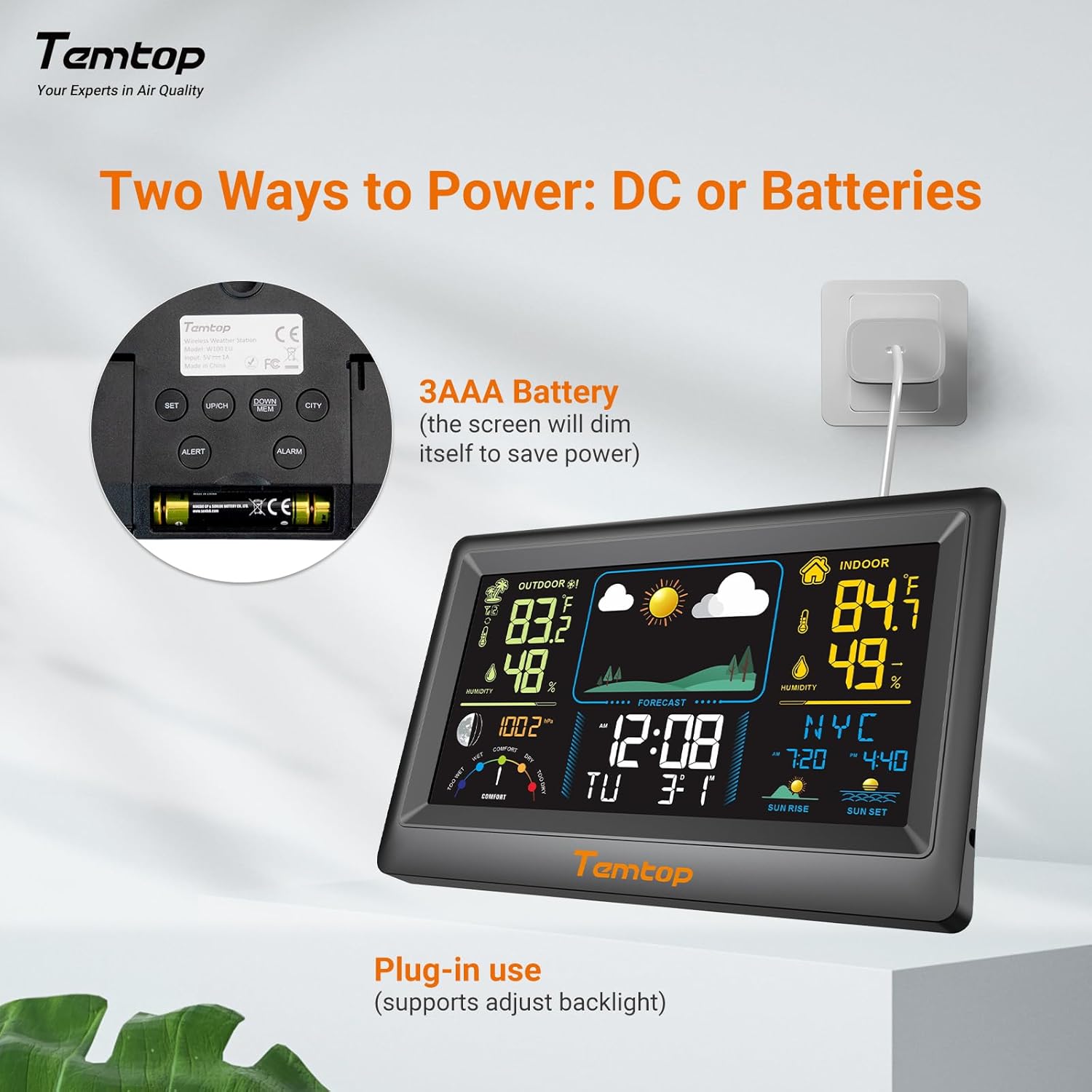
The weather station can be powered by either the included AC adapter or 3x AAA batteries (not included for the main unit, but included for the outdoor sensor). For continuous backlight and optimal performance, AC power is recommended.
- Unitate nagusia: Insert the AC adapter into the power port on the back of the unit and plug it into a wall outlet. Alternatively, insert 3x AAA batteries into the battery compartment.
- Kanpoko sentsorea: Insert 2x AAA batteries into the outdoor sensor's battery compartment.

Irudia: Adibample of digital displays, illustrating the clear readouts of temperature and humidity.

Image: Illustration of power modes, showing the weather station connected via AC adapter and the battery compartment. AC mode allows adjustable backlight, while battery mode conserves power by dimming the display.
4.2 Kanpoko sentsoreen kokapena
Place the outdoor sensor in a shaded area, protected from direct sunlight and rain, to ensure accurate temperature and humidity readings. The sensor has a wireless range of up to 100 meters (328 feet) in an open, unobstructed area.

Image: Diagram showing the wireless range of the outdoor sensor from the main unit, suitable for gardens, terraces, or rooftops.
4.3 Initial Settings (Time, Date, City)
Follow these steps to set the correct time, date, and city for accurate sunrise/sunset times:
- Eduki sakatuta EZARTU button to enter setting mode. The hour field will begin to flash.
- Erabili UP/CH eta BEHERA/MEM ordua doitzeko botoiak.
- Sakatu EZARTU to confirm the hour and move to the next item (minute, year, month, day). Repeat the adjustment and confirmation process for each.
- After setting the date, briefly press the HIRIA button. The city code will flash.
- Erabili UP/CH button to scroll through the list of cities until you find your location.
- Azkenik, sakatu EZARTU to confirm your city selection. The sunrise, sunset times, and date will now be accurately displayed.
Video: This video demonstrates how to set the time, date, and city on your Temtop W100 Lite Weather Station to ensure accurate display of local sunrise and sunset times.
5. Funtzionamendua
5.1 Pantailaren interpretazioa
The main display is divided into several sections for easy reading:
- Outdoor Section: Shows current outdoor temperature and humidity, and temperature trend.
- Indoor Section: Displays current indoor temperature and humidity, and temperature trend.
- Eguraldi Iragarpena: Icons indicate the predicted weather for the next 12 hours (Sunny, Partially Sunny, Cloudy, Rainy, Snowy).
- Ordua eta data: Uneko ordua, asteko eguna eta data.
- Ilargiaren fasea: Displays the current moon phase.
- Presio atmosferikoa: Shows current barometric pressure and its trend.
- Erosotasun maila: A gauge indicating indoor comfort levels (Wet, Comfort, Dry).
- Egunsentia / Ilunabarra: Displays the local sunrise and sunset times for the selected city.

Image: Visual representation of the five weather forecast modes and moon phases displayed on the weather station.
5.2 Tenperatura-unitatearen hautaketa
Celsius (°C) eta Fahrenheit (°F) artean aldatzeko, sakatu labur botoia UP/CH button during normal display mode.
5.3 Min/Max Temperature and Humidity Records
The weather station automatically records the minimum and maximum temperature and humidity values over a 24-hour period. Briefly press the BEHERA/MEM botoia view these records. Press again to cycle through min/max indoor and outdoor values.
5.4 Alarmak ezartzea
The device supports both time alarms and temperature alerts.
- Ordua alarma: Sakatu ALARMA button to enter alarm setting mode. Use UP/CH eta BEHERA/MEM to adjust the alarm time, and ALARMA to confirm. The snooze function can be activated by pressing any button (except ALARM) when the alarm sounds.
- Tenperaturaren alertak: Sakatu ALERTA button to set high/low temperature alerts for indoor or outdoor readings. Use UP/CH eta BEHERA/MEM to set the desired temperature thresholds.
6. Mantentzea
- Garbitu pantaila eta casing bigun batekin, damp oihal. Ez erabili garbitzaile edo disolbatzaile urratzailerik.
- Replace batteries in the outdoor sensor when the low battery indicator appears on the main unit.
- Saihestu unitate nagusia eguzki-argiaren, tenperatura altuen edo hezetasunaren eraginpean jartzea.
7. Arazoak
| Arazoa | Kausa posiblea | Irtenbidea |
|---|---|---|
| Ez dago pantailarik unitate nagusian. | Argirik ez edo bateria gutxi. | Ensure AC adapter is properly connected or replace batteries. |
| Outdoor readings are inaccurate or not displayed. | Sensor out of range, interference, or low sensor batteries. | Move sensor closer to main unit, reduce obstructions, or replace sensor batteries. |
| Eguraldi iragarpena okerra dirudi. | The forecast is based on atmospheric pressure changes and is an estimation. | Allow time for the station to calibrate (up to 24 hours). It provides a general trend, not a precise forecast. |
8. Zehaztapenak
| Ezaugarri | Xehetasuna |
|---|---|
| Marka | Temptop |
| Eredua | EU-W100-Lite |
| Energia iturria | Battery (Main Unit: 3x AAA, Sensor: 2x AAA) / AC Adapter |
| Ezaugarri bereziak | Customizable Alarms, Wireless Connectivity |
| Konektibitate Teknologia | Haririk gabekoa |
| Kolorea | Beltza |
| Sensor Teknologia | Haririk gabekoa |
| Funtzionamendu-tenperatura (goikoa) | 40 gradu Celsius |
| Bistaratzeko mota | Koloretako pantaila |
| Elementuaren pisua | 100 gramo |
9. Bermea eta Laguntza
Temtop products are designed for reliability and performance. For warranty information, technical support, or service inquiries, please refer to the warranty card included in your package or visit the official Temtop webgunea. Gorde erosketa-agiria erosketaren frogagiri gisa.