
1. Sarrera
The Bikevee GPS Cycling Computer BKV300B is designed to provide cyclists with essential ride data. It features a clear 2.4-inch LCD display with automatic backlight, GPS tracking, and an auto start/stop function for convenience. Its waterproof design ensures reliable performance in various weather conditions.

Image 1.1: The Bikevee GPS Cycling Computer BKV300B.
Ezaugarri nagusiak
- Bateriaren iraupen luzea: Up to 28 hours of continuous use with a 650mAh rechargeable battery.
- Clear 2.4" LCD Display: Easy-to-read screen with automatic backlight for day and night visibility.
- Abiarazi/gelditu automatikoa: Automatically records ride data when cycling begins and pauses when stopped.
- Accurate Odometer: Tracks current speed, average speed, maximum speed, total distance, and trip time.
- IPX7 iragazgaitza: Hainbat eguraldi-baldintza jasateko diseinatua.
- Diseinu arina: Weighs approximately 50g (0.11lb) for minimal impact on your bike.

Image 1.2: The Bikevee GPS Cycling Computer BKV300B is lightweight and portable.
2. Zer dago barne
Instalazioarekin jarraitu aurretik, egiaztatu osagai guztiak paketean daudela.
- Bike Computer (Main Unit)
- USB-C kargatzeko kablea
- Standard Bike Out Front Mount
- Torloju hexagonoduna
- Hexagonoko giltza
- Sponge (for mounting)
- Erabiltzailearen eskuliburua

Image 2.1: Package contents including the bike computer, charging cable, mount, and tools.
3. Konfigurazioa
3.1. Gailua muntatzea
The Bikevee GPS Cycling Computer BKV300B is designed for easy, wireless installation on your bicycle handlebars.
- Place the Mount: Position the standard bike out front mount horizontally on your handlebar. Use the provided sponge for a secure fit.
- Ziurtatu muntaketa: Use the hexagon socket screw and wrench to firmly attach the mount to your handlebar.
- Attach the Computer: Place the bike computer onto the mount.
- Lock the Computer: Turn the bike computer clockwise by 90 degrees until it clicks securely into place.

Image 3.1: Step-by-step guide for mounting the cycling computer.
3.2. Initial GPS Connection
For the first use, ensure you are in an open area. The device will take approximately 30 to 90 seconds to receive the satellite signal and calibrate the time. Subsequent connections will be significantly faster.

Image 3.2: The device utilizes five satellite positioning systems for accurate tracking.
3.3. Setting Time Zone and Units
To adjust settings, long press the right button (gear icon) to enter the settings page. Navigate through the settings using the right button and adjust values with the left button (power/play icon).
- Ordu-eremua: Find the time zone setting. Press the left button to change to your country's time zone.
- Unitateak: Find the unit settings. Press the left button to switch between kilometers (KM/H) and miles (MPH). When switching to miles, the temperature display will automatically change to Fahrenheit.

Image 3.3: Setting the time zone on the device.

Image 3.4: Adjusting speed units (KM/H or MPH).
4. Funtzionamendu-argibideak
4.1. Botoiaren funtzioak
The device has three main buttons for control:
- Left Button (Power/Play/Pause):
- Eduki sakatuta bi segundoz pizteko edo itzaltzeko.
- Click to display cycling data (play icon) or not display cycling data (pause icon).
- Middle Button (Settings):
- Long press to enter the settings page.
- Right Button (Next Page):
- Click to move to the next data page.

4.1. irudia: Amaituview of button functions and display indicators.
4.2. Datuen bistaratzea
The device supports the display of 14 types of cycling data, organized across multiple screens. Use the right button to cycle through these screens.
| Datu mota | Deskribapena |
|---|---|
| Ibilaldiaren Denbora | Uneko ibilaldiaren iraupena. |
| Ride Distance | Distance covered in the current ride. |
| Batez besteko Abiadura | Average speed during the current ride. |
| Gehienezko Abiadura | Highest speed recorded during the current ride. |
| Distantzia osoa | Cumulative distance recorded by the device. |
| Erlojua | Egungo ordua. |
| Tenperatura | Uneko giro-tenperatura. |
| Igoera | Total elevation gain during the ride. |
| Gradientea | Current incline/decline percentage. |
| Altuera | Uneko kota. |
| Average Gradient | Average incline/decline percentage. |
| Denbora osoa | Total accumulated time the device has been active. |
| Gehienezko gradientea | Steepest incline/decline recorded. |
| Gehieneko altuera | Highest altitude reached. |
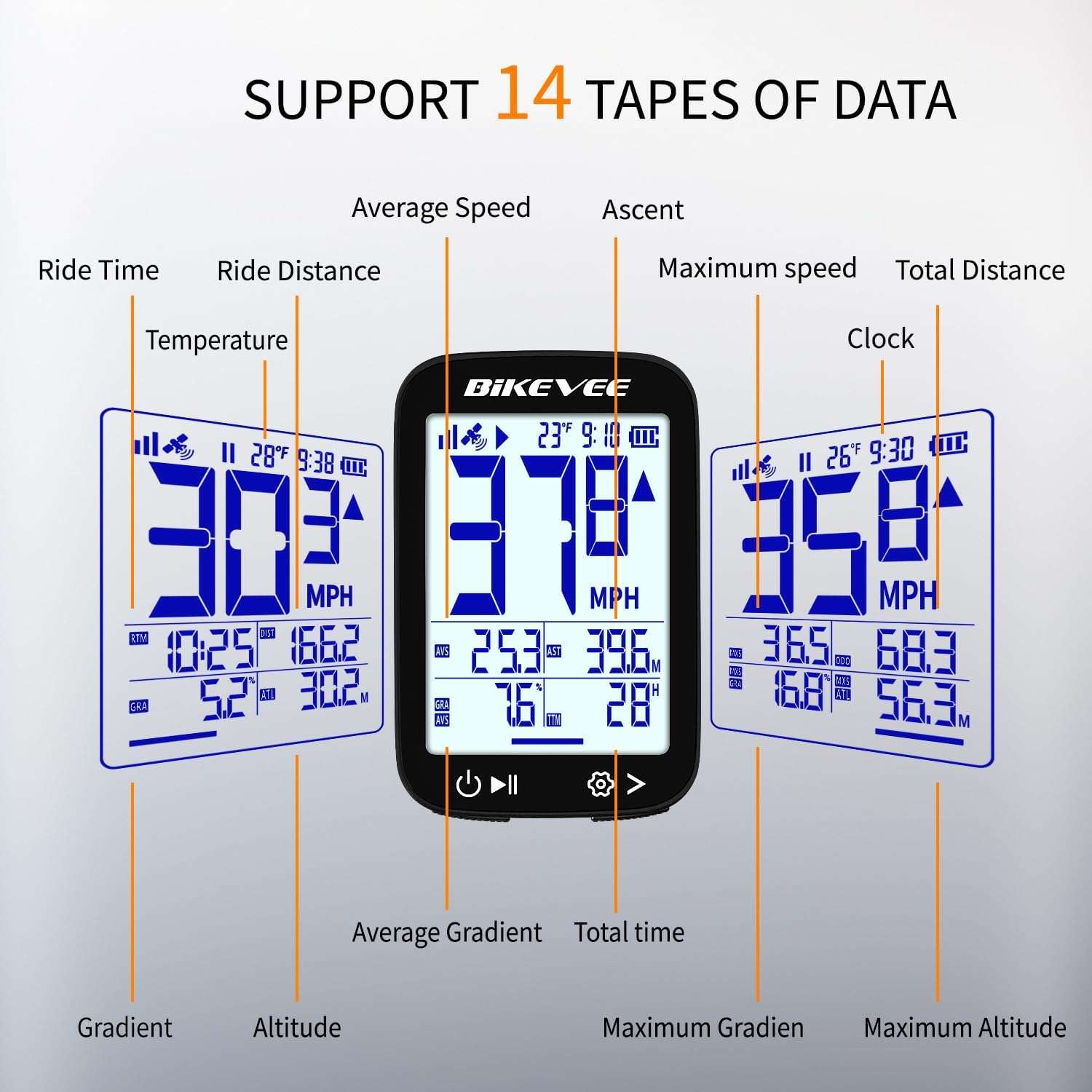
4.2 irudia: Adibideaamples of data displayed on the cycling computer screen.
4.3. Auto Start/Stop and Backlight
- The device automatically begins recording when movement is detected and pauses when you stop, resuming when you start cycling again.
- The automatic backlight adjusts to ambient light conditions, ensuring visibility day or night.
5. Mantentzea
5.1. Iragazgaiztasuna
The Bikevee GPS Cycling Computer BKV300B features an IPX7 waterproof rating. This means it is protected against temporary immersion in water (up to 1 meter for 30 minutes). It is suitable for use in rain and wet conditions.
Garrantzitsua: Do not immerse the device in water for extended periods or use it for underwater activities. Ensure the USB-C charging port cover is securely closed to maintain water resistance.

Image 5.1: The device is IPX7 waterproof, suitable for rainy conditions.
5.2. Garbiketa eta Zainketa
- Garbitu gailua leun batekin, damp cloth to remove dirt or sweat.
- Avoid using abrasive cleaners or solvents, as these can damage the screen or casing.
- Gorde gailua leku fresko eta lehor batean erabiltzen ez duzunean.
6. Arazoak
If you encounter issues with your Bikevee GPS Cycling Computer BKV300B, refer to the following common problems and solutions:
- Gailua ez da pizten:
- Ziurtatu bateria kargatuta dagoela. Konektatu gailua energia-iturri batera USB-C kablea erabiliz.
- Eduki sakatuta pizteko botoia gutxienez 2 segundoz.
- GPS signal loss or inaccurate readings:
- Ziurtatu leku ireki eta garbi batean zaudela view of the sky. Dense tree cover or tall buildings can obstruct the signal.
- For first-time use or after a long period of inactivity, allow more time (30-90 seconds) for initial satellite acquisition.
- If issues persist, try restarting the device.
- Display is difficult to read:
- Check if the automatic backlight is functioning correctly. Ensure the screen is clean and free from smudges.
- Some data fields may appear smaller. Focus on the primary speed display for quick readings.
- Mount does not fit securely:
- Ensure the correct sponge or rubber pad is used with the mount to match your handlebar diameter.
- Tighten the hexagon socket screw firmly, but do not overtighten.
- Auto Start/Stop not working:
- Ensure the device is securely mounted and has a clear GPS signal.
- Movement detection requires a certain level of activity to trigger.
7. Zehaztapenak
| Ezaugarri | Xehetasuna |
|---|---|
| Modelo zenbakia | BKV300B |
| Marka | Bikevee |
| Bistaratzeko mota | LCDa |
| Pantailaren tamaina | 2.4 hazbete |
| Neurriak (L x W x H) | 70 x 45 x 16 mm (2.76 x 1.77 x 0.63 hazbete) |
| Elementuaren pisua | 50 gramo |
| Bateria mota | Litio ioia |
| Bateria Edukiera | 650mAh |
| Bateriaren iraupena | Gehienez 28 ordu |
| Sentsore mota | GPS Sensor (supports GPS, BDS, QZSS, Glonass, Galileo) |
| Iragazgaitzaren balorazioa | IPX7 |
| Giza Interfazearen Sarrera | Botoiak |
| Muntatze Mota | Eskulekuaren muntaia |
| Kargatzeko ataka | USB-C |
8. Bermea eta laguntza
8.1. Bermearen informazioa
The Bikevee GPS Cycling Computer BKV300B comes with a two-year warranty from the date of purchase. This warranty covers manufacturing defects and malfunctions under normal use. It does not cover damage caused by misuse, accidents, unauthorized modifications, or improper installation.
Mesedez, gorde zure erosketa-froga berme-erreklamazioetarako.
8.2. Bezeroarentzako arreta
For technical assistance, troubleshooting, or warranty inquiries, please contact Bikevee customer support through the retailer where the product was purchased or visit the official Bikevee webharremanetarako informazioa lortzeko gunea.


