
Sarrera
This manual provides comprehensive instructions for the Tenda 5MP QHD Outdoor Pan/Tilt Wi-Fi Security Camera, Model CH7 NEW. This advanced security camera offers 5MP Ultra HD resolution, 360° full coverage, color night vision, AI-powered human and vehicle detection, two-way audio, and Wi-Fi 6 connectivity. Designed for outdoor use, it features an IP65 weather-resistant rating, ensuring reliable performance in various conditions. Please read this manual carefully to ensure proper installation, operation, and maintenance of your device.
Kutxan dagoena
- Tenda 5MP QHD Outdoor Pan/Tilt Wi-Fi Security Camera (CH7 NEW)
- Power Adapter (3m cable)
- Euskarria muntatzea
- Instalazio Gida
- Screws and Wall Plugs for Mounting
Produktua amaituview
The Tenda CH7 NEW camera is designed for robust outdoor surveillance. It features a durable, weather-resistant housing and a motorized pan/tilt mechanism for wide-area coverage. Key components include the camera lens, infrared LEDs for night vision, spotlights for color night vision, a microphone, a speaker for two-way audio, and a microSD card slot for local storage.
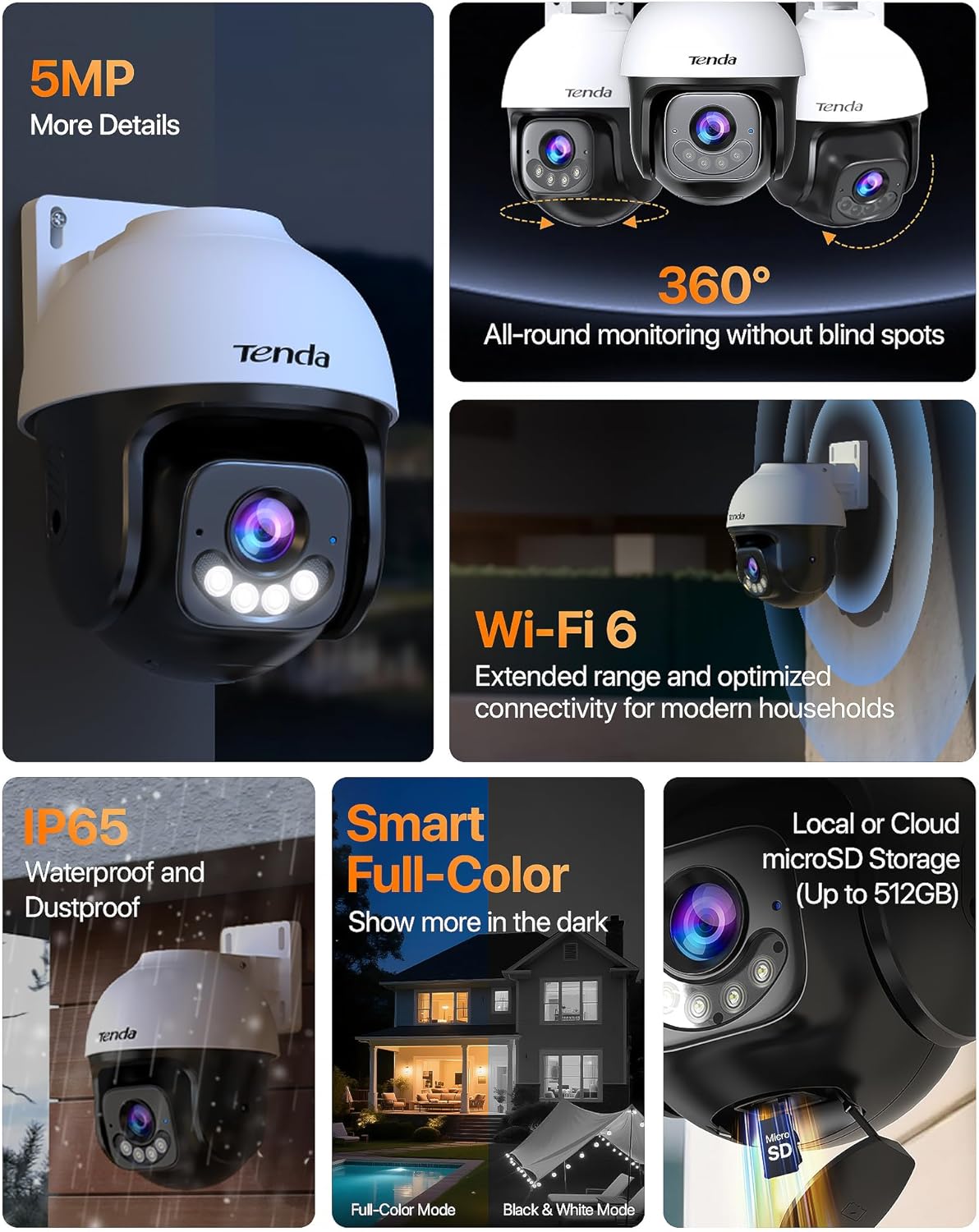
1. irudia: Tenda CH7 NEW camera highlighting its main features including 5MP resolution, 360° coverage, Wi-Fi 6, IP65 rating, smart full-color night vision, and local/cloud storage options.
Konfigurazioa
1. Download and Install the TDSEE App
Locate the QR code on the product packaging or in the Quick Installation Guide. Scan this QR code with your smartphone to download the official TDSEE application from your device's app store (App Store for iOS or Google Play for Android).
2. Create an Account and Log In
Open the TDSEE app. Follow the on-screen prompts to create a new user account using your email or phone number. Once registered, log in to your account.
3. Gehitu zure gailua
- Piztu: Connect the camera to a power source using the provided power adapter. Wait for approximately 40 seconds until the LED indicator on the camera blinks blue quickly, indicating it is ready for connection. You will also hear a "Waiting for connection" voice prompt.
- Eskaneatu QR kodea: In the TDSEE app, tap the "+" icon or "Add Device" to start the pairing process. Select the option to scan the device QR code. Scan the QR code located on the camera itself (usually on the bottom or side).
- Wi-Fi konfigurazioa: Ensure your smartphone is connected to a 2.4 GHz Wi-Fi network. The camera only supports 2.4 GHz Wi-Fi. Enter your Wi-Fi password in the app.
- Konektatu: Follow the remaining prompts in the app to complete the connection. The camera will connect to your Wi-Fi network and appear in your device list.

2. irudia: Visual guide for the 4-step setup process: Download TDSEE App, Power on Camera, Run App for Connection, Scan QR Code to Add Device.
4. Instalazio fisikoa
The camera can be mounted on walls, ceilings, or poles using the provided mounting bracket. Choose a location that offers optimal viewing angles and is within range of your Wi-Fi network and a power outlet.
- Zulatzeko posizioak markatu: Use the mounting template (if provided) or the bracket itself to mark the screw positions on the desired surface.
- Zulatzeko zuloak: Drill pilot holes at the marked positions. Insert wall plugs if mounting on masonry.
- Lotu euskarria: Lotu muntatzeko euskarria gainazalera emandako torlojuak erabiliz.
- Erantsi kamera: Align the camera with the mounting bracket and secure it in place. Ensure the camera is firmly attached.
Funtzionamendua
Zuzenean View eta Pan/Tilt kontrola
Access the live feed from your camera through the TDSEE app. Use the on-screen controls to pan (rotate horizontally 360°) and tilt (move vertically 90°) the camera lens to adjust your viewing area. You can also set preset locations for quick navigation.

3. irudia: The camera's 360° patrol feature, demonstrating its ability to scan and track movement, then return to a pre-set guard position.
AI detekzio adimenduna
The camera utilizes advanced AI algorithms to intelligently identify people and vehicles, reducing false alarms caused by environmental factors like rain or moving leaves. You will receive accurate notifications for relevant events.

4. irudia: Smart AI Detection in action, showing the camera accurately identifying human and vehicle movement while filtering out irrelevant motion.
Kolore Gaueko Ikusmena
Equipped with smart color night vision, the camera activates vivid spotlights upon detecting motion in low-light conditions, capturing critical details in full color up to 30 meters. This provides clearer identification compared to traditional black and white infrared night vision.

5. irudia: Active Defense and 30m Full-Color Night Vision, illustrating how motion-activated spotlights, siren, and custom voice warnings deter unwanted visitors.
Bi norabidetako solasaldia
The integrated microphone and speaker allow for two-way communication. You can listen to what's happening around the camera and speak through the camera to visitors or deter intruders directly from your smartphone.
Defentsa aktiboa
When a threat is detected, the camera can trigger a loud siren and flashing lights to deter unwanted visitors. You can also record custom voice messages (e.g., "Private Property!") to play automatically, acting as a 24/7 digital security guard.
Biltegiratze-aukerak
The camera supports local storage via a microSD card (up to 512GB, not included) for continuous recording. Cloud storage options may also be available through the TDSEE app for remote backup and access.

6. irudia: Reliable and Flexible Security Solution, showing local storage capability, IP65 weather resistance, and smart home integration.
Bateragarritasuna
The Tenda CH7 NEW camera is fully compatible with NVR systems and works seamlessly with Alexa for hands-free voice control, allowing for integration into your existing smart home ecosystem.
Mantentzea
- Garbiketa: Garbitu kameraren lentea eta karkasa aldizka zapi leun eta lehor batekinamp oihal bat erabili irudiaren kalitate garbia bermatzeko. Saihestu garbitzaile urratzaileak.
- Firmware eguneraketak: Check the TDSEE app periodically for firmware updates. Keeping your camera's firmware up-to-date ensures optimal performance, security, and access to new features.
- Elikatze-iturria: Ensure the power adapter and cable are free from damage and properly connected to maintain continuous operation.
- Eguraldiaren babesa: While rated IP65, ensure the camera is installed in a location that minimizes direct exposure to extreme weather conditions for extended longevity.
Arazoak konpontzea
| Arazoa | Kausa posiblea | Irtenbidea |
|---|---|---|
| Kamera ez da wifira konektatzen | Incorrect Wi-Fi password; camera too far from router; 5GHz Wi-Fi network selected. | Verify password; move camera closer to router; ensure connection to 2.4GHz Wi-Fi. |
| No image in live view | Power issue; network disconnection; camera malfunction. | Check power supply; verify Wi-Fi connection; restart camera; contact support if issue persists. |
| Alarma faltsuak maiz | Motion detection sensitivity too high; environmental factors (e.g., trees, animals). | Adjust motion detection sensitivity in the app; define specific detection zones to exclude irrelevant areas. |
| Gaueko ikusmenaren kalitate eskasa | Dirty lens; insufficient ambient light for color night vision; IR/spotlights obstructed. | Clean the camera lens; ensure no obstructions block the IR sensors or spotlights. |
Zehaztapenak
| Ezaugarri | Xehetasuna |
|---|---|
| Modelo zenbakia | CH7 NEW |
| Ebazpen finko eraginkorra | 5 MP |
| Konektibitate Teknologia | Wired, Wireless (Wi-Fi 6) |
| Barruko/Kanpoko erabilera | Kanpoan |
| Ezaugarri bereziak | Color Night Vision, Customize monitoring area and time, Motion Sensor, WIFI 6, AI Human/Vehicle Detection, 2-Way Talk, 360° Pan/Tilt, Active Defense |
| Uraren Erresistentzia Maila | IP65 (iragazgaitza) |
| Viewangelua | 360 gradu |
| Zoom optikoa | 4 x |
| Onartutako Flash memoria Gehienezko tamaina | 512 GB (microSD card) |
| Kontrol-metodoa | Aplikazioa |
| Gailu bateragarriak | Alexa, Laptop, Smartphone |
| Energia iturria | Kable elektrikoa |
| Elementuaren neurriak | 4.72 x 4.72 x 5.75 hazbete |
| Elementuaren pisua | 600 gramo |
Bermea eta Laguntza
For warranty information, please refer to the specific warranty card included with your product or visit the official Tenda website. For technical support, troubleshooting assistance, or further inquiries, please contact Tenda customer service through the TDSEE app or their official support channels. Keep your purchase receipt for warranty claims.