
1. Sarrera
This manual provides essential information for the NIMO 15.6" Gaming Laptop (Model N159). It covers product features, setup procedures, operating instructions, maintenance guidelines, troubleshooting tips, and detailed specifications. Please read this manual thoroughly before using your new laptop to ensure optimal performance and longevity.

Image: The NIMO 15.6" Gaming Laptop, showcasing its display and key features like fingerprint unlock, Type-C PD charger, and backlit keyboard.
2. Zer dago kutxan
Egiaztatu elementu guztiak ontzian daudela:
- 1 x NIMO N159 Laptop
- 1 x Type-C 100W PD Fast Charger
- 1 x Erabiltzailearen eskuliburua (dokumentu hau)
- Windows 11 Home Operating System (pre-installed)
- Warranty Information (2 Years Warranty, 90 Days Return)
3. Produktua amaitu daview
3.1 Ezaugarri nagusiak
- Prozesadorea: AMD Ryzen 7 7735HS (8 nukleo, 16 hari, 4.75 GHz-ra arte)
- Grafikoak: Integrated AMD Radeon 680M GPU
- Pantaila: 15.6" Full HD (1920x1080) IPS Anti-Glare Display
- Memoria: 16GB DDR5 RAM (upgradeable)
- Biltegiratzea: 1TB PCIe 4.0 SSD (upgradeable)
- Kargatzen: 100W Type-C PD Fast Charger
- Segurtasuna: Fingerprint Reader for secure unlock
- Teklatua: Backlit Keyboard with Numeric Keypad
- Audioa: Dual 2W stereo speakers, dual beamforming microphones
- Webkamera: 2MP with physical camera shutter
- Sistema eragilea: Windows 11 Home

Image: An illustration detailing the AMD Ryzen 7 7735HS processor, highlighting its 8 cores, 16 threads, and integrated Radeon 680M graphics for balanced performance.
3.2 Portuak eta konektoreak
Familiarize yourself with the available ports on your NIMO laptop:

Image: A detailed diagram illustrating the location and type of ports on the NIMO laptop, including USB 2.0, USB 3.2 Gen1, Type-C Gen2 (multifunction), HDMI 2.0, Audio Jack, Micro SD Reader, and Kensington Lock.
- USB 2.0 ataka: USB gailu zaharragoak konektatzeko.
- USB 3.2 Gen1 Ports (x4): USB gailu bateragarriekin datuak abiadura handian transferitzeko.
- Type-C Gen2 Ports (x2, Multifunction): Supports data transfer, video output, and power delivery (100W PD fast charging).
- HDMI 2.0 ataka: Kanpoko pantailetara edo telebistetara konektatzeko.
- Audio Jack: Entzungailuak edo kanpoko bozgorailuak konektatzeko.
- Mikro SD irakurgailua: Mikro SD memoria txartelak irakurtzeko.
- Kensington blokeoaren zirrikitua: Zure ordenagailu eramangarria giltzarrapo bateragarri batekin babesteko.
4. Konfigurazioa
4.1 Hasierako piztea
- Atera ordenagailu eramangarria eta osagarri guztiak kaxatik.
- Connect the 100W Type-C PD Fast Charger to one of the Type-C ports on the laptop and then to a power outlet.
- Ireki ordenagailu eramangarriaren tapa. Baliteke ordenagailu eramangarria automatikoki piztea, edo pizteko botoia sakatu behar izatea.
- Jarraitu pantailan agertzen diren argibideei Windows 11 Home konfigurazioa osatzeko, hizkuntza hautatzea, sareko konexioa eta erabiltzaile kontua sortzea barne.
4.2 Bateria kargatzea
Before first use, it is recommended to fully charge the laptop battery. The 100W Type-C PD Fast Charger can provide approximately 5 hours of usage time with just 1 hour of charging.

Image: A visual representation of the 100W Type-C lightning-fast charger connected to the NIMO laptop, demonstrating its ability to charge quickly and efficiently.
5. Funtzionamendu-argibideak
5.1 Piztea/Itzaltzea eta lo modua
- Piztu: Sakatu teklatuan dagoen pizteko botoia.
- Itzali: Egin klik Windows-eko Hasi botoian, eta ondoren hautatu Energia > Itzali.
- Lo egiteko modua: Egin klik Hasi botoian, eta ondoren hautatu Energia > Lo edo itxi ordenagailu eramangarriaren tapa.
5.2 Using the Fingerprint Unlock
The fingerprint reader is integrated into the touchpad for quick and secure access.
- During Windows setup or later in Windows Settings, configure your fingerprint for login.
- To unlock, simply place your registered finger on the fingerprint reader on the touchpad.
5.3 Adjusting the Backlit Keyboard
The keyboard backlight can be adjusted for comfortable typing in various lighting conditions.

Image: A visual guide demonstrating the fingerprint unlock feature on the touchpad and the functionality of the backlit keyboard, including how to cycle through brightness settings using the F9 key.
- Sakatu F9 key to cycle through backlight settings:
- 1 Tap: Light (Temporary)
- 2 Taps: Light (Temporary)
- 3 Taps: Light (Constant)
- 4 Taps: Off
5.4 Erabili Webcam Shutter
For privacy, the laptop includes a physical camera shutter.
- Slide the shutter to the left to open the camera.
- Slide the shutter to the right to close and cover the camera lens.

Image: A visual guide demonstrating the physical camera shutter, showing both the 'Camera Open' and 'Camera Close' statuses for enhanced privacy.
6. Mantentzea
6.1 Ordenagailu eramangarria garbitzea
- Always power off the laptop and disconnect the charger before cleaning.
- Erabili lipurrik gabeko zapi leun bat dampUrarekin edo pantaila-garbitzaile batekin garbitu pantailarako.
- Teklatuarentzat eta xasisarentzat, erabili oihal leun eta lehor bat. Saihestu produktu kimiko gogorrak edo material urratzaileak.
- Erabili aire konprimatua aldian-aldian aireztapen-hodietatik hautsa kentzeko.
6.2 Bateria zaintzea
- Saihestu bateria maiz erabat deskargatzea.
- Denbora luzez erabiltzen ez baduzu, gorde ordenagailu eramangarria leku fresko eta lehor batean.
- Ez jarri ordenagailu eramangarria tenperatura altuetan.
6.3 Software eguneraketak
Egiaztatu eta instalatu aldizka sistema eragilearen eta kontrolatzaileen eguneraketak errendimendu eta segurtasun optimoak bermatzeko.
7. Arazoak
| Arazoa | Kausa posiblea | Irtenbidea |
|---|---|---|
| Ordenagailu eramangarria ez da pizten. | Bateria baxua edo korronte-egokigailuaren arazoa. | Connect the charger and wait a few minutes before attempting to power on. Ensure the charger is properly connected to both the laptop and the power outlet. |
| Pantaila hutsik edo beltzez dago. | Ordenagailu eramangarria lo moduan, pantailaren ezarpenen arazoa edo hardwarearen arazoa. | Press any key or the power button to wake from sleep. Try connecting an external monitor to check if the display output works. Restart the laptop. |
| Teklatuaren atzeko argia ez dabil. | Backlight turned off or at lowest setting. | Sakatu F9 key repeatedly to cycle through brightness levels and turn on the backlight. |
| Fingerprint unlock not working. | Finger not properly placed, or sensor issue. | Ensure your finger is clean and dry and covers the sensor completely. Re-register your fingerprint in Windows Settings if the issue persists. |
| Errendimendu motela. | Too many applications running, insufficient storage, or outdated drivers. | Close unnecessary applications. Check available storage space. Update Windows and device drivers. |
If you encounter issues not listed here or require further assistance, please contact NIMO customer support.
8. Zehaztapenak
| Marka | NIMO |
| Ereduaren izena | NIMO N159B |
| Pantailaren tamaina | 15.6 hazbete |
| Pantailaren bereizmena | 1920 x 1080 pixel (FHD IPS) |
| Prozesadorea | AMD Ryzen 7 7735HS (8 Cores, 4.75 GHz Max Turbo) |
| RAM | 16 GB DDR5 (4800 MHz) |
| Disko gogorra | 1024 GB SSD (PCIe 4.0) |
| Koprozesadore grafikoa | AMD Radeon 680M (Integratua) |
| Sistema eragilea | Windows 11 Home |
| Haririk gabeko mota | 802.11a/b/g/n/ac |
| USB 2.0 Portuak | 1 |
| USB 3.0 Portuak | 4 |
| Bateriaren batez besteko iraupena | 5 Hours (54Wh, 11.4V/4700mAh) |
| Elementuaren pisua | 3.8 kilo |
| Produktuaren neurriak | 14.07 x 8.98 x 0.76 hazbete |
| Kolorea | Urdina |
| Atzekoa Webkamaren ebazpena | 2 MP |
| Ezaugarri bereziak | Backlit Keyboard, Fingerprint Reader, HD Audio, Numeric Keypad |
9. Bermea eta Laguntza
9.1 Fabrikatzailearen bermea
Your NIMO N159 laptop is covered by a comprehensive 2 urteko fabrikatzailearen bermea from Nimo Direct Inc. This warranty covers defects in materials and workmanship under normal use. For warranty claims, please contact customer support.
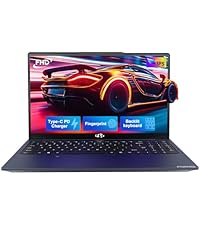
Image: A technician working on a laptop's internal components, representing the 2-year support provided for Nimo products.
9.2 Itzultzeko politika
Nimo Direct Inc. offers a 90-Day Hassle-Free Return Policy. You may return any Nimo product for any reason within 90 days of purchase. Please refer to your purchase documentation for specific return procedures.
Image: A delivery person handing a package to a customer, illustrating the 90-day return policy for Nimo products.
9.3 Bezeroarentzako laguntza
For any product-related questions, technical assistance, or warranty claims, please contact our professional after-sales service team. Our dedicated support team is available to resolve issues or facilitate replacements.
- Posta elektronikoa: service@nimopc.com
- Sarean: Visit the official NIMO website or product page for contact options.
Image: Customer service representatives wearing headsets, indicating professional customer assistance available via phone and live chat.