
1. Sarrera
Thank you for choosing the Antec VCX300 ARGB ATX/M-ATX PC Case. This manual provides detailed instructions for the installation, operation, and maintenance of your new computer chassis. Please read this manual thoroughly before installation to ensure proper setup and optimal performance.
2. Segurtasun informazioa
- Always disconnect the power supply before installing or removing any components.
- Handle components with care to avoid damage from electrostatic discharge. Use an anti-static wrist strap if available.
- Keep the case away from water, moisture, and direct heat sources.
- Berotu gehiegizko tenperatura saihesteko, ziurtatu kaxa inguruan aireztapen egokia dagoela.
- Do not attempt to open or repair the power supply unit inside the case. Refer to qualified service personnel.
3. Paketearen edukia
Mesedez, egiaztatu elementu guztiak zure paketean daudela:
- Antec VCX300 ARGB ATX/M-ATX PC Case
- Accessory Box (Screws, standoffs, cable ties)
- Erabiltzailearen eskuliburua (dokumentu hau)
4. Produktua amaitu daview
Familiarize yourself with the various parts of your Antec VCX300 ARGB PC Case.
4.1 Aurrealdeko paneleko I/O
- Pizteko botoia
- Berrezarri botoia
- USB 3.0 Portuak
- USB 2.0 Portuak
- Audio-konektoreak (aurikularrak/mikrofonoa)
- LED Control Button (for ARGB lighting)
4.2 Barne-diseinua
The VCX300ARGB case supports ATX and Micro-ATX motherboards. It features multiple drive bays for storage and ample space for cooling solutions.
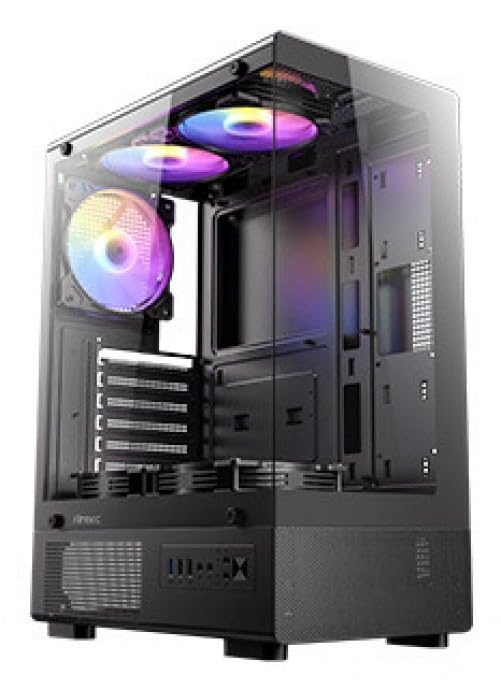
1. irudia: Aurrealdea view of the Antec VCX300 ARGB PC Case, showcasing the ARGB lighting elements and front panel I/O ports.
5. Konfigurazioa eta instalazioa
Follow these steps to install your components into the Antec VCX300 ARGB PC Case.
5.1 Kasua prestatzea
- Jarri zorroa gainazal lau eta egonkor batean.
- Kendu alboko panelak kaxaren atzealdeko torlojuak askatuz eta panelak atzerantz irristatuz.
5.2 Plaka amaierako instalazioa
- Instalatu S/I babeskia kaxaren atzeko irekiduran.
- Align the motherboard with the pre-installed standoffs. Ensure the screw holes on the motherboard match the standoffs.
- Secure the motherboard with the provided screws from the accessory box.
5.3 Energia-iturriaren instalazioa
- Position the power supply unit (PSU) in the designated compartment at the bottom rear of the case.
- Secure the PSU with screws from the outside rear of the case.
5.4 Biltegiratze Unitatearen Instalazioa (HDD/SSD)
- Locate the drive bays. The VCX300ARGB typically features dedicated bays for 3.5" HDDs and 2.5" SSDs.
- For 3.5" HDDs, slide the drive into the bay and secure it with screws or tool-less clips if available.
- For 2.5" SSDs, mount the drive onto the designated brackets or trays and secure with screws.
5.5 Expansion Card Installation (GPU, etc.)
- Kendu beharrezko hedapen-zirrikituen estalkiak kaxaren atzealdetik.
- Insert the expansion card (e.g., graphics card) into the appropriate PCIe slot on the motherboard.
- Secure the card with a screw.
5.6 Kableen kudeaketa
Erabili plaka basearen atzean dauden kableen bideratze-ebakiak eta lotzeko puntuak kableak kudeatzeko. Horrek aire-fluxua eta estetika hobetzen ditu.
- Connect all power cables from the PSU to the motherboard and components.
- Connect front panel I/O cables (USB, audio, power/reset switches, LED) to the corresponding headers on the motherboard.
- Connect ARGB cables from the case fans/strips to the motherboard's ARGB header or the integrated ARGB controller.
6. Funtzionamendua
6.1 Piztea
- Ensure all components are correctly installed and cables are connected.
- Close and secure the side panels.
- Konektatu elikatze-kablea PSUra eta hormako entxufe batera.
- Flip the power switch on the PSU to the "ON" position.
- Press the Power Button on the front panel of the case.
6.2 ARGB Argiztapen Kontrola
The Antec VCX300 ARGB case features customizable ARGB lighting. You can control the lighting effects in two ways:
- LED kontrol botoia: Press the dedicated LED control button on the front panel to cycle through various pre-set ARGB lighting modes and colors. Hold the button for a few seconds to turn off/on the lighting.
- Plaka basearen softwarea: If the ARGB cables are connected to a compatible motherboard ARGB header, you can synchronize and customize lighting effects using your motherboard's proprietary software (e.g., ASUS Aura Sync, MSI Mystic Light Sync, Gigabyte RGB Fusion, ASRock Polychrome Sync). Refer to your motherboard manual for specific instructions.
7. Mantentzea
Mantentze-lan erregularrak zure ordenagailuaren osagaien errendimendu optimoa eta iraupena bermatzen laguntzen du.
- Hauts-iragazkiak: The VCX300ARGB includes dust filters. Regularly remove and clean these filters to prevent dust buildup inside the case, which can impede airflow and cooling performance. Use compressed air or a soft brush.
- Barne garbiketa: Ireki karkasa aldian-aldian eta erabili aire konprimatua haizagailuetatik, bero-hustugailuetatik eta beste osagai batzuetatik hautsa kentzeko. Ziurtatu sistema itzalita eta deskonektatuta dagoela garbitu aurretik.
- Kanpoko garbiketa: Garbitu kaxaren kanpoaldea zapi leun batekin,amp oihal. Saihestu produktu kimiko gogorrak edo material urratzaileak.
8. Arazoak
| Arazoa | Kausa posiblea | Irtenbidea |
|---|---|---|
| PCa ez da pizten. | Power cable disconnected, PSU switch off, front panel power button not connected, faulty PSU. | Check power cable connections. Ensure PSU switch is ON. Verify front panel power button cable is correctly connected to motherboard. Test PSU if possible. |
| ARGB argiztapena ez dabil. | ARGB cables disconnected, incompatible motherboard header, LED control button issue. | Ensure ARGB cables are securely connected to the motherboard or controller. Try cycling modes with the LED control button. Verify motherboard ARGB header compatibility. |
| Poor airflow/overheating. | Dust buildup, incorrect fan orientation, obstructed vents. | Clean dust filters and internal components. Ensure fans are oriented correctly for optimal airflow (intake/exhaust). Check for any obstructions. |
9. Zehaztapenak
| Ezaugarri | Xehetasuna |
|---|---|
| Ereduaren izena | VCX300ARGB |
| Kasu mota | Mid dorrea |
| Plaka amaren euskarria | ATX, Micro-ATX |
| Neurriak (L x W x H) | 14.57"D x 8.07"W x 17.72"H (370mm x 205mm x 450mm approx.) |
| Elementuaren pisua | 3.6 kilogramo |
| Barne unitateak | 5 (combination of 3.5" HDD and 2.5" SSD) |
| Aurreko I / O Portuak | USB 3.0, USB 2.0, Audio In/Out, Power, Reset, LED Control Button |
| Ezaugarri bereziak | Built-In Fan, Dust Filter, LED Control Button, Noise Reduction Technology, Partition Plate Cooling Technology, ARGB Lighting |
| Kolorea | Beltza |
10. Bermea eta Laguntza
Antec products come with a limited warranty. Please refer to the official Antec website or your regional distributor for specific warranty terms and conditions applicable to your product.
For technical support, product registration, or further inquiries, please visit the official Antec support page: www.antec.com/support
Importer Contact Information: Ariisto House, 5th Floor, Junction of N.S.Phadke Road, Telli Gali, Andheri (E), Mumbai- 400 069 Maharashtra, India


