
1. Sarrera
Thank you for choosing the Pisichen 24 inch Touch Screen Gaming Monitor. This manual provides essential information for setting up, operating, and maintaining your monitor. Please read it thoroughly before use to ensure optimal performance and safety.
This monitor features a 24-inch QHD (2560x1440P) display with a 165Hz refresh rate, 2ms response time, and 10-point projected capacitive touchscreen functionality. It supports FreeSync and HDR, offering a vibrant and responsive visual experience for both gaming and professional applications.

Image: The Pisichen 24-inch 2K 165Hz Touch Screen Monitor highlighting its key features like HDR, IPS Panel, and 10-point Touch.
2. Paketearen edukia
Konfigurazioarekin jarraitu aurretik, egiaztatu osagai guztiak paketean daudela:
- Pisichen 24 inch Touch Screen Monitor
- Monitorearen euskarria (oinarria eta lepoa)
- DP kablea
- HDMI kablea
- USB B Touch Cable
- USB CC kablea
- DC korronte egokitzailea
- Erabiltzailearen eskuliburua (dokumentu hau)
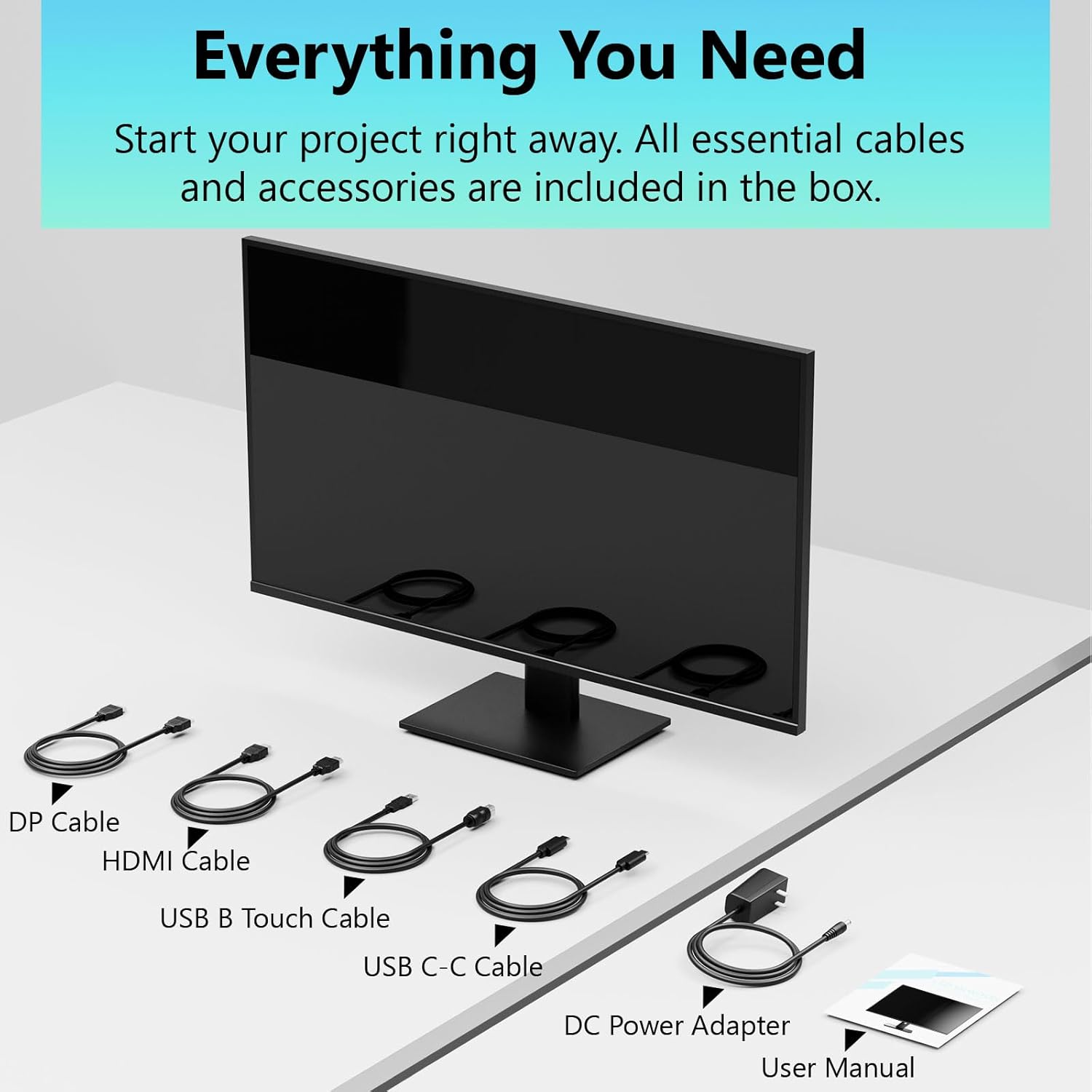
Image: All essential cables and accessories included in the box for the monitor setup.
3. Konfiguratzeko argibideak
3.1 Standa muntatzea
- Kontu handiz atera monitorearen paketea, aurpegia behera jarriz gainazal leun eta garbi batean, marradurak saihesteko.
- Lotu euskarriaren lepoa monitorearen atzeko panelera.
- Lotu euskarriaren oinarria euskarriaren lepoari emandako torlojuak erabiliz.
- Ziurtatu konexio guztiak sendo daudela monitoreak zutik jarri aurretik.
3.2 VESA euskarriaren instalazioa (aukerakoa)
This monitor supports VESA mounting. If you plan to use a VESA-compatible arm or wall mount, remove the stand and attach the VESA mount according to the mount's instructions. The VESA pattern is typically 75x75mm or 100x100mm (refer to specifications for exact details).
3.3 Gailu batera konektatzea
Monitoreak hainbat konexio aukera eskaintzen ditu:
- HDMI: Connect one end of the HDMI cable to the monitor's HDMI port and the other end to your computer's HDMI output.
- DisplayPort (DP): Connect one end of the DP cable to the monitor's DP port and the other end to your computer's DP output.
- USB C mota: For compatible devices, connect the USB C-C cable to the monitor's USB Type-C port and your device's USB Type-C port. This single cable can transmit video, data, and power (charging).
- USB Type-B (for Touch Functionality): To enable the touch screen feature, connect the USB B Touch Cable from the monitor's USB Type-B port to an available USB Type-A port on your computer.

Image: The monitor's rear panel with various connectivity options, including HDMI, DisplayPort, and USB-C ports.
3.4 Energia-konexioa
Connect the DC Power Adapter to the monitor's power input port, then plug the adapter into a power outlet.
3.5 Initial Power On and Touch Compatibility
Press the power button on the monitor. The display should light up. If no image appears, ensure all cables are securely connected and the correct input source is selected on the monitor (via the OSD menu).
For touch functionality, ensure the USB B Touch Cable is connected to your computer. Touch compatibility may vary by operating system and device. Most Windows PCs support multi-touch. For Mac devices, single-touch click is generally supported, but multi-touch may require specific drivers or configurations. Game consoles (PS3/4/5, Xbox, Steam Deck) and some other devices (Fire TV, Apple products like iPhone/iPad) typically do not support touch functionality.

Image: A compatibility chart illustrating which devices support multi-touch or single-touch, and which devices do not support touch functionality with the monitor.
4. Funtzionamendu-argibideak
4.1 Piztu/Itzali
Sakatu monitorearen gainean dagoen pizteko botoia pizteko edo itzaltzeko. Pizteko adierazlearen argiak monitorearen egoera erakutsiko du.
4.2 Pantailan bistaratzeko (OSD) menua
The OSD menu allows you to adjust various monitor settings. Use the control buttons (usually located on the back or bottom of the monitor) to navigate the menu. Common menu options include:
- Irudiaren ezarpenak: Brightness, Contrast, Sharpness, Color Temperature, HDR mode.
- Pantailaren ezarpenak: Aspect Ratio, Input Source selection (HDMI, DP, USB-C).
- Jokoen ezarpenak: FreeSync, Response Time (Overdrive), Crosshair.
- Audio ezarpenak: Volume (if internal speakers or audio output are present).
- Sistemaren ezarpenak: Hizkuntza, OSD gardentasuna, Berrezarri fabrikako balioetara.
4.3 Touch Screen Functionality
The monitor supports 10-point multi-touch, allowing for intuitive interaction directly on the screen. Ensure the USB B Touch Cable is connected to your computer for this feature to work.
- Ukitu bakarra: Equivalent to a left-click.
- Eduki ukituta: Eskuineko botoiarekin klik egitearen baliokidea.
- Zoom egiteko apur bat egin: Erabili bi hatz zooma handitzeko edo txikitzeko.
- Pasatu hatza: Navigate through content or scroll.

Image: A user interacting with the monitor's touch screen, highlighting its precision and responsiveness for creative tasks.
4.4 Doikuntza ergonomikoak
The monitor stand allows for tilt adjustments to achieve the most comfortable viewing and touch angle. Gently adjust the screen to your preferred position.
4.5 Begien Zainketaren Ezaugarriak
The monitor includes advanced eye-comfort features such as Flicker-Free technology and Low Bluelight mode to reduce eye strain during prolonged use. These settings can typically be adjusted within the OSD menu.

Image: Visual representation of the monitor's advanced eye-comfort features, including Flicker-Free and Low Bluelight technologies.
5. Mantentzea
5.1 Monitorea garbitzea
- Itzali beti monitorearen energia eta deskonektatu elikatze-kablea garbitu aurretik.
- Erabili lipurrik gabeko zapi leun bat dampUrarekin edo pantaila-garbitzaile leun eta ez-urratzaile batekin garbitu.
- Ez ihinztatu garbitzailea zuzenean pantailan. Aplikatu lehenik oihalaren gainean.
- Saihestu bentzenoa, mehetzailea, amoniakoa duten garbitzaileak edo material urratzaileak erabiltzea, hauek pantailaren gainazala kaltetu baitezakete.
5.2 Biltegiratzea
Monitorea denbora luzez gordetzean, ziurtatu itzalita dagoela, deskonektatuta dagoela eta leku fresko eta lehor batean gordeta dagoela, eguzki-argitik eta muturreko tenperaturetatik babestuta. Erabili jatorrizko ontzia, baldin badago, babes onena lortzeko.
6. Arazoak
Monitorearekin arazoak badituzu, jarraitu arazoak konpontzeko ohiko urrats hauek:
- Potentziarik gabe: Ziurtatu korronte-egokitzailea ondo konektatuta dagoela monitoreari eta funtzionatzen duen entxufe bati. Egiaztatu ea potentzia-adierazlearen argia piztuta dagoen.
- Irudi/seinalerik ez:
- Verify that the video cable (HDMI, DP, or USB-C) is securely connected to both the monitor and your computer.
- Ziurtatu sarrera-iturri zuzena hautatuta dagoela monitorearen OSD menuan.
- Check your computer's display settings to ensure the monitor is detected and enabled.
- Ukipenik gabeko funtzionalitatea:
- Confirm the USB B Touch Cable is connected from the monitor to your computer.
- Check your computer's device manager to see if the touch screen driver is installed and functioning correctly.
- Refer to the "Initial Power On and Touch Compatibility" section for device-specific limitations.
- Irudi keinukaria edo distortsionatua:
- Egiaztatu bideo-kablea kaltetuta edo konexio solterik dagoen.
- Saiatu beste bideo-kable edo ataka batekin.
- Doitu freskatze-tasa ordenagailuaren pantailaren ezarpenetan.
- Pixel hilak: A small number of bright or dark pixels are common in LCD/LED technology and are not considered a defect unless they exceed manufacturer specifications.
Urrats hauek probatu ondoren arazoa konpontzen ez bada, jarri harremanetan bezeroarentzako arreta-zerbitzuarekin.
7. Zehaztapenak
| Ezaugarri | Zehaztapena |
|---|---|
| Marka | Pisichen |
| Modelo zenbakia | 24IN165HZ-QHD |
| Pantailaren tamaina | 23.8 hazbetekoa |
| Ebazpena | QHD Wide 1440p (2560 x 1440) |
| Aspektu-erlazioa | 16:9 |
| Freskatze tasa | 165 Hz |
| Erantzun Denbora | 2 milisegundo |
| Bistaratzeko mota | LED IPS |
| Distira | 400 Kandela (cd/m²) |
| Kontraste-erlazioa | 3000:1 |
| Viewangelua | 178 gradu |
| Kolore gama | %99 |
| Picture Quality Enhancement | HDR |
| Sinkronizazio egokitzailea | FreeSync |
| Konektibitate Teknologia | DisplayPort, HDMI, USB Type-C, USB Type-B |
| Ezaugarri gehigarriak | Tilt Adjustment, 10-Point Touchscreen |
| Elementuaren neurriak (L x W x H) | 0.75" L x 21.5" W x 12.7" H |
| Elementuaren pisua | 5.38 kilogramo |
| Kolorea | Beltza |
8. Bermearen informazioa
This product comes with a 1-year limited warranty from the date of purchase. The warranty covers manufacturing defects and workmanship under normal use. It does not cover damage caused by misuse, accidents, unauthorized modifications, or external factors. Please retain your proof of purchase for warranty claims.
9. Bezeroarentzako arreta
For technical assistance, warranty claims, or further inquiries, please contact Pisichen customer support. You may find contact information on the official Pisichen webgunea edo zure dendariaren bidez.
Baliabide eta produktuen informazio gehiago lortzeko, bisitatu Pisichen Store on Amazon.