
1. Segurtasun informazio garrantzitsua
Mesedez, irakurri arretaz argibide guztiak monitore hau erabili aurretik. Gorde eskuliburu hau etorkizunean erreferentzia gisa.
- Energia iturria: Erabili monitorearekin batera datozen kablea eta egokitzailea soilik. Ziurtatu entxufea behar bezala lurrera konektatuta dagoela.
- Aireztapena: Ez blokeatu aireztapen-irekidurak. Utzi nahikoa leku monitorearen inguruan aire-fluxu egokia izan dadin.
- Hezetasuna: Do not expose the monitor to rain, moisture, or high humidity. Avoid placing liquids near or on the monitor.
- Garbiketa: Deskonektatu kablea garbitu aurretik. Erabili zapi leun eta lehor bat. Ez erabili garbitzaile likidorik edo aerosolik.
- Lekua: Place the monitor on a stable, flat surface. Avoid direct sunlight or heat sources.
- Zerbitzua: Ez saiatu produktu hau zuk zeuk ematen. Bidali zerbitzu guztiak zerbitzu kualifikatuko langileengana.
2. Paketearen edukia
Konfigurazioarekin jarraitu aurretik, egiaztatu elementu guztiak paketean daudela.
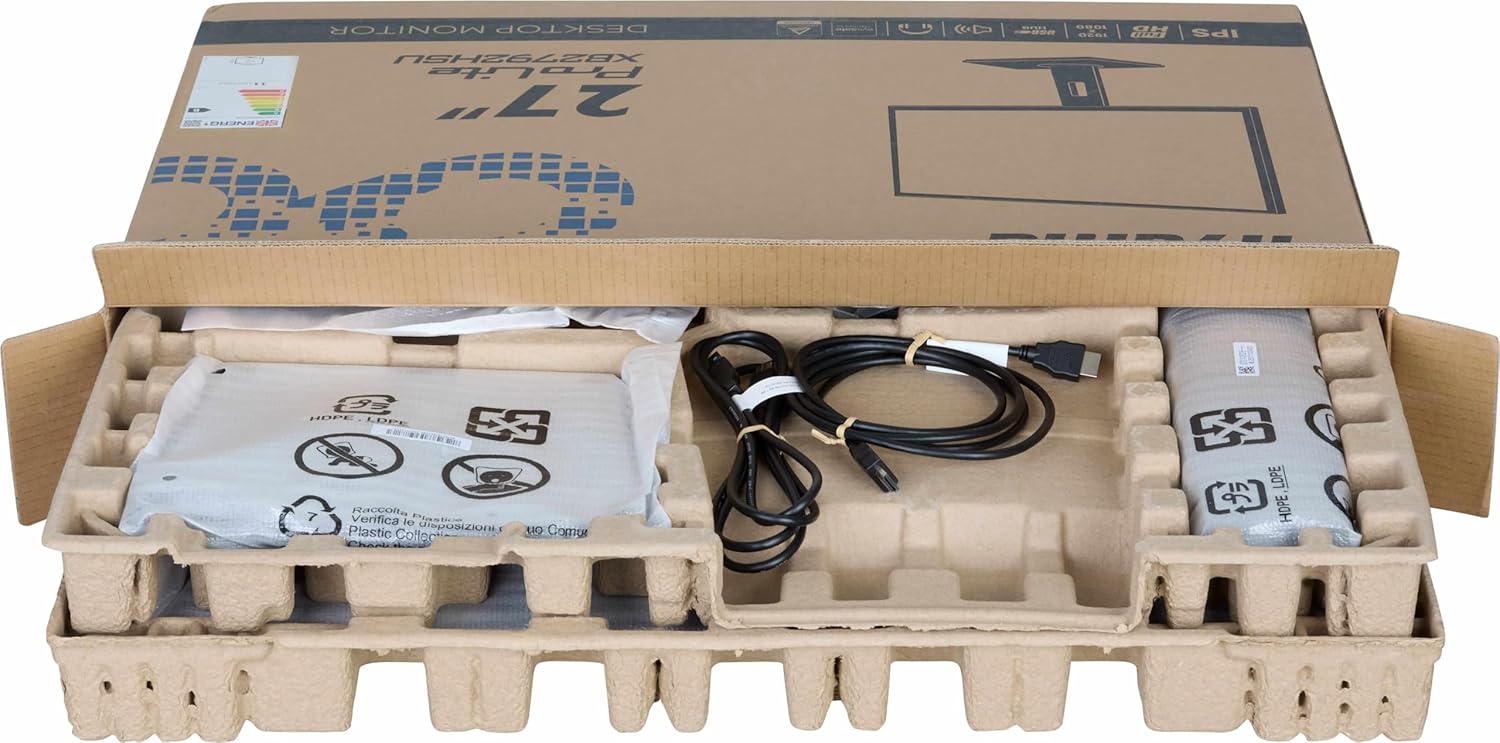
Irudia: The iiyama ProLite XB2792QSU-B1 monitor and its accessories, including cables and stand components, neatly packed in the retail box.
- iiyama ProLite XB2792QSU-B1 Monitor
- Monitorearen euskarria (oinarria eta lepoa)
- Elikatze-kablea
- HDMI kablea
- USB Cable (for USB hub functionality)
- Quick Start Guide / Safety Guide

Irudia: Gertu bat view of the power cable, HDMI cable, and USB cable included with the monitor.
3. Konfiguratzeko argibideak
3.1 Standa muntatzea
- Carefully remove the monitor from its packaging, keeping it protected on a soft surface (e.g., foam packaging).
- Lotu euskarriaren lepoa monitorearen atzealdean. Ziurtatu ondo sartzen dela klik eginez edo torlojuekin lotuta dagoela, baldin badaude.
- Attach the stand base to the stand neck. Tighten the thumb screw or screws from the bottom of the base to secure it.

Irudia: The rear of the iiyama ProLite XB2792QSU-B1 monitor, showing the stand securely attached to the monitor panel.
3.2 Konektatzeko kableak
Ziurtatu monitoreak eta ordenagailuak itzalita daudela konexiorik egin aurretik.
- Potentzia-konexioa: Konektatu elikatze-kablea monitorearen elikatze-sarrerara eta gero lurrera konektatutako entxufe elektriko batera.
- Bideo-konexioa: Konektatu HDMI edo DisplayPort kablearen mutur bat ordenagailuaren txartel grafikoaren dagokion atakara eta beste muturra monitorearen HDMI edo DisplayPort sarrerara.
- USB Hub Connection (Optional): Connect the supplied USB cable from your computer's USB port to the upstream USB port on the monitor to enable the monitor's built-in USB 3.2 hub.
- Audio-konexioa (aukerakoa): If you wish to use external speakers or headphones connected to the monitor, connect an audio cable from your computer's audio output to the monitor's audio input, or connect headphones directly to the monitor's audio output jack.

Irudia: Xehetasun bat view of the monitor's connectivity panel, showing the power input, HDMI ports, DisplayPort, USB 3.2 ports, and audio jack.
3.3 Hasierako piztea
- Piztu ordenagailua.
- Press the power button on the monitor. The power indicator light should illuminate.
- The monitor should automatically detect the input signal. If not, you may need to manually select the input source using the On-Screen Display (OSD) menu.
4. Monitorea funtzionatzea
4.1 Pantailan bistaratzeko (OSD) menua
The OSD menu allows you to adjust various monitor settings. The control buttons are typically located on the bottom or rear of the monitor.

Irudia: Aurrealdea view of the iiyama ProLite XB2792QSU-B1 monitor, displaying its slim bezel design and the location of the control buttons (usually on the bottom right bezel or rear).
- Sakatu Menua botoia OSDa irekitzeko.
- Use the navigation buttons (usually arrows) to move through the menu options.
- Press the Select/OK button to confirm a selection or enter a sub-menu.
- Press the Exit/Back button to return to the previous menu or exit the OSD.
4.2 OSD ezarpen arruntak
- Irudia: Adjust Brightness, Contrast, Sharpness, Gamma, OverDrive.
- Kolorea: Adjust Color Temperature, RGB levels, or select preset color modes.
- Sarrera hautatzea: Aldatu eskuz HDMI eta DisplayPort sarreren artean.
- Audioa: Adjust volume for the built-in speakers or headphone output.
- OSD ezarpenak: Doitu OSD hizkuntza, posizioa eta denbora-muga.
- Informazioa: Display current resolution, refresh rate, and model information.
4.3 Doikuntza ergonomikoak
Monitorearen euskarriak hainbat doikuntza ahalbidetzen ditu zure optimizazioa lortzeko viewerosotasuna.

Irudia: Alboko profesional batfile of the iiyama ProLite XB2792QSU-B1 monitor, illustrating its adjustable stand that allows for height, tilt, and swivel movements.
- Altuera doitzea: Gently push or pull the monitor panel up or down to adjust its height.
- Inklinazio doikuntza: Hold the top and bottom edges of the monitor panel and gently tilt it forwards or backwards.
- Birako doikuntza: Rotate the monitor panel left or right on its stand base.
- Pibote funtzioa: The monitor can be rotated 90 degrees to a portrait orientation. Ensure the monitor is at its maximum height and tilted back slightly before pivoting to avoid hitting the desk.
5. Mantentzea
5.1 Monitorea garbitzea
- Deskonektatu beti monitorearen entxufea korrontetik garbitu aurretik.
- Erabili lipurrik gabeko zapi leun bat dampUrarekin edo pantaila-garbitzaile leun eta ez-urratzaile batekin garbitu.
- Ez ihinztatu garbitzailea zuzenean pantailan. Aplikatu lehenik oihalaren gainean.
- Saihestu bentzenoa, mehetzailea, amoniakoa duten garbitzaileak edo material urratzaileak erabiltzea, hauek pantaila edo... kaltetu baitezakete.asing.
5.2 Biltegiratzea
If storing the monitor for an extended period, disconnect all cables and pack it in its original packaging if possible. Store in a cool, dry place away from direct sunlight and extreme temperatures.
6. Arazoak
Monitorearekin arazoak badituzu, jo ezazu honako arazo eta irtenbide ohikoenei.
| Arazoa | Irtenbide posiblea |
|---|---|
| Argirik ez / Pizte-LEDa itzalita |
|
| Seinalerik ez / "Seinalerik ez" mezua |
|
| Irudia lausoa edo distortsionatua dago |
|
| Koloreak okerrak dira |
|
| USB atakak ez dira funtzionatzen |
|
If the problem persists after trying these solutions, please contact iiyama customer support.
7. Zehaztapen Teknikoak
Below are the key technical specifications for the iiyama ProLite XB2792QSU-B1 monitor.
| Ezaugarri | Zehaztapena |
|---|---|
| Modelo zenbakia | XB2792QSU-B1 |
| Pantailaren tamaina | 27 hazbetekoa |
| Panel mota | IPS |
| Ebazpena | 2560 x 1440 (QHD) |
| Freskatze tasa | 120Hz |
| Aspektu-erlazioa | 16:9 |
| Erantzun Denbora | 5 milisegundo |
| Distira | 350 cd/m² |
| Viewangelua | 178° (H) / 178° (V) |
| Hardware Konektibitatea | 1x HDMI, 1x DisplayPort, 2x USB 3.2 Gen 1, 3.5mm Audio Out |
| Elementuaren neurriak (L x W x H) | 8.25" L x 24.25" W x 15.59" H |
| Elementuaren pisua | 5.5 kilogramo |
| Kolorea | Beltza |
8. Bermea eta Laguntza
This iiyama monitor comes with a manufacturer's warranty. For detailed warranty terms and conditions, please refer to the warranty card included in your product packaging or visit the official iiyama webgunea.
For technical support, troubleshooting assistance, or service inquiries, please contact iiyama customer support through their official channels. Have your monitor's model number (XB2792QSU-B1) and serial number ready when contacting support.
Official iiyama Webgunea: www.iiyama.com