
Sarrera
Eskerrik asko erosketagatik.asing the Anker Soundcore P31i True Wireless Earbuds. This manual provides detailed instructions on how to set up, operate, and maintain your earbuds to ensure optimal performance and longevity. Please read this manual carefully before use and retain it for future reference.
Zer sartzen da
Your Soundcore P31i package includes the following items:
- Soundcore P31i Earbuds (Left and Right)
- Kargatzeko kaxa
- Ear Tips (XS, S, M, L - M size pre-installed)
- USB-C USB-A kargatzeko kablea
- Hasierako gida azkarra
- Segurtasun eskuliburua
Produktua amaituview
The Soundcore P31i earbuds are designed for comfort and high-quality audio. Each earbud features a touch control area and an indicator light. The charging case protects the earbuds and provides additional battery life.
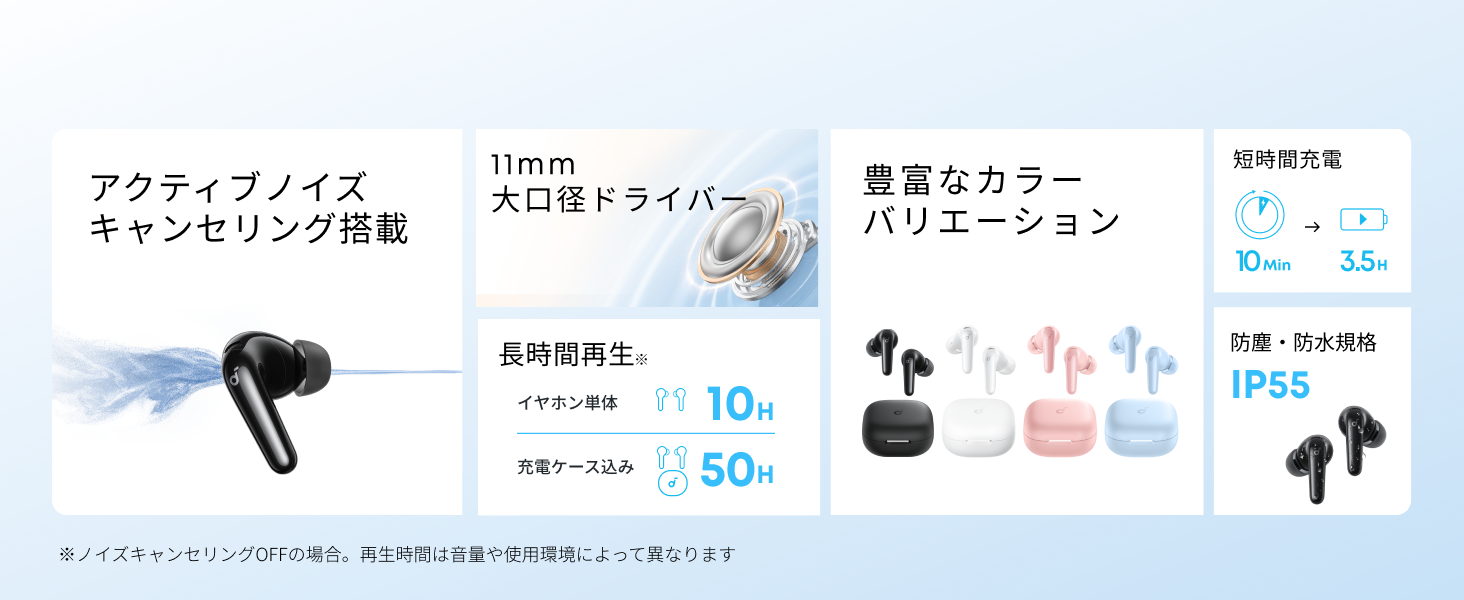
Diagram showing the Soundcore P31i earbuds and charging case with key components labeled.
Entzungailuak: Each earbud is equipped with an 11mm dynamic driver for powerful bass and clear sound. They feature active noise cancellation and AI noise reduction for calls. The ergonomic design ensures a secure and comfortable fit.
Kargatzeko kaxa: The compact charging case not only stores and protects your earbuds but also recharges them on the go. It has a USB-C charging port and a strap hole for portability.
Zure entzungailuak eta zorroa kargatzen
Lehenengo aldiz erabili aurretik, kargatu guztiz entzungailuak eta kargatzeko zorroa.
- Entzungailuak kargatzea: Place the earbuds into the charging case. The indicator lights on the earbuds will show charging status.
- Kasua kargatzea: Connect the charging case to a power source using the provided USB-C to USB-A cable. A full charge for the case and earbuds takes approximately 3 hours.
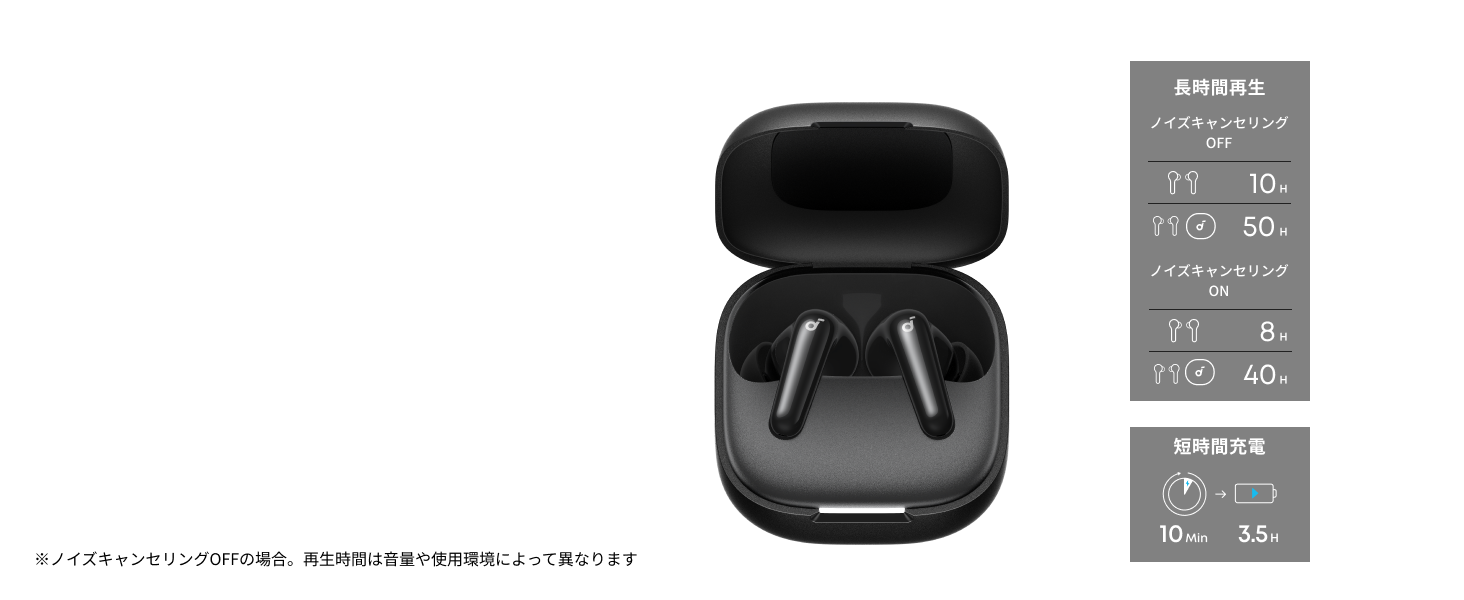
Diagram illustrating charging times and playback duration for Soundcore P31i earbuds.
Bateriaren iraupena:
- Up to 10 hours of playback on a single charge (earbuds only).
- Kargatzeko zorroarekin, guztira 50 orduko erreprodukzioa.
- A quick 10-minute charge provides up to 3.5 hours of listening time.
Note: Playback time varies depending on volume level and audio content.
Entzungailuak jantzita
For optimal sound quality and comfort, it is important to wear your earbuds correctly.
- Aukeratu belarri-punta egokiak: Select the ear tips that provide the best seal and comfort for your ears. Experiment with different sizes (XS, S, M, L) to find the perfect fit.
- Sartu entzungailuak: Sartu aurikularrak astiro-astiro belarri-hodietan.
- Twist to Secure: Twist the earbuds slightly until they fit snugly and securely in your ears.

Image showing a person wearing the Soundcore P31i earbuds correctly.
Bluetooth parekatzea
Follow these steps to pair your Soundcore P31i earbuds with your device:
- Lehenengo bikotea:
- Open the charging case. The earbuds will automatically enter Bluetooth pairing mode. The indicator lights on the earbuds will flash white.
- Zure gailuan (smartphone-a, tableta, etab.), joan Bluetooth ezarpenetara.
- Select "Soundcore P31i" from the list of available devices.
- Once connected, the indicator lights on the earbuds will turn solid white for 1 second and then turn off.
- Beste gailu batekin parekatzea:
- Place the earbuds in the charging case and leave the lid open.
- Press and hold the button on the charging case for 3 seconds until the earbud indicator lights flash white rapidly.
- Repeat steps 2 and 3 from "First-Time Pairing" on your new device.
Kontrolak
The Soundcore P31i earbuds feature touch controls for managing playback, calls, and other functions. Specific control configurations can often be customized via the Soundcore app.
General Touch Controls (Default):
- Erreproduzitu/Pausatu: Sakatu behin entzungailu batean.
- Hurrengo ibilbidea: Sakatu birritan eskuineko aurikularra.
- Aurreko pista: Sakatu birritan ezkerreko aurikularra.
- Deia erantzun/amaitu: Sakatu behin entzungailu batean.
- Deia baztertu: Eduki sakatuta aurikularretako bat 2 segundoz.
- Aktibatu Ahots Laguntzailea: Triple-tap either earbud (may vary).
- Aldatu ANC/Gardentasun modua: Press and hold the right earbud for 2 seconds (may vary).
For detailed and customizable controls, please refer to the Soundcore app or the included Quick Start Guide.
Zarata ezabatze aktiboa (ANC)
The Soundcore P31i earbuds feature Active Noise Cancelling technology to minimize ambient noise, allowing for an immersive listening experience.

Illustration demonstrating the active noise cancelling feature of the Soundcore P31i earbuds.
ANC detects and reduces various types of noise, such as engine hum on trains or buses, and chatter in cafes. This allows you to enjoy your music or podcasts with greater clarity and fewer distractions.
To switch between ANC, Normal, and Transparency modes, use the touch controls on the earbuds or adjust settings within the Soundcore app.
Soinu-Kalitatea
The Soundcore P31i earbuds are engineered to deliver a rich audio experience.

Diagram illustrating the 11mm dynamic driver responsible for the audio output.
- 11 mm-ko kontrolatzaile dinamikoak: Equipped with large 11mm drivers, these earbuds produce a wide frequency range and detailed sound.
- BassUp™ Technology: Anker's proprietary BassUp™ technology enhances low frequencies, delivering powerful and impactful bass.
You can further customize the sound profile using the equalizer settings within the Soundcore app.
Deitu Kalitatea
The Soundcore P31i earbuds ensure clear voice calls and web hitzaldiak.

Illustration depicting AI noise reduction technology for clear voice calls.
AI zarata murriztea: Integrated AI noise reduction technology effectively filters out background noise, ensuring your voice is transmitted clearly to the person on the other end of the call, even in noisy environments.
Puntu anitzeko konexioa
The Soundcore P31i supports multi-point connection, allowing you to connect to two Bluetooth devices simultaneously.

Illustration showing the Soundcore P31i connected to multiple devices simultaneously.
This feature enables seamless switching between devices. For example, you can listen to music on your laptop and instantly switch to answer a call on your phone without manually re-pairing.
To enable multi-point connection, ensure both devices are paired with your earbuds. The earbuds will automatically connect to the last two paired devices when powered on.
Soundcore aplikazioa
Download the Soundcore app to enhance your experience with the P31i earbuds. The app offers various features and customization options.

Screenshots of the Soundcore app interface, highlighting customization features.
App Features include:
- Kontrol pertsonalizagarriak: Personalize touch controls for playback, calls, and voice assistant.
- Ekualizazio ezarpenak: Doitu audio profiles to your preference or choose from preset EQs.
- ANC/Transparency Mode Switching: Easily toggle between noise cancelling and transparency modes.
- Firmware eguneraketak: Mantendu zure entzungailuak eguneratuta azken funtzio eta hobekuntzekin.
- AI Translation Function: (Available from Spring 2026, requires Soundcore app ver 4.0.0 or higher).
The Soundcore app is available for download on both iOS and Android devices.
Produktua amaituview Bideoa
Produktu ofizialaren bideo emanaldiaasing the key features and design of the Soundcore P31i True Wireless Earbuds, including active noise cancellation, powerful bass, long battery life, and multi-point connectivity.
Mantentzea eta zaintzea
Proper maintenance ensures the longevity and performance of your Soundcore P31i earbuds.
- Garbiketa: Garbitu aldizka entzungailuak eta kargatzeko zorroa oihal leun, lehor eta lihorik gabeko batekin. Ez erabili produktu kimiko gogorrik edo material urratzailerik.
- Belarrietarako aholkuak: Remove the ear tips and clean them with water and mild soap if necessary. Ensure they are completely dry before reattaching.
- Kontaktuak kargatzeko: Mantendu entzungailuen eta zorroaren kargatzeko kontaktuak garbi eta lehor, behar bezala kargatzen direla ziurtatzeko.
- Biltegiratzea: Erabiltzen ez dituzunean, gorde entzungailuak kargatzeko zorroan hautsetik eta kalteetatik babesteko.
- Uraren erresistentzia: The earbuds are rated IP55 for dust and water resistance. This means they can withstand sweat and light rain, but are not designed for submersion in water. Ensure the earbuds are dry before placing them back in the charging case.

Image showing Soundcore P31i earbuds with water droplets, highlighting their IP55 water resistance.
Arazoak konpontzea
If you encounter any issues with your Soundcore P31i earbuds, refer to the following common solutions:
- Entzungailuak ez dira parekatzen:
- Ziurtatu bi entzungailuak guztiz kargatuta daudela.
- Place earbuds in the case, close the lid, then open it again to re-enter pairing mode.
- Forget "Soundcore P31i" from your device's Bluetooth list and try pairing again.
- Berrezarri entzungailuak (berrezarri argibide zehatzak ikusteko, kontsultatu Hasiera Azkarreko Gida).
- Only One Earbud Playing Audio:
- Place both earbuds back into the charging case and close the lid for 5 seconds, then open it again.
- Ensure both earbuds have sufficient battery.
- Berrezarri entzungailuak.
- Soinu kalitate eskasa:
- Ziurtatu belarri-puntak ondo itsasten direla belarri-hodian. Probatu tamaina desberdinak.
- Garbitu entzungailuen toberetatik geratzen den edozein hondakin.
- Hurbildu konektatutako gailura interferentziak saihesteko.
- Kargatzeko arazoak:
- Kargatzeko kablea eta egokitzailea kaltetuta dauden egiaztatu.
- Ziurtatu entzungailuen eta zorroaren kargatzeko kontaktuak garbi daudela.
- Probatu kargatzeko kable edo elikadura-iturri ezberdin batekin.
Zehaztapenak
| Ezaugarri | Xehetasuna |
|---|---|
| Marka | Soundcore |
| Ereduaren izena | P31i |
| Modelo zenbakia | D1202 |
| Kolorea | Black (This specific variant) |
| Forma-faktorea | Belarri barnean |
| Konektibitate Teknologia | Haririk gabekoa (Bluetooth 6.1) |
| Zarata Kontrola | Zarata Deuseztatze Aktiboa |
| Gidariaren tamaina | 11 mm-ko kontrolatzaile dinamikoak |
| Erreprodukzio-denbora (entzungailuak) | Gehienez 10 ordu |
| Erreprodukzio-denbora osoa (zorroarekin) | Gehienez 50 ordu |
| Karga azkarra | 10 minutuko karga 3.5 orduko erreprodukziorako |
| Charging Time (Full) | 3 ordu gutxi gorabehera |
| Uraren Erresistentzia | IP55 |
| Puntu anitzeko konexioa | Onartua |
| UPC | 194644251543 |
| Jatorrizko Herrialdea | Txina |
Bermea eta Bezeroarentzako Arreta
Soundcore provides a comprehensive warranty for your P31i earbuds.

Image detailing the warranty period and extension for Soundcore P31i.
- Berme estandarra: An 18-month warranty is provided for products purchased from authorized retailer AnkerDirect.
- Berme Hedatua: Anker members can extend their warranty up to a maximum of 24 months.
- Ohar garrantzitsua: Purchases from unauthorized sellers may not be covered under warranty.
For product inquiries, delivery questions, or technical support, please contact Soundcore customer support. Contact details can typically be found on the official Soundcore webgunea edo Hasiberrientzako Gida Azkarrean.
Segurtasun Informazioa
Mesedez, irakurri eta jarraitu segurtasun-jarraibide hauek zure gailuari kalterik edo zeure buruari kalterik ez egiteko:
- Ez desmuntatu edo aldatu entzungailuak edo kargatzeko zorroa.
- Mantendu gailua muturreko tenperaturetatik, eguzki-argitik zuzenean eta sugar irekietatik urrun.
- Avoid exposing the device to excessive moisture or liquids, beyond its IP55 rating.
- Do not use the device at high volume levels for extended periods to prevent hearing damage.
- Mantendu haurren eta maskoten eskura.
- Bota ezazu produktua arduraz tokiko araudiaren arabera.