
1. Sarrera
Thank you for choosing the EasySMX X05PRO PC Controller. This manual provides detailed instructions for setting up, operating, and maintaining your controller. The X05PRO offers versatile connectivity options, advanced features, and multi-platform compatibility for an enhanced gaming experience.
2. Paketearen edukia
- EasySMX X05PRO PC Controller
- 2.4G Haririk gabeko Hargailua
- USB-C kargatzeko/datu kablea
- Erabiltzailearen eskuliburua (dokumentu hau)
3. Produktuen diseinua
Familiarize yourself with the buttons and components of your EasySMX X05PRO controller.
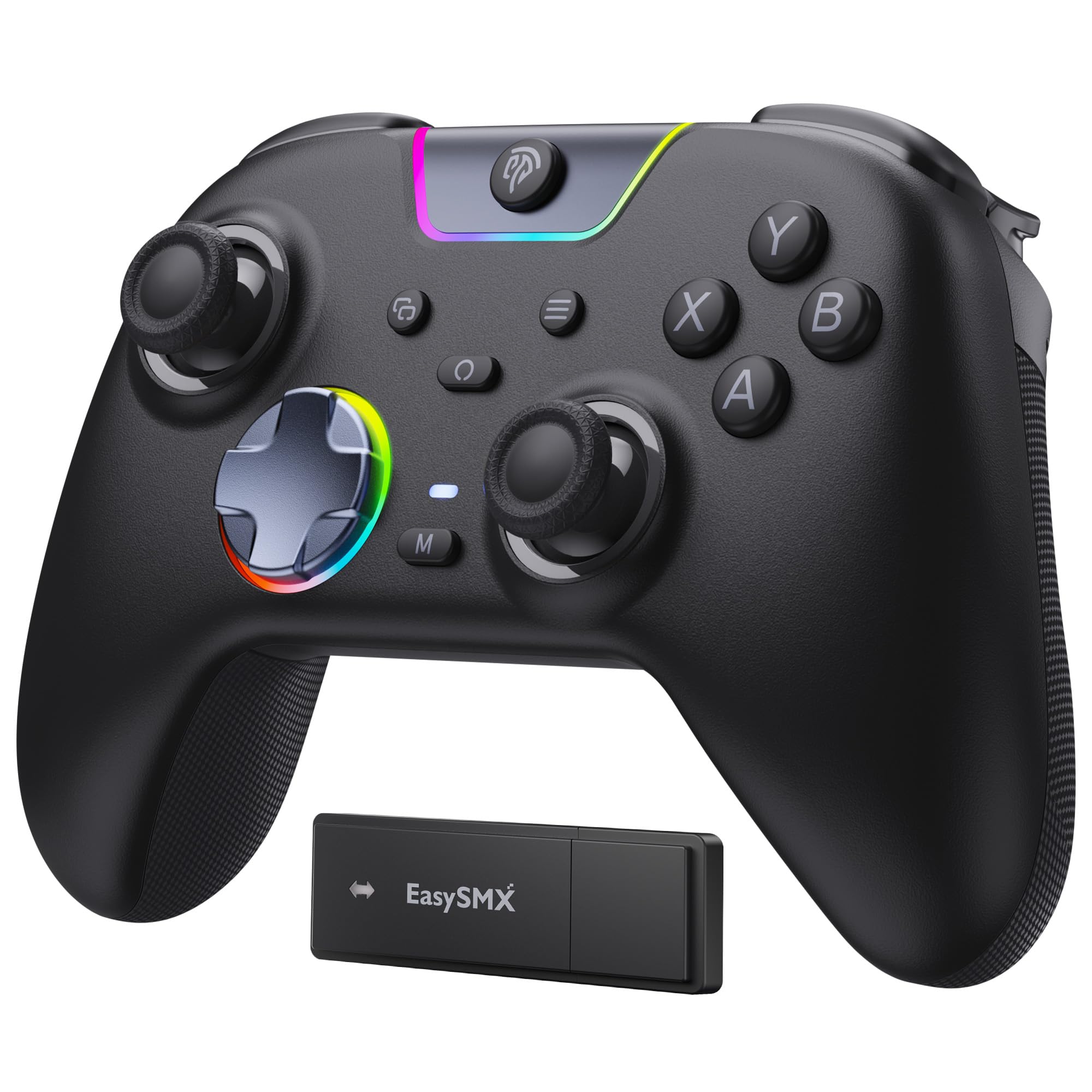
Figure 1: EasySMX X05PRO Controller Overview
- A/B/X/Y botoiak: Ekintza-botoi estandarrak.
- D-Pad: 8-direction digital input.
- Ezkerreko/eskuineko analogikoen makilak: Mugimendu zehatza eta kameraren kontrola lortzeko.
- LB/RB botoiak: Ezkerreko eta eskuineko babes-botoiak.
- LT/RT abiarazleak: Left and Right Analog Triggers with two-stage funtzionaltasuna.
- HOME botoia: Kontrolatzailea piztu/itzali eta sistemaren menuetara sartzen da.
- HASI/HAUTATU botoiak: Joko espezifikoen funtzioak.
- M1/M2 botoiak: Programmable buttons on the top of the controller.
- USB-C ataka: Kable bidezko konexiorako eta kargatzeko.
- Modu aldaketa: For selecting connection modes (if applicable).
4. Konfigurazioa eta konexioa
4.1. 2.4G Wireless Connection (PC Windows)
- Insert the 2.4G wireless receiver into an available USB port on your PC.
- Press and hold the HOME button on the controller until the indicator lights turn on, indicating it's powered on.
- The controller will automatically connect to the receiver. Once connected, the indicator light will stabilize.
4.2. Bluetooth Connection (Switch, Android, iOS)
- Ziurtatu zure gailuaren Bluetooth-a gaituta dagoela.
- On the controller, press and hold the HOME button along with the appropriate mode button (refer to the controller's specific button combination for Bluetooth pairing, usually a small button near the USB port or a combination with HOME).
- The indicator lights will flash rapidly, indicating pairing mode.
- On your device, search for new Bluetooth devices and select "EasySMX X05PRO" (or similar) to pair.
- Behin parekatuta, kontrolagailuko adierazle-argia egonkortu egingo da.
4.3. Wired Connection (PC, Switch, Steam Deck)
- Connect the USB-C end of the cable to the controller and the USB-A end to your device (PC, Switch dock, Steam Deck).
- The controller will automatically be recognized by your device and switch to wired mode.
- This mode is ideal for competitive gaming due to minimal input lag and also allows charging while playing.

Figure 2: Multi-platform Connectivity
5. Funtzionamendu-argibideak
5.1. Silent Buttons
The X05PRO features a redesigned full-button structure with silicone dampers, providing ultra-quiet operation. This is ideal for late-night gaming sessions without disturbing others.

Figure 3: Silent Button Design
5.2. Bi-Stage Hall Triggers
The adjustable trigger locks allow you to switch between short (3mm) and long (9mm) trigger strokes. Short strokes are optimized for rapid firing in FPS games, while long strokes provide precise control for racing games.

4. Irudia: Bi-Stage Hall Triggers
5.3. Upgraded 8-Direction D-Pad
The D-pad features a dome switch and concave pivot design, enabling smooth diagonal inputs and precise 8-direction operation, ideal for fighting games and retro titles.

Figure 5: Upgraded 8-Direction D-Pad
5.4. Dynamic RGB Backlight
Customize your gaming experience with dynamic RGB lighting effects. The controller offers various lighting modes and 7 color combinations. Refer to the manual for detailed settings.

Figure 6: Dynamic RGB Lighting
5.5. Programatzeko botoiak (M1/M2)
The two additional customizable buttons (M1 and M2) located on the top of the controller are designed to prevent accidental presses during intense gameplay, a common issue with back paddles. These buttons can be programmed to various functions. Consult the full manual for programming instructions.

Figure 7: Programmable M1/M2 Buttons
5.6. 1000Hz Polling Rate & Hall Effect Sticks
Experience virtually no input delay with a 1000Hz polling rate in both wired and 2.4G wireless modes. The high-precision 11-bit Hall effect sensors ensure drift-free accuracy and extended lifespan for the joysticks and triggers.

Figure 8: Hall Effect Technology and 1000Hz Polling Rate
5.7. Bibrazio-feedbacka
The controller features a 2+2 internal rumble motor system, providing realistic feedback for impacts, drifts, and collisions. Vibration intensity can be adjusted to your preference.

Figure 9: 4-Zone Vibration Feedback
5.8. Turbo funtzioa
The controller supports a manual Turbo function for rapid, repeated button presses. This feature can be configured for specific action buttons (A/B/X/Y/LB/RB/LT/RT) and offers 3 speed levels.
5.9. Grip ergonomikoa
The soft-touch silicone coating provides a sweat-resistant, non-slip grip, ensuring comfort during extended gaming sessions.

Figure 10: Ergonomic Grip
6. Kargatzea
The controller is equipped with a built-in 1000mAh rechargeable battery, ensuring long playtimes. To charge, connect the controller to a power source using the provided USB-C cable. Charging typically takes approximately 3 hours. An indicator light will show charging status (e.g., red for charging, green for fully charged).
7. Zehaztapenak
| Ezaugarri | Deskribapena |
|---|---|
| Modelo zenbakia | X05PRO |
| Konektibitatea | Kable bidezkoa (USB-C), 2.4G haririk gabekoa, Bluetooth |
| Bozketa-tasa | 1000Hz (kable bidezkoa eta 2.4G), 125Hz (Bluetooth) |
| Bateria Edukiera | 1000mAh Litio-ioia |
| Kargatzeko Denbora | Gutxi gorabehera. 3 ordu |
| Dardara | 4-zone adjustable rumble motors |
| Abiarazleak | Bi-stage Hall Effect Triggers (3mm/9mm) |
| Joystickak | Hall efektuko joystickak |
| D-Pad | Upgraded 8-direction with dome switch and concave pivot |
| Argiztapena | Dynamic RGB Backlight (customizable) |
| Botoi programagarriak | M1, M2 |
| Neurriak | 18.1 x 14.4 x 7.4 cm |
| Pisua | 390 g |
| Onartutako plataformak | PC (Windows), Steam Deck, Switch, Android, iOS |
8. Mantentzea
- Mantendu kontrolatzailea garbi zapi lehor eta leun batekin garbituz.
- Saihestu kontrolatzailea muturreko tenperaturen, hezetasunaren edo eguzki-argiaren eraginpean jartzea.
- Do not attempt to disassemble the controller, as this may void the warranty.
- Gorde kontrolatzailea leku seguru batean erabiltzen ez duzunean, kalteak saihesteko.
9. Arazoak
- Kontrolatzailea ez da konektatzen:
Ensure the controller is charged. For 2.4G, verify the receiver is properly inserted. For Bluetooth, ensure the device's Bluetooth is on and the controller is in pairing mode. Try restarting both the controller and the device. - Input lag in wireless mode:
Ensure there are no obstructions between the controller and the receiver/device. Move closer to the receiver/device. For critical gaming, consider using a wired connection. - Botoiek edo joystick-ek ez dute erantzuten:
Check if the controller is properly connected. If using wired, try a different USB port or cable. If the issue persists, perform a factory reset (refer to the full manual for specific instructions, usually a small reset button or button combination). - Bibrazioak ez du funtzionatzen:
Ensure vibration is enabled in the game settings and on the controller. Some games may require specific in-game support for trigger vibration. - RGB lights not working/customizing:
Refer to the full manual for specific button combinations to adjust RGB modes and colors. Ensure the controller is powered on. - D-Pad diagonal inputs are difficult:
The upgraded D-pad is designed for precision. Practice with the new design. If issues persist, ensure the controller firmware is up to date (check EasySMX support webgunea).
10. Bermea eta Laguntza
EasySMX products come with a standard warranty. For specific warranty terms, technical support, or any issues not covered in this manual, please contact EasySMX customer service or visit the official EasySMX website. Please have your product model (X05PRO) and purchase information ready when contacting support.

Figure 11: Technical Compliance Information