
1. Sarrera
This manual provides detailed instructions for the setup, operation, maintenance, and troubleshooting of your Muddy Pro Cam 20 MP Trail Camera. Please read this manual thoroughly before using the camera to ensure proper function and longevity of the device. The Muddy Pro Cam 20 MP is designed for capturing high-resolution images and videos of wildlife with its 20MP sensor and 720p video capabilities.

1. irudia: Aurrealdea view of the Muddy Pro Cam 20 MP Trail Camera.
2. Paketearen edukia
Egiaztatu behean zerrendatutako elementu guztiak zure paketean sartuta daudela:
- Muddy Pro Cam 20 Megapixel Trail Camera with Video Function
3. Ezaugarri nagusiak
- Bereizmen handiko irudiak: 20MP camera with 850nm LEDs for clear day and night captures. Supports 20MP, 8MP, and 4MP resolution images.
- Definizio handiko bideoa: Captures 720p videos at 30 frames per second (FPS).
- Abiadura azkarra: 0.5-second trigger speed to capture quick movements.
- Versatile Burst Mode: Captures 1 to 3 images per triggering event.
- Detekzio-eremu zabala: 80-foot detection range for broad coverage.
- Energia iturria: Operates on eight AA batteries.
- Segurtasuna: Integrated Python lock latch for theft deterrence.
4. Konfigurazioa
4.1. Bateriaren instalazioa
- Ireki kameraren karkasaren heldulekua.
- Kokatu bateriaren konpartimendua.
- Sartu zortzi (8) AA pila, konpartimentuaren barruan adierazten den polaritate zuzena (+/-) ziurtatuz.
- Itxi bateriaren konpartimendua ongi.
4.2. SD txartelaren instalazioa
- Kamera itzalita duzula, bilatu SD txartelaren zirrikitua.
- Insert a standard SD card (up to 32GB, not included) into the slot with the metal contacts facing down, until it clicks into place.
- To remove, press the SD card gently to release it.
4.3. Kamera muntatzea
The camera can be mounted using the included strap or a compatible mounting accessory.
- Select a suitable location, such as a tree or post, ensuring a clear view nahi den eremuarena.
- Pasa muntatzeko uhala kameraren atzealdeko zirrikituetatik.
- Securely fasten the strap around the mounting surface.
- Egokitu kameraren angelua eremua optimizatzeko view and detection zone.
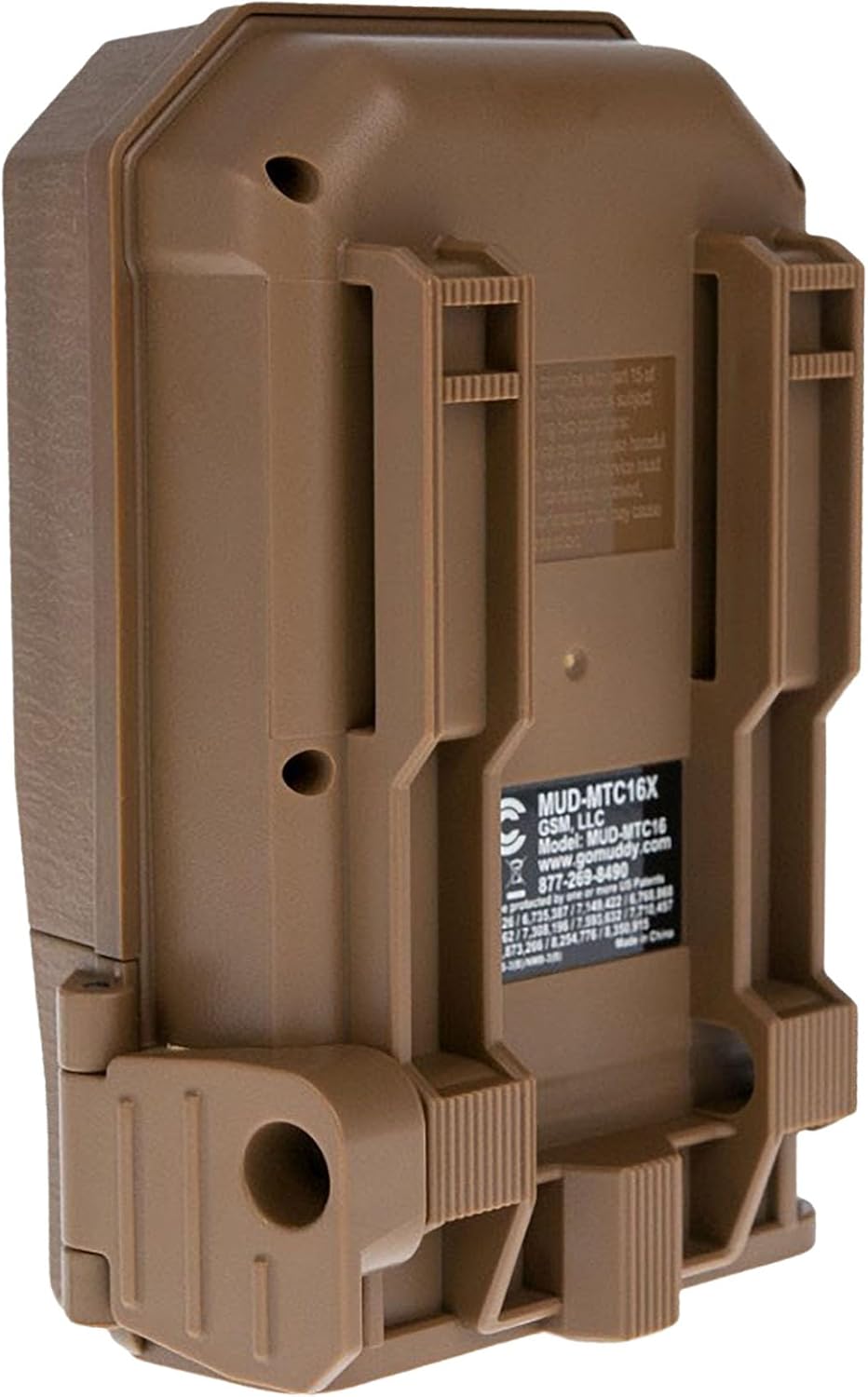
2. irudia: Atzealdea view of the camera showing mounting slots and product label.
5. Funtzionamendu-argibideak
5.1. Piztu/Itzaltzea
- To power on, slide the power switch to the 'ON' position. The camera will perform a self-check.
- Itzaltzeko, irristatu etengailua 'OFF' posiziora.
5.2. Menuen nabigazioa
Use the navigation buttons (Up, Down, Left, Right, OK) to move through the menu options and confirm selections. The display screen will show current settings.
5.3. Photo Mode Settings
In the menu, navigate to 'Photo Settings' to adjust:
- Ebazpena: Select 20MP, 8MP, or 4MP for image quality. Higher resolution results in larger file neurriak.
- Leherketa modua: Set the number of images captured per trigger (1 to 3 photos).
- Atzerapena: Set the time interval between consecutive triggers.
5.4. Bideo moduaren ezarpenak
In the menu, navigate to 'Video Settings' to adjust:
- Ebazpena: Set to 720p for video capture.
- Bideoaren iraupena: Specify the duration of each video clip.
- Audio grabaketa: Enable or disable audio capture with video.
5.5. Detection and Trigger
The camera features an 80-foot detection range and a 0.5-second trigger speed. Ensure the detection area is clear of obstructions that might cause false triggers, such as swaying branches.
6. Mantentzea
6.1. Bateria ordezkatzea
When the battery indicator shows low power, replace all eight AA batteries with new ones to ensure optimal performance and prevent data loss.
6.2. SD txartelaren kudeaketa
Regularly check the SD card capacity. Format the SD card periodically to maintain optimal performance and prevent corruption. Always power off the camera before inserting or removing the SD card.
6.3. Garbiketa
Use a soft, dry cloth to clean the camera lens and housing. Avoid using abrasive cleaners or solvents. Ensure the camera is dry before closing the housing.
7. Arazoak
- Kamera ez da pizten: Egiaztatu bateriaren instalazioa eta ziurtatu bateriak berriak direla.
- Ez da irudirik/bideorik atera: Verify SD card is inserted correctly and has sufficient space. Check camera settings for proper mode selection and trigger delay.
- Irudi/bideo kalitate eskasa: Ensure the lens is clean. Check resolution settings.
- Eragile faltsuak: Adjust camera placement to avoid moving branches or excessive sunlight in the detection zone.
8. Zehaztapenak
| Ezaugarri | Zehaztapena |
|---|---|
| Modelo zenbakia | MUD-MTC20X |
| Irudien Ebazpena | 20MP, 8MP, 4MP |
| Bideo Ebazpena | 720p @ 30 FPS |
| Detekzio-eremua | 80 oin |
| Abiarazle Abiadura | 0.5 segundo |
| Flash memoria mota | SD (32 GB arte) |
| Energia iturria | 8 x AA pila |
| Argazki sentsoreen teknologia | CMOS |
| Konektibitate Teknologia | Infragorriak |
| Elementuaren pisua | 12.3 ontza |
| Produktuaren neurriak | 1 x 1 x 1 hazbete |
9. Bermearen informazioa
For detailed warranty information, please refer to the official MUDDY webwebgunera edo jarri harremanetan bezeroarentzako arreta-zerbitzura. Gorde erosketa-agiria erosketaren frogagiri gisa.
10. Laguntza
If you require further assistance or have questions not covered in this manual, please visit the MUDDY support page on their official webwebgunean edo jarri harremanetan bezeroarentzako arreta-zerbitzuarekin. Harremanetarako informazioa normalean produktuaren ontzian edo fabrikatzailearen eskuliburuan aurki daiteke. webgunea.