
Sarrera
This manual provides essential information for the safe and efficient use of your Google Pixel 9 Pro 5G smartphone. Please read these instructions carefully before operating your device.

1. irudia: Aurrealdea view of the Google Pixel 9 Pro 5G.
Kutxan dagoena
Egiaztatu elementu guztiak ontzian daudela:
- Google Pixel 9 Pro telefonoa
- USB-C to USB-C Cable (1m, USB 2.0)
- SIM erretilua ateratzeko tresna
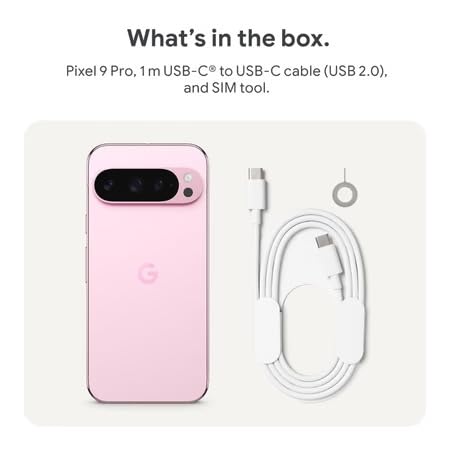
Figure 2: Included items in the Pixel 9 Pro packaging.
Konfigurazioa
1. SIM txartelaren txertatzea
- Bilatu SIM txartelaren erretilua zure Pixel 9 Pro-ren alboan.
- Insert the provided SIM ejector tool into the small hole on the SIM tray and press gently until the tray pops out.
- Place your Nano-SIM card into the tray with the gold contacts facing down. Ensure it is seated correctly.
- Carefully push the SIM tray back into the device until it is flush.
2. Hasierako kargatzea
Lehenengo aldiz erabili aurretik, gomendagarria da gailua guztiz kargatzea.
- Konektatu USB-C kablea telefonoaren beheko aldean dagoen kargatzeko atakara.
- Connect the other end of the cable to a compatible USB power adapter (sold separately) and plug it into a power outlet.
- Pantailako bateriaren ikonoak kargaren egoera adieraziko du.
3. Piztu/Itzaltzea
- Pizteko: Press and hold the Power button (located on the right side) until the Google logo appears on the screen.
- Itzaltzeko: Sakatu eta eutsi pizteko botoiari, eta ondoren, sakatu 'Itzali' pantailan.
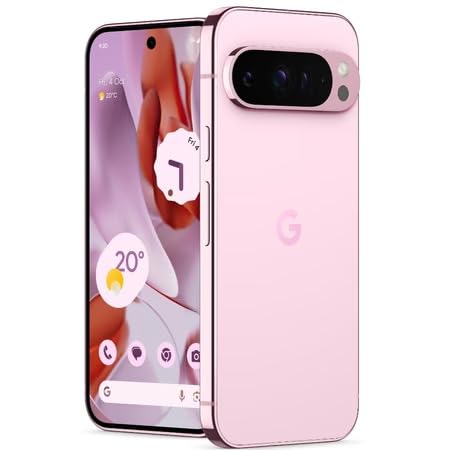
Figure 3: Power and volume buttons on the side of the device.
4. Lehen Konfigurazioko Morroia
Upon powering on for the first time, follow the on-screen instructions to:
- Hautatu zure hizkuntza eta eskualdea.
- Konektatu Wi-Fi sare batera.
- Hasi saioa zure Google kontuarekin edo sortu berri bat.
- Set up security features such as fingerprint unlock, face unlock, PIN, pattern, or password.
- Transferitu datuak gailu zahar batetik (aukerakoa).
Funtzionamendu-argibideak
Oinarrizko Nabigazioa
- Ukipen-pantailaren keinuak: Interact with the device using taps, swipes, pinches (for zoom), and long presses.
- Hasierako pantaila: Access your applications, widgets, and customize your layout.
- Jakinarazpenak: Irristatu hatza behera pantailaren goialdetik view jakinarazpenak.
- Ezarpen azkarrak: Swipe down twice from the top of the screen to access quick settings toggles (Wi-Fi, Bluetooth, etc.).
Kameraren funtzionamendua
The Pixel 9 Pro features a powerful triple rear camera system.

Figure 4: Rear camera system of the Pixel 9 Pro.
- Kamera irekitzea: Tap the Camera app icon on your home screen or lock screen.
- Switching Lenses: Tap the icons on the viewfinder to switch between wide, ultrawide, and 5x telephoto lenses.
- Filmatzeko moduak: Select from various modes such as Night Sight for low-light conditions, Astrofotografia for capturing stars, Makroa for close-up shots, Esposizio luzea for creative effects, and Erretratua for depth-of-field effects.
- Super Bereizmen Zooma: Pinch the screen to digitally zoom up to 30x. For video, Super Res Zoom supports up to 20x.
- Kontrol profesionalak: Access advanced camera settings like shutter speed and manual focus for greater creative control.
Baterien kudeaketa
- Bateriaren maila egiaztatzea: View bateria ehunekoatage in the status bar or in Settings > Battery.
- Bateria Aurrezle Muturrekoa: Enable this mode in Settings > Battery > Extreme Battery Saver to significantly extend battery life.
- Kargatzen: Use the provided USB-C cable and a compatible power adapter for optimal charging speed.
Segurtasun Ezaugarriak
Your Pixel 9 Pro incorporates multiple hardware security layers to protect your data.
- Hatz-marka desblokeatzea: Erregistratu zure hatz-markak Ezarpenak > Segurtasuna eta pribatutasuna > Gailuaren desblokeoa atalean.
- Aurpegia desblokeatzea: Konfiguratu aurpegi-ezagutza eroso desblokeatzeko.
- PINa/Eredua/Pasahitza: Always set a strong screen lock method.
- Software eguneraketak: Regularly install system updates to ensure your device has the latest security patches.
Tenperatura-sentsorea
The Pixel 9 Pro includes a thermometer for measuring temperature.
- Open the dedicated Thermometer app.
- Follow the on-screen instructions to measure body temperature or the temperature of objects.
- Temperature data can be saved and tracked within the Fitbit application.
Mantentzea
Zure gailua garbitzea
- Use a soft, lint-free cloth to clean the screen and body of your phone.
- Avoid using abrasive materials, harsh chemicals, or aerosol sprays.
- Do not submerge the device in water, despite its water-resistant rating.
Software eguneraketak
Google regularly releases software updates to improve performance, add features, and enhance security.
- To check for updates, go to Settings > System > System update.
- Ensure your device is connected to Wi-Fi and has sufficient battery charge before installing updates.
Zainketa fisikoa
The Pixel 9 Pro is built with Corning Gorilla Glass Victus 2 and is water-resistant, offering durability against everyday drops and spills.
- While durable, avoid excessive impacts or drops to prevent damage.
- Consider using a screen protector and a protective case for additional safeguarding.
Arazoak konpontzea
Gailuak ez du erantzuten
If your phone becomes unresponsive, perform a force restart:
- Sakatu eta eutsi pizteko botoia 10-15 segundo inguru gailua berrabiarazi arte.
Aplikazioak kraskatzen edo izozten
- Itxi arazoa duen aplikazioa eta ireki berriro.
- Clear the app's cache: Go to Settings > Apps > See all apps > [App Name] > Storage & cache > Clear cache.
- Ziurtatu aplikazioa Google Play Store-tik azken bertsiora eguneratuta dagoela.
- Berrabiarazi telefonoa.
Network Connectivity Issues (Wi-Fi/Cellular)
- Toggle Wi-Fi or cellular data off and then back on.
- Berrabiarazi telefonoa.
- Verify that your SIM card is correctly inserted.
- Sarearen ezarpenak berrezarri: Joan Ezarpenak > Sistema > Berrezarri aukerak > Berrezarri Wi-Fia, mugikorra eta Bluetootha atalera.
Bateria azkar husten
- Bateriaren erabilera egiaztatu Ezarpenak > Bateria atalean, energia kontsumitzen duten aplikazioak identifikatzeko.
- Murriztu pantailaren distira eta pantailaren denbora-muga.
- Disable unnecessary features like GPS, Bluetooth, and Wi-Fi when not in use.
- Enable Extreme Battery Saver mode.
Fabrika Berrezarri (Azken Aukera)
Warning: A factory reset will erase all data from your phone. Back up all important data before proceeding.
- Joan Ezarpenak > Sistema > Berrezarri aukerak > Ezabatu datu guztiak (fabrika berrezartzea).
- Confirm your decision when prompted.
Zehaztapenak
| Ezaugarri | Xehetasuna |
|---|---|
| Marka | |
| Eredua | Pixel 9 Pro |
| Sistema eragilea | Android 15 |
| Prozesadorea | Google Tensor G4 (3.1 GHz) |
| RAM | 16 GB |
| Barne Biltegiratzea | 256 GB |
| Bistaratzea | 6.3 Inches LTPO OLED (Actua), 1280 x 2856 Pixels, 120 Hz Refresh Rate |
| Atzeko kamera | 50 MP wide + 48 MP ultrawide (Macro) + 48 MP 5x telephoto |
| Aurrealdeko kamera | 42 MP |
| Bateria Edukiera | 4700 milioiamp Hours (up to 24 hours average life) |
| Konektibitatea | 5G, Wi-Fi 7, Bluetooth 5.3, NFC, UWB, USB-C |
| SIM txartela | Single Nano SIM |
| Uraren Erresistentzia | Urarekiko erresistentea |
| Neurriak | 8 x 72 x 153 milimetro |
| Pisua | 198 gramo |
Bermea eta Laguntza
Bermearen informazioa
Your Google Pixel 9 Pro 5G comes with a 1 urteko fabrikatzailearen bermea erosketa-datatik aurrera. Berme honek erabilera normalaren pean fabrikazio-akatsak estaltzen ditu. Gorde erosketaren egiaztagiria berme-erreklamazioetarako.
Bezeroarentzako Arreta
For technical assistance, warranty claims, or other support inquiries, please contact Google customer service:
- Fabrikatzailea: Google LLC, 1600 AmpParkway hitheatrea, Mendia View, CA 94043, AEB
- Phone Support (India): +91 7718892303
- Importer Contact (India): Nexora Axis Private Limited (+91 7718892303)
For the most up-to-date support information, please visit the official Google Pixel support webgunea.