
1. Sarrera
This manual provides detailed instructions for the proper use and maintenance of your BAOFENG UV-32 10W Ham Radio. The UV-32 is a multi-band two-way radio featuring 10W selectable power, GPS navigation, a 2.0-inch color display, and multiple programming options including wireless app connectivity. Please read this manual thoroughly before operating the device to ensure safe and efficient communication.
2. Segurtasun informazioa
Observe the following safety precautions to prevent injury or damage to the radio:
- Ez erabili irratia lehergai diren atmosferatan (adibidez, gas sukoiak, hauts-partikulak, hauts metalikoak).
- Ez transmititu antena konektatuta gabe.
- Keep the antenna at least 2.5 cm (1 inch) away from your body when transmitting.
- Use only BAOFENG-approved batteries and chargers. Unauthorized accessories may cause damage or fire.
- Do not disassemble or modify the radio. Repairs should only be performed by qualified technicians.
- Saihestu eguzki-argiaren edo tenperatura altuen eraginpean denbora luzez egotea.
- Do not operate the radio while driving or performing other activities that require full attention.
3. Paketearen edukia
Egiaztatu elementu guztiak zure paketean daudela:
- 1 x BAOFENG UV-32 Radio
- 1 x 2500mAh bateria
- 1 x USB-C Charger
- 1 x Desktop Charger Base
- 1 x Standard UV Antenna
- 1 x Long Airband Antenna
- 1 x Aurikularra
- 1 x Gerriko Klip
- 1 x Radio Case Holder

Image: The BAOFENG UV-32 radio shown with its complete set of accessories, including the battery, charger, antennas, headset, belt clip, and case holder.
4. Produktua amaitu daview
Familiarize yourself with the main components of your UV-32 radio.

Irudia: Aurrealdea view of the BAOFENG UV-32 radio, highlighting the 2.0-inch color display, alphanumeric keypad, and function buttons.
Funtsezko osagaiak:
- Antena konektorea: For attaching the standard UV or airband antenna.
- Potentzia/Bolumen botoia: Irratia piztu/itzali eta bolumena doitzen du.
- Pantaila: 2.0-inch color screen showing frequency, channel, battery status, and other indicators.
- PTT botoia: Push-To-Talk button for transmitting.
- Side Keys (P1, P2): Customizable function keys.
- Teklatua: Alphanumeric input for frequencies, channels, and menu navigation.
- USB-C kargatzeko ataka: For direct battery charging.
- Accessory Jack: For connecting the headset or programming cable.
5. Konfigurazioa
5.1 Bateriaren instalazioa eta kargatzea
- Align the 2500mAh Li-ion battery with the grooves on the back of the radio.
- Irristatu bateria gorantz, bere lekuan klik egin arte.
- To charge, connect the USB-C charger directly to the battery's USB-C port or place the radio with the battery attached into the desktop charging base.
- The charging indicator on the desktop base will show red during charging and green when fully charged.

Image: A close-up of the 2500mAh Li-ion battery for the UV-32, highlighting its integrated USB-C charging port.
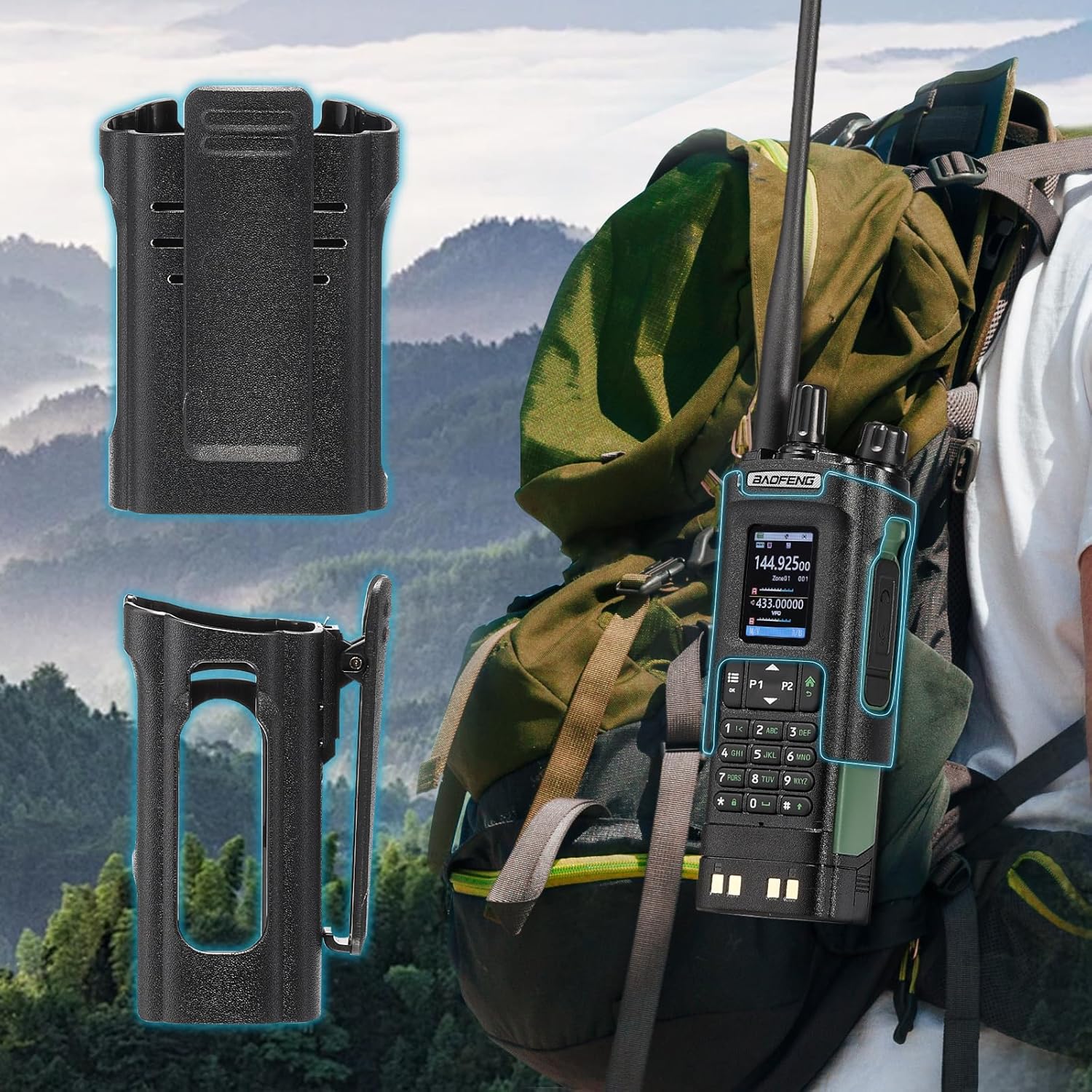
Image: The BAOFENG UV-32 radio demonstrating both direct USB-C charging and charging via its desktop cradle.
5.2 Antenen instalazioa
- Select the appropriate antenna: the standard UV antenna for general VHF/UHF use or the long airband antenna for enhanced aviation signal reception.
- Screw the chosen antenna clockwise onto the antenna connector at the top of the radio until it is finger-tight. Do not overtighten.

Image: The BAOFENG UV-32 radio illustrating the use of two different antennas: a standard antenna for UHF/VHF and a longer antenna specifically designed for airband reception.
5.3 Belt Clip Installation
- Align the belt clip with the screw holes on the back of the radio.
- Lotu gerriko-klipak emandako torlojuak erabiliz.
- The radio case holder can be used to attach the radio to a backpack or belt for secure carrying.

Image: The BAOFENG UV-32 radio securely mounted to a backpack strap using its belt clip and an additional case holder, demonstrating portability.
6. Irratiaren funtzionamendua
6.1 Piztea/Itzaltzea eta Bolumena
Rotate the Power/Volume knob clockwise to turn the radio on and increase volume. Rotate counter-clockwise to decrease volume and turn the radio off.
6.2 Bistaratuview
The 2.0-inch color display provides essential information:
- Frequency/Channel: Displays the current operating frequency or channel number.
- Bateria maila: Bateria karga geratzen dela adierazten du.
- Seinalearen indarra: Shows the strength of received signals.
- Modu adierazleak: Icons for various functions like GPS, Bluetooth, power level, etc.

Image: A close-up of the BAOFENG UV-32's 2-inch color display, showing detailed frequency, channel, and status information.
6.3 Channel Mode vs. Frequency Mode
The radio operates in two primary modes:
- Maiztasun modua (VFO): Allows direct input of frequencies for scanning or temporary use.
- Kanal modua (MR): Uses pre-programmed channels for quick access to stored frequencies.
Sakatu MENUA button and navigate to the mode setting to switch between VFO and MR modes.
6.4 Maiztasunaren hautaketa
- Teklatua: In Frequency Mode, directly enter the desired frequency using the numeric keypad.
- Quick Channel Knob: Rotate the top knob to quickly scroll through frequencies or channels.
- Gora/Behera geziak: Use the arrow keys (P1/P2) to fine-tune frequencies or navigate channels.
6.5 Igortzea eta jasotzea
- Ensure an antenna is properly connected.
- Select the desired frequency or channel.
- Transmititzeko, sakatu eta eutsi botoiari PTT Irratiaren alboko botoia. Hitz egin argi mikrofonotik.
- Askatu PTT botoia transmisioa gelditzeko eta jasotzeko modura itzultzeko.
- Potentzia maila: The UV-32 offers High (H), Medium (M), and Low (L) power settings. Adjust this in the menu to balance range and battery life.
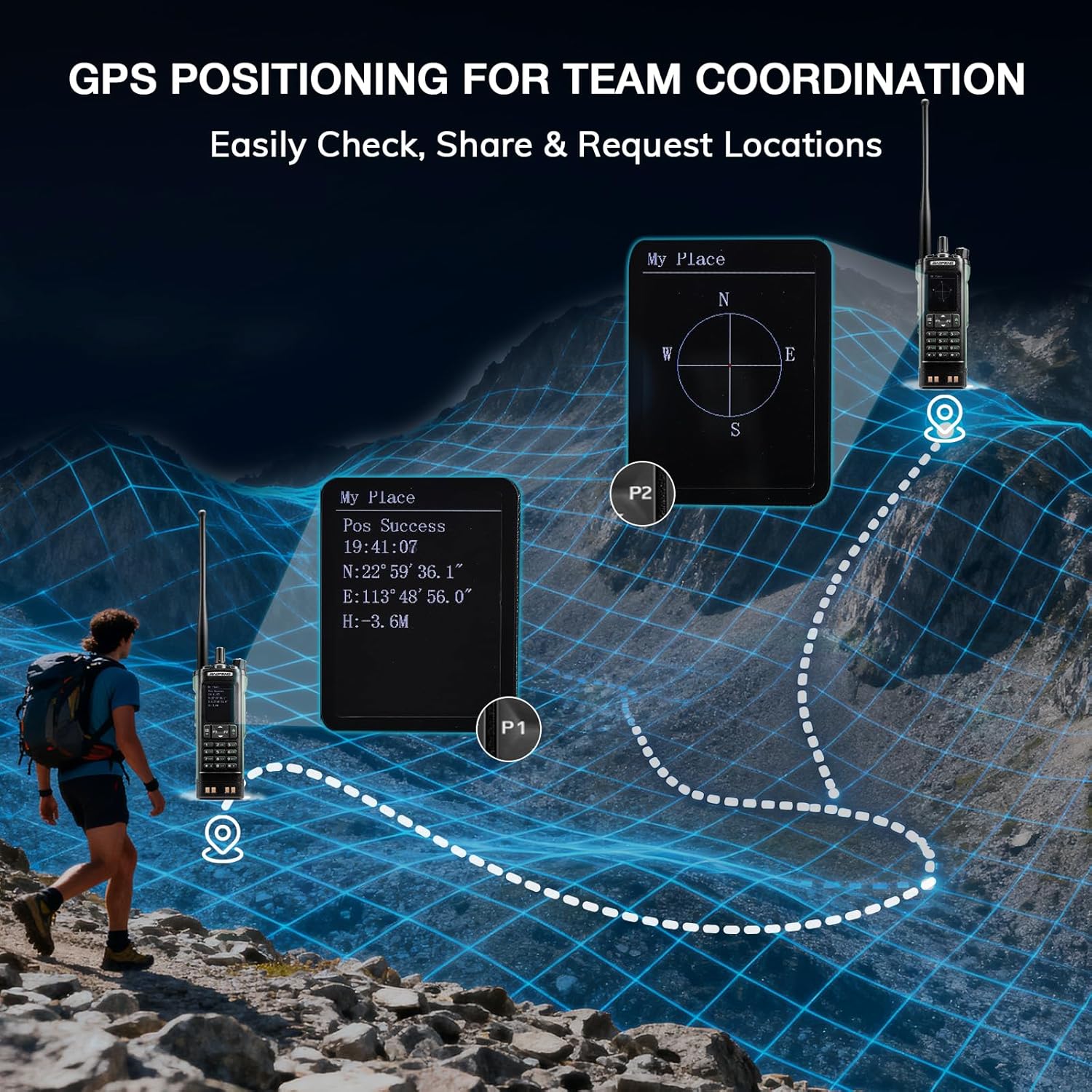
Image: The BAOFENG UV-32 radio's display showing different power output levels (High, Medium, Low) and an external SWR meter for measurement.
6.6 Programazio Aukerak
The UV-32 offers several methods for programming frequencies and settings:
- Haririk gabeko APP programazioa: Connect your radio to a smartphone (iOS/Android) via Bluetooth using the dedicated BT app for quick and wireless programming.
- CHIRP Software: For advanced or bulk programming, use CHIRP software on a PC. Select "UV-17ProGPS" as the radio model in CHIRP.
- Teklatuaren programazioa: Basic programming can be done directly on the radio using the keypad and menu system.
- One-Key Frequency Copy: This feature allows for easy cloning of frequencies from another radio. Refer to the radio's on-screen prompts or full manual for specific steps.

Image: An illustration depicting the various programming methods available for the BAOFENG UV-32, including mobile app (Bluetooth), CPS software, CHIRP software, and direct keypad input.

Image: Two BAOFENG radios illustrating the one-key frequency copy function, allowing for quick and easy channel cloning between devices.
6.7 GPS nabigazioa
The integrated GPS module provides real-time location data:
- Access the GPS function through the radio's menu.
- View your current latitude, longitude, and altitude.
- The radio supports sharing your location or requesting coordinates from other team members for improved coordination.

Image: A visual representation of the BAOFENG UV-32's GPS functionality, showing how it displays coordinates and facilitates location sharing for team coordination in outdoor environments.
6.8 Enhanced Airband Reception
For clearer reception of aviation signals, utilize the dedicated AM antenna included with your UV-32. This specialized antenna is designed to provide more accurate and stable airband listening compared to standard UV dual-band antennas.
6.9 NOAA Weather Radio
The UV-32 can receive NOAA weather alerts. Consult the radio's menu for instructions on how to scan for and select NOAA channels in your area.
6.10 Alboko tekla pertsonalizagarriak
The radio features four customizable side keys (P1, P2, and two others). These can be programmed via the menu or programming software to quickly access frequently used functions such as scan, monitor, or power level adjustment.

Image: A close-up of the BAOFENG UV-32's side, highlighting the customizable P1 and P2 function keys.
7. Mantentzea
7.1 Irratia garbitzea
Garbitu irratiaren gainazala oihal leun batekin,amp oihalik. Ez erabili produktu kimiko gogorrik edo garbitzaile urratzailerik. Ziurtatu ataka guztiak lehor daudela erabili aurretik.
7.2 Bateria zaintzea
- Bateria guztiz kargatu lehen erabili aurretik.
- Saihestu bateria gehiegi kargatzea edo guztiz hustea.
- Bateria denbora luzez erabiltzen ez duzunean, gorde leku fresko eta lehor batean.
7.3 Biltegiratzea
When storing the radio for a long time, remove the battery and store it separately. Keep the radio in a dry, dust-free environment away from direct sunlight and extreme temperatures.
8. Arazoak
| Arazoa | Kausa posiblea | Irtenbidea |
|---|---|---|
| Irratia ez da pizten | Bateria ez dago behar bezala instalatuta edo deskargatuta. | Ziurtatu bateria ondo lotuta dagoela. Kargatu bateria guztiz. |
| Ezin transmititu | Antenna not connected. Incorrect frequency/channel. Low power setting. | Attach antenna. Verify frequency/channel. Increase power level. |
| Poor reception/transmission range | Obstructions. Low power setting. Incorrect antenna. | Move to an open area. Increase power. Ensure correct antenna is used and properly connected. |
| Programming errors with CHIRP/APP | Incorrect radio model selected. Connection issues. Outdated software/firmware. | Ensure "UV-17ProGPS" is selected in CHIRP. Re-establish Bluetooth connection. Update software/firmware if available. |
9. Zehaztapenak
| Ezaugarri | Xehetasuna |
|---|---|
| Marka | BAOFENG |
| Modelo zenbakia | UV-32 |
| Kanal kopurua | 1000 |
| Maiztasun barrutia | UHF, VHF |
| Potentzia Irteera | Up to 10W (selectable High, Medium, Low) |
| Bistaratzea | 2.0 hazbeteko koloretako pantaila |
| Bateria | 2500mAh Li-ioizko bateria (barne) |
| Kargatzen | USB-C, Desktop Charger Base |
| Ezaugarri bereziak | Digital Display, Dual Band, USB-C Rechargeable, Wireless APP Programming, Wireless Channel Clone, GPS, NOAA Reception |
| Konektibitate-protokoloa | Bluetootha |
| Produktuaren neurriak | 1.2" L x 2.2" W x 4" H |
| Uraren Erresistentzia Maila | Ez Urarekiko Erresistentea |
10. Bermea eta Laguntza
Your BAOFENG UV-32 radio comes with an 18 hilabeteko bermea. BAOFENG also provides bizitza osorako laguntza produktu honetarako.
For technical assistance, warranty claims, or further inquiries, please visit the official BAOFENG webwebgunera edo jarri harremanetan bezeroarentzako arreta-zerbitzuarekin zuzenean. Gorde erosketa-agiria erosketaren frogagiri gisa berme-zerbitzuetarako.