
Sarrera
This manual provides essential information for the setup, operation, maintenance, and troubleshooting of your AWOW Mini PC, Model BA7. Please read these instructions carefully before using the device.

Irudia: Gainetikview of the AWOW BA7 Mini PC, highlighting its compact design and key features.
Paketearen edukia
Egiaztatu elementu guztiak paketean daudela:
- AWOW BA7 Mini PC
- Elikatze-moldagailua
- Muntatzeko Torlojuak
- VESA muntatzeko euskarria
- HDMI kablea
- Erabiltzailearen eskuliburua (dokumentu hau)

Image: Illustration of the AWOW BA7 Mini PC and its included accessories: power adapter, screws, VESA mount, HDMI cable, and user manual.
Konfigurazio Argibideak
- Konektatu periferikoak: Connect your keyboard, mouse, and monitor(s) to the appropriate ports on the Mini PC.
Irudia: Aurrealdea view of the Mini PC showing the Power Button, Type-C port, USB 3.2 ports, and 3.5mm Audio Jack.

Irudia: Atzealdea view of the Mini PC showing the DC IN, DP1.2, HDMI2.0, USB 2.0 ports, and RJ45 LAN port.
- Potentzia-konexioa: Connect the power adapter to the DC IN port on the Mini PC, then plug the adapter into a power outlet.
- Piztu: Sakatu Mini PCaren aurrealdean dagoen pizteko botoia. Sistema abiaraziko da.
- Hasierako konfigurazioa: Jarraitu pantailan agertzen diren argibideei Windows 11 Pro-ren hasierako konfigurazioa osatzeko, hizkuntza, eskualdea, sareko konexioa eta erabiltzaile-kontua sortzea barne.
- Sare-konexioa:
- Sare: Connect an Ethernet cable to the RJ45 LAN port for a stable wired connection.
- Haririk gabekoa: During Windows setup or via Windows settings, connect to your Wi-Fi network using the built-in WiFi 6.
Funtzionamendu-argibideak
Oinarrizko Funtzionamendua
- Piztu/Itzali: Press the power button to turn on the PC. To shut down, use the Windows Start menu options (Shut down, Restart, Sleep). A short press on the power button can put the PC to sleep. A long press (approx. 5 seconds) will force a shutdown.
- Bistaratzeko irteera: The Mini PC supports up to three 4K displays simultaneously via DP, HDMI, and USB-C. Connect your monitors and configure display settings in Windows.

Image: A user working with a triple monitor setup, demonstrating the Mini PC's multi-display capability.
- USB konexioa: Utilize the USB 2.0 and USB 3.0 ports for connecting external devices such as external hard drives, USB flash drives, printers, and other peripherals. The Type-C port also supports data transfer and display output.
- Audioa: Konektatu entzungailuak edo bozgorailuak 3.5 mm-ko audio-hargunera.
Erabilera aurreratua
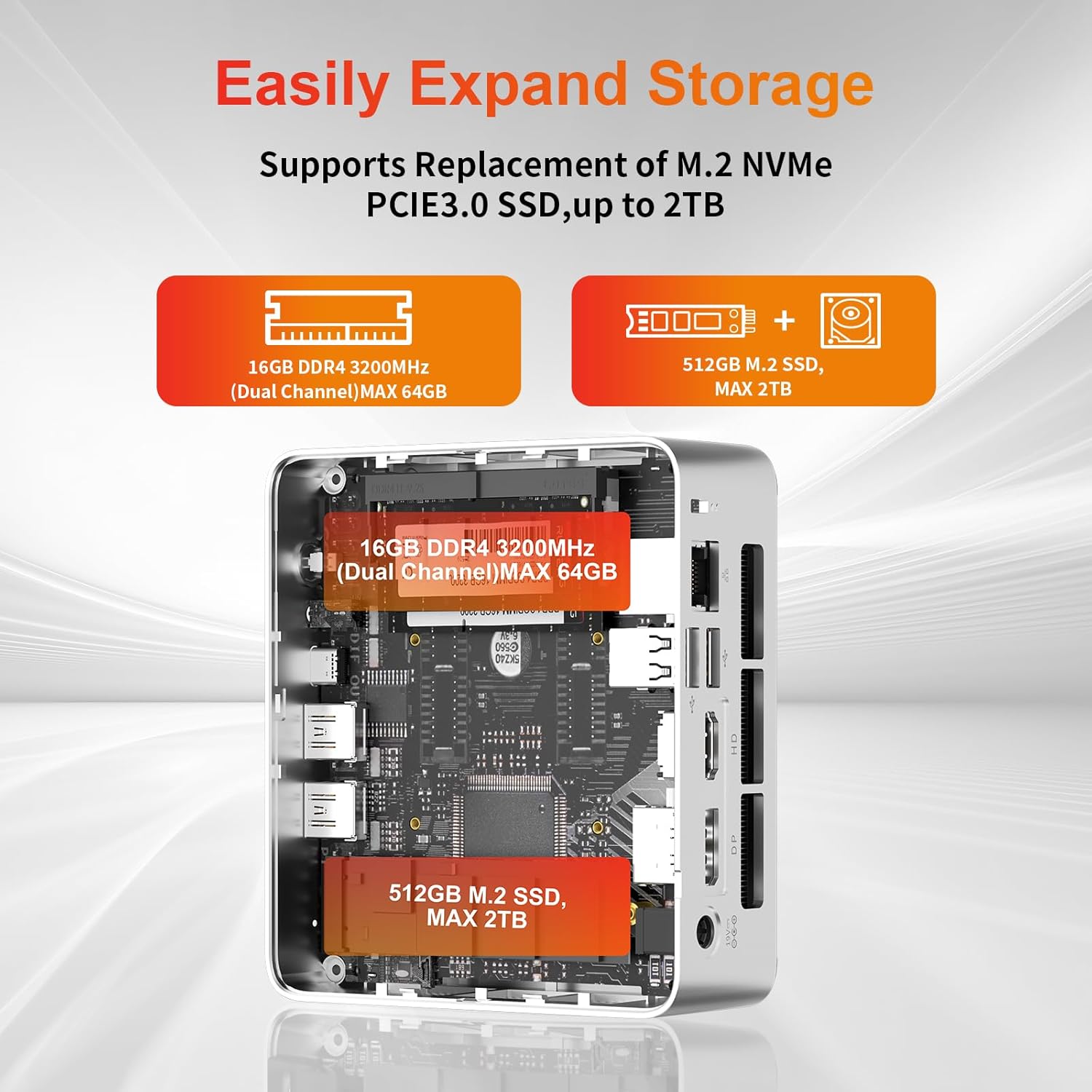
- Biltegiratze hedapena: The Mini PC supports replacement of the M.2 NVMe PCIe 3.0 SSD up to 2TB. It also supports memory expansion up to 64GB DDR4.

Image: Diagram illustrating the internal components and options for expanding storage (M.2 SSD up to 2TB) and RAM (DDR4 up to 64GB).
- VESA muntaketa: Use the included VESA mount bracket to attach the Mini PC to the back of a compatible monitor or to a wall mount, saving desk space.
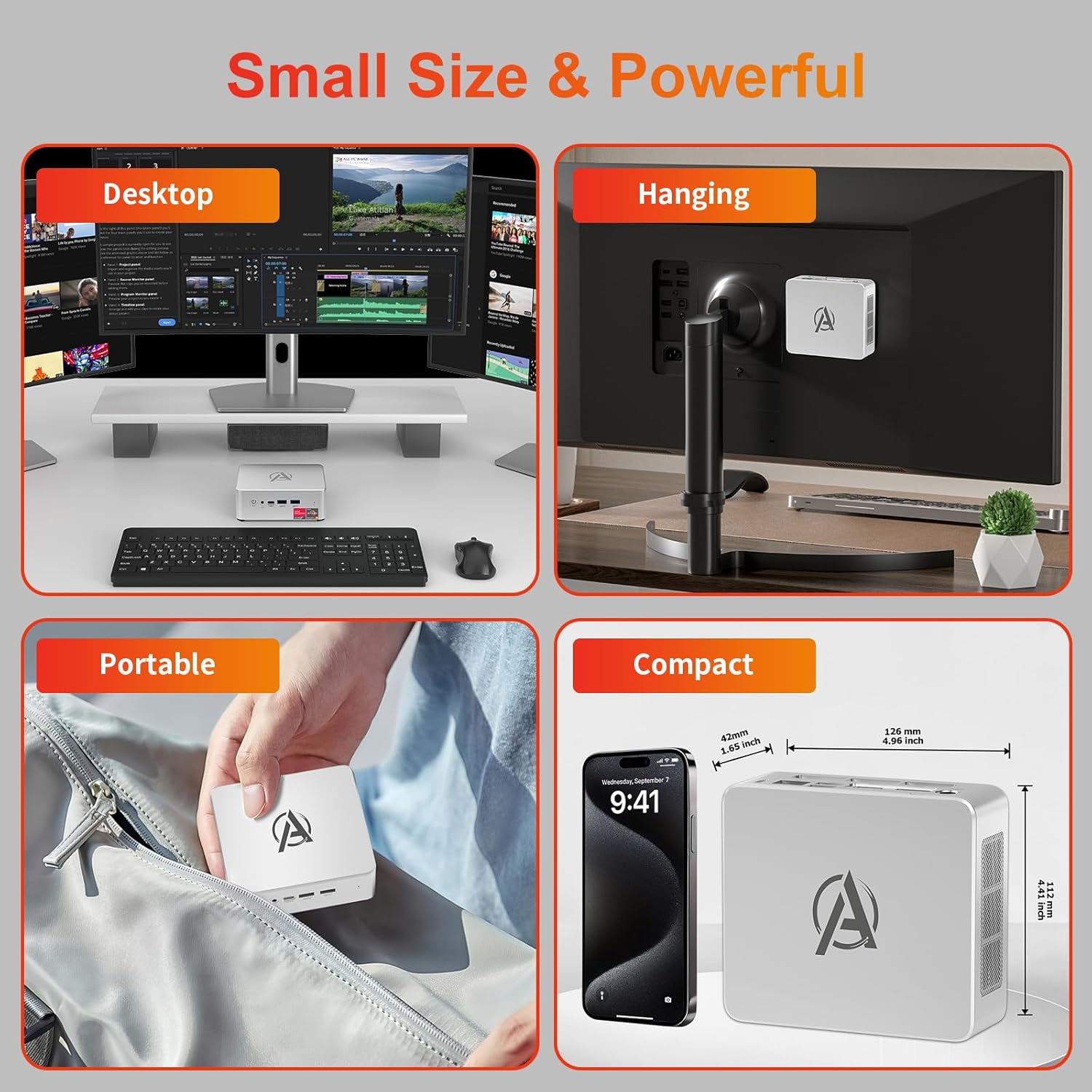
Image: Various usage scenarios for the Mini PC, including desktop, VESA-mounted behind a monitor, portable, and compact size comparison.
Mantentzea
- Garbiketa: Use a soft, dry cloth to clean the exterior of the Mini PC. Do not use liquid cleaners or aerosols. Ensure ventilation openings are free from dust.
- Software eguneraketak: Egiaztatu eta instalatu aldizka Windows eguneraketak eta kontrolatzaileen eguneraketak errendimendu eta segurtasun optimoak bermatzeko.
- Beroaren kudeaketa: Ensure the Mini PC is placed in a well-ventilated area. Avoid blocking the air vents. The intelligent cooling system is designed for low noise and efficient heat dissipation.

Image: Diagram illustrating the internal cooling fan and heat sink, showing airflow for efficient heat dissipation.
- Biltegiratze kudeaketa: Aldian-aldian garbitu beharrezkoak ez direnak files and applications to maintain system performance.
Arazoak konpontzea
- Potentziarik gabe:
- Check if the power adapter is securely connected to both the Mini PC and the power outlet.
- Ziurtatu korronte-hartunea funtzionala dela.
- Saiatu beste korronte bat.
- Ez dago pantailarik:
- Verify that the HDMI/DP/USB-C cable is securely connected to both the Mini PC and the monitor.
- Ziurtatu monitoreak piztuta dagoela eta sarrera-iturri zuzenera konfiguratuta dagoela.
- Saiatu beste pantaila-kable edo monitore batekin, eskuragarri badago.
- Errendimendu motela:
- Itxi atzeko planoan exekutatzen ari diren beharrezkoak ez diren aplikazioak.
- Begiratu eta instalatu dauden Windows eguneratzeak edo kontrolatzaileen eguneratzeak.
- Ziurtatu SSDan leku libre nahikoa dagoela.
- Monitor CPU and RAM usage in Task Manager to identify resource-intensive processes.
- Sarearen konexio arazoak:
- For wired connections, ensure the Ethernet cable is properly connected and the router is working.
- For Wi-Fi, check if the Wi-Fi adapter is enabled and connected to the correct network. Restart your router/modem.
- Sistemak blokeatzen/matxuratzen du:
- Restart the Mini PC.
- Ensure the system is not overheating (check ventilation).
- Run a system diagnostic or check Windows Event Viewerrore-mezuak ikusteko.
Zehaztapenak
| Eredua | AWOW BA7 Mini PC |
| Prozesadorea | AMD Ryzen 5 7430U (6 nukleo, 12 hari, 4.3 GHz arte) |
| Grafikoak | AMD Radeon grafiko integratuak |
| RAM | 16 GB DDR4 (64 GB arte zabaldu daiteke) |
| Biltegiratzea | 512GB PCIe 3.0 M.2 SSD (Expandable up to 2TB) |
| Sistema eragilea | Windows 11 Pro |
| Bideo Irteera | DP1.2 (4K@60Hz), HDMI2.0 (4K@60Hz), USB-C (4K@60Hz) - Supports Triple Display |
| Konektibitatea | WiFi 6, Bluetooth 5.2, 1000Mbps RJ45 LAN |
| Portuak | 2x USB 3.2, 2x USB 2.0, 1x Type-C (Full Function), 1x DP1.2, 1x HDMI2.0, 1x RJ45 LAN, 1x 3.5mm Audio Jack, 1x DC IN |
| Neurriak | 126 mm x 112 mm x 42 mm (gutxi gorabehera 4.96 x 4.41 x 1.65 hazbete) |
| Pisua | 398 g (gailua soilik) Image: The Mini PC with its dimensions (126mm x 112mm x 42mm) and weight (398g) labeled. |
Bermea eta Laguntza
AWOW provides comprehensive support for its products.
- Bermea: This product includes a 12-month service period from the date of purchase, covering manufacturing defects.
- Laguntza teknikoa: Lifetime technical support is available for all AWOW products.
- Harremanetarako: For technical assistance, warranty claims, or any product-related inquiries, please visit the official AWOW webwebgunean edo jarri harremanetan bere bezeroarentzako zerbitzuarekin.

Image: AWOW brand message emphasizing fulfillment, lifetime technical support, and 12-month service.