1. Segurtasun informazio garrantzitsua
Read all instructions before operating the drone. Failure to follow instructions may result in injury or property damage.
- Adinaren gomendioa: This drone is intended for users aged 14 and older. It is not a toy for children.
- Hegaldi-ingurunea: Operate the drone in open, clear areas, away from people, animals, buildings, and power lines. Avoid flying in strong winds or adverse weather conditions.
- Bateriaren segurtasuna: Use only the provided batteries and charging cables. Do not overcharge or puncture batteries. Dispose of batteries properly.
- Helizearen Segurtasuna: Keep hands, face, and loose clothing away from rotating propellers. Always power off the drone before handling propellers.
- Ikusmen lerroa: Mantendu beti dronearekin ikusmen-lerroa hegaldian zehar.
- Pribatutasuna errespetatu: Be mindful of privacy laws when using the camera features.
2. Paketearen edukia
Egiaztatu elementu guztiak paketean daudela:
- E99 Pro Drone Tolesgarria
- Urruneko Kontrola
- Rechargeable Drone Batteries (Quantity: 2)
- USB kargatzeko kablea
- Ordezko Helizeak
- Bihurkin
- Eramateko zorroa
- Erabiltzailearen eskuliburua (dokumentu hau)

Image: Contents of the E99 Pro Foldable Drone package, including the drone, remote, and carrying case.
3. Osagaien identifikazioa
3.1 Droneen osagaiak
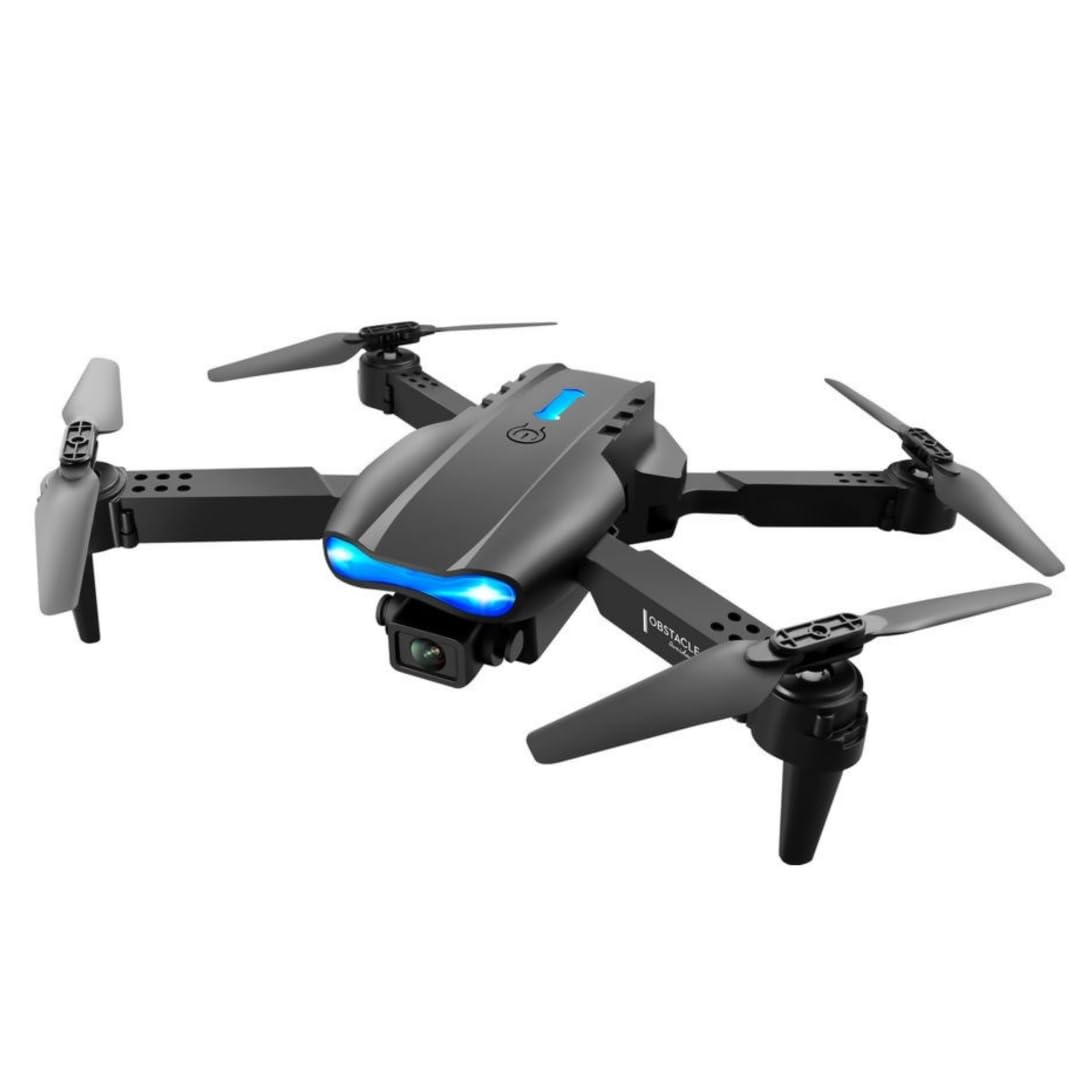
Image: The E99 Pro drone in its unfolded state, showing the main body, propellers, and front camera.
- Aurrealdeko kamera: Main 4K HD camera for aerial photography and video.
- Bottom Camera: Secondary 4K HD camera for alternative perspectives and optical flow positioning.
- helizeen: Four rotating blades for flight.
- Motor Arms: Foldable arms holding the motors and propellers.
- Bateriaren konpartimendua: Located on the underside of the drone.
- Pizteko botoia: Dronea piztu/itzaltzeko.
3.2 Urrutiko agintearen osagaiak

Image: Detailed diagram of the remote control with labels for each button and joystick function.
- Azeleragailu palanka (ezkerreko joystick-a): Altuera (gora/behera) eta biraketa (ezkerra/eskuina) kontrolatzen ditu.
- Zuzendaritza-barra (eskuineko joysticka): Aurrera/atzera eta ezker/eskuin mugimendua kontrolatzen du.
- One Key Up/Landing Button: Aireratze edo lurreratze automatikoa abiarazten du.
- Headless Mode / Return Home (Long Press): Activates headless mode or initiates return to home.
- One Key Correction: For fine-tuning flight stability.
- 3D Roll: Activates 360-degree flip function.
- Left Fly Fine Tuning: Ezker/eskuin desbideratzea doitzen du.
- Right Fly Fine Tuning: Ezker/eskuin desbideratzea doitzen du.
- Forward Fine-tuning: Aurrera/atzera mugitzeko mugimendua doitzen du.
- Backward Fine-tuning: Aurrera/atzera mugitzeko mugimendua doitzen du.
- Switch potentziala: Urrutiko agintea piztu/itzali egiten du.
- Telefonoaren titularra: Extends to hold a smartphone for FPV viewing.
4. Konfigurazioa
4.1 Dronearen bateriaren instalazioa eta kargatzea
- Insert the fully charged drone battery into the battery compartment on the drone's underside. Ensure it clicks securely into place.
- To charge, connect the drone battery to the USB charging cable, then plug the USB cable into a 5V/1A USB adapter (not included). The charging indicator will show charging status.
- Bateria bakoitzeko kargatzeko denbora gutxi gorabehera 60-80 minutukoa da.
4.2 Urrutiko agintearen bateriaren instalazioa
- Ireki urrutiko agintearen atzealdeko bateriaren estalkia.
- Insert 3 AA batteries (not included) according to the polarity markings.
- Itxi bateriaren estalkia ongi.
4.3 Dronea zabaltzea
- Gently unfold the front motor arms first, then the rear motor arms, until they are fully extended and locked into position.
- Ensure all arms are securely locked before flight.
4.4 Aplikazioaren deskarga eta konexioa (FPV)
- Scan the QR code in the manual (or search your app store) for the recommended FPV application.
- Instalatu aplikazioa zure telefonoan.
- Piztu dronea eta urrutiko agintea.
- On your smartphone, connect to the drone's Wi-Fi network (usually named 'WIFI-XXXXXX').
- Open the FPV application to view the live camera feed and access additional controls.
5. Funtzionamendu-argibideak
5.1 Piztea/Itzaltzea eta Parekatzea
- Sakatu eta eutsi droneko pizteko botoia adierazle-argiak piztu arte.
- Press the power switch on the remote control. The remote will beep.
- Push the left joystick (throttle) fully up, then fully down. The remote will beep, and the drone lights will become solid, indicating successful pairing.
5.2 Giroskopioaren Kalibrazioa
- After pairing, place the drone on a flat, level surface.
- Push both joysticks down and to the bottom-left corner simultaneously for 2-3 seconds. The drone lights will flash rapidly and then become solid, indicating successful calibration.
5.3 Takeoff and Landing
- Abiarazte gako bakarrekoa: Press the 'One Key Up/Landing' button once. The drone will automatically ascend to a stable hovering height.
- Eskuzko aireratzea: Push both joysticks down and to the bottom-right corner to unlock the motors. Then, slowly push the left joystick (throttle) up to ascend.
- Gako bakarreko lurreratzea: Press the 'One Key Up/Landing' button once. The drone will automatically descend and land.
- Eskuzko lurreratzea: Slowly pull the left joystick (throttle) down until the drone lands. Once landed, pull both joysticks down and to the bottom-right corner to stop the motors.
5.4 Oinarrizko hegaldi-kontrolak
- Altuera: Sakatu ezkerreko joysticka gora igotzeko, eta behera jaisteko.
- Errotazioa: Push the left joystick left to rotate counter-clockwise, push right to rotate clockwise.
- Aurrera/Atzera: Aurrera hegan egiteko, bultzatu eskuineko joystick-a gora, eta atzera hegan egiteko, tira behera.
- Ezker/Eskuin alboko hegaldia: Sakatu eskuineko joystick-a ezkerrera ezkerrera hegan egiteko, eta eskuinera eskuinera hegan egiteko.
5.5 Hegaldiaren Ezaugarri Aurreratuak
- Abiadura moduak: Press the speed button on the remote to cycle through 3 different speed settings (low, medium, high).
- Bururik gabeko modua: Press the 'Headless Mode' button. In this mode, the drone's orientation is relative to the pilot, regardless of the drone's front direction. Press again to exit.
- 360°-ko biraketak: Fly the drone to a height of at least 3 meters. Press the '3D Roll' button, then push the right joystick in any direction to perform a flip.
- Haizearen erresistentzia: The drone is designed with upgraded motors for stable flight in light wind conditions. Avoid flying in strong winds.

Image: The E99 Pro drone demonstrating its wind-resistant capabilities during flight.
5.6 Kameraren funtzionamendua

Image: Diagram illustrating the E99 Pro's dual camera system, showing the main lens, 90-degree adjustment, and 120-degree wide angle view.
- Argazkia: While connected to the FPV app, tap the photo icon to capture still images.
- Bideoa: While connected to the FPV app, tap the video icon to start recording. Tap again to stop.
- FPV Live Video: The FPV app provides a real-time view from the drone's camera to your smartphone.
- Kamera aldatzea: Use the app to switch between the front and bottom 4K HD cameras.
6. Mantentzea
- Garbiketa: Use a soft, dry cloth to clean the drone and remote control. Do not use water or solvents.
- Helizearen ordezkapena: If a propeller is damaged, use the provided screwdriver to remove the screw, replace the propeller with a spare, and re-secure the screw. Ensure correct propeller (A or B) is installed on the corresponding motor arm.
- Bateria zaintzea: Store batteries in a cool, dry place. Do not store fully charged or fully depleted for extended periods. Charge them to about 50% for long-term storage.
- Biltegiratzea: Fold the drone arms and store the drone and remote in the carrying case when not in use to protect them from damage.
7. Arazoak
| Arazoa | Kausa posiblea | Irtenbidea |
|---|---|---|
| Droneak ez du erantzuten urrutiko aginteari. | Parekatu gabe; bateria baxua; interferentzia. | Re-pair drone and remote; charge batteries; move to an area with less interference. |
| Droneak modu irregularrean hegan egiten du edo noraezean dabil. | Not calibrated; damaged propeller; uneven surface for takeoff. | Giroskopioaren kalibrazioa egin; helize kaltetuak ordezkatu; gainazal lau batetik aireratu. |
| FPV app shows no image or disconnects. | Wi-Fi not connected; app error; weak signal. | Ensure phone is connected to drone's Wi-Fi; restart app and drone; fly closer to the drone. |
| Droneak ez du aireratzen. | Motors not unlocked; low battery. | Unlock motors (joysticks down-right); charge drone battery. |
8. Zehaztapenak
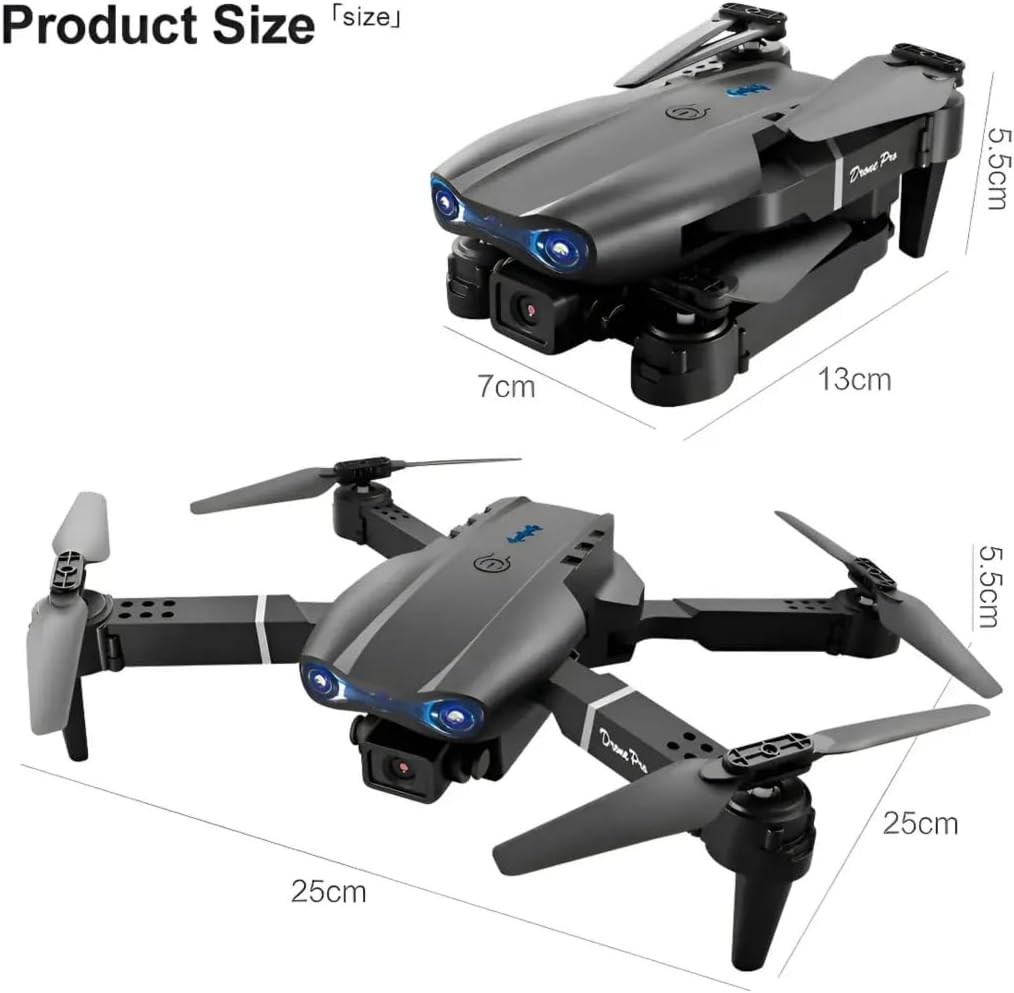
Image: Dimensions of the E99 Pro drone in both folded and unfolded states.
| Ezaugarri | Xehetasuna |
|---|---|
| Ereduaren izena | E99 |
| Marka | Generikoa |
| Bideo Harrapaketa Ebazpena | 4K |
| Ebazpen finko eraginkorra | 8 MP |
| Konektibitate Teknologia | Bluetooth konexioa, Wi-Fi |
| Trebetasun Maila | Denak |
| Elementuaren pisua | 340 gramo (12 ontza) |
| Dronearen bateriaren edukiera | 1800 milioiamp Orduak (bateria bakoitzeko) |
| Kontrol mota | Urruneko Kontrola |
| Materiala | Plastikoa |
| Produktuaren neurriak (tolestuta) | 9.84"L x 9.84"Z x 2.17"A (25 cm x 25 cm x 5.5 cm) |
| Urruneko Kontroleko bateriak | 3 AA bateria (ez dago barne) |
9. Bermea eta Laguntza
Bermeari buruzko informazioa edo laguntza teknikoa lortzeko, jo ezazu zure saltzaileak edo fabrikatzailearen hornitzaile ofizialak emandako harremanetarako datuetara. webgunea.
Gorde erosketa-agiria erosketaren frogagiri gisa, berme-erreklamazioetarako.


