
Sarrera
This manual provides detailed instructions for the ZIUTY T21 Wireless Earbuds. Please read this guide thoroughly before using your earbuds to ensure proper operation and to maximize your listening experience. Keep this manual for future reference.
Kutxan dagoena
Egiaztatu behean zerrendatutako elementu guztiak zure paketean daudela:
- ZIUTY T21 Wireless Earbuds (Left and Right)
- Kargatzeko zorroa ukipen-pantailarekin
- Erabiltzailearen eskuliburua
- USB-A USB-C kargatzeko kablea
- Belarri-puntak (Txikia, Ertaina, Handia)

Image: Contents of the ZIUTY T21 package.
Produktua amaituview
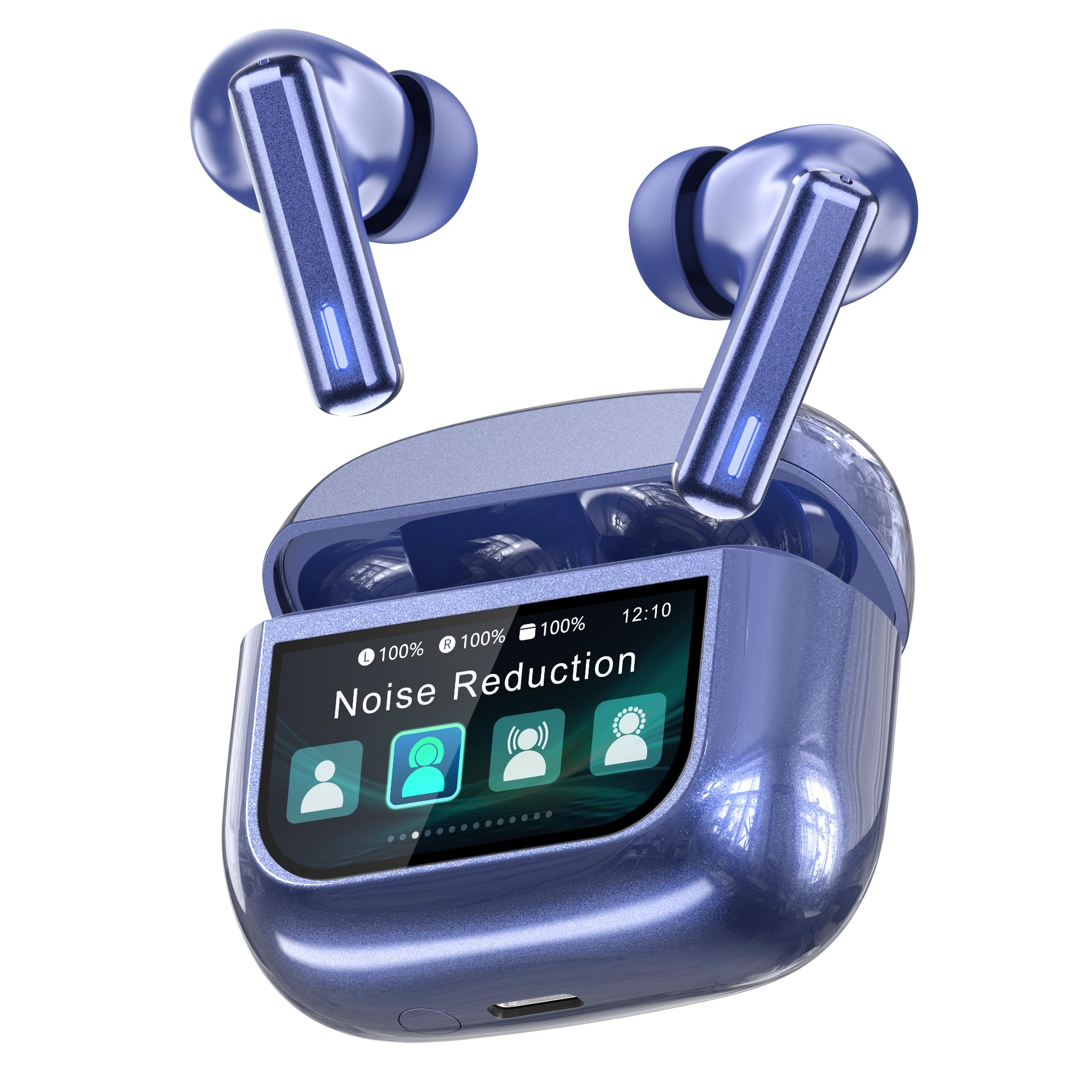
Image: ZIUTY T21 Wireless Earbuds.
Ezaugarri nagusiak
- Ukipen-pantailaren kontrola: Manage music, calls, and settings directly from the charging case.
- Hybrid Active Noise Cancelling (ANC) + Environmental Noise Cancellation (ENC): Reduces ambient noise by up to 40dB and filters 90% of call background chatter.
- 14.2 mm-ko kontrolatzaile dinamikoak: Delivers deep bass and clear highs.
- Bluetooth 5.3: Haririk gabeko konexio egonkorra eta azkarra bermatzen du.
- Jolasaldi luzatua: Up to 7-8 hours on a single charge, and a total of 40 hours with the charging case.
- IPX7 iragazgaitza: Resistant to sweat and rain.
- Diseinu ergonomikoa: Lightweight (4.2g per earbud) with three eartip sizes for comfortable fit.
- 5 EQ moduak: Pertsonalizatu zure soinu profesionalafile (Normal, Rock, Pop, Classic, Jazz).
- "Find My Earbuds" Feature: Locate misplaced earbuds via the charging case.

Image: Key features of the ZIUTY T21 Wireless Earbuds.
Konfigurazioa
1. Entzungailuak eta zorroa kargatzea
Before first use, fully charge the earbuds and the charging case. Connect the provided USB-A to USB-C charging cable to the charging port on the case and a power source. The touch screen display will indicate the charging status.
- A full charge provides approximately 7-8 hours of listening time for the earbuds.
- The charging case provides an additional 4 full charges, totaling up to 40 hours of playtime.
- 10 minutuko karga azkar batek 2 ordu arteko erreprodukzio-denbora eman dezake.

Image: Battery life and charging indication.
2. Zure gailuarekin parekatzea
- Ziurtatu entzungailuak kargatuta daudela eta kargatzeko zorroan sartuta daudela.
- Ireki kargatzeko zorroaren estalkia. Aurikularrak automatikoki sartuko dira parekatze moduan.
- Zure gailuan (smartphone-an, tabletan, etab.), gaitu Bluetooth-a.
- Bilatu "T21" eskuragarri dauden Bluetooth gailuen zerrendan eta hautatu konektatzeko.
- Behin parekatuta, entzungailuak automatikoki konektatuko dira azken parekatutako gailura zorrotik ateratzean.

Image: Bluetooth 5.3 pairing process.
3. Belarri-puntak hautatzea
For optimal sound quality and comfort, choose the eartip size (S, M, L) that best fits your ears. A proper seal is crucial for effective noise cancellation and bass response.

Image: Eartip sizes for comfortable fit.
Funtzionamendu-argibideak
Touch Screen Controls on Charging Case
The charging case features a multi-function LCD touch screen for direct control of various settings without needing your phone.

Image: Multi-function LCD touch screen interface.
- Pasatu hatza: Navigate through different screens (e.g., volume, EQ, ANC modes).
- Sakatu: Select options or confirm actions.
- Bolumenaren doikuntza: Swipe on the screen to adjust playback volume.
- ANC moduak: Tap to switch between Active Noise Cancelling, Transparency Mode, and Normal Mode.
- EQ aurrezarpenak: Select from 5 equalizer modes: Normal, Rock, Pop, Classic, Jazz.
- Bilatu Nire Aurikularrak: Use this feature to locate misplaced earbuds.
- Beste funtzio batzuk: The screen may also offer controls for calls, flashlight, screen lock, language settings, and time display.

Image: Available EQ modes.
Entzungailuen ukipen-kontrolak
The earbuds themselves also feature touch-sensitive areas for basic controls:
- Erreproduzitu/Pausatu: Sakatu bakar batean entzungailu batean.
- Hurrengo ibilbidea: Sakatu birritan eskuineko entzungailuan.
- Aurreko pista: Sakatu bi aldiz ezkerreko entzungailuan.
- Deia erantzun/amaitu: Sakatu bakar batean entzungailu batean.
- Deia baztertu: Sakatu eta eutsi entzungailuetako bat.
- Aktibatu Ahots Laguntzailea: Sakatu hiru aldiz entzungailuetako edozeinetan (funtzionalitatea alda daiteke gailuaren arabera).
Zarata Aktibo Ezeztatzailea (ANC) eta Gardentasun Modua
The ZIUTY T21 earbuds offer three listening modes:
- Zarata ezabatze aktiboa (ANC): Reduces external noise for an immersive audio experience. Ideal for noisy environments.
- Gardentasun modua: Allows you to hear your surroundings while still enjoying your audio, enhancing awareness.
- Modu normala: Zarata ezeztapenik edo gardentasunik gabeko audio erreprodukzio estandarra.
Switch between these modes using the touch screen on the charging case or by tapping the earbuds (refer to specific earbud touch control instructions if available in the product documentation).

Image: Active Noise Cancelling in action.
Deiak egitea eta jasotzea
The earbuds are equipped with AI-enhanced Environmental Noise Cancellation (ENC) microphones for clear calls, even in noisy environments.

Image: Clear call quality with ENC.
- Deia erantzun/amaitu: Sakatu bakar batean entzungailu batean.
- Deia baztertu: Sakatu eta eutsi entzungailuetako bat.
"Find My Earbuds" Feature
If you misplace your earbuds, use the "Find My Earbuds" function on the charging case's touch screen. This feature will cause the earbuds to emit a sound, helping you locate them.

Image: Using the "Find My Earbuds" feature.
Mantentzea
Garbiketa
Regular cleaning helps maintain optimal performance and hygiene. Use a soft, dry, lint-free cloth for the earbuds and charging case. For charging contacts and ear tip mesh, gently clean with an alcohol pad or a dry cotton swab to remove dust or earwax that might affect charging or sound volume.

Image: Cleaning instructions for earbuds.
Urarekiko erresistentzia (IPX7)
The ZIUTY T21 earbuds are IPX7 waterproof, meaning they can withstand immersion in water up to 1 meter for 30 minutes. This makes them suitable for workouts and use in light rain. However, the charging case is not waterproof. Do not expose the charging case to water.

Irudia: IPX7 iragazgaitza.
Earbud Removal Gesture
To easily remove the earbuds from the charging case, follow these steps:
- Gently push the earbud inwards towards the center of the case.
- Lift the earbud upwards to remove it.

Image: Easy earbud removal gesture.
Arazoak konpontzea
| Arazoa | Kausa posiblea | Irtenbidea |
|---|---|---|
| Earbuds not charging or low volume. | Dirty charging contacts or ear tip mesh. | Clean the charging contacts on both earbuds and inside the case, and the ear tip mesh, using an alcohol pad or dry cotton swab. |
| Aurikularrak ez dira gailuarekin parekatzen. | Bluetooth not enabled, earbuds not in pairing mode, or previously paired device interference. | Ensure Bluetooth is on. Place earbuds in case, close, then open lid to re-enter pairing mode. Forget "T21" from your device's Bluetooth list and try pairing again. |
| Soinua entzungailu batetik bakarrik. | One earbud not connected or low battery. | Place both earbuds back in the charging case, close the lid, then open it again. Ensure both earbuds are charged. Re-pair if necessary. |
| Deiaren kalitate eskasa. | Environmental noise, microphone obstruction. | Ensure microphones are not covered. Move to a quieter environment if possible. |
| Ukipen-kontrolek ez dute erantzuten. | Earbuds or case screen may be dirty or wet. | Clean the touch surfaces. Ensure hands are dry. Restart earbuds by placing them in the case and taking them out. |
Zehaztapenak
| Ezaugarri | Xehetasuna |
|---|---|
| Marka | ZIUTY |
| Modelo zenbakia | T21 |
| Konektibitate Teknologia | Bluetooth 5.3 |
| Zarata Kontrola | Active Noise Cancellation (ANC) + Environmental Noise Cancellation (ENC) |
| Belarrien Kokatzea | Belarrian |
| Audio kontrolatzaile mota | 14.2 mm-ko gidari dinamikoa |
| Maiztasun barrutia | 20 Hz - 20 KHz |
| Bateriaren iraupena (entzungailuak) | 7-8 ordu (karga bakarra) |
| Jolas-denbora osoa (zorroarekin) | Gehienez 40 ordu |
| Uraren Erresistentzia Balorazioa | IPX7 (aurikularretarako soilik) |
| Earbud pisua | 4.2 g (aurikular bakoitzeko) |
| Color (Current Model) | Urdina |
Bermea eta Laguntza
The ZIUTY T21 Wireless Earbuds come with a limited warranty. Please refer to the warranty card included in your package for specific terms and conditions. For technical support, troubleshooting assistance, or warranty claims, please contact ZIUTY customer service through the retailer where you purchased the product or visit the official ZIUTY webgunea.
Fabrikatzailea: Huizhou Tuopule Technology Co., LTD
Bermearen deskribapena: 1 year (as per product specifications, specific terms apply)