
Sarrera
This manual provides comprehensive instructions for the setup, operation, maintenance, and troubleshooting of your T-Wolf T60 Wired 60% Mechanical Keyboard. Please read this manual carefully before using the product to ensure proper function and longevity.
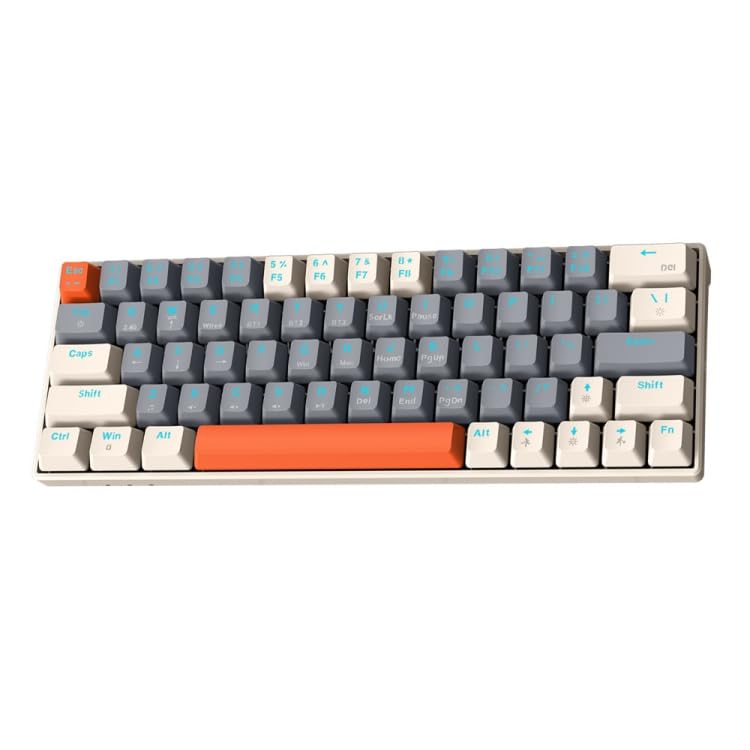
Image: T-Wolf T60 Wired 60% Mechanical Keyboard. This image displays the compact design of the keyboard, highlighting its 63-key layout and wired connectivity.
Konfigurazioa
- Deskargatzea: Carefully remove the keyboard and all included accessories from the packaging. Verify that all components are present: T-Wolf T60 keyboard and USB-C to USB cable.
- Teklatua konektatzea:
- Bilatu USB-C ataka teklatuan.
- Insert the USB-C end of the provided cable into the keyboard's USB-C port.
- Insert the USB-A end of the cable into an available USB 2.0 port on your computer (PC, desktop, or laptop).
- Gidariaren instalazioa: The T-Wolf T60 keyboard is plug-and-play. Your operating system should automatically detect and install the necessary drivers. No manual driver installation is typically required.
- Hasierako proba: Open a text editor or word processor and type to confirm the keyboard is functioning correctly.
Funtzionamendua
The T-Wolf T60 is a 60% mechanical keyboard with 63 keys, designed for efficient typing and gaming. It features RGB backlighting and multi-key anti-ghosting.
- Oinarrizko Funtzioak: All standard alphanumeric and symbol keys function as expected. Due to the compact 60% layout, some functions (like F-keys, arrow keys, and navigation keys) are accessed via a Function (Fn) key combination. Refer to the keyboard's keycap legends for specific Fn key combinations.
- RGB atzeko argiztapena: The keyboard features customizable RGB backlighting.
- To cycle through different lighting modes, use the designated Fn key combination (e.g., Fn + \ or Fn + P).
- To adjust brightness, use the designated Fn key combination (e.g., Fn + Up/Down arrow keys, if available via Fn layer).
- To change lighting speed, use the designated Fn key combination (e.g., Fn + Left/Right arrow keys, if available via Fn layer).
- Multi-Key Anti-Ghosting: This feature ensures that multiple simultaneous key presses are registered accurately, which is beneficial for fast-paced gaming and complex commands.
Mantentzea
Proper maintenance helps extend the lifespan of your keyboard.
- Garbiketa:
- Deskonektatu teklatua ordenagailutik garbitu aurretik.
- Erabili aire konprimituzko lata bat tekla-tapoien arteko hautsa eta hondakinak kentzeko.
- Garbitu teklak eta teklatuaren gainazala oihal leun eta apur batekinamp, oihal lihogabea. Saihestu gehiegizko hezetasuna.
- Do not use harsh chemicals, abrasive cleaners, or solvents, as these can damage the keyboard's finish and keycap legends.
- Biltegiratzea: Denbora luzez erabiltzen ez duzunean, gorde teklatua leku garbi eta lehor batean, eguzki-argitik eta muturreko tenperaturetatik urrun.
- Kableen zainketa: Avoid bending or twisting the USB-C cable excessively to prevent internal damage.
Arazoak konpontzea
If you encounter issues with your T-Wolf T60 keyboard, refer to the following common solutions:
- Teklatuak ez du erantzuten:
- Ziurtatu USB-C kablea ondo konektatuta dagoela teklatura eta ordenagailura.
- Saiatu teklatua ordenagailuko beste USB ataka batera konektatzen.
- Probatu teklatua beste ordenagailu batean arazoa teklatuan edo jatorrizko ordenagailuaren konfigurazioan dagoen zehazteko.
- Berrabiarazi ordenagailua.
- RGB Backlighting Not Working or Incorrect:
- Ziurtatu teklatua behar bezala konektatuta dagoela eta energia jasotzen duela.
- Try cycling through the RGB modes using the Fn key combinations mentioned in the Operation section.
- Check if the brightness is set to maximum.
- Giltzak ez dira erregistratzen edo bi aldiz idazten ari dira:
- Garbitu ondo teklatua, batez ere kaltetutako teklak ingurua, aire konprimatua erabiliz.
- Ziurtatu ez dagoela hondakinik tekla-tapen azpian.
- If the issue persists, it may indicate a hardware fault.
Zehaztapenak
| Ezaugarri | Xehetasuna |
|---|---|
| Marka | T-OTSOA |
| Eredua | T60 |
| Konektibitate Teknologia | USB-C (kable bidezkoa) |
| Gailu bateragarriak | PC, desktop, laptop |
| Teklatuaren deskribapena | Jokoak, Mekanikoa |
| Gako kopurua | 63 |
| Ezaugarri bereziak | RGB Backlighting, Multi-Key Anti-Ghosting |
| Materiala | Plastikoa |
| Teklatuaren diseinua | QWERTY |
Bermea eta Laguntza
Bermeari buruzko informazioa eta laguntza teknikoa lortzeko, kontsultatu erosketarekin batera emandako dokumentazioa edo jarri harremanetan zuzenean saltzailearekin/fabrikatzailearekin. Gorde erosketaren frogagiria bermeari buruzko erreklamazioetarako.
Ekoizlea: T-Wolf