
1. Sarrera
This manual provides detailed instructions for the installation, operation, and maintenance of your IIWEY C4 PRO 4-Channel Dash Cam and its accompanying hardwire kit. The C4 PRO system is designed to provide comprehensive video surveillance for your vehicle, offering multi-channel recording and advanced parking monitoring features.
2. Paketearen edukia
Mesedez, egiaztatu behean zerrendatutako elementu guztiak zure paketean sartuta daudela:
- C4 PRO Dash Cam Set (Main unit with front, interior, and rear cameras)
- Type C Port Hardwire Kit
- Installation Crowbar
- 8 x Fuse Tap Cables (various types: LP, Mini, ATO, Micro2)
- 4 x Cable Hiding Clips

Image: Contents of the hardwire kit, including the main cable, various fuse taps, and a pry tool.
3. Konfigurazioa eta instalazioa
3.1 Dash Cam instalazioa
- Unitate nagusia muntatzea: Aukeratu kokapen egoki bat haizetakoan, normalean atzeko atzeanview ispilua, zure ikusmena oztopatzen ez duena view. Clean the area thoroughly before attaching the dash cam mount.
- Kamerak konektatzea: Connect the interior and rear cameras to the main unit. Ensure cables are routed neatly and securely, using the provided cable hiding clips.
- Potentzia-konexioa: For continuous power and parking mode functionality, connect the dash cam to the hardwire kit.

Irudia: Gainetikview of the IIWEY C4 PRO dash cam system, illustrating its multi-camera setup and connectivity.
3.2 Kableatu finkoen kitaren instalazioa
The hardwire kit enables 24-hour parking surveillance and protects your vehicle's battery from draining.
- Identify Fuse Box: Locate your vehicle's fuse box, typically found under the dashboard or in the engine bay.
- Konektatu kableak: The hardwire kit has three wires:
- Red (BAT): Connect to a constant power fuse (always on, even when the ignition is off).
- Yellow (ACC): Connect to an accessory power fuse (on only when the ignition is on).
- Beltza (GND): Connect to a metal bolt or screw on the vehicle's chassis for ground.
- Use Fuse Taps: Select the appropriate fuse tap cable (LP/Mini/ATO/Micro2) that matches your vehicle's fuse type. Insert the original fuse into the lower slot of the tap, and a new fuse (same amperage) for the dash cam into the upper slot.
- Ibilbide kableak: Use the installation crowbar to neatly tuck the cables along the vehicle's trim and headliner to conceal them.

Irudia: Xehetasun handikoa view of the hardwire kit's ACC, GND, and BAT wires for proper connection.

Image: Illustration of different fuse tap types and a typical hardwire kit installation in a vehicle's fuse box.
4. Funtzionamendu-argibideak
4.1 Oinarrizko funtzionamendua
Once properly installed and powered, the dash cam will typically power on and begin recording automatically when your vehicle starts. It will power off shortly after the vehicle is turned off, unless parking mode is active via the hardwire kit.
4.2 Parking Modes (with Hardwire Kit)
The hardwire kit enables 24-hour surveillance with two distinct parking modes:
- Denbora-tarteko aparkaleku modua: The dash cam records footage at a low frame rate (e.g., 1 frame per second) to conserve memory while continuously monitoring your parked vehicle. This allows for extended recording periods.
- Talkak hautemateko aparkaleku modua: The dash cam remains in standby mode and automatically activates to record and lock video footage upon detecting a significant impact or collision.

Image: Explanation of 24-hour parking modes, including time-lapse and collision detection.
4.3 Kanal anitzeko grabaketa
The C4 PRO supports various recording configurations:
| Modua | Aurrealdeko kamera | Eskuineko kamera | Ezkerreko kamera | Atzeko kamera |
|---|---|---|---|---|
| 4-Kanal | 2.7 K (1440p) | 1080p | 1080p | 1440p |
| 3-Kanal | 1944p | 1080p | / | 1440p |
| 2-Kanal | 1944p | / | / | 1440p |
| Single Front | 1944p | / | / | / |
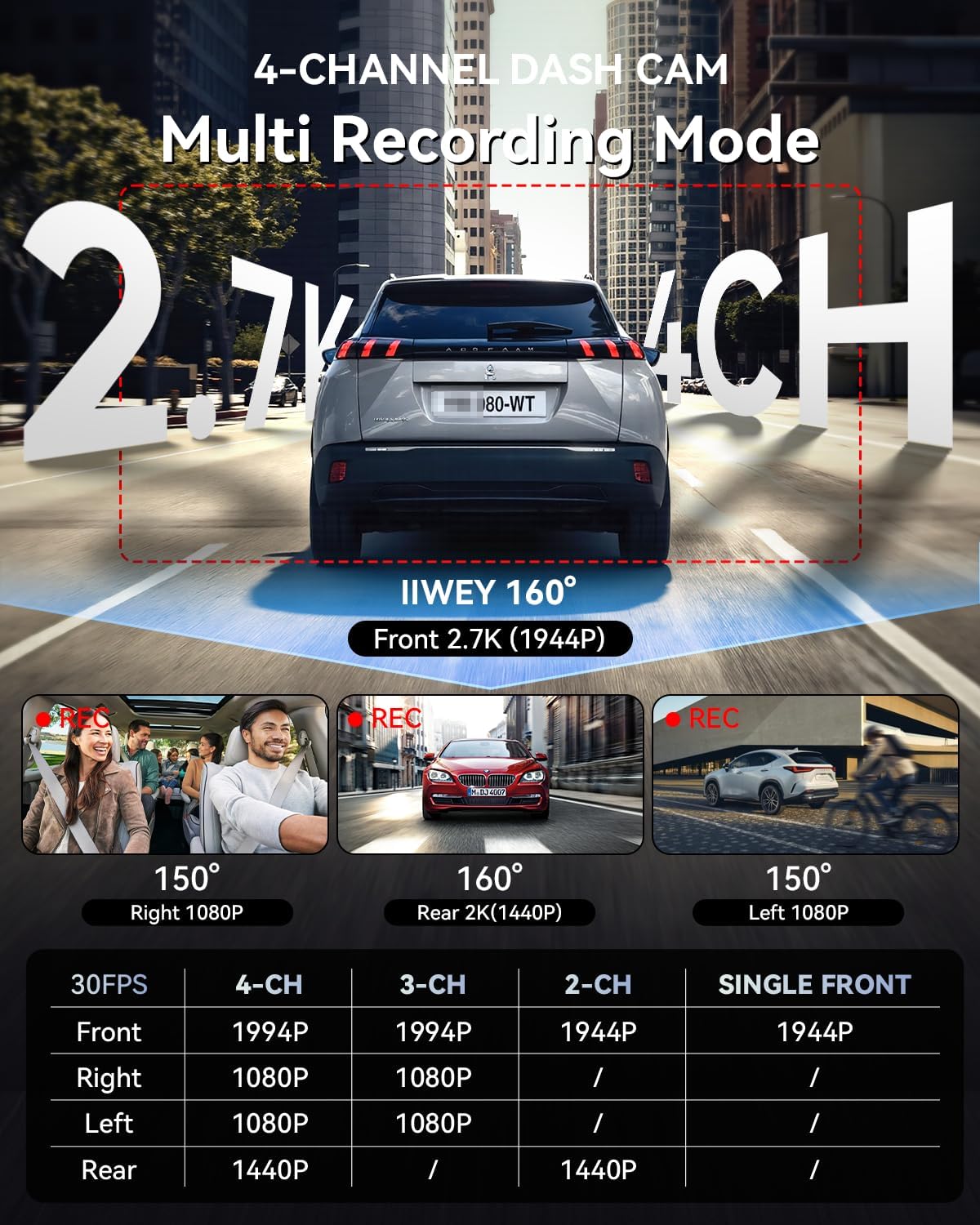
Image: Multi-recording mode options and corresponding resolutions for the C4 PRO dash cam.
4.4 Behe-boltage Babesa
The hardwire kit includes a smart power management chip that monitors your vehicle's battery voltage. Bolumena badatage drops below 11.6V, the kit will automatically cut off power to the dash cam, ensuring sufficient power remains to start your engine.

Image: Illustration of the hardwire kit's low voltage babes mekanismoa.
5. Mantentzea
- SD Txartela Kudeatzeko: Regularly format the microSD card (at least once a month) to ensure optimal performance and prevent data corruption. Use a high-quality, high-endurance microSD card.
- Lenteen garbiketa: Keep camera lenses clean using a soft, lint-free cloth to ensure clear video recordings.
- Firmware eguneraketak: Check the official IIWEY webgunea aldian-aldian bisitatu firmware eguneratzeak errendimendua hobetzeko eta funtzio berriak gehitzeko.
6. Arazoak
- Dash Cam does not power on:
- Check all power connections. Ensure the hardwire kit is correctly installed and receiving power from the fuse box. Verify the vehicle's battery voltage bolumen baxuaren gainetik dagotage protection threshold (11.6V).
- Parking Mode is not working:
- Confirm the hardwire kit is correctly installed with the ACC and BAT wires connected to their respective constant and accessory power sources. Ensure parking mode is enabled in the dash cam's settings.
- Bideoa footage is blurry or unclear:
- Clean the camera lenses. Ensure the protective film has been removed from the lenses. Check if the dash cam is securely mounted and not vibrating.
- SD txartelaren errorea:
- Format the microSD card. If the issue persists, try a different high-quality microSD card.
7. Zehaztapenak
| Ezaugarri | Xehetasuna |
|---|---|
| Marka | IIWEY |
| Ereduaren izena | C4 PRO |
| Bideo Harrapaketa Ebazpena | 2.7K 1440P (Front) |
| Fotograma-tasa | 30 FPS |
| Ezaugarri bereziak | Parking Assistant, Time Lapse, Low Voltage Babesa |
| Hardwire Kit Input | 12V-24V |
| Kableatu finkoko kitaren irteera | 5V/3A |
| Vol. Baxuatage Ebaketa | 11.6V |
| Ibilgailu mota bateragarria | Autoa, Kamioia, Furgoneta |
| Bistaratzeko mota | LCDa |
| Kolorea | Beltza |
8. Bermea eta Laguntza
For warranty information, technical support, or any inquiries regarding your IIWEY C4 PRO Dash Cam, please refer to the contact information provided with your purchase or visit the official IIWEY webgunea. Gorde erosketa-agiria erosketaren frogagiri gisa berme-erreklamazioetarako.
A video guide for installation may be available by scanning a QR code provided in the physical manual or on the product packaging.

Image: Reference to a video guide and manual for wiring the dash cam.