
Sarrera
The Rapoo M308 is a versatile multi-mode wireless mouse designed for efficiency and comfort. It features an ambidextrous design, allowing comfortable use for both right-handed and left-handed individuals. With its dual connectivity options, Bluetooth 5.0 and 2.4 GHz wireless, you can seamlessly connect to up to three devices and switch between them with ease. The mouse is engineered for long-lasting performance, offering a battery life of up to 12 months.
Paketearen edukia
- Rapoo M308 Multi-mode Wireless Mouse
- USB hargailua (saguaren barruan gordeta)
- 2 AA bateria
- Hasierako gida azkarra (eskuliburu hau)
Produktua amaituview
Familiarize yourself with the components of your Rapoo M308 mouse.
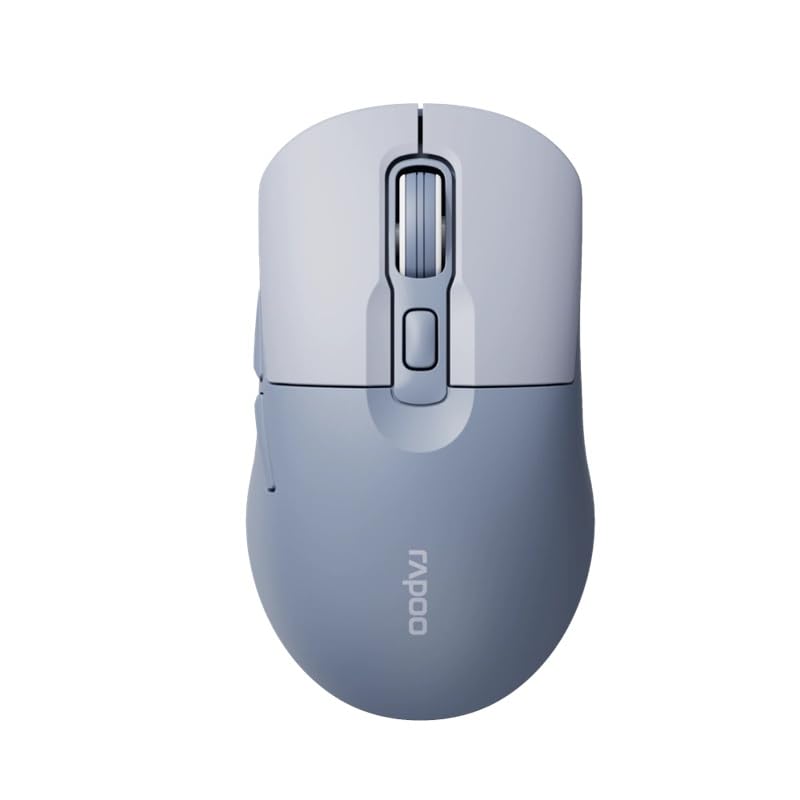
Image: The Rapoo M308 Multi-mode Wireless Mouse in blue, showcasing its ergonomic, ambidextrous design with a scroll wheel and multiple buttons.
- Ezkerreko botoia: Ezkerreko klik funtzio estandarra.
- Eskuineko botoia: Eskuineko botoiarekin klik egiteko funtzio estandarra.
- Korritzeko gurpila: Korritzeko eta erdiko botoiarekin klik egiteko funtziorako.
- DPI botoia: Kurtsorearen sentikortasuna (DPI) doitzen du.
- Mode Switch Button/Indicator: Switches between connected devices (2.4G, Bluetooth 1, Bluetooth 2) and indicates current mode.
- Alboko botoiak: Forward/Backward navigation (programmable).
- Bateriaren konpartimendua: Located on the underside, holds 2 AA batteries.
- USB hargailuaren zirrikitua: Located inside the battery compartment for storage.
Konfigurazioa
1. Bateriaren instalazioa
- Ireki saguaren azpialdean dagoen bateriaren konpartimentuaren estalkia.
- Sartu bi AA pilak, polaritate zuzena ziurtatuz (+/-).
- Itxi bateriaren konpartimenduaren estalkia.
2. 2.4 GHz-ko haririk gabeko konexioaren bidez konektatzea
- Remove the USB receiver from its storage slot inside the battery compartment.
- Konektatu USB hargailua zure ordenagailuko USB ataka erabilgarri batean.
- Turn on the mouse. The mouse should automatically connect to your computer. The mode indicator light will show a steady green light for a few seconds.
3. Bluetooth bidez konektatzen
The M308 mouse supports two Bluetooth connections (BT1 and BT2).
- Piztu sagua.
- Press the mode switch button to select either Bluetooth 1 (blue light flashes slowly) or Bluetooth 2 (blue light flashes slowly).
- Press and hold the mode switch button for 3 seconds until the blue light starts flashing rapidly. This indicates the mouse is in pairing mode.
- Zure ordenagailuan edo gailuan, joan Bluetooth ezarpenetara eta bilatu gailu berriak.
- Select "Rapoo M308" from the list of available devices to pair.
- Once paired, the blue light will become steady for a few seconds and then turn off.
Funtzionamendu-argibideak
Gailuen artean aldatzea
The Rapoo M308 allows you to connect to up to three devices (one 2.4G wireless and two Bluetooth devices) and switch between them.
- Briefly press the mode switch button to cycle through the connected devices: 2.4G (green light), Bluetooth 1 (blue light), Bluetooth 2 (blue light).
- The indicator light will briefly illuminate in the corresponding color to confirm the selected mode.
DPI doikuntza
Press the DPI button (usually located behind the scroll wheel) to cycle through different DPI settings. This changes the cursor speed and sensitivity. The indicator light may flash to show the current DPI level (e.g., one flash for low DPI, two for medium, etc.).
Mantentzea
- Garbiketa: Erabili zapi leun eta lehor bat sagua garbitzeko. Zikinkeria egoskorra bada, garbitu zapi pixka bat.amp oihal bat erabil daiteke, baina ziurtatu hezetasunik ez sartzen gailuan.
- Bateria ordezkatzea: When the mouse performance degrades or the indicator light signals low battery, replace the two AA batteries following the installation steps.
- Biltegiratzea: Denbora luzez erabiltzen ez duzunean, itzali sagua bateriaren iraupena aurrezteko. Gorde USB hargailua saguaren barruan galtzea saihesteko.
Arazoak konpontzea
- Saguak ez du erantzuten:
- Egiaztatu sagua piztuta dagoen.
- Ziurtatu bateriak behar bezala instalatuta daudela eta ez daudela agortuta. Ordeztu itzazu beharrezkoa bada.
- 2.4G konexiorako, ziurtatu USB hargailua ondo konektatuta dagoela funtzionatzen duen USB ataka batera. Saiatu beste USB ataka batekin.
- For Bluetooth connection, ensure the mouse is in the correct Bluetooth mode (BT1 or BT2) and successfully paired with your device. Re-pair if needed.
- Kurtsorearen mugimendua irregularra edo motela da:
- Garbitu saguaren azpialdeko sentsore optikoa.
- Ziurtatu sagua gainazal egoki batean erabiltzen ari zarela (ez islatzailea, ez gardena).
- Doitu DPI ezarpena DPI botoia erabiliz.
- Cannot switch between devices:
- Ensure all devices are properly connected (2.4G receiver plugged in, Bluetooth devices paired).
- Briefly press the mode switch button to cycle through modes. A long press will initiate Bluetooth pairing mode.
Zehaztapenak
| Marka Izena | Rapoo |
| Eredua | M308 |
| Konektibitate Teknologia | Bluetooth 5.0, 2.4 GHz Radio Frequency |
| Ezaugarri bereziak | Arinak |
| Mugimendu-detekzioa | Optikoa |
| Botoi kopurua | 4 |
| Eskuen Orientazioa | Anbidistroa |
| Gomendatutako Erabilerak | Bulegoa |
| Gailu bateragarriak | Ordenagailu pertsonala, ordenagailu eramangarria |
| Elementuaren pisua | 50 gramo |
| Sistema eragilea | Linux, Mac, Windows |
| Bateriaren iraupena | 12 hilabete |
| Pila kopurua | 2 AA (barne) |
| Energia iturria | Bateriaren bidez |
| Gutxieneko sistema eragilea behar da | Mac OS 14 Sonoma, Windows 11 |
| Materiala | Plastikoa |
| Jatorrizko Herrialdea | Txina |
| Dakarten osagaiak | Sagua |
Bermea eta Laguntza
The Rapoo M308 Multi-mode Wireless Mouse comes with a 2 urteko bermea erosketa-datatik aurrera. Berme honek fabrikazio-akatsak eta erabilera normalaren ondoriozko matxurak estaltzen ditu.
For technical support, warranty claims, or further assistance, please refer to the contact information provided on the Rapoo official website or your local distributor's support channels. Please retain your proof of purchase for warranty validation.