
1. Sarrera
Eskerrik asko erosketagatik.asing the Rii K28 Bluetooth Mini Keyboard Remote Control. This device combines a full QWERTY keyboard, a multi-touch touchpad, and a remote control into a compact, backlit unit. It offers versatile connectivity options, including 2.4GHz wireless and Bluetooth, making it suitable for a wide range of devices such as Smart TVs, Android TV Boxes, PCs, and gaming consoles. This manual provides detailed instructions for setup, operation, and maintenance to ensure optimal performance.
2. Ezaugarri nagusiak
- Konektibitate bikoitza: Supports both Bluetooth 4.0 and 2.4GHz wireless connections for broad compatibility.
- Ukipen-panel integratua: Responsive multi-touch touchpad for precise cursor control and gesture support.
- Atzeko argiztatutako teklak: Allows for clear operation in low-light environments.
- Bateria kargagarria: Built-in Li-ion battery with auto-sleep function for extended use.
- Trinkoa eta eramangarria: Ergonomic design for comfortable handheld use and easy portability.
- Bateragarritasun zabala: Compatible with Amazon Fire TV Stick, Android TV Box, Smart TV, Raspberry Pi, Xbox 360, PS3, HTPC, IPTV, Pad, and PC.
3. Paketearen edukia
Mesedez, egiaztatu paketearen edukia kutxa irekitzean:
- Rii K28 Mini Keyboard
- 2.4 GHz USB hargailua
- USB kargatzeko kablea
- Erabiltzailearen eskuliburua (dokumentu hau)

Figure 3.1: Package contents including the Rii K28 Mini Keyboard, USB receiver, and charging cable.
4. Produktuen diseinua
Familiarize yourself with the layout and components of your Rii K28 Mini Keyboard:

4.1. irudia: Aurrealdea eta alboa view of the Rii K28 Mini Keyboard with labeled components and dimensions.
- Ukipen-panela: Located at the top center, supports multi-finger gestures.
- Left/Right Mouse Buttons: Located on the sides of the keyboard for convenient clicking.
- QWERTY teklatua: Full QWERTY layout for typing.
- Function (FN) Key: Used in combination with other keys for special functions.
- Switch potentziala: Located on the side to turn the device on/off.
- USB hargailuaren konpartimentua: Located on the back for storing the 2.4GHz USB receiver.
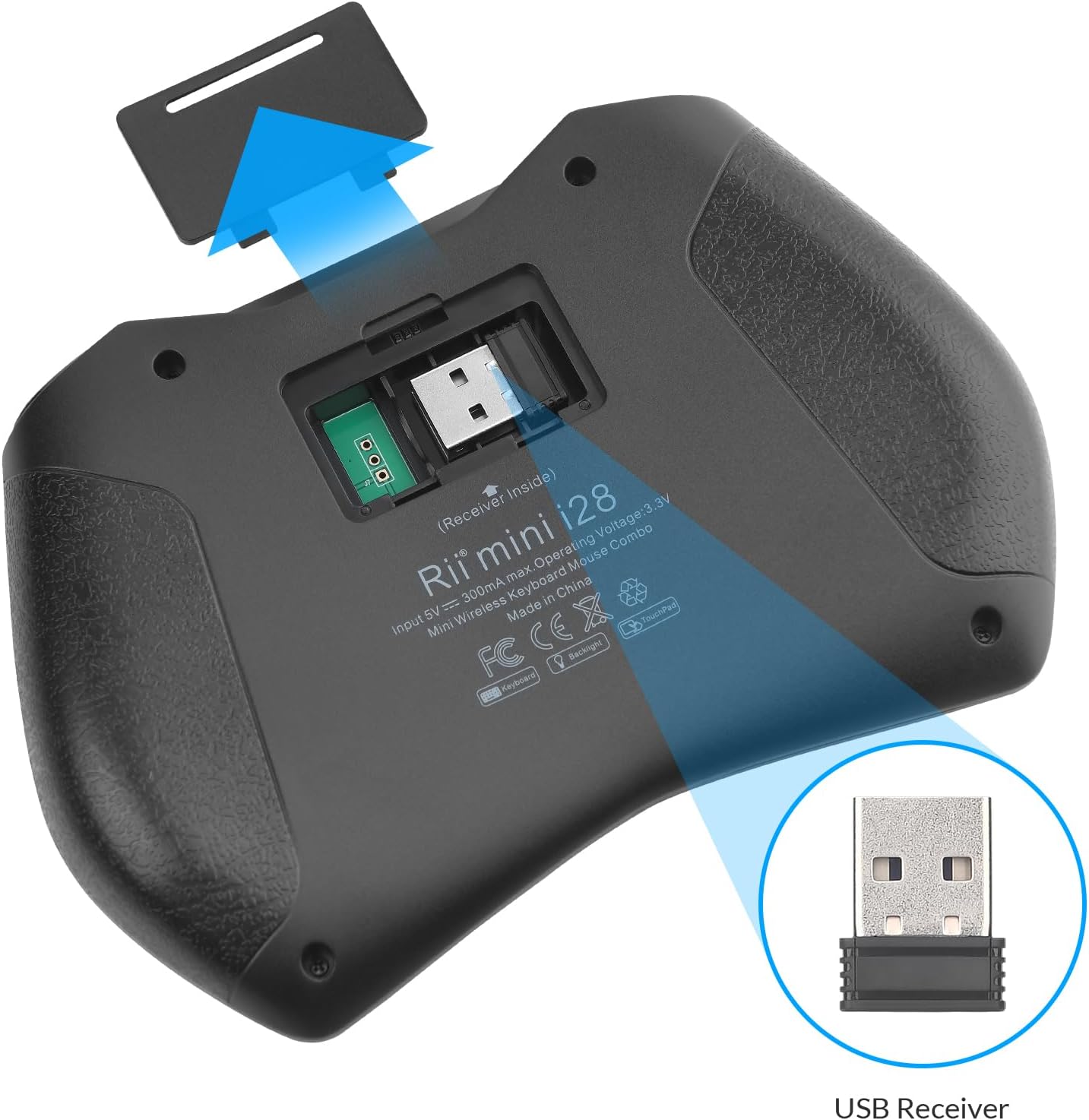
4.2. Irudia: Atzealdea view showing the USB receiver storage compartment.
5. Konfigurazioa
5.1. Teklatua kargatzea
Before initial use, fully charge the Rii K28 keyboard using the provided USB charging cable. Connect the cable to the keyboard's charging port and a standard USB power source (e.g., computer USB port, USB wall adapter).
- Kargatzeko adierazlearen argia piztuko da kargatzen ari den bitartean.
- The indicator light will turn off or change color once fully charged.
5.2. 2.4 GHz-ko haririk gabeko konexioaren bidez
- Kokatu 2.4 GHz-ko USB hargailua teklatuaren atzealdeko konpartimentuan.
- Insert the USB receiver into an available USB port on your device (e.g., Smart TV, PC, Android TV Box).
- Turn on the Rii K28 keyboard using the power switch.
- The keyboard should automatically connect to your device. If not, press FN + Caps to ensure it is in 2.4GHz mode.
5.3. Bluetooth bidez konektatzen
- Turn on the Rii K28 keyboard using the power switch.
- Sakatu FN + Tab to switch the keyboard to Bluetooth mode. The Bluetooth indicator light will blink.
- On your device (e.g., Smart TV, PC, tablet), navigate to the Bluetooth settings.
- Bilatu available Bluetooth devices. You should see "Rii K28" or a similar name.
- Select "Rii K28" to pair. Follow any on-screen prompts to complete the pairing process.

Figure 5.1: Visual guide for switching between Bluetooth (FN+Tab) and 2.4GHz (FN+Caps) modes.
6. Funtzionamendu-argibideak
6.1. Oinarrizko teklatuaren funtzioak
The Rii K28 functions as a standard QWERTY keyboard. Type as you would on a regular keyboard. Use the FN key in combination with blue-labeled keys for secondary functions (e.g., multimedia controls, F-keys).
6.2. Touchpad Gestures
The integrated touchpad supports various gestures for navigation:
- Hatz bakarreko ukitu: Egin klik ezkerreko botoiarekin.
- Bi hatzekin ukitzea: Egin klik eskuineko botoiarekin.
- Hatz bakarreko arrastatzea: Move cursor.
- Bi hatzekin korritzea: Scroll up/down or left/right (if supported by application).

Figure 6.1: Demonstrating single-finger touchpad interaction.
6.3. Atzeko argiaren kontrola
Teklatuaren atzeko argia piztu edo itzaltzeko, sakatu FN tekla aldi berean bonbilla ikonoaren tekla (usually F2 or similar, indicated by an icon).

Figure 6.2: Activating the keyboard backlight.
6.4. Hotkeys and Multimedia Keys
The keyboard includes various hotkeys and multimedia keys accessible via the FN key. These keys provide quick access to functions like volume control, media playback, and web browsing shortcuts. Refer to the key labels for specific functions.
7. Bateragarritasuna
The Rii K28 Mini Keyboard is designed for broad compatibility with various operating systems and devices, including but not limited to:
- Android TV Box
- Smart TV (with USB port or Bluetooth support)
- PC (Windows, macOS, Linux)
- Raspberry Pi
- Gaming Consoles (Xbox 360, PS3)
- HTPC (Home Theater PC)
- IPTV
- Tablets/Pads (with Bluetooth support)
- Amazon Fire TV Stick 4K/Lite/Cube
8. Mantentzea
- Garbiketa: Erabili zapi leun eta lehor bat teklatuaren gainazala garbitzeko. Zikinkeria egoskorra bada, garbitu zapi pixka bat.amp oihal bat erabil daiteke, likidorik gailuan sartzen ez dela ziurtatuz.
- Bateria zaintzea: Bateriaren iraupena luzatzeko, saihestu bateria maiz erabat deskargatzea. Kargatu gailua aldizka, batez ere denbora luzez erabiliko ez bada.
- Biltegiratzea: Gorde teklatua leku fresko eta lehor batean, eguzki-argitik eta muturreko tenperaturetatik babestuta.
- USB hargailua: Always store the USB receiver in its dedicated compartment on the back of the keyboard when not in use to prevent loss.
9. Arazoak
| Arazoa | Irtenbidea |
|---|---|
| Teklatuak ez du erantzuten. |
|
| Cursor movement is erratic or unresponsive. |
|
| Atzeko argia ez dabil. |
|
| Ezin da Bluetooth bidez parekatu. |
|
10. Zehaztapenak
| Ezaugarri | Xehetasuna |
|---|---|
| Modelo zenbakia | K28 |
| Marka | ikusi |
| Konektibitate Teknologia | 2.4G Haririk gabekoa, Bluetooth 4.0 |
| Eragiketa-eremua | Gehienez 10 metro (33 oin) |
| Teklatuaren diseinua | QWERTY |
| Energia iturria | Li-ioizko bateria kargagarria |
| Ezaugarri gehigarriak | Backlit, Ergonomic, Portable, Multi-touch Touchpad |
| Kolorea | Beltza |
| Fabrikatzailea | Riitek |
11. Bermea eta Laguntza
For warranty information and technical support, please visit the official Rii webwebgunean edo jarri harremanetan bezeroarentzako arreta-zerbitzuan. Informazio gehiago hemen aurki dezakezu: www.riitek.com or for security related information: www.riitek.com/support/security.html.
Gorde erosketa-agiria berme-erreklamazioetarako.


