
Sarrera
Thank you for choosing the Digitus DA-70919 USB-C 8K 12-Port Docking Station. This device is designed to expand the connectivity of your USB-C enabled laptop or computer, providing a comprehensive solution for video output, data transfer, network access, and power delivery. Please read this manual carefully to ensure proper installation and operation.
Produktua amaituview
The Digitus DA-70919 docking station offers 12 essential ports to enhance your workspace. It supports high-resolution video output, fast data transfer, and efficient power delivery to your host device.

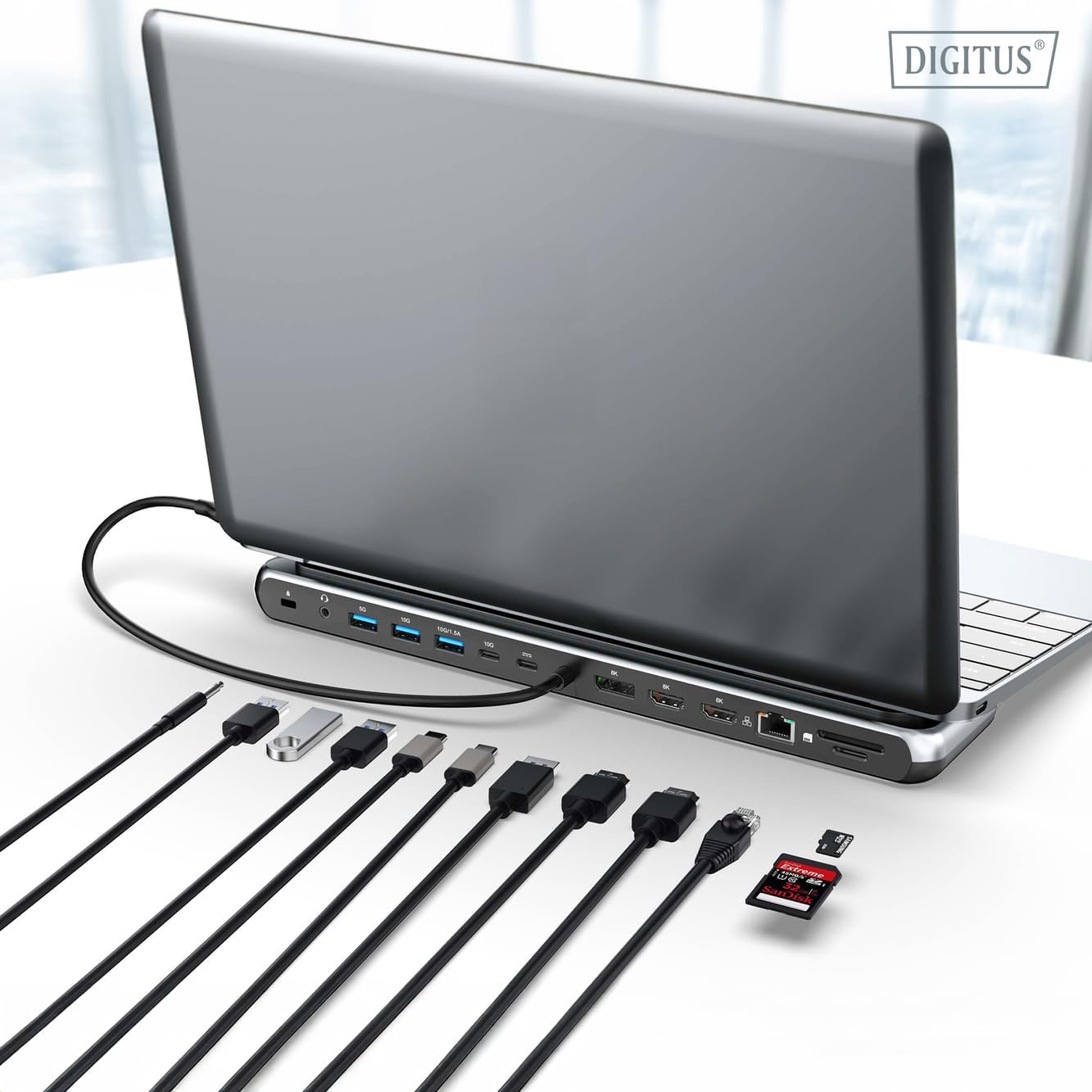
1. irudia: Detailed diagram of the Digitus DA-70919 docking station ports and their functions. This diagram labels each of the 12 ports on the docking station, including Audio Jack, USB-A, USB-C, USB-C PD, DisplayPort, HDMI, RJ45 Gigabit Ethernet, and SD/MicroSD card slots, along with anti-theft protection.

2. irudia: Aurrealdea view of the Digitus DA-70919 docking station showing all accessible ports. A clear view of the docking station's front panel, displaying the various input and output ports including USB-A, USB-C, HDMI, DisplayPort, Ethernet, and card readers.
Ezaugarri nagusiak:
- Bideo irteera: 2x HDMI, 1x DisplayPort (DP) supporting up to 8K/30Hz for single display, or multi-display configurations.
- USB datu-ataka: 2x USB-A 3.2 Gen 2 (10Gbps), 1x USB-A 3.2 Gen 1 (5Gbps), 1x USB-C 3.2 Gen 2 (10Gbps).
- Energia-hornidura (PD): USB-C PD 3.0 port for charging your host laptop (up to 85W output).
- Sarea: Gigabit Ethernet (RJ45) for stable wired internet connection.
- Txartel irakurgailuak: SD and MicroSD card slots with 104 MBps transfer speed.
- Audioa: 3.5mm audio jack for headphones or speakers.
Konfigurazio Argibideak
Follow these steps to set up your Digitus DA-70919 docking station:
- Check Host USB-C Port Compatibility: Ensure your laptop's USB-C port supports DisplayPort Alternate Mode (DP Alt Mode) for video output and Power Delivery for charging. Without DP Alt Mode, video output will not function.

3. irudia: Guide to USB-C port compatibility for DisplayPort Alternate Mode. This graphic explains which types of USB-C ports on your laptop support the full functionality of the docking station, specifically highlighting the requirement for DisplayPort Alternate Mode (DP Alt Mode) for video output.
- Konektatu ostalari gailura: Connect the integrated USB-C cable from the docking station to the USB-C port on your laptop.
- Connect Power Adapter (Optional but Recommended): If you wish to charge your laptop via the docking station or power high-demand peripherals, connect a USB-C Power Delivery adapter (not included, up to 100W recommended) to the USB-C PD input port on the docking station.
- Kanpoko pantailak konektatu: Connect your monitors to the HDMI and/or DisplayPort outputs on the docking station using appropriate cables.
- Konektatu periferikoak: Plug in your USB devices (keyboard, mouse, external drives), Ethernet cable, SD/MicroSD cards, and audio devices to the corresponding ports on the docking station.
- Gidariaren instalazioa: In most cases, the docking station is plug-and-play and does not require additional drivers. If prompted, allow your operating system to install any necessary drivers automatically.
Funtzionamendu-argibideak
Bistaratzeko moduak
Ainguratze-estazioak hainbat pantaila-konfigurazio onartzen ditu:
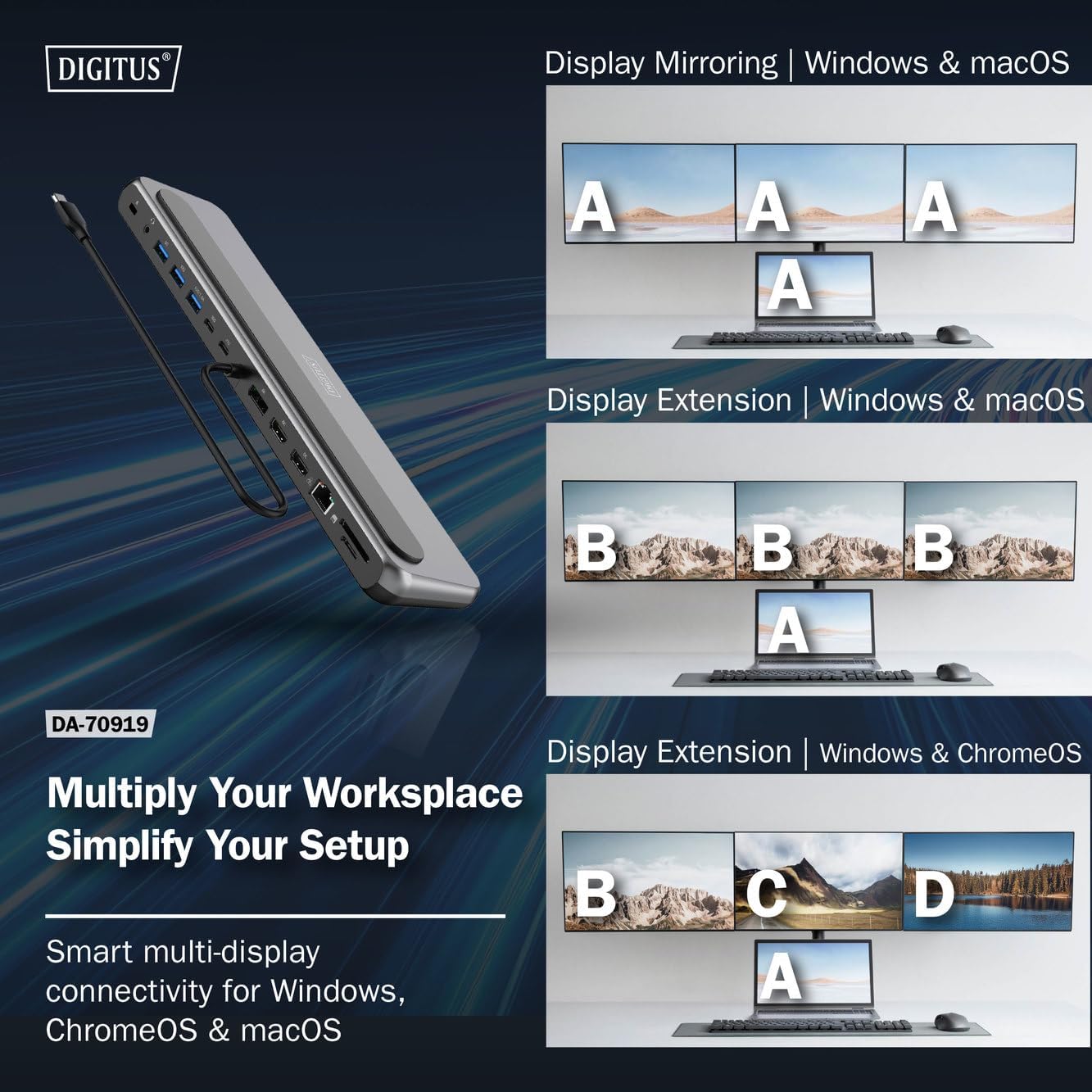
4. irudia: Diagram showing display mirroring and extension modes for Windows, macOS, and ChromeOS. This image illustrates the various display configurations supported by the docking station, including mirroring your screen or extending it across multiple external monitors on Windows, macOS, and ChromeOS.
- Ispilu modua: Duplicates your laptop's display onto the external monitors.
- Extend Mode (Windows/ChromeOS): Extends your desktop across multiple external monitors, allowing for a multi-tasking environment. Supports dual monitors (2x 4K/60Hz) and triple monitors (1x 4K/60Hz + 2x 4K/30Hz) in MST (Multi Stream Transport) mode.
- Extend Mode (macOS): macOS typically supports extended desktop to one external monitor, with other external monitors mirroring each other.
To configure display settings, access your operating system's display settings (e.g., Windows Display Settings, macOS System Preferences > Displays).
Datuen transferentzia
Utilize the USB-A and USB-C data ports for connecting external storage devices, keyboards, mice, and other USB peripherals. The USB 3.2 Gen 2 ports offer speeds up to 10Gbps, while the USB 3.2 Gen 1 port offers speeds up to 5Gbps.
Potentzia Entrega
When a compatible USB-C PD power adapter is connected to the docking station's PD input port, the docking station can deliver up to 85W of power to charge your connected laptop. This allows you to power your laptop and peripherals through a single USB-C connection.
5. irudia: Illustration of the docking station's fast charging capability via USB-C Power Delivery. This image demonstrates the Power Delivery function, showing a 100W input to the docking station and an 85W output to charge the connected laptop.
Sare-konexioa
Connect an Ethernet cable to the RJ45 port for a stable and high-speed wired network connection (10/100/1000 Mbps Gigabit Ethernet).
Txartel irakurgailuak
Insert SD or MicroSD cards into the dedicated slots for quick access to photos, videos, and other files. The card readers support transfer speeds up to 104 MBps.
Audio Irteera
Connect your headphones or speakers to the 3.5mm audio jack for audio output.
Mantentzea
- Garbiketa: Erabili oihal leun eta lehor bat kargatzeko estazioaren gainazala garbitzeko. Saihestu garbitzaile likidoak edo disolbatzaileak erabiltzea.
- Biltegiratzea: Gorde kargatzeko estazioa leku fresko eta lehor batean, eguzki-argitik eta muturreko tenperaturetatik babestuta.
- Manipulazioa: Avoid dropping or subjecting the device to strong impacts. Do not attempt to disassemble the docking station.
Arazoak konpontzea
If you encounter issues with your docking station, please refer to the following common solutions:
- Ez dago pantaila-irteerarik:
- Ziurtatu zure ordenagailu eramangarriaren USB-C atakak DisplayPort modu alternatiboa onartzen duela.
- Check all video cables (HDMI/DP) are securely connected to both the docking station and the monitor.
- Egiaztatu monitoreak piztuta dagoela eta sarrera-iturri zuzenera konfiguratuta dagoela.
- Saiatu monitore bana aldi berean konektatzen arazoa isolatzeko.
- Eguneratu zure ordenagailu eramangarriaren grafikoen kontrolatzaileak.
- Ez dago ordenagailu eramangarrirako energia-hornidurarik:
- Ensure a compatible USB-C PD power adapter (up to 100W) is connected to the docking station's PD input port.
- Egiaztatu zure ordenagailu eramangarriaren USB-C atakak Power Delivery onartzen duela.
- Egiaztatu korronte-egokitzailea eta kablea kaltetuta dauden.
- Ez dira ezagutzen USB gailuak:
- Konektatu berriro USB gailua kargatzeko estazioaren beste ataka batera.
- Ensure the docking station is properly connected to the host laptop.
- If using a high-power USB device, ensure the docking station is connected to an external power adapter.
- Ethernet konexio arazoak:
- Egiaztatu Ethernet kablearen konexioa bai kargatzeko estaziora bai zure bideratzailera/modemara.
- Egiaztatu sareko ezarpenak zure ordenagailu eramangarrian.
- Restart your router/modem and laptop.
- Txartel irakurgailua ez dabil:
- Ensure the SD/MicroSD card is inserted correctly and fully.
- Test the card with another device to confirm it is not damaged.
Zehaztapenak
| Ezaugarri | Zehaztapena |
|---|---|
| Eredua | DA-70919 |
| Ostalariaren konexioa | USB-C (kable integratua) |
| Bideo Irteera | 2x HDMI, 1x DisplayPort (DP) |
| Max. Single Display Resolution | 8K (7680x4320) 30Hz-tan |
| Max. Dual Display Resolution (MST) | 2x 4K (3840x2160) @ 60Hz |
| Max. Triple Display Resolution (MST) | 1x 4K@60Hz + 2x 4K@30Hz |
| USB-A Datu Portuak | 2x USB 3.2 Gen 2 (10Gbps), 1x USB 3.2 Gen 1 (5Gbps) |
| USB-C Datu Portua | 1 USB 3.2 2. belaunaldia (10 Gbps) |
| Energia-banaketa (PD) sarrera | USB-C PD 3.0 (up to 100W) |
| Power Delivery (PD) Output to Host | Gehienez 85W |
| Ethernet | RJ45 Gigabit (10/100/1000 Mbps) |
| Txartel irakurgailuak | SD, MicroSD (104 MBps) |
| Audioa | 1x 3.5 mm-ko audio-konexioa |
| Bateragarritasuna | Windows, macOS, ChromeOS |
| Funtzionamendu-tenperatura | 0°C eta 45°C (32°F eta 113°F) |
| Biltegiratze Tenperatura | -10 °C eta 70 °C (14 °F eta 158 °F) |
Bermea eta Laguntza
The Digitus DA-70919 USB-C 8K 12-Port Docking Station comes with a 2 urteko bermea erosketa-datatik aurrera. Berme honek fabrikazio-akatsak estaltzen ditu eta produktuak deskribatutako moduan funtzionatzen duela ziurtatzen du erabilera normalaren pean.
For technical support, warranty claims, or further assistance, please contact your retailer or visit the official Digitus website for contact information. Please have your product model number (DA-70919) and proof of purchase ready when seeking support.