
Sarrera
This manual provides essential information for setting up, operating, maintaining, and troubleshooting your Apple iPhone 17. This device is a renewed, unlocked US Version with 256GB storage and eSIM capability. Please read these instructions carefully to ensure optimal performance and longevity of your device.
Gailua amaitu daview
The Apple iPhone 17 features a sleek design and powerful capabilities. Below are images highlighting key aspects of the device.
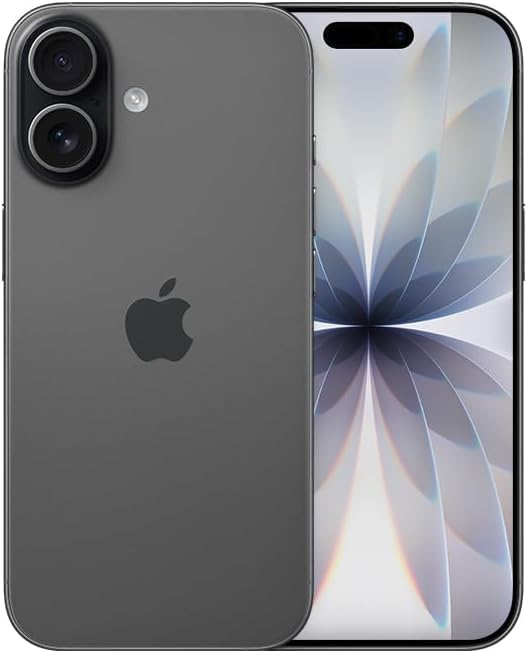
Irudia: Aurrealdea view of the Apple iPhone 17 in Black. This image displays the device's screen and overall form factor.

Image: Close-up of the dual camera system on the rear of the Apple iPhone 17. This highlights the camera lenses and flash module.

Irudia: Alboko profesionalafile of the Apple iPhone 17, showing the power button and volume controls. This view emphasizes the device's slim design.
Konfigurazioa
Follow these steps to set up your renewed Apple iPhone 17:
- Garraiolarien bateragarritasuna: This phone is unlocked and compatible with GSM and CDMA networks (e.g., AT&T, T-Mobile, Sprint, Verizon, US Cellular, Cricket, Metro, Tracfone, Mint Mobile). Before proceeding, verify compatibility with your chosen carrier.
- eSIM aktibazioa: The iPhone 17 uses an eSIM. Your carrier will provide instructions for activating the eSIM. Often, this involves scanning a QR code. Important: Do not discard any QR stickers provided with your device, as they may be essential for eSIM activation.
- Piztu: Press and hold the power button on the side of the device until the Apple logo appears.
- Hasierako konfigurazioa: Follow the on-screen prompts to select your language, region, connect to a Wi-Fi network, and transfer data from a previous device if applicable.
- Osagarriak: The device includes a generic (Mfi certified) charger and charging cable. Headphones and a physical SIM card are not included.
Operating Your iPhone 17
Your iPhone 17 runs on iOS 18, offering a user-friendly interface and a wide range of features.
Oinarrizko Nabigazioa
- Hasierako pantaila: Swipe up from the bottom of the screen to return to the Home Screen.
- Aplikazio aldatzailea: Swipe up from the bottom and pause in the middle of the screen to view ireki aplikazioak.
- Kontrol Zentroa: Irristatu hatza goiko eskuineko izkinatik behera ezarpen azkarretara sartzeko.
- Jakinarazpenak: Swipe down from the top-center to view jakinarazpenak.
Kameraren Ezaugarriak
The iPhone 17 is equipped with a powerful camera system:
- Atzeko kamera: 48 MP sensor with LED flash and 10x digital zoom for high-quality photos and videos.
- Aurrealdeko kamera: Single front-facing camera for selfies and video calls.
- Bideoa ateratzea: Supports 1080p and 4k video recording.
Pantaila eta Konektibitatea
- Pantaila: 6.3-inch OLED display with 2622 x 1206 resolution and a 120Hz refresh rate, providing vibrant visuals and smooth scrolling.
- Konektibitatea: Supports 5G cellular technology, Bluetooth, NFC, USB Type C, and Wi-Fi for seamless communication and data transfer.
Security and Additional Features
- Biometric Security: Face Recognition for secure unlocking and authentication.
- Ezaugarri gehigarriak: Includes Always On Display, Built-In GPS, Dual SIM capability (via eSIM), and Wireless Charging.
Bideo lagungarriak
Video: A comparison between the iPhone 17 and another phone model, highlighting design and features. This video is provided by Ersbit.
Bideoa: Berri zintzo batview of the Apple iPhone 17, discussing its performance and user experience. This video is provided by Dimitri.
Bideoa: Berrikuspen zehatzaview of the Apple iPhone 17, covering various aspects of the device. This video is provided by Bonfashion.
Bideoa: Klip labur baten erakustaldiaasing the Lavender color variant of the iPhone 17. This video is provided by Veronika.
Video: Demonstrating the Apple iPhone 17 in daily use scenarios. This video is provided by Ericka Garcia Garcia.
Video: A design comparison between the iPhone 17 Pro and the standard iPhone 17. This video is provided by Ersbit.
Bideoa: Amaiera batview of the iPhone Air and iPhone 17's overall design. This video is provided by Ersbit.
Mantentzea
Proper maintenance ensures the longevity and performance of your iPhone 17.
- Bateria osasuna: Your renewed iPhone 17 is guaranteed to have a minimum battery capacity of 80%. To preserve battery life, avoid extreme temperatures and excessive charging cycles.
- Garbiketa: Erabili zapi leun eta lihorik gabeko bat pantaila eta kanpoaldea garbitzeko. Saihestu material urratzaileak edo produktu kimiko gogorrak.
- Software eguneraketak: Regularly update your iOS to the latest version to benefit from security patches, new features, and performance improvements.
- Biltegiratze kudeaketa: Aldian behin berriroview eta beharrezkoak ez direnak ezabatu files, apps, and media to optimize storage and performance.
Arazoak konpontzea
If you encounter issues with your iPhone 17, consider the following common solutions:
- Sarearen konexio arazoak: If you experience problems with calls, texts, or data, first ensure your eSIM is properly activated with your carrier. Some carriers may have specific requirements or known compatibility issues. Contact your carrier's support for assistance.
- Gailuak ez du erantzuten: Perform a force restart. The exact steps may vary slightly by iOS version, but typically involve pressing and quickly releasing the Volume Up button, then the Volume Down button, then pressing and holding the Side button until the Apple logo appears.
- Bateria hustutzea: Check battery usage in Settings to identify apps consuming significant power. Adjust settings like screen brightness, background app refresh, and location services to optimize battery life.
- Aplikazioaren arazoak: If an app is not functioning correctly, try closing and reopening it. If the issue persists, delete and reinstall the app, or check for app updates in the App Store.
- Softwarearen akatsak: Ensure your device is running the latest iOS version. If problems persist, consider backing up your data and performing a factory reset.
Zehaztapenak
Detailed technical specifications for the Apple iPhone 17 (256GB, Unlocked, Renewed):
| Ezaugarri | Zehaztapena |
|---|---|
| Marka | Sagarra |
| Ereduaren izena | iPhone 17 |
| Sistema eragilea | iOS 18 |
| Memoria Biltegiratzeko Ahalmena | 256 GB |
| RAM memoria instalatuaren tamaina | 8 GB |
| CPU eredua | A-seriea |
| CPU Abiadura | 3.7 GHz |
| Pantailaren tamaina | 6.3 hazbete |
| Bistaratzeko mota | OLEDa |
| Ebazpena | 2622 x 1206 pixel |
| Freskatze tasa | 120 Hz |
| Display Pixel Density | 460 Pixels Per Inch (PPI) |
| Haririk gabeko hornitzailea | Desblokeatua |
| Teknologia Zelularra | 5G |
| Konektibitate Teknologia | Bluetooth, NFC, USB, Wi-Fi |
| SIM txartelaren zirrikituen kopurua | E Sim |
| Konektore mota | USB C mota |
| Rear Facing Camera Photo Sensor Resolution | 48 MP |
| Number of Rear Facing Cameras | 1 |
| Number of Front Cameras | 1 |
| Kamera Flasha | LED |
| Zoom digitala | 10.0 |
| Bideo Harrapaketa Ebazpena | 1080p, 4k |
| Bateria Edukiera | 3600 milioiamp Orduak |
| Bateria deskribapena | Litio-Ioia |
| Biometric Security Feature | Aurpegi-ezagutza |
| Ezaugarri gehigarriak | Always On Display, Built-In GPS, Dual SIM, Factory Unlocked, Wireless Charging |
| Uraren Erresistentzia Maila | Ez Urarekiko Erresistentea |
| Elementuaren pisua | 14.88 ontza |
| Elementuaren neurriak | 6 x 4 x 2 hazbete |
| Eredu Urtea | 2025 |
| UPC | 756613503987 |
Bermea eta Laguntza
Your renewed Apple iPhone 17 is covered by a 90-Day Amazon Renewed Guarantee. This warranty ensures that your device is in excellent working condition and provides options for replacement or refund if issues arise within the warranty period.
For further assistance, please refer to the following:
- Amazonen laguntza berritua: Visit the Amazon Renewed Store for information regarding your purchase and warranty claims.
- Appleren laguntza: For general iOS and device functionality questions, visit the official Apple Support webgunea.
- Garraiolariaren laguntza: Contact your mobile carrier for any network-related issues, eSIM activation, or service plan inquiries.