
1. Bukatu daview
The IIWEY C3 PRO 4K Dash Cam 3 Channel is an advanced vehicle recording system designed to capture comprehensive footage of your driving environment. Equipped with triple Sony STARVIS 2 sensors (IMX678 for front, dual IMX675 for cabin & rear), it provides high-resolution video (4K Front + 2K Cabin + 1080P Rear) with enhanced clarity, especially in low-light conditions. Key features include HDR 3.0, Night Vision 3.0, PlateTag AI for license plate recognition, 5GHz Wi-Fi for fast data transfer, GPS logging, and intelligent parking modes.
2. Produktuaren ezaugarriak
- Triple STARVIS 2 Sensors: Front (IMX678), Cabin (IMX675), and Rear (IMX675) for superior low-light performance and image clarity.
- Bereizmen handiko grabaketa: Simultaneous 4K (Front), 2K (Cabin), and 1080P (Rear) video capture.
- HDR 3.0: Advanced High Dynamic Range technology to balance exposure in varying light conditions, reducing glare and enhancing detail.
- Night Vision 3.0: Optimized for clear nighttime recording, capturing readable license plates in near-total darkness.
- PlateraTag AI: Utilizes deep learning to automatically detect and highlight license plates within the IIWEY App for easy retrieval.
- 5 GHz Wi-Fi: Enables rapid video downloads and live streaming to your smartphone via the IIWEY App.
- GPS erregistroa: Records speed and location data, providing indisputable evidence for incidents.
- Intelligent Parking Modes: (Requires optional hardwire kit) Motion Detection, Collision Detection, and Time Lapse Record for 24/7 vehicle monitoring.
- Supercapacitor Power: Ensures durability and safety in extreme temperatures, replacing traditional batteries.
- Ahots kontrola: Hands-free commands for locking videos or taking photos.
- 3.18 hazbeteko IPS pantaila: Clear and wide-angle viewing for real-time monitoring and playback.
- Loop grabaketa: Automatically overwrites oldest footage when the SD card is full.
- G-sentsorea: Janaria automatikoki blokeatzen dutage upon impact or sudden braking.
- 512 GB-rainoko MicroSD txartela onartzen du: Includes a 128GB card for immediate use.
3. Zer dago kutxan
The IIWEY C3 PRO package includes the following components:
- Main camera with GPS module
- 2K atzeko kamera
- Kargatzeko kablea (3.5 metro)
- Car Mount (adhesive pads)
- Crowbar (for cable tucking)
- Kable-klipak (x5)
- Instalazio tresna
- Gida Azkarra
- Erabiltzailearen eskuliburua
- Berme Txartela
- Rear Camera Cable (7 meters)
- 128 GB MicroSD txartela
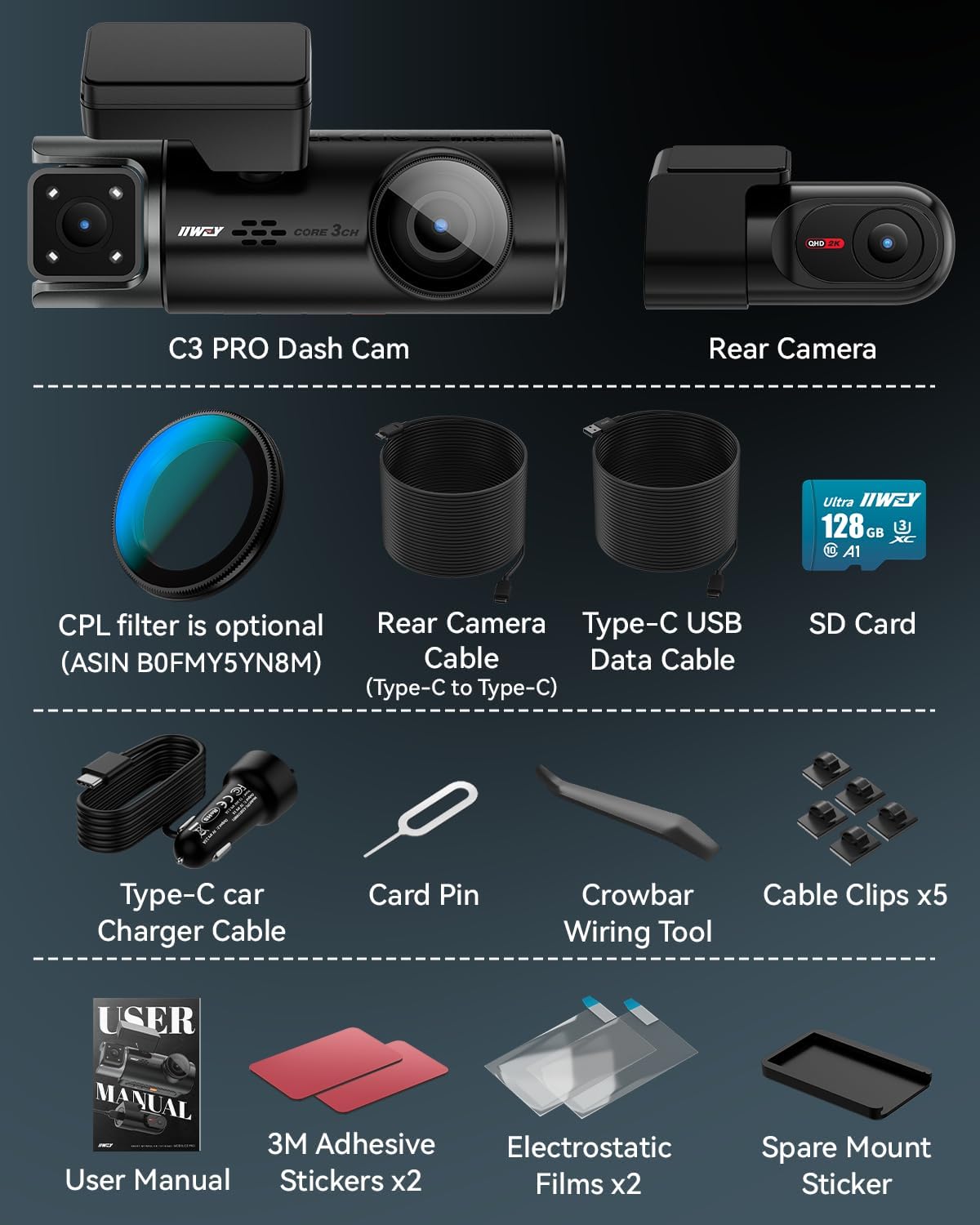
Image: All components included in the IIWEY C3 PRO package, neatly arranged.
4. Konfigurazioa eta instalazioa
Follow these steps to properly install your IIWEY C3 PRO Dash Cam:
- Muntatzeko eremua prestatu: Clean the windshield area where the main camera will be mounted. Ensure it's free of dust and grease for optimal adhesive performance.
- Mount the Main Camera: Attach the main camera with its adhesive mount behind your rearview mirror. Position it to ensure a clear view errepidetik gidatzeko ikusmena oztopatu gabe.
- Konektatu energia: Route the 3.5-meter charging cable along the windshield edge and down to your vehicle's 12V power outlet (cigarette lighter socket). Use the provided crowbar and cable clips to neatly tuck the cable and secure it.
- Atzeko kamera instalatu: Mount the 2K rear camera on your rear windshield using its adhesive. Connect it to the main unit using the 7-meter rear camera cable. Route this cable along the vehicle's headliner and side panels to the rear, securing it with clips.
- Sartu MicroSD txartela: Insert the provided 128GB MicroSD card into the main camera's slot.
- Piztu eta probatu: Start your vehicle. The dash cam should power on automatically and begin recording. Verify that all three cameras are functioning and recording correctly on the display.
- Optional Hardwire Kit: For 24/7 parking surveillance modes (Motion Detection, Collision Detection, Time Lapse), an optional IIWEY Hardwire Kit (ASIN: B0DHJNRPB9) is required and sold separately.

Image: Diagram illustrating the recommended cable routing for the front and rear cameras, ensuring a tidy installation.

Image: A visual representation of all items included in the IIWEY C3 PRO Dash Cam package, including cameras, cables, and installation tools.
Instalazio Bideoa
Video: An official seller video demonstrating the installation process of the IIWEY C3 PRO 3 Channel 4K Dash Cam.
5. Funtzionamendu-argibideak
Oinarrizko Funtzionamendua
- Piztu/Itzali: The dash cam automatically powers on and off with your vehicle's ignition.
- Grabaketa: Once powered on, the dash cam automatically begins loop recording.
- Bistaratzeko moduak: Use the buttons on the device to switch between different camera views (front, cabin, rear, or split-screen).
- Pantaila-babesle modua: The camera can activate a screen saver mode after 30 seconds or one minute to reduce distractions, especially during nighttime driving. The dash cam continues recording in the background.

Image: A visual representation of the IIWEY C3 PRO Dash Cam's three recording channels (front, interior, rear) and their wide viewangeluak.

Image: Illustrates the simultaneous 4K front, 2K cabin, and 1080P rear recording capabilities of the dash cam.

Image: Shows the dash cam's screen saver mode, designed to minimize driving distractions while recording continues.
Ahots kontrola
The IIWEY C3 PRO supports hands-free voice commands for critical functions:
- "Lock the Video": Saves the current recording from being overwritten.
- "Argazkia atera": Irudi finko bat ateratzen du.
- "Turn ON Wi-Fi" / "Turn OFF Wi-Fi": Activates or deactivates the Wi-Fi connection.
- "Turn ON Audio" / "Turn OFF Audio": Controls audio recording.
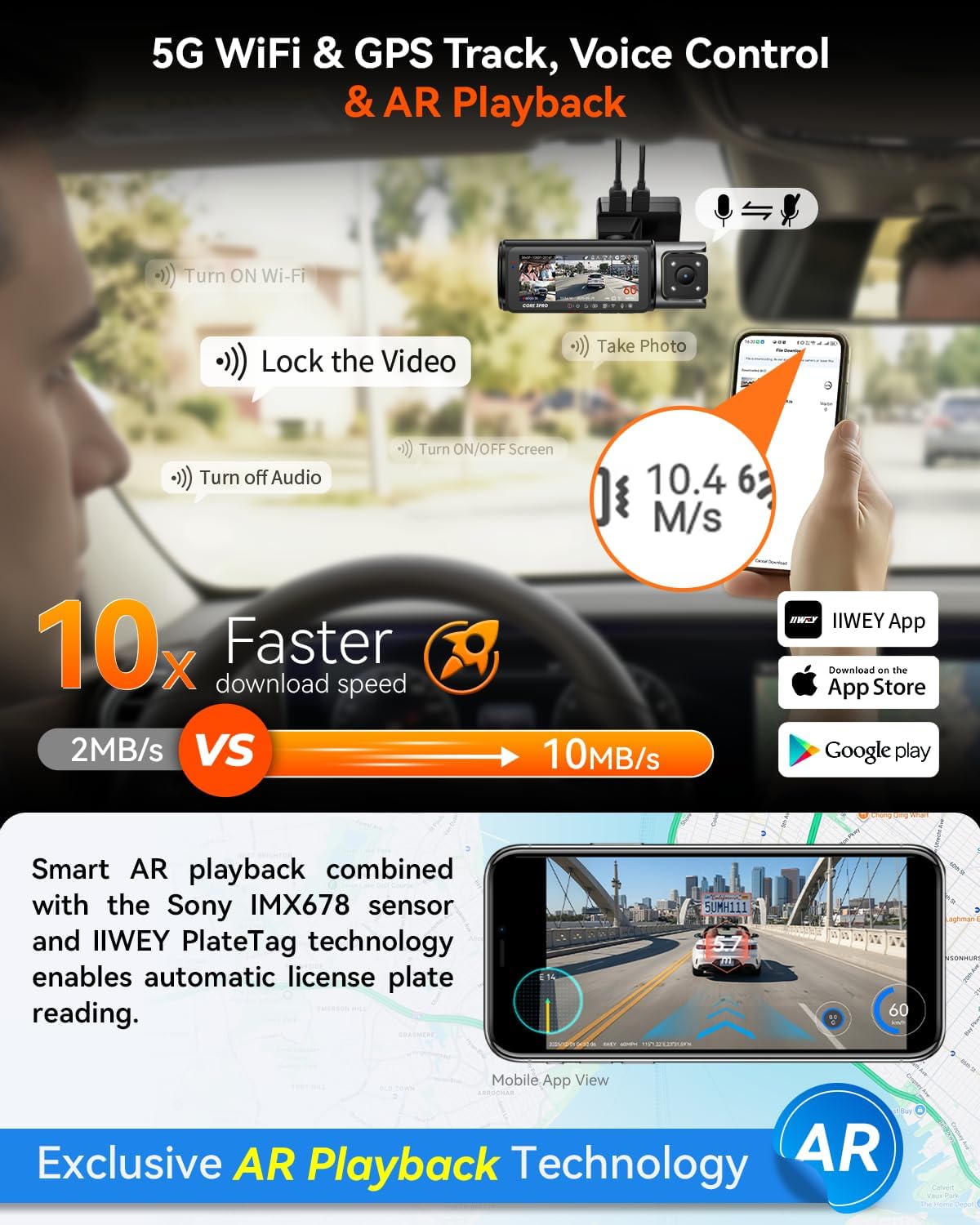
Image: Illustrates the 5GHz Wi-Fi, GPS tracking, voice control, and AR Playback features of the dash cam.

Image: Highlights the 5GHz Wi-Fi for fast downloads, GPS tracking, voice control, and AR Playback technology.
IIWEY App & 5GHz Wi-Fi
Download the IIWEY App from your smartphone's app store. Connect to the dash cam's 5GHz Wi-Fi for:
- Zuzeneko erreprodukzioa view kamera guztiena.
- Fast footage downloads (up to 10MB/s).
- Access to PlateTag AI for license plate detection.
- Easy sharing of photos and videos.
GPS Jarraipena
The built-in GPS module logs your driving route, speed, and location. This data can be viewed on Google Maps via the IIWEY App or a dedicated GPS Player on your computer, providing verifiable evidence.

Image: Demonstrates how GPS tracking data, including route and speed, can be viewed on a map within the IIWEY App or a computer player.
6. Ezaugarri aurreratuak
Intelligent Parking Guard (Requires Hardwire Kit)
With the optional IIWEY Hardwire Kit, the C3 PRO offers 24/7 parking surveillance:
- Mugimendu-detekzioa: Records when movement is detected around the vehicle.
- Talkak hautematea: Records when an impact is detected.
- Denbora-erregistroa: Continuously records at a low frame rate to save storage space while monitoring.

Image: Illustrates the three intelligent parking modes: Motion Detection, Collision Detection, and Time-Lapse Record.

Image: Shows how motion and collision detection work to monitor your vehicle when parked.

Image: Explains the time-lapse recording feature for continuous 24/7 parking monitoring with reduced file tamaina.
G-sentsorea
The built-in G-sensor detects sudden movements, impacts, or rapid acceleration/deceleration. When triggered, it automatically locks the current video segment to prevent it from being overwritten during loop recording, ensuring critical evidence is preserved.

Image: Illustrates the G-sensor's function in detecting collisions and locking footage, with examples of front, cabin, and rear views.

Image: Shows the adjustable sensitivity levels of the G-sensor for customized accident detection.
OTA Firmware Updates
Keep your dash cam's software up-to-date with Over-The-Air (OTA) firmware updates via the IIWEY App. This ensures your device benefits from the latest features, performance improvements, and bug fixes.

Image: Illustrates the process of updating the dash cam's firmware wirelessly through the IIWEY App.
7. Mantentzea
- SD Txartela Kudeatzeko: Regularly format your MicroSD card (at least once a month) to maintain optimal recording performance and prevent data corruption. The C3 PRO supports up to 512GB cards.
- Lenteen garbiketa: Keep camera lenses clean and free of dust or smudges for clear video quality. Use a soft, lint-free cloth.
- Firmware eguneraketak: Periodically check for and install firmware updates via the IIWEY App to ensure your device has the latest features and stability improvements.
- Tenperatura: The supercapacitor design allows operation in extreme temperatures (-4°F to 158°F). Avoid prolonged exposure to temperatures outside this range.

Image: Highlights the dash cam's support for MicroSD cards up to 512GB and its loop recording functionality.

Image: Explains the benefits of the supercapacitor, including longer lifespan, no explosion risk, and all-weather adaptability.
8. Arazoak
- Dash Cam-ek ez du pizten: Ensure the power cable is securely connected to both the dash cam and the vehicle's 12V power outlet. Verify the vehicle's power outlet is functional.
- Grabaketa arazoak: Check if the MicroSD card is inserted correctly and is not full. Format the SD card regularly. Ensure the dash cam's firmware is up-to-date.
- Bideoaren kalitate eskasa: Clean the camera lenses. Ensure the protective film has been removed from the lenses. Check video resolution settings in the menu.
- Wi-Fi konexio arazoak: Ensure Wi-Fi is enabled on the dash cam via voice command or menu. Restart both the dash cam and your smartphone.
- GPSak ez du funtzionatzen: Ziurtatu GPS modulua behar bezala konektatuta dagoela eta argia duela. view of the sky. It may take a few minutes to acquire a signal.
- Ahots-komandoek ez dute erantzuten: Speak clearly and directly towards the dash cam. Ensure the audio recording is enabled.
9. Zehaztapenak
| Ezaugarri | Zehaztapena |
|---|---|
| Marka | IIWEY |
| Ereduaren izena | C3 PRO |
| Bideo Harrapaketa Ebazpena | 4K+2K+1080P |
| Sentsoreak | Triple STARVIS 2 (IMX678 Front, IMX675 Cabin & Rear) |
| Konektibitate Teknologia | 5GHz Wi-Fi & GPS |
| Pantailaren tamaina | 3.18 hazbeteko IPS |
| Fotograma-tasa | 30 FPS |
| Included Memory Card Size | 128 GB |
| Onartutako Flash memoria Gehienezko tamaina | 512 GB |
| Energia iturria | Supercapacitor (No Batteries Included) |
| Produktuaren neurriak | 6.9" L x 5.47" W x 3.42" H |
| Ezaugarri bereziak | PlateraTag AI, HDR 3.0, Night Vision, Parking Mode, Voice Control, Loop Recording, G-Sensor |
10. Bermea eta laguntza
The IIWEY C3 PRO Dash Cam comes with an 18 hilabeteko bermea. For any inquiries, technical assistance, or support, please contact IIWEY customer service. They provide 24-hour responsive support to assist with setup and any operational questions.
For further assistance, please refer to the contact information provided on your Warranty Card or visit the official IIWEY webgunea.
