
Sarrera
This manual provides detailed instructions for the setup, operation, maintenance, and troubleshooting of your GMKtec Mini PC M2Pro S. This compact desktop computer is equipped with an 11th generation Intel Core i7-1185G7 processor, 32GB DDR4 RAM, and a 512GB NVMe SSD, designed for efficient performance in various applications. Please read this manual thoroughly before using the device to ensure proper functionality and longevity.
Paketearen edukia
Egiaztatu behean zerrendatutako elementu guztiak zure paketean daudela:
- 1 x GMKtec Nucbox Mini PC Computer
- 1 x korronte egokitzailea
- 1 x VESA Mount with Screws
- 1 x HDMI kablea
- 1 x Erabiltzailearen eskuliburua (dokumentu hau)

Image: Contents of the GMKtec Mini PC M2Pro S retail box.
Produktua amaituview
The GMKtec Mini PC M2Pro S is a high-performance, compact desktop solution. Key features include:
- Prozesadorea: 11th Gen Intel Core i7-1185G7 (up to 4.8 GHz, 4 Cores, 8 Threads, 12MB Cache)
- Memoria: 32GB DDR4 SODIMM (dual-channel, expandable up to 64GB)
- Biltegiratzea: 512GB M.2 2280 NVMe SSD (PCIe3.0, expandable up to 2TB), additional M.2 2242 SATA slot (expandable up to 2TB)
- Grafikoak: Intel Iris Xe Graphics G7 96EU
- Bistaratzeko irteera: Supports triple 4K displays via 2 x HDMI (4K@60Hz) and 1 x USB Type-C (4K@60Hz)
- Sarea: 2.5Gbps LAN (RJ45), WiFi 6 (802.11ax), Bluetooth 5.2
- Portuak: USB 3.2, USB Type-C (40Gbps), Audio (3.5mm CTIA)
- Hoztea: Upgraded quiet cooling fan with copper vapor chamber and multiple exhaust vents
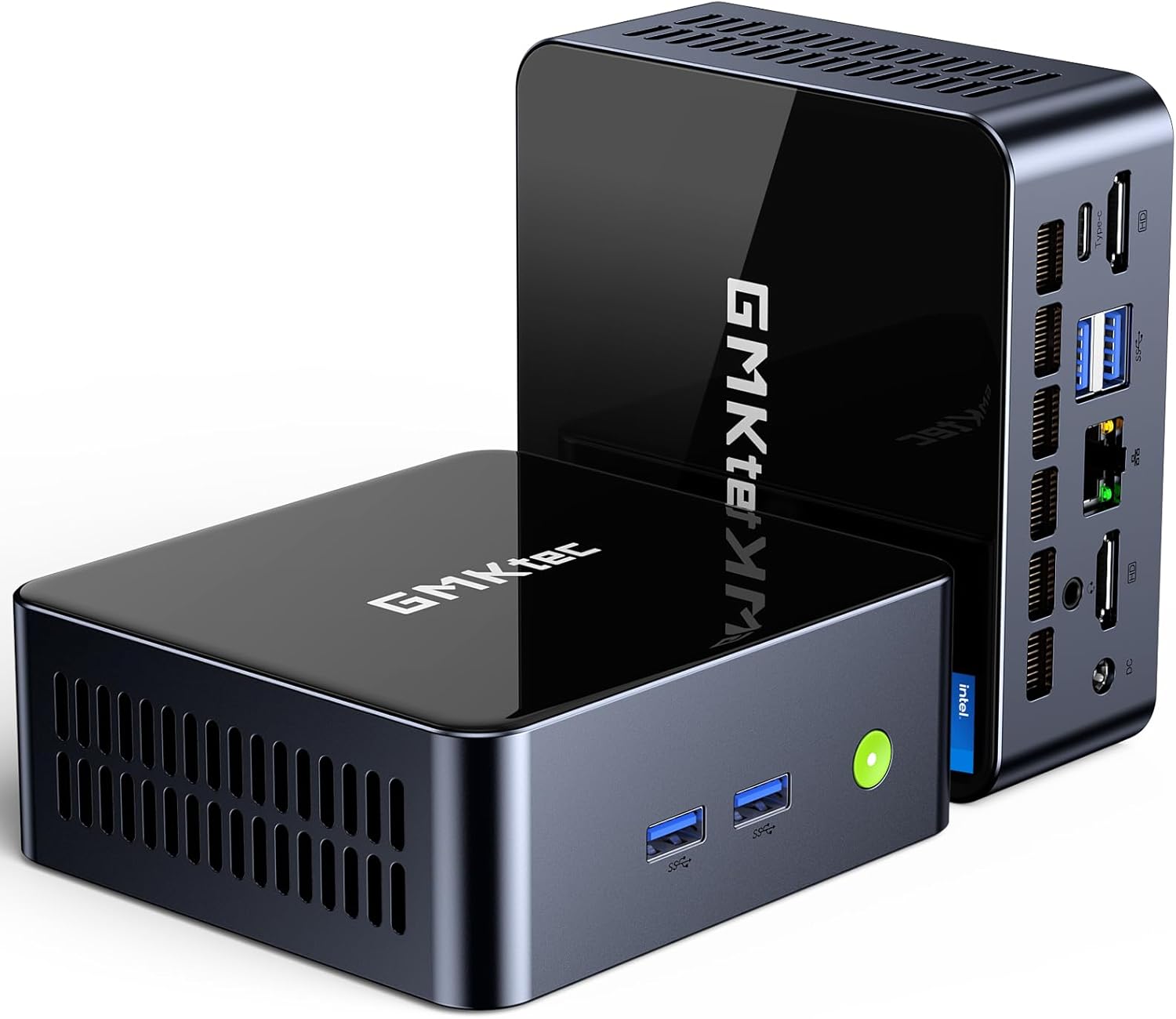
Irudia: Aurrealdea view of the GMKtec Mini PC M2Pro S.
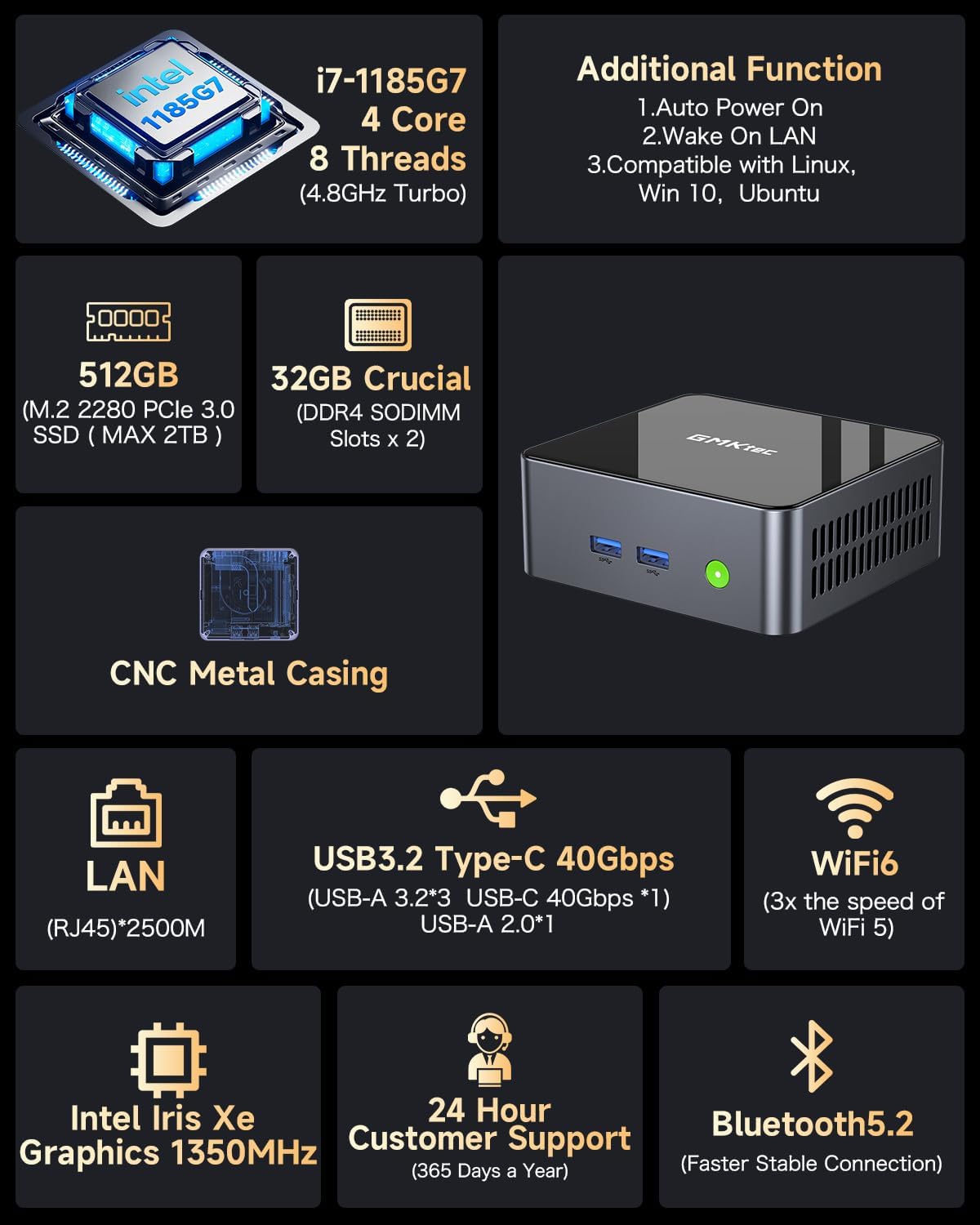
Irudia: Gainetikview of the GMKtec Mini PC M2Pro S features and specifications.
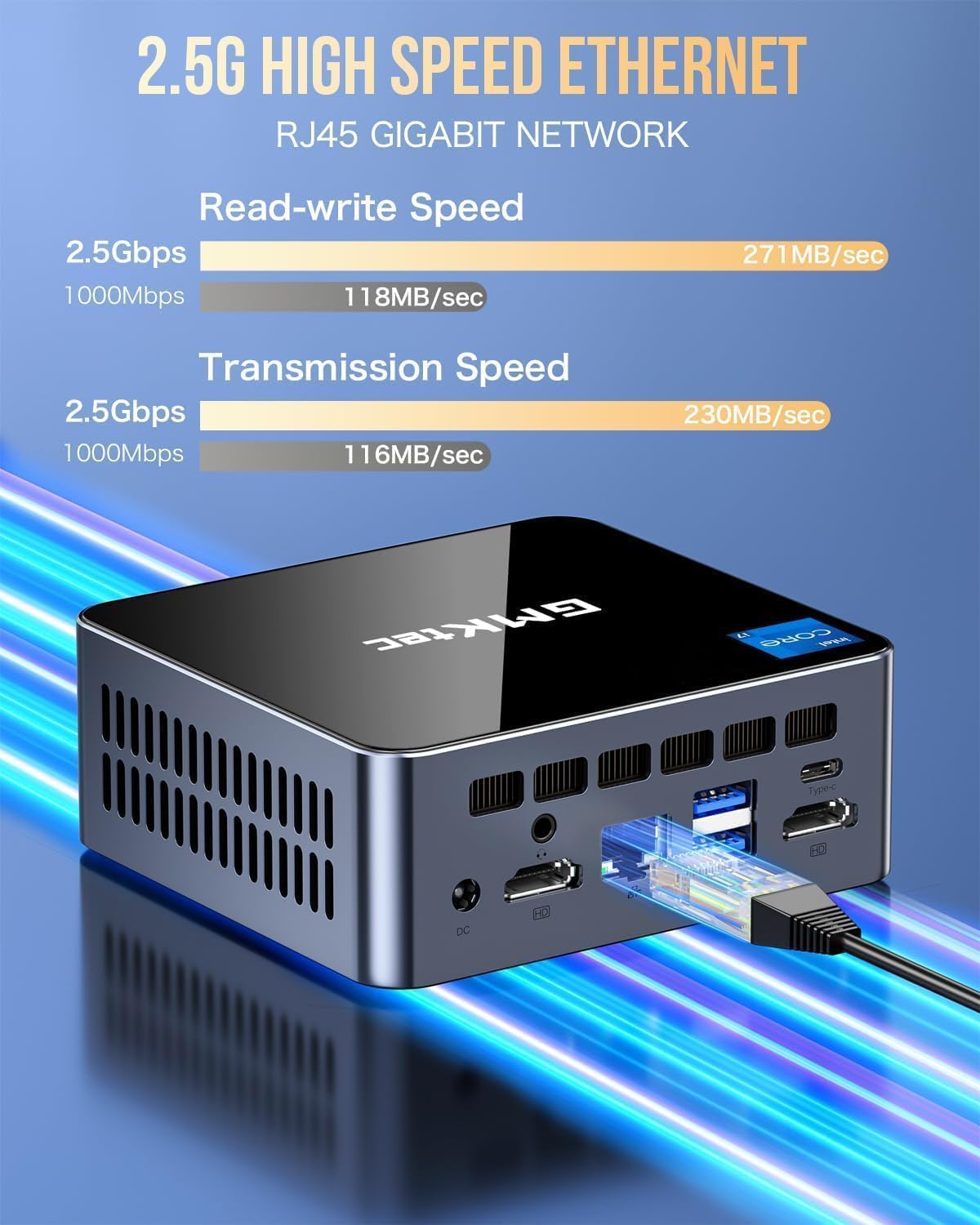
Irudia: Xehetasun handikoa view of the multi-purpose ports on the GMKtec Mini PC M2Pro S.
Konfigurazio Gida
- Konektatu periferikoak: Connect your monitor(s) using the HDMI or USB Type-C ports. Connect your keyboard and mouse to the available USB ports.
- Sare-konexioa: For a wired connection, plug an Ethernet cable into the 2.5Gbps LAN port. For wireless, the device supports WiFi 6 and Bluetooth 5.2, which can be configured after initial boot.
- Potentzia-konexioa: Connect the provided power adapter to the DC IN port on the mini PC and then to a power outlet.
- Piztu: Press the power button located on the front of the mini PC. The system will boot up.
- Hasierako Windows konfigurazioa: Follow the on-screen instructions to complete the Windows 11 Pro setup, including language, region, network, and user account creation.
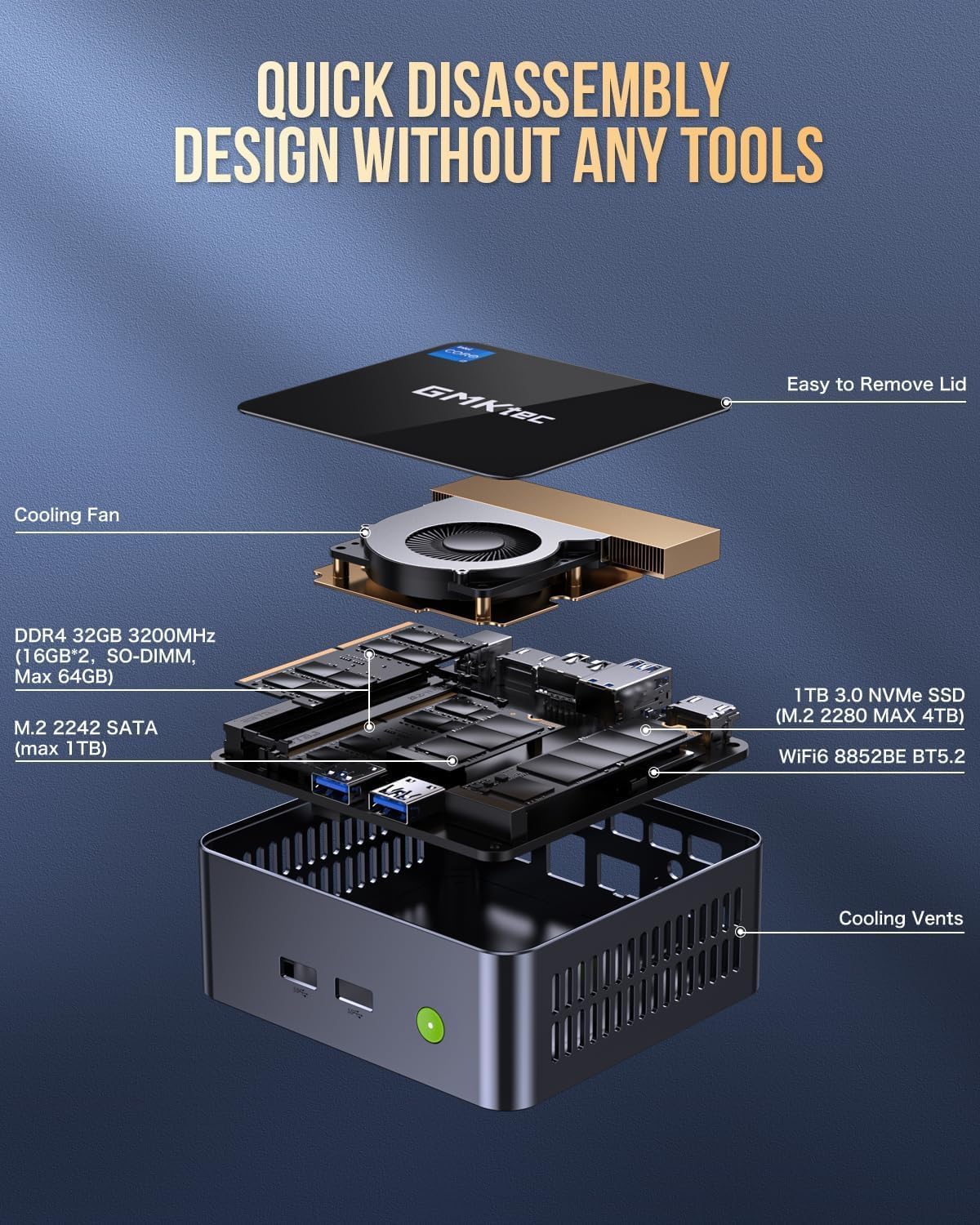
Image: Desktop placement and VESA mount installation options for the Mini PC.
Funtzionamendu-argibideak
Piztu/Itzali
- Pizteko: Sakatu pizteko botoia gailuaren aurrealdean.
- Itzateko: Egin klik Windows-eko Hasi botoian, eta ondoren hautatu Energia > Itzali.
- Berrabiarazteko: Egin klik Windows-eko Hasi botoian eta, ondoren, hautatu Energia > Berrabiarazi.
Pantaila hirukoitzaren konfigurazioa
The GMKtec Mini PC M2Pro S supports up to three 4K displays simultaneously. Connect your monitors to the available HDMI ports and the USB Type-C port. Once connected, Windows will automatically detect the displays. You can configure display settings (e.g., extend, duplicate) via Ezarpenak > Sistema > Pantaila.

Irudia: Adibample of a triple 4K display setup with the Mini PC.
Sare-konektibitatea
- Kable bidezko konexioa (LAN): Connect an Ethernet cable to the RJ45 port for a stable 2.5Gbps connection.
- Wireless (WiFi): Access network settings in Windows to connect to a WiFi 6 network.
- Bluetootha: Pair Bluetooth devices (e.g., headphones, keyboard, mouse) via Windows Bluetooth settings.
Mantentze-lanak eta berritzeak
Biltegiratze-hedapena
The GMKtec Mini PC M2Pro S supports storage expansion:
- The existing M.2 2280 NVMe (PCIe3.0) SSD can be upgraded to a maximum of 2TB.
- An additional M.2 2242 SATA slot is available for expansion up to 2TB.
RAM hedapena
The device comes with 32GB DDR4 SODIMM RAM in a dual-channel configuration. It can be expanded up to a maximum of 64GB by replacing the existing modules with higher capacity ones.
Barne osagaietara sartzea
The mini PC features a quick disassembly design for easy access to internal components for upgrades or maintenance. Carefully remove the lid to access the RAM and SSD slots. Refer to the diagram below for guidance.

Image: Quick disassembly design for internal component access.

Image: Illustration of the upgraded quiet cooling fan system.
Arazoak konpontzea
If you encounter issues with your GMKtec Mini PC M2Pro S, refer to the following common solutions:
- Potentziarik gabe: Ensure the power adapter is securely connected to both the mini PC and a working power outlet. Check the power button for any damage.
- Ez dago pantailarik: Verify that the monitor is powered on and correctly connected to the mini PC via HDMI or USB Type-C. Try a different cable or monitor if possible. Ensure the correct input source is selected on your monitor.
- No Network Connection (Wired): Check if the Ethernet cable is properly connected to both the mini PC and your router/modem. Verify router status.
- No Network Connection (Wireless): Ensure WiFi is enabled in Windows settings. Check if the correct WiFi network is selected and the password is entered correctly.
- Errendimendu motela: Close unnecessary applications. Check for background processes. Ensure sufficient free storage space. Consider upgrading RAM or SSD if performance issues persist after basic troubleshooting.
- Windows Activation Issues: If you experience problems activating Windows 11 Pro, ensure your internet connection is active. If the issue persists, contact GMKtec customer support for assistance.
For further assistance, please contact GMKtec customer support.
Zehaztapen Teknikoak
| Ezaugarri | Zehaztapena |
|---|---|
| Marka | GMKtec |
| Modelo zenbakia | M2 Pro S |
| Prozesadorea | Intel Core i7-1185G7 (4.8 GHz Turbo, 4 Cores, 8 Threads) |
| RAM | 32GB DDR4 SDRAM (3200 MHz, Dual-channel, expandable to 64GB) |
| Biltegiratzea | 512GB M.2 2280 NVMe SSD (PCIe 3.0, expandable to 2TB), M.2 2242 SATA slot (expandable to 2TB) |
| Koprozesadore grafikoa | Intel Iris Xe Graphics G7 96EU |
| Gehienezko pantailaren bereizmena | 5120 x 2880 pixel |
| Sistema eragilea | Windows 11 Pro |
| Haririk gabeko mota | WiFi 6 (802.11ax), Bluetooth 5.2 |
| LAN | 2.5Gbps RJ45 Ethernet |
| USB atakak | 3 x USB 3.2, 1 x USB Type-C (40Gbps) |
| Bideo Irteera | 2 x HDMI (4K@60Hz), 1 x USB Type-C (4K@60Hz) |
| Audio-portua | 3.5 mm-ko CTIA |
| Elementuaren pisua | 3.3 kilo |
| Paketearen neurriak | 6.38 x 6.26 x 4.69 hazbete |
Bermea eta Laguntza
Your GMKtec Mini PC M2Pro S comes with a standard manufacturer's warranty. Please refer to the warranty card included in your package for specific terms and conditions. For technical support, troubleshooting assistance, or warranty claims, please contact GMKtec customer service directly. Contact information can typically be found on the GMKtec official webgunearen bidez edo produktua erosi diozun saltzailearen bidez.
The seller for this product is GMKtec一Store. Please reach out to them for product-specific inquiries.