
1. Sarrera
This manual provides comprehensive instructions for the installation, operation, and maintenance of your SOYO X99 Motherboard Set. This kit includes a SOYO X99 Motherboard, an LGA2011-3 Xeon E5 2650 V4 CPU, and 16GB DDR4 RAM. Please read this manual carefully before proceeding with installation to ensure proper setup and optimal performance.
The SOYO X99 Motherboard Set is designed for high-performance desktop computers, offering robust capabilities for demanding applications, gaming, and professional tasks.
2. Paketearen edukia
Please verify that all items listed below are present in your package. If any items are missing or damaged, contact your retailer immediately.
- SOYO X99 Motherboard
- Intel Xeon E5 2650 V4 Processor (LGA2011-3)
- 16GB DDR4 RAM Module(s)
- SATA datu kableak
- I / O ezkutukoa
- Erabiltzailearen eskuliburua (dokumentu hau)
3. Ezaugarri nagusiak
- LGA2011-3 Socket: Supports Intel Xeon E5 2650 V4 series processors for high-performance computing.
- DDR4 memoria euskarria: Includes 16GB DDR4 RAM for efficient multitasking and enhanced system speed.
- NVMe M.2 Support: Provides high-speed storage options for faster data transfer and system responsiveness.
- Diseinu sendoa: Engineered for stability and durability in demanding desktop environments.
- Konektibitate polifazetikoa: Offers a range of ports and expansion slots for various peripherals and upgrades.
4. Konfigurazioa eta instalazioa
Before beginning installation, ensure your workspace is clean, well-lit, and static-free. It is recommended to wear an anti-static wrist strap to prevent damage to components.
4.1 Plaka baseaview
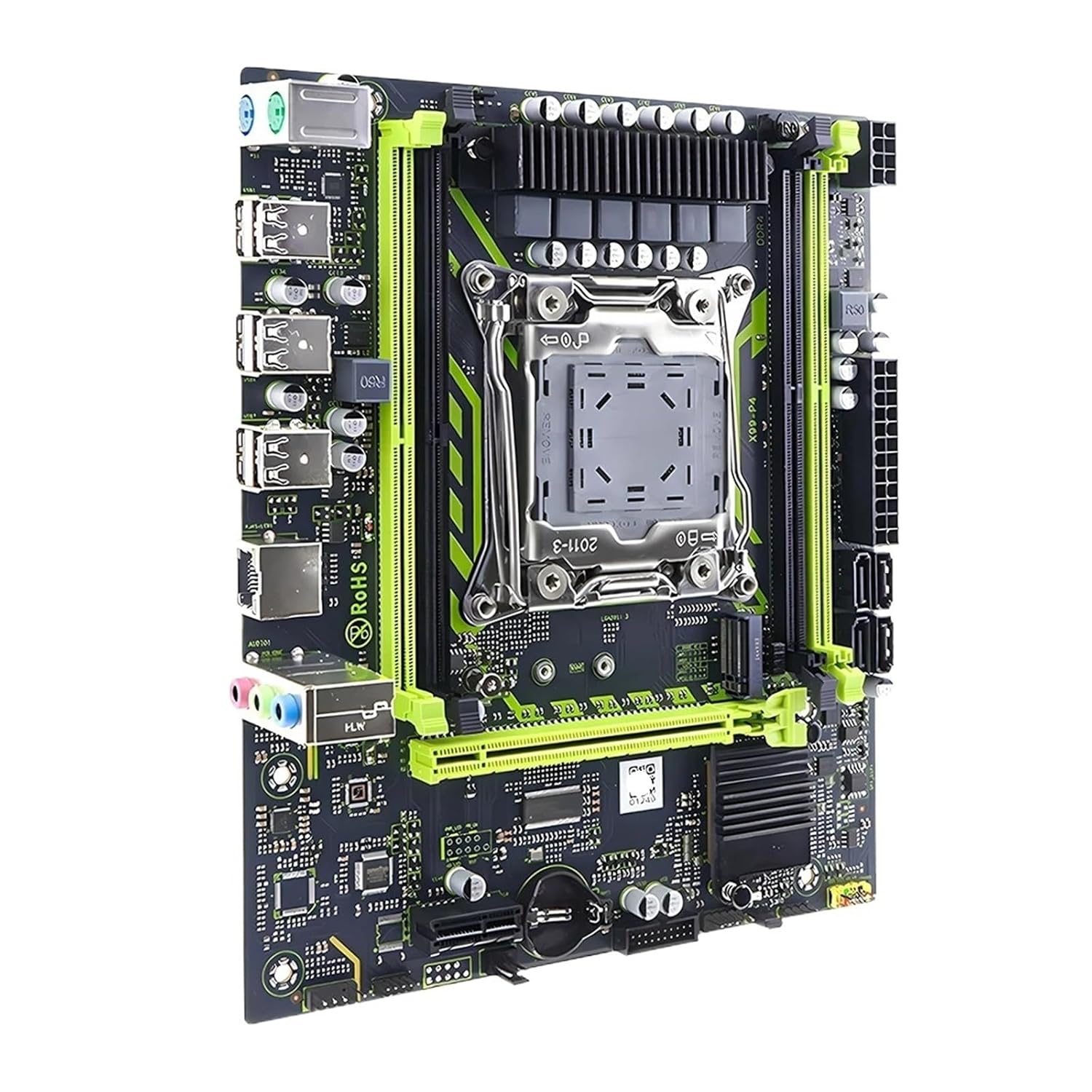
1. irudia: Goitik behera view of the SOYO X99 Motherboard, highlighting the LGA2011-3 CPU socket, DDR4 RAM slots, PCIe slots, and I/O ports.
4.2 PUZa instalatzea
- Locate the LGA2011-3 CPU socket on the motherboard.
- Gently push down the metal retention arm and swing it open.
- Carefully align the Intel Xeon E5 2650 V4 CPU with the socket, matching the gold triangle on the CPU with the corresponding mark on the socket. Do not force the CPU into place.
- Once seated, close the retention arm until it clicks into place.
- Aplikatu pasta termiko geruza fin eta uniforme bat CPUaren goialdean.
- Instalatu CPU hozkailua fabrikatzailearen argibideen arabera.

2. irudia: Xehetasuna view of the LGA2011-3 CPU socket on the SOYO X99 Motherboard, showing the retention bracket.
4.3 Installing the RAM
- Locate the DDR4 RAM slots on the motherboard.
- Open the clips at both ends of the RAM slot.
- Align the 16GB DDR4 RAM module with the slot, ensuring the notch on the module matches the key in the slot.
- Sakatu ondo RAM moduluaren bi muturrak klipak bere lekuan sartu arte.
4.4 Motherboard Installation into Case
- Instalatu E/S babeskia ordenagailuaren kaxaren atzeko irekiduran.
- Lerrokatu plaka basea kaxa barruko distantziadoreekin.
- Lotu plaka nagusia torlojuekin, ondo finkatuta dagoela ziurtatuz.
- Connect the necessary power cables (24-pin ATX and 8-pin CPU power) from your power supply to the motherboard.
- Connect front panel connectors (power switch, reset switch, USB, audio) to the corresponding headers on the motherboard. Refer to your case manual for specific pin assignments.
- Connect SATA data cables to storage devices and the motherboard.

3. irudia: Angeludun view of the SOYO X99 Motherboard, detailing the rear I/O panel with USB ports, audio jacks, and Ethernet port.
5. Funtzionamendu-argibideak
5.1 Lehenengo abiarazpena
- After all components are installed and connected, ensure your monitor, keyboard, and mouse are connected.
- Piztu zure sistema.
- Access the BIOS/UEFI setup by pressing the designated key (usually DEL or F2) during startup.
- Configure boot order, set system time, and verify component recognition.
- Save changes and exit BIOS/UEFI.
5.2 Sistema eragilearen instalazioa
Insert your operating system installation media (USB drive or DVD) and follow the on-screen prompts to install your preferred operating system. Ensure all necessary drivers for the motherboard, chipset, and other components are installed after the OS installation is complete. Drivers can typically be found on the manufacturer's webgunea.
6. Mantentzea
- Hautsa kentzea: Regularly clean dust from inside your computer case using compressed air. Pay attention to CPU cooler fins, RAM modules, and motherboard surfaces.
- BIOS/UEFI eguneraketak: Aldian-aldian egiaztatu fabrikatzailearen website for BIOS/UEFI updates. Updates can improve stability, compatibility, and performance. Follow update instructions carefully.
- Gidarien eguneraketak: Keep all system drivers (chipset, audio, network, etc.) updated to ensure optimal performance and compatibility.
- Ingurumen-baldintzak: Operate the system in a well-ventilated area, away from direct sunlight, excessive heat, and moisture.
7. Arazoak
| Arazoa | Kausa posiblea | Irtenbidea |
|---|---|---|
| Sistema ez da pizten. | Power cables not connected, faulty power supply, front panel connector issue. | Check 24-pin ATX and 8-pin CPU power connections. Verify power supply functionality. Recheck front panel power switch connection. |
| Ez dago pantaila-irteerarik. | Monitor cable loose, graphics card not seated, RAM not seated correctly. | Ensure monitor cable is secure. Reseat graphics card (if applicable). Reseat RAM modules. |
| Sistemak huts egiten du edo izozten da. | Gehiegi berotzea, overclock ezegonkorra, RAM akastuna, kontrolatzaile zaharkituak. | Monitor temperatures. Reset BIOS to default. Test RAM modules. Update drivers. |
| Sistema eragilea ez da detektatu. | Incorrect boot order, faulty storage drive, loose SATA cable. | Check BIOS boot order. Verify storage drive connections. Test storage drive. |
For further assistance, consult the manufacturer's support resources or a qualified technician.
8. Zehaztapenak
| Osagaia | Xehetasuna |
|---|---|
| Plaka-eredua | SOYO X99 |
| CPU Socketa | LGA2011-3 |
| Included CPU | Intel Xeon E5 2650 V4 |
| Memoria Mota | DDR4 |
| Included RAM | 16 GB DDR4 |
| Biltegiratze euskarria | NVMe M.2, SATA |
| Elementuaren eredu-zenbakia | SVCBYUYUU-MOTHERBOARD+CPU+RAM |
| Paketearen neurriak | 0.39 x 0.39 x 0.39 hazbete |
| Elementuaren pisua | 12.38 ontza |
9. Bermea eta Laguntza
This product is covered by a standard manufacturer's warranty. Please refer to the warranty card included with your purchase or visit the manufacturer's official website for detailed warranty terms and conditions. For technical support, driver downloads, or further assistance, please contact your retailer or the product manufacturer directly.
Gorde erosketa-froga berme-erreklamazioetarako.
