
1. Sarrera
Thank you for choosing the OTVOC DGBook 15.6-inch Laptop. This manual provides essential information for setting up, operating, maintaining, and troubleshooting your new device. Please read it thoroughly to ensure optimal performance and longevity of your laptop.
The OTVOC DGBook is designed for balanced performance, ideal for everyday tasks, studying, business, and entertainment. It features a 15.6-inch Full HD IPS display, an Intel Core m3-8100Y processor, 4GB RAM (upgradable), and a 128GB SSD (expandable up to 2TB).
2. Zer dago kutxan
- OTVOC DGBook Laptop
- Erabiltzailearen eskuliburua
- Kargagailua
Bideoaren deskribapena: This video demonstrates the unboxing process of the OTVOC DGBook laptop, showing the contents included in the package.
3. Konfigurazioa eta lehen erabilera
3.1 Hasierako piztea
- Connect the charger to the laptop and a power outlet.
- Ireki ordenagailu eramangarriaren estalkia.
- Sakatu teklatuan dagoen pizteko botoia.
- Follow the on-screen instructions to complete the Windows 11 setup process. This includes selecting your region, connecting to Wi-Fi, and creating a user account.
Bideoaren deskribapena: This video provides a general introduction to the OTVOC DGBook, showcasing its features and initial boot-up process.
3.2 Reinstalling the Operating System
If you need to reinstall the operating system, follow these steps:
- Power on the device and immediately press F7 repeatedly to enter the boot menu.
- Hautatu Sartu Konfigurazioa to access the BIOS settings.
- Nabigatu Segurtasuna tab using the arrow keys.
- Hautatu Abio segurua and change it from Ezindua to Gaituta.
- Sakatu Esc to return to the Security main page, then select Gorde aldaketak eta irten to save settings and reboot.
- Before proceeding, connect the system installation USB drive.
- After reboot, press F7 multiple times to enter the boot menu.
- Select the second option (USB device) to boot from the installation drive.
- The system installation will begin. This process is estimated to take 8 minutes.
- When prompted, safely remove the USB drive. The laptop will automatically restart.
- The system will perform initial setup, estimated to take 6 minutes.
- After logging in, click OK on the System Preparation Tool window to exit Audit Mode. The laptop will restart into the Windows Out-of-Box Experience (OOBE).
Bideoaren deskribapena: This video guides you through the process of reinstalling the operating system on your OTVOC DGBook laptop, including BIOS settings and USB boot.
4. Hardwarea amaitu daview
4.1 Portuak eta Konexioa
The OTVOC DGBook offers a comprehensive suite of ports for all your connectivity needs:
- 2x USB 3.0 ataka
- 1x Multi-function Type-C port (for charging & data)
- 1x HDMI ataka
- 1x TF txartelaren zirrikitua
- 1x DC-in port
- 1x Entzungailuen sarrera

Irudiaren deskribapena: Xehetasun bat view of the OTVOC DGBook laptop's side profiles, highlighting the placement and types of available ports for external device connections.
4.2 Teklatua eta ukipen-panela
The laptop features a full-size keyboard with a dedicated numeric keypad for efficient data entry. The spacious, precision touchpad ensures seamless navigation.

Irudiaren deskribapena: Buru bat view of the OTVOC DGBook laptop, showcasing its full-size keyboard with a numeric keypad and a large, responsive touchpad for comfortable typing and navigation.
4.3 Bistaratzea
Experience clear visuals on the 15.6-inch FHD IPS screen with 1920x1080 resolution, offering wide viewangeluak eta kolore zehatzak.

Irudiaren deskribapena: The OTVOC DGBook laptop with its screen laid flat at 180 degrees, demonstrating its flexible hinge design suitable for sharing content or presentations.
4.4 WebPribatutasun-obturagailua duen kamera
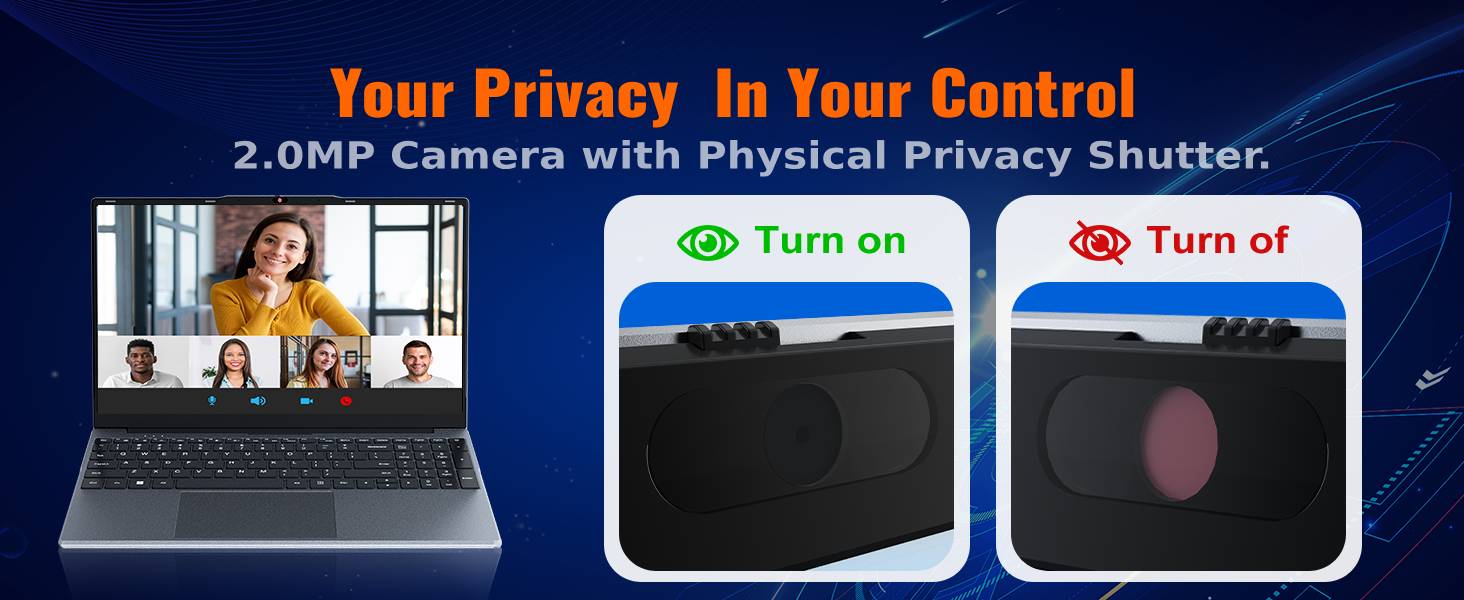
The integrated 2MP camera is suitable for video calls and online learning. A physical privacy slider is included to block the lens when not in use, ensuring your privacy.

Irudiaren deskribapena: Gertu bat view of the OTVOC DGBook laptop's 2MP webcam, illustrating the physical privacy shutter in both open and closed positions for enhanced user privacy.
5. Upgrades and Maintenance
5.1 RAM Upgrade
The laptop comes with one 4GB DDR3 RAM module installed and an additional empty slot. You can easily upgrade the RAM to boost performance by adding another module or replacing the existing one. The maximum supported RAM is 16GB.
Bideoaren deskribapena: This video demonstrates the steps to upgrade the RAM in your OTVOC DGBook laptop, showing how to access the memory slots and install new modules.

Irudiaren deskribapena: Barne bat view of the OTVOC DGBook laptop's motherboard, highlighting the dual-channel SO-DIMM RAM slots and illustrating the process of upgrading memory modules.
5.2 SSD Storage Expansion
The laptop includes a 128GB SATA SSD. An easy-upgrade slot allows you to add a larger 2.5" SATA SSD, expanding your storage up to 2TB for all your files eta komunikabideak.
Bideoaren deskribapena: This video demonstrates how to replace or upgrade the SSD in your OTVOC DGBook laptop, detailing the steps for accessing and installing a new solid-state drive.

Irudiaren deskribapena: An illustration of the OTVOC DGBook laptop's internal layout, highlighting the easy-upgrade SATA SSD bay and showing how to expand storage from 128GB up to 2TB.
5.3 Hozte-sistema
The laptop features an integrated cooling fan to maintain optimal performance and prevent overheating during demanding workloads, ensuring quiet operation.
Irudiaren deskribapena: An animated diagram illustrating the active cooling system of the OTVOC DGBook laptop, showing the internal fan and airflow designed to maintain sustained performance and prevent overheating.
6. Zehaztapenak
| Ezaugarri | Xehetasuna |
|---|---|
| Pantailaren tamaina | 15.6 hazbete |
| Pantailaren bereizmena | 1920 x 1080 pixel (FHD IPS) |
| Prozesadorea | Intel Core m3-8100Y (Up to 3.4GHz) |
| RAM | 4GB DDR3 (Upgradable to 16GB) |
| Biltegiratzea | 128GB SATA SSD (Expandable up to 2TB) |
| Grafikoak | Intel UHD Graphics 615 (Integratua) |
| Sistema eragilea | Windows 11 Home |
| Konektibitatea | 802.11a/b/g/n/ac Wireless, Bluetooth 5.0 |
| Portuak | 2x USB 3.0, 1x Type-C, 1x HDMI, 1x TF Card, 1x DC-in, 1x Headphone Jack |
| Webkamara | 2MP with Privacy Slider |
| Bateriaren iraupena | Approx. 4 hours (38Wh) |
| Pisua | 1.57 kg (3.46 lb) |
| Neurriak | 14.08 x 9.03 x 0.76 hazbete |
7. Arazoak
7.1 Gai arruntak
- Ordenagailu eramangarria ez da pizten: Ensure the charger is securely connected and the power outlet is functional. Try a different outlet.
- Errendimendu motela: Check for background applications, update drivers, or consider upgrading RAM/SSD.
- Wi-Fi konexio arazoak: Restart your router and laptop. Check network settings and ensure Wi-Fi drivers are up to date.
- Screen display problems: Adjust brightness settings. If the issue persists, contact support.
For more detailed troubleshooting or issues not listed here, please refer to the support section below.
8. Bermea eta Laguntza
8.1 Bermearen informazioa
Your OTVOC DGBook laptop comes with a 30 eguneko dirua itzultzeko bermea eta a 1 urteko ordezko bermea against manufacturing issues.
8.2 Laguntzarekin harremanetan jartzea
For any questions, technical assistance, or warranty claims, please contact the seller through Amazon:
- Joan zaitez Amazon.com eta hasi saioa zure kontuan.
- Click on the "Returns & Orders" section, located in the top right corner of the homepage.
- Find the order containing your OTVOC DGBook laptop, and click on the "Contact Seller" button next to it.
- Enter your inquiry details and click "Send" to submit your message.
Alternatively, you can click on the seller name below the "Add to Cart" button on the product page, then contact us via email by clicking "Ask a Question" in the top right corner.
We typically reply to customer messages within 12 hours, and no more than 24 hours.