
Sarrera
The Fender Mustang LTX50 is a versatile 50-watt modeling combo amplifier designed for guitarists seeking a wide range of authentic Fender tones and modern features. Equipped with a 12-inch Celestion G12P-80 speaker, it delivers dynamic sound suitable for practice, rehearsal, and performance. This amplifier offers 25 amp models and 25 effects, covering various musical styles from clean to high-gain. Its intuitive color display, onboard tuner, and 100 user preset slots provide easy customization and quick access to your preferred sounds. The Mustang LTX50 also features Bluetooth audio streaming for playing along with tracks and USB-C connectivity for direct recording and monitoring.
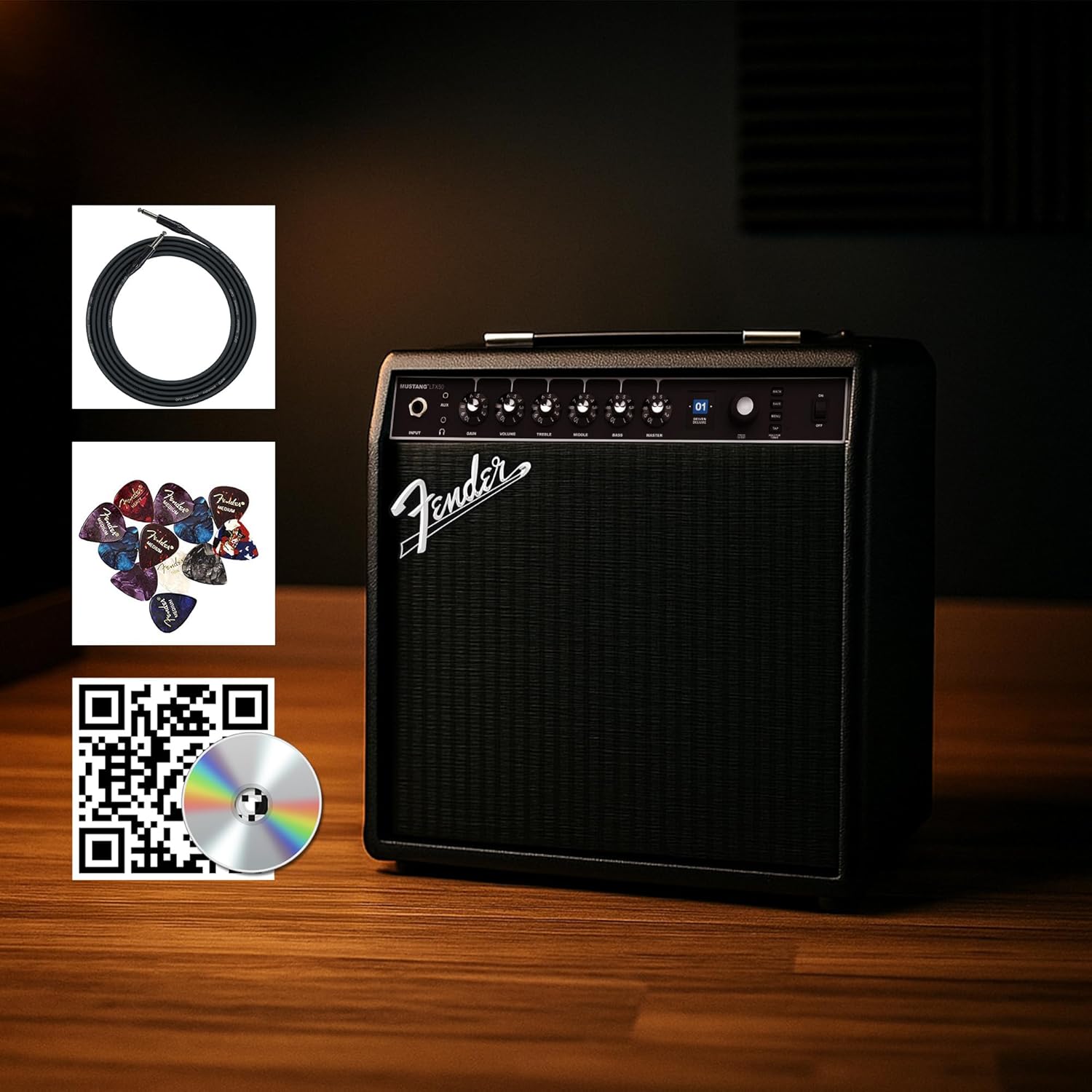
Figure 1: Fender Mustang LTX50 Guitar Combo Ampbizigarria barneko osagarriekin.
Konfigurazioa
1. Unboxing eta Hasierako Ikuskapena
- Kendu arretaz amplifier and all accessories from the packaging.
- Ikuskatu amplifier for any signs of damage that may have occurred during shipping.
- Confirm all included items are present: Mustang LTX50 amplifier, power cord, instrument cable, 12-pack guitar picks, and instructional DVD.
2. Potentzia konektatzea
- Ziurtatu ampLikidatzailearen etengailua itzali posizioan dago.
- Connect the included power cord to the AC input on the rear panel of the ampbiziagoa.
- Entxufatu korronte-kablearen beste muturra lurreko hartune elektriko batean.
3. Gitarra konektatzea
- Use the included instrument cable to connect your guitar to the SARRERA jack on the front panel of the ampbiziagoa.
4. Basic Controls Overview
Familiarize yourself with the front panel controls before powering on the ampbiziagoa.
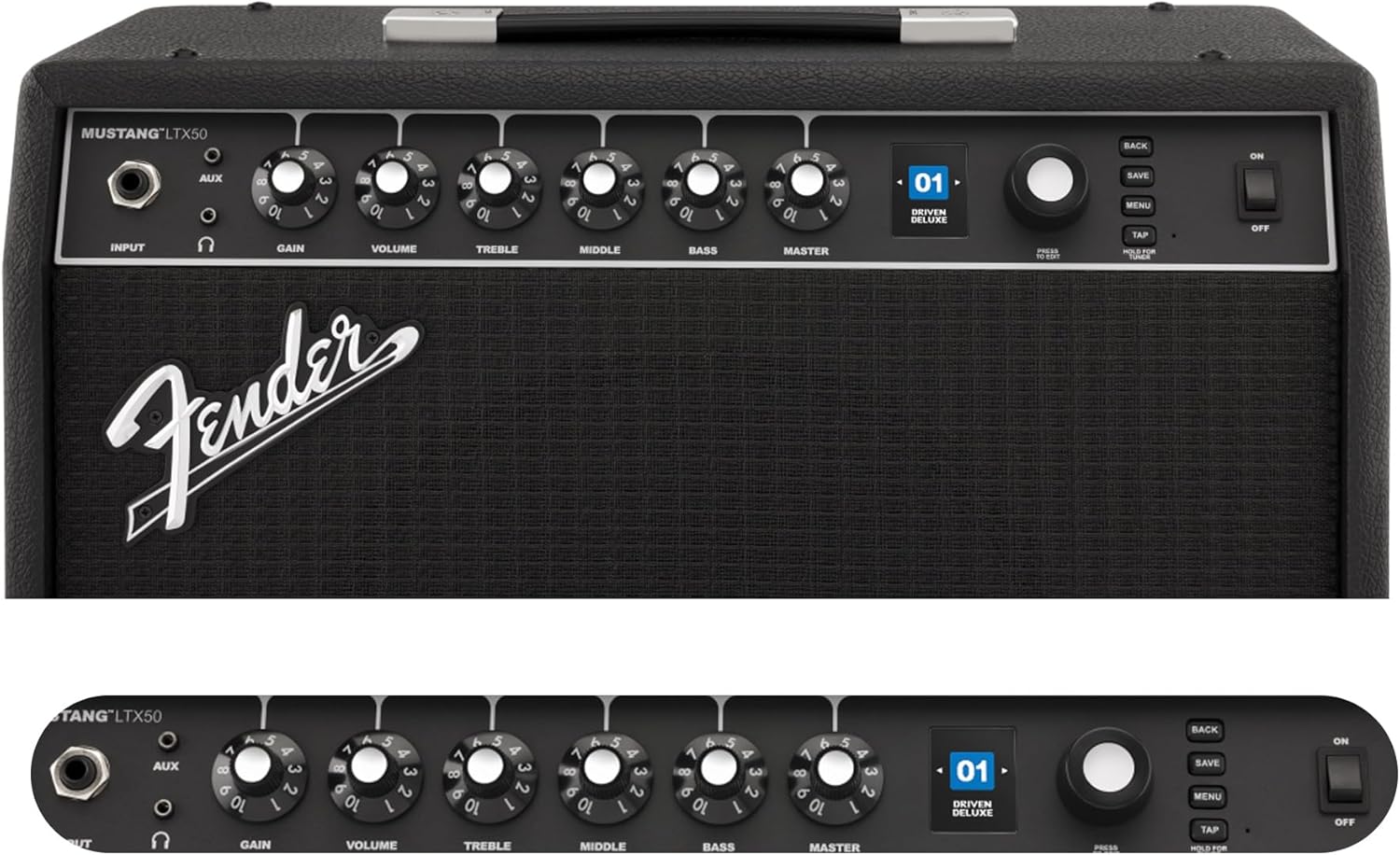
Figure 2: Front Panel Controls of the Mustang LTX50.
Funtzionamendu-argibideak
1. Piztu/Itzaltzea
- To power on, ensure all volume controls are set to minimum, then flip the BOTEREA aldatu ON posiziora.
- To power off, flip the BOTEREA aldatu OFF posiziora.
2. Navigating Presets
- Erabili KODETZAILEA knob (large rotary knob) to scroll through the 100 available presets (70 factory, 30 user).
- Sakatu KODETZAILEA knob to select a preset.
- The color LCD displays the current preset number and name.
3. Adjusting Amp Ereduak eta efektuak
- Sakatu MENUA botoian sartzeko amplifier's settings.
- Navigate through options like AMP, STOMP, MOD, DELAY, REVERB using the KODETZAILEA.
- Select an option and use the KODETZAILEA to choose different amp models or effects.
- Adjust parameters for each effect using the smaller control knobs (GAIN, VOLUME, TREBLE, MIDDLE, BASS, MASTER) or by selecting parameters on the display.
- Sakatu GORDE to store your customized preset.
4. Using the Built-in Tuner
- Eduki sakatuta TAPETA button to activate the chromatic tuner.
- Play a single note on your guitar; the display will show the note and indicate if it is sharp, flat, or in tune.
- Press any button or play for a few seconds to exit tuner mode.
5. Fender Tone 3.0 App Control
- Download the Fender Tone 3.0 app from your device's app store (iOS/Android).
- Gaitu Bluetootha zure gailu mugikorrean.
- On ampbizigarria, sakatu botoia MENUA button, navigate to "Bluetooth," and select "Pair."
- Select "Mustang LTX50" from your device's Bluetooth settings to connect.
- Use the app to wirelessly create, edit, save, and share presets, and to manage your ampdeformatzaileen ezarpenak.
6. Playing Along with Audio (Bluetooth)
- Once paired via Bluetooth, you can stream audio from your mobile device directly to the ampbiziagoa.
- Adjust the volume of the streamed audio from your mobile device.
- Alternatively, connect an external audio source to the AUX jack on the front panel using a 3.5mm stereo cable.
7. Recording via USB-C
- Connect a USB-C cable from the amplifier's USB-C port to your computer (Mac or PC).
- The amplifier functions as a bidirectional audio interface, allowing direct recording and monitoring.
- Refer to your Digital Audio Workstation (DAW) software's manual for specific setup instructions.
Mantentzea
1. Garbiketa
- Deskonektatu ampGarbitu aurretik, itzali likitzailea korrontetik.
- Erabili zapi leun eta lehor bat kanpoko gainazalak garbitzeko.
- Zikinkeria egoskorrerako, pixka bat damp xaboi leun batekin zapi bat erabil daiteke, eta ondoren zapi lehor bat.
- Saihestu garbitzaile, disolbatzaile edo argizari urratzaileak erabiltzea, hauek akabera kaltetu baitezakete.
2. Biltegiratzea
- Gorde amplifizer-a leku fresko eta lehor batean gorde, eguzki-argitik eta muturreko tenperaturetatik urrun.
- Avoid storing in areas with high humidity.
- If storing for extended periods, cover the amphautsetik babesteko lixibatzailea.
3. Safety Warnings (Proposition 65)
Produktu honek Kaliforniako Estatuak minbizia, jaiotzetiko akatsak edo bestelako ugalketa-arazoak eragiten dituztela ezagutzen dituen produktu kimikoak izan ditzake. Informazio gehiago lortzeko, bisitatu www.P65Warnings.ca.gov.
Arazoak konpontzea
Soinurik ez
- Ziurtatu amplifier is powered on and the power cord is securely connected.
- Check that your guitar is properly connected to the SARRERA jack.
- Egiaztatu hori MAISUA volume and individual preset volume controls are not set to zero.
- Test with a different instrument cable and guitar to rule out faulty equipment.
- If using headphones, ensure they are fully plugged into the headphone jack and that the main speaker is not muted.
Zarata distortsionatua edo nahi gabekoa
- Check your guitar's volume and tone controls.
- Murriztu IRABAZI ezarpenean ampbiziagoa.
- Ensure your instrument cable is not damaged or poorly shielded.
- Try a different power outlet to rule out electrical interference.
- If using high-gain amp models, some distortion is inherent. Adjust settings accordingly.
Bluetooth konexio-arazoak
- Ensure Bluetooth is enabled on both your mobile device and the ampbiziagoa.
- Ziurtatu amplifier is in pairing mode (refer to "Fender Tone 3.0 App Control" section).
- Move your mobile device closer to the ampbiziagoa.
- Saiatu gailuak desparekatzen eta berriro parekatzen.
- Berrabiarazi biak amplifier eta zure gailu mugikorra.
Amplifier Not Responding
- Potentzia zikloa amplifier by turning it off, waiting 10 seconds, and turning it back on.
- If the issue persists, a factory reset may be necessary. Consult the Fender support website for instructions on performing a factory reset for the Mustang LTX50.
Zehaztapenak
| Ereduaren izena | MUSTANG LTX50 |
| Modelo zenbakia | 2311700000 |
| Marka | Fender |
| Ampbiziagoa Mota | Modelaketa digitala |
| Potentzia Irteera | 50 Watt |
| Hizlaria | 1 x 12" Celestion G12P-80 |
| Amp Ereduak | 25 |
| Eraginak | 25 (distortion, overdrive, compression, modulation, reverb, delay, octave, etc.) |
| Aurrez ezarriak | 70 factory + 100 user slots |
| Bistaratzea | Color LCD with onboard chromatic tuner |
| Konektibitatea | Bluetooth audio, USB-C bidirectional audio |
| Irteerak | XLR line out, Headphone out |
| Aplikazioen laguntza | Fender Tone 3.0 app (iOS/Android) |
| Itxituraren Materiala | Metala |
| Elementuaren neurriak (L x W x H) | 22.3" L x 19.9" W x 12.3" H |
| Elementuaren pisua | 26.4 kilo |
| UPC | 840262259088 |

Figure 3: Rear Panel Connections of the Mustang LTX50.
Bermearen informazioa
The Fender Mustang LTX50 Guitar Combo Amplifier is covered by a 2 urteko berme mugatua. This warranty covers defects in materials and workmanship under normal use. For full terms and conditions, please refer to the warranty documentation included with your product or visit the official Fender webgunea.
Laguntza
For further assistance, technical support, or service inquiries regarding your Fender Mustang LTX50 amplifier, please visit the official Fender support webgunea:
You may also find additional resources, FAQs, and software updates on the Fender webgunea.