
1. Sarrera
The NEWFAST NF-RE516 N300 WiFi Repeater is designed to extend your existing wireless network coverage, eliminating Wi-Fi dead zones and providing a stable, high-speed internet connection throughout your home or office. This device operates on the 2.4 GHz band, offering a maximum speed of 300 Mbps, ideal for everyday online activities such as web browsing, video streaming, and online gaming.
2. Zer dago kutxan
Paketea irekitzean, elementu hauek aurkitu behar dituzu:
- 1 x NEWFAST NF-RE516 N300 WiFi Repeater
- 1 x Multi-language Instruction Manual
Video: Unboxing of a similar WiFi Repeater, showing the device and its components.
3. Ezaugarri nagusiak
- Superior Speed and Stability: Experience a maximum speed of 300 Mbps on the 2.4 GHz band, ensuring stable and fast connections for various online activities. This band is known for its long-distance transmission and good wall-penetrating capabilities.
- 4 irabazi handiko antena: Equipped with four high-gain antennas, the repeater provides extended coverage and a strong signal, effectively eliminating Wi-Fi dead zones in hard-to-reach areas like garages or bathrooms.
- Hainbat lan-modu: The device supports Repeater/Bridge mode and features Ethernet ports, offering flexibility to meet diverse internet needs in your home or office. It is compatible with 802.11 b/g/n standards.
- Konfigurazio erraza: Simple configuration options, including WPS (Wi-Fi Protected Setup) for quick connection to your router.

Image: The NEWFAST NF-RE516 WiFi Repeater highlighting its 300Mbps speed capability and stable signal.
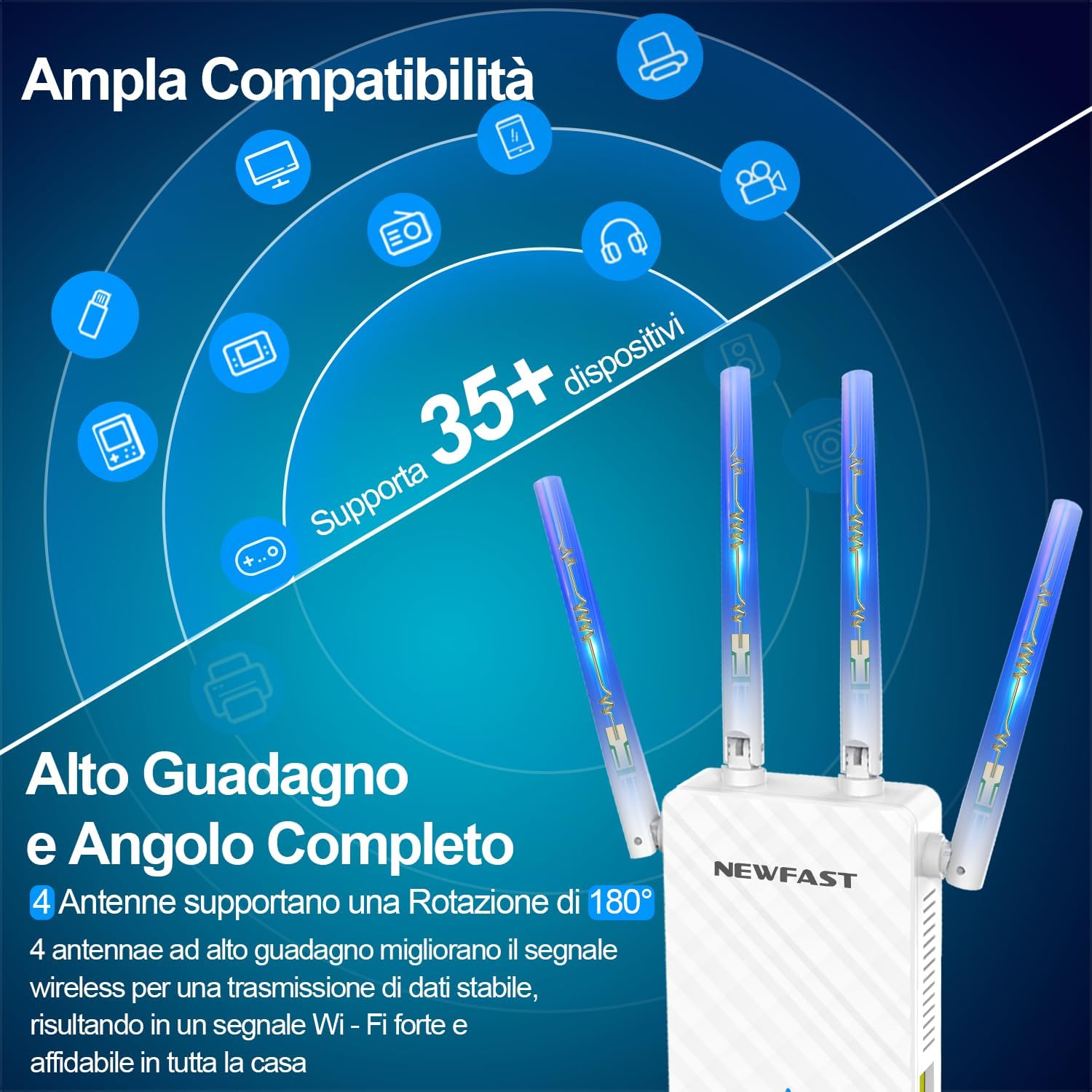
Image: The repeater showcasing its four high-gain antennas and broad compatibility with various devices.
4. Konfigurazioa eta instalazioa
4.1. Hasierako piztea
- Plug the NF-RE516 WiFi Repeater into a power outlet near your existing Wi-Fi router.
- Wait for the power indicator light to become stable, indicating the device is ready.
4.2. Configuration via WPS (Recommended)
WPS (Wi-Fi Protected Setup) offers a quick and easy way to connect your repeater to your router without manual configuration.
- Sakatu WPS botoia zure Wi-Fi bideratzailean.
- Within 2 minutes, press the WPS button on the NF-RE516 WiFi Repeater.
- The indicator lights on both devices should flash and then turn solid, indicating a successful connection.
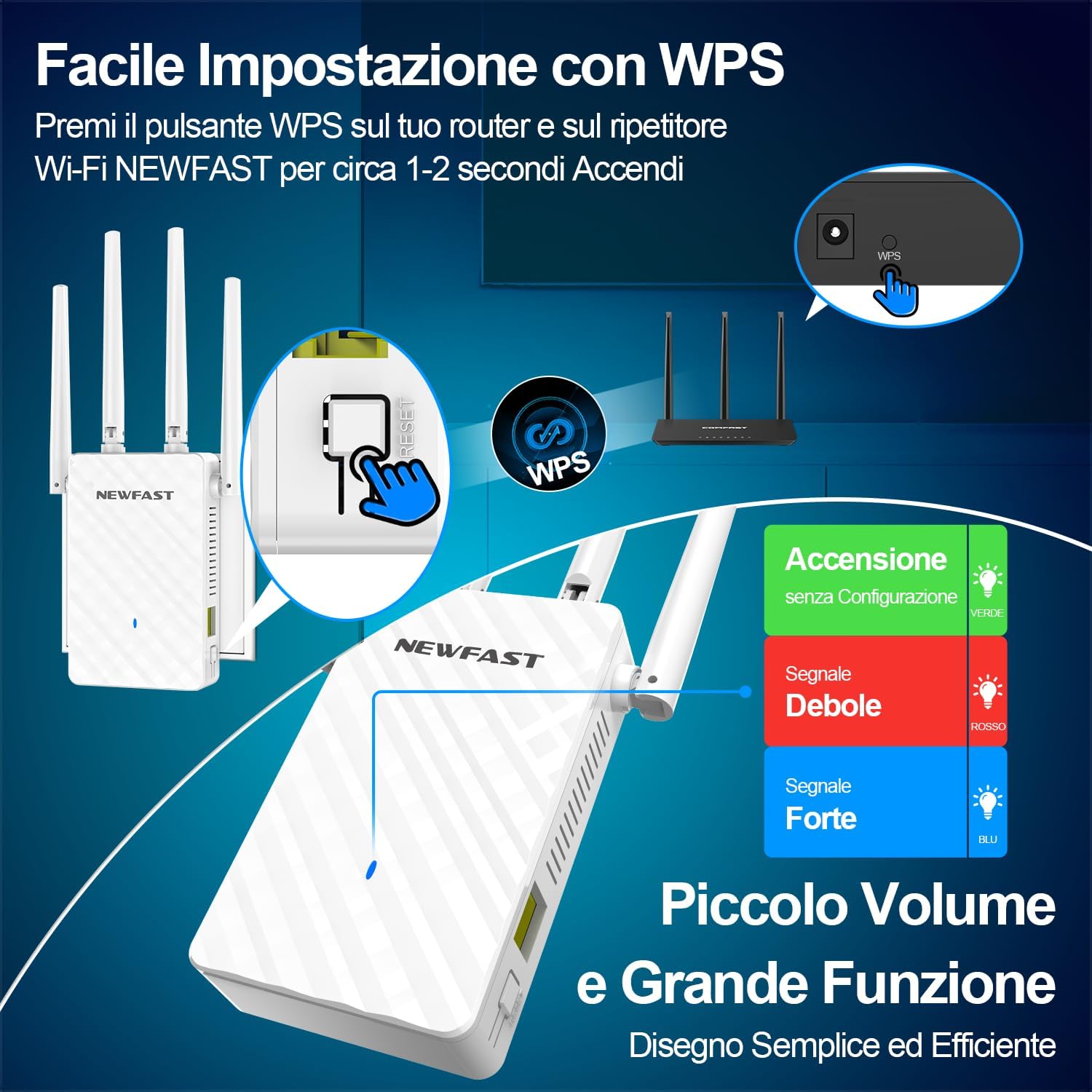
Image: Illustration of the WPS button on the repeater and its signal indicators.
4.3. Konfigurazioa honen bidez Web Arakatzailea
If your router does not support WPS or you prefer manual setup, follow these steps:
- Connect your computer or smartphone to the repeater's default Wi-Fi network (SSID usually starts with "NEWFAST" or similar, found on the device label). No password is required for the initial connection.
- Ireki a web arakatzailea eta sartu IP helbide lehenetsia (adibidez, http://192.168.10.1) or the domain name (e.g., waplogin.link) into the address bar.
- Hasi saioa erabiltzaile-izen eta pasahitza lehenetsiekin (normalean "admin" bietarako).
- Jarraitu pantailan agertzen diren argibideei zure Wi-Fi sarea hautatzeko eta haren pasahitza sartzeko.
- The repeater will restart, and your extended Wi-Fi network will be available.
Video: Demonstrates the web-based setup process for a WiFi Repeater, including connecting to the default network and accessing the configuration page.
4.4. Kokapen optimoa
For the best performance, consider the following:
- Place the repeater approximately halfway between your router and the Wi-Fi dead zone.
- Ensure the repeater is in an open area, free from obstructions like large furniture or walls.
- Keep the repeater away from large household appliances (e.g., microwaves, refrigerators) that can interfere with the Wi-Fi signal.

Image: A visual representation of how the NEWFAST WiFi Repeater extends network coverage throughout a multi-room environment.
5. Funtzionamendu moduak
The NF-RE516 supports multiple operating modes to suit various network requirements:
- Errepikagailu modua: Extends the existing Wi-Fi coverage of your main router. This is the most common mode for eliminating dead zones.
- AP (Sarbide Puntua) Modua: Converts a wired internet connection into a wireless network, allowing wireless devices to connect.
- Router modua: Functions as a standard router for home use, converting a wired signal to a wired network.
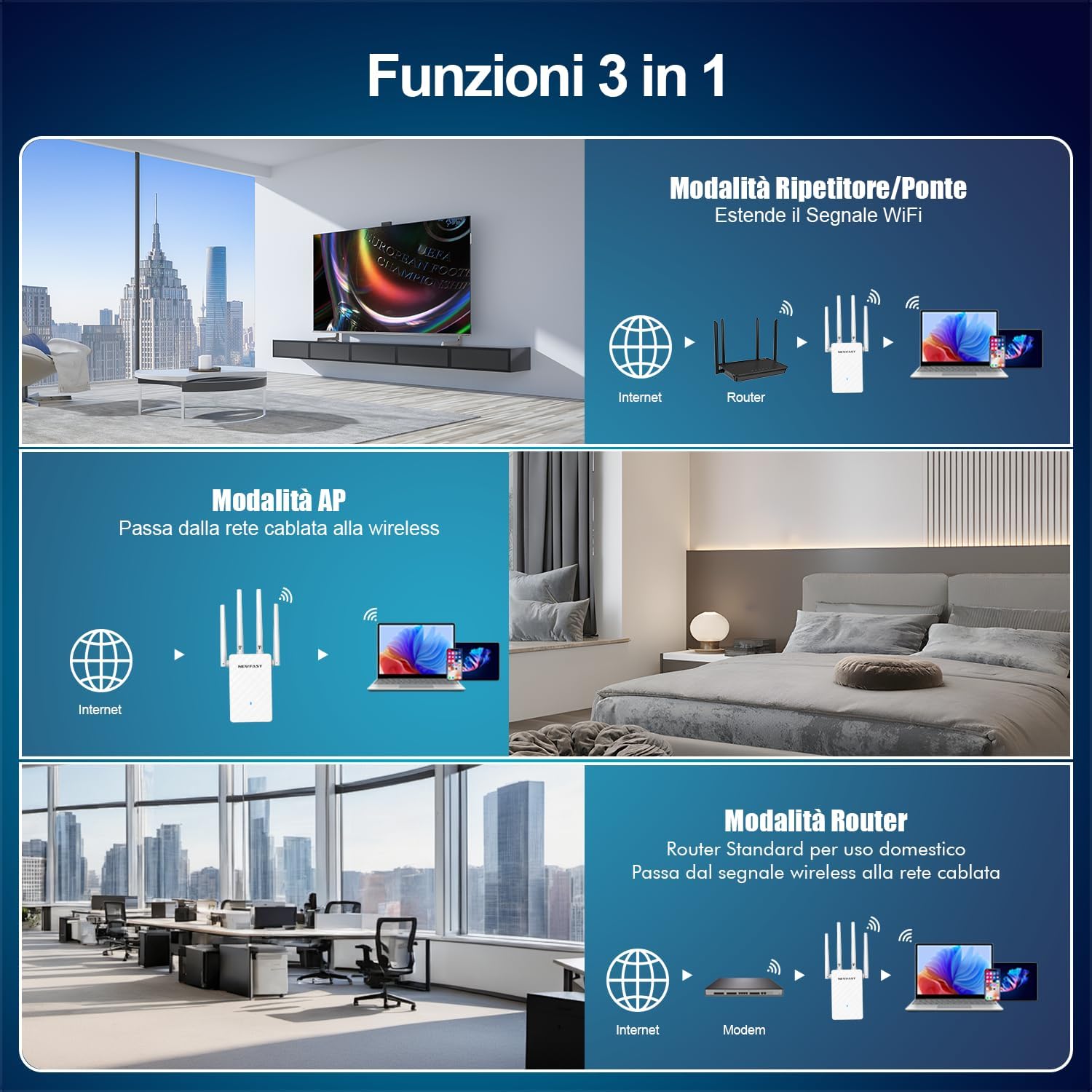
Image: Visual explanation of the three primary operating modes supported by the device.
6. Zehaztapenak
| Ezaugarri | Xehetasuna |
|---|---|
| Marka | BERRIA |
| Modelo zenbakia | NF-RE516 |
| Kolorea | Zuria |
| Haririk gabeko mota | 802.11a/b/g/n |
| Datuen transferentzia-tasa | 300 Megabit per second |
| Maiztasun Banda Klasea | Single Band (2.4 GHz) |
| Ezaugarri Berezia | Ethernet interface for flexible use, One-click WPS setup, Four high-gain antennas with 180° directional rotation |
| Elementuaren pisua | 230 gramo |
| Paketearen neurriak | 20.7 x 9.8 x 6.7 cm |
7. Arazoak
- Weak Signal After Setup:
- Ensure the repeater is placed within the range of your main router's signal.
- Relocate the repeater to a position that is equidistant from the router and the desired coverage area, avoiding physical obstructions.
- Adjust the four external antennas for optimal signal reception and transmission.
- Ezin da sartu Web Kudeaketa orria:
- Verify that your device is connected to the repeater's Wi-Fi network (default SSID).
- Ensure you are using the correct IP address (http://192.168.10.1) or domain name (waplogin.link).
- Garbitu arakatzailearen cachea eta cookieak, edo saiatu beste arakatzaile bat erabiltzen.
- If issues persist, perform a factory reset on the repeater by pressing the reset button for 5-10 seconds.
- Konexioa maiz erortzen da:
- Egiaztatu beste gailu elektroniko batzuen interferentziarik.
- Update the firmware of your repeater (if available on the manufacturer's webgunea).
- Ensure your main router's firmware is also up to date.

Image: Illustrates the strong signal penetration capability of the repeater, helping to overcome obstacles.
8. Bermea eta laguntza
NEWFAST products come with a standard manufacturer's warranty. For specific warranty details, please refer to the warranty card included in your product packaging or visit the official NEWFAST webgunea.
If you encounter any issues or have questions regarding your NF-RE516 WiFi Repeater, please contact NEWFAST customer support through the contact information provided in your manual or on the official webgunea. Gure laguntza-taldea prest dago laguntzeko.


