
1. Sarrera
The Carpuride W125P is an advanced 11.26-inch portable car display designed to enhance your driving experience with seamless connectivity and entertainment features. This device supports wireless Apple CarPlay and Android Auto, allowing for navigation, calls, music, and messaging via voice commands. It also integrates popular streaming applications like Netflix and YouTube, offers a split-screen function for multitasking, and provides multiple audio output options. Equipped with a 1080P reversing camera and supporting Over-The-Air (OTA) updates, the W125P ensures a safe, connected, and enjoyable journey.
2. Paketearen edukia
Mesedez, egiaztatu behean zerrendatutako elementu guztiak zure paketean sartuta daudela. Elementuren bat falta bada edo hondatuta badago, jarri harremanetan bezeroarentzako arreta-zerbitzuarekin.
- 1x Carpuride W125P Car Stereo Display
- 1x Car Charger (2.5 m)
- 1x 1080P Reversing Camera with Cable (6 m)
- 1x AUX Cable (1.5 m)
- 1x Self-Adhesive Mount
- 1 x Bentosa muntaia
- 1x User Manual (PDF versions in multiple languages are also available)

Irudia: Xehetasun handikoa view of the Carpuride W125P display and all included accessories, such as the car charger, reversing camera, AUX cable, and mounting options.
3. Konfigurazioa eta instalazioa
3.1 Pantaila muntatzea
The Carpuride W125P offers two primary mounting options: a self-adhesive mount and a suction cup mount. Choose the option that best suits your vehicle's dashboard or windshield.
- Garbitu gainazala: Ensure the mounting surface (dashboard or windshield) is clean and dry for optimal adhesion.
- Muntaia lotu:
- rentzat Self-Adhesive Mount: Remove the protective film from the adhesive pad and firmly press the mount onto the desired surface. Apply pressure for a few seconds.
- rentzat Suction Cup Mendia: Place the suction cup on the clean surface, then press down the lever to create a vacuum seal.
- Pantaila ziurtatu: Slide the Carpuride W125P display onto the chosen mount until it clicks securely into place.
- Egokitu Angelua: Egokitu viewing angle for optimal visibility without obstructing your driving view.
Ohar garrantzitsua:
For initial installation with the self-adhesive mount, it is recommended to fix the mount to the vehicle and let it rest for 24 hours before attaching the display. This allows the adhesive to cure properly, ensuring a secure hold.

Image: Step-by-step diagram illustrating the installation process for both adhesive and suction cup mounts.
3.2 Energia-konexioa
Connect the provided 2.5m car charger to the Type-C port on the Carpuride W125P and plug the other end into your vehicle's cigarette lighter socket. Use only the original car charger included in the package to ensure proper functionality and prevent damage.
3.3 Reversing Camera Installation
The 1080P reversing camera comes with a 6m cable. Install the camera at the rear of your vehicle, ensuring a clear view. Connect the camera cable to the AV IN port on the Carpuride W125P. The camera will automatically activate when the vehicle is put into reverse gear.

Image: Technical diagram showing the features of the 1080P waterproof rear camera, including 1080P resolution, IP67 waterproof rating, 170° wide angle, and adjustable guidelines.
4. Funtzionamendu-argibideak
4.1 Piztea/Itzaltzea eta lo modua
- Pizteko botoia laburki sakatuta: Enters sleep mode.
- Eduki sakatuta 2 segundoz: Displays options to "Power Off", "Restart", or access "Settings".
- Eduki sakatuta 5 segundoz: Powers off the device directly.
4.2 Haririk gabeko Apple CarPlay eta Android Auto
The Carpuride W125P supports wireless Apple CarPlay and Android Auto. This allows you to integrate your smartphone's navigation, communication, and entertainment features directly onto the display.
- Gaitu Bluetooth eta Wi-Fi: Zure telefonoan, ziurtatu Bluetooth eta Wi-Fi gaituta daudela.
- Parekatu gailua: On the Carpuride W125P, navigate to the CarPlay or Android Auto application. Bilatu the device's Bluetooth name (e.g., "Carpuride_BT-xxxx") on your phone and pair.
- Berretsi konexioa: Follow any on-screen prompts on both your phone and the Carpuride W125P to confirm the connection.
Bateragarritasun-oharrak:
- Apple CarPlay requires iOS 13 or later.
- Android Auto requires Android 11 or later.
- Some applications may not be compatible with CarPlay or Android Auto.
- Certain Samsung, Xiaomi, and Huawei models may have limited compatibility.

Image: The Carpuride W125P display showing a navigation interface with voice command prompts for Siri and Google Assistant, demonstrating wireless CarPlay/Android Auto functionality.
4.3 Integrated Streaming Applications
The Carpuride W125P runs on an Android operating system and comes with pre-installed streaming applications such as Netflix, YouTube, and TikTok.
- Konektatu wifira: Ensure the device is connected to a Wi-Fi hotspot (e.g., from your smartphone) to access online content.
- Hasi saioa: Open the desired streaming app and log in with your account credentials.
- Gozatu edukia: Browse and play your favorite movies, series, or videos.
Ohar garrantzitsuak:
- Additional apps cannot be downloaded; only pre-installed applications are supported.
- Available applications may vary based on IP address.

Image: The Carpuride W125P display showing a football match being streamed, surrounded by icons of popular apps like Netflix, YouTube, Spotify, and TikTok.
4.4 Pantaila zatituaren funtzionalitatea
The dual integrated Wi-Fi modules enable a split-screen mode, allowing you to use navigation (via CarPlay/Android Auto) on one side while passengers enjoy streaming entertainment on the other.
- To activate split-screen, select the desired applications from the main menu and drag them to the split-screen zones.
- When switching between full-screen and split-screen modes, CarPlay/Android Auto will automatically reconnect.
Oharra:
If your phone does not allow hotspot activation while connected to CarPlay/Android Auto, connect the Carpuride W125P to an alternative hotspot or Wi-Fi network.
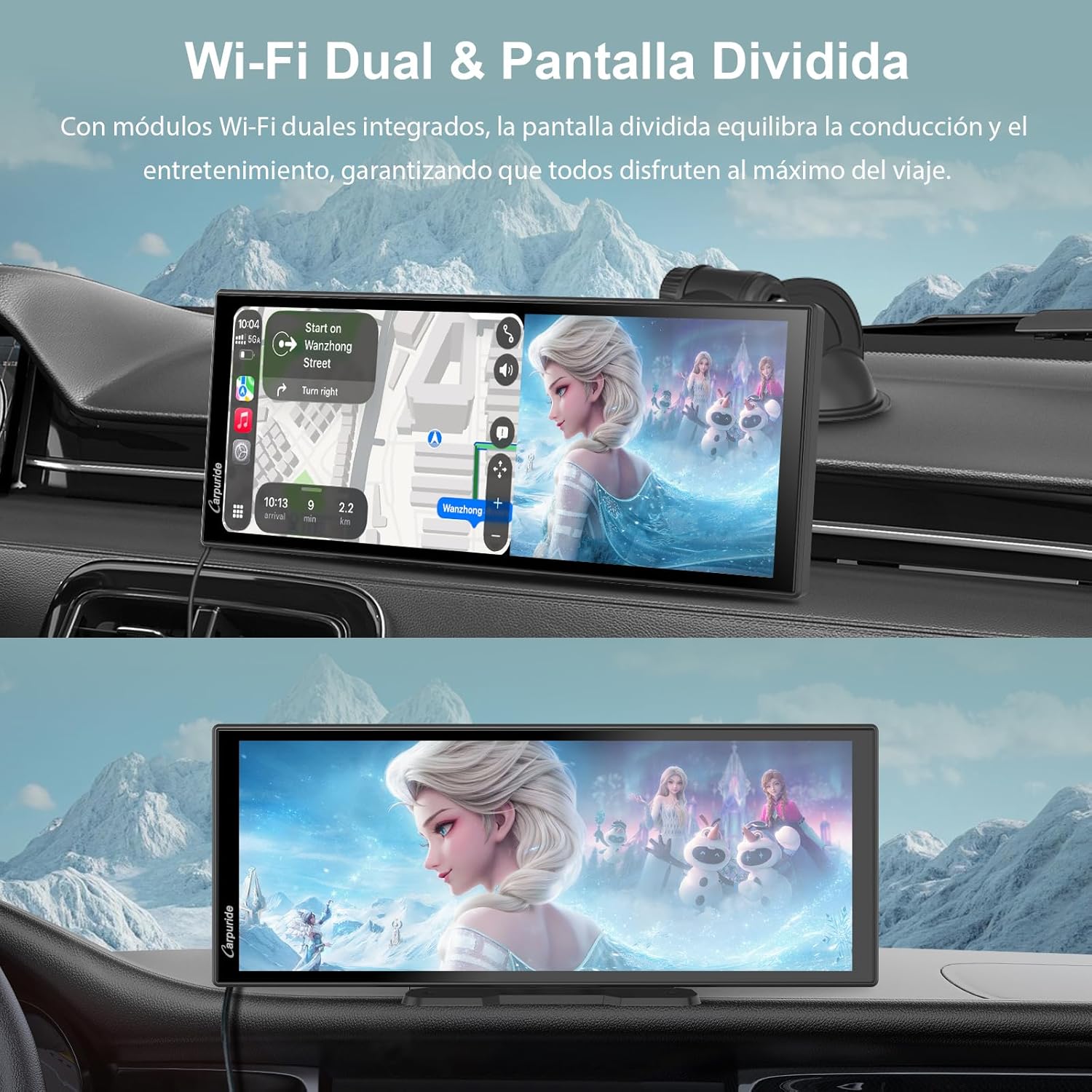
Image: The Carpuride W125P display demonstrating split-screen functionality, showing navigation on one side and video entertainment on the other.
4.5 Audio irteerako aukerak
The Carpuride W125P offers four ways to transmit audio to your vehicle's sound system:
- Bluetooth igorle modua: Connect the display directly to your car's audio system via Bluetooth for a stable and immersive sound experience.
- AUX konexioa: Use the included 1.5m AUX cable to connect the display to your car's AUX input.
- FM igorlea: Tune the display and your car radio to the same FM frequency to transmit audio wirelessly.
- Bozgorailu integratua: The device has an integrated speaker for direct audio output, suitable for vehicles without Bluetooth or AUX inputs.
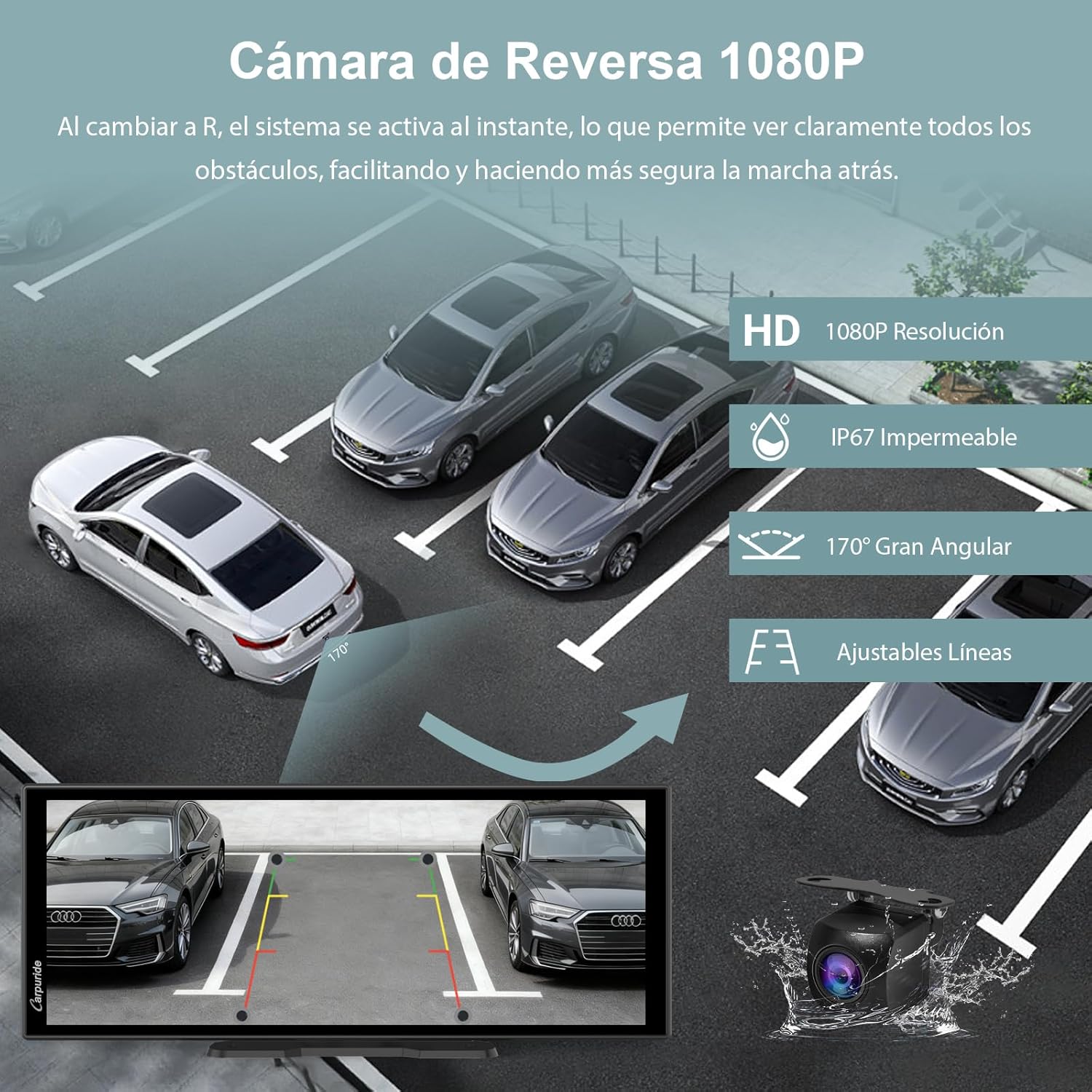
Image: Diagram illustrating the four audio output options: Bluetooth transmitter, built-in speaker, FM transmission, and AUX connection, with a music player interface shown on the main screen.
4.6 Over-The-Air (OTA) Updates
The OTA technology allows for easy online updates of your Carpuride W125P via Wi-Fi, ensuring your device always has the latest firmware and application versions.
- Konektatu wifira: Ziurtatu gailua Wi-Fi sare egonkor batera konektatuta dagoela.
- Access Update Settings: Go to "Settings" on the device and look for the "System Update" or "OTA Update" option.
- Egiaztatu eguneratzeak: Click to check for available updates.
- Instalatu eguneraketak: Follow the on-screen instructions to download and install any new updates.
Abantailak:
- No professional assistance required.
- Keeps your device optimized with the latest features and improvements.

Image: Diagram illustrating the OTA update process, highlighting that no computer knowledge or professional equipment is needed, just a Wi-Fi connection.
4.7 Customizable Wallpaper and Offline Media
Personalize your Carpuride W125P with custom wallpapers and enjoy your media offline.
- Custom Wallpaper: Load your favorite images (e.g., car logos, family photos) onto a TF card (not included). Insert the TF card into the device, then navigate to the wallpaper settings to select your custom image.
- Offline Media Library: Store your favorite songs, videos, and photos on a TF card. The device's intuitive file manager allows you to browse, play, and organize your content without an internet connection, ideal for areas with limited signal.
Oharra:
Software cannot be installed via TF card. The TF card is not included in the package.

Image: The Carpuride W125P display showing a custom wallpaper and a TF card being inserted, illustrating offline media playback and personalization features.
5. Reversing Camera Operation
The included 1080P reversing camera provides a 170° wide-angle view, automatically activating when you engage reverse gear.
- Aktibazio automatikoa: Kamera view appears on the display instantly when shifting into reverse.
- Jarraibide erregulagarriak: Parking guidelines can be adjusted on the screen for precise parking.
- Edonoiz View: You can access the reverse view at any time through the dedicated "Reverse" app on the display.
- Irudiaren orientazioa: If the camera is installed upside down, you can adjust the viewing angle directly on the Carpuride W125P screen without needing to reinstall the camera.

Irudia: Goiko aldea view of cars in a parking lot with a simulated 1080P reversing camera view on the Carpuride W125P display, showing adjustable guidelines and a 170° wide-angle perspective.
6. Mantentzea
To ensure the longevity and optimal performance of your Carpuride W125P, follow these maintenance guidelines:
- Garbiketa: Use a soft, dry, lint-free cloth to clean the screen and exterior. Avoid abrasive cleaners, solvents, or aerosol sprays.
- Tenperatura: Ez jarri gailua tenperatura altuen eraginpean (beroa edo hotza) denbora luzez.
- Hezetasuna: Keep the device dry. Do not expose it to water or excessive humidity.
- Kableen kudeaketa: Ensure all cables are properly routed and secured to prevent damage or interference with driving.
7. Arazoak
If you encounter issues with your Carpuride W125P, please refer to the following common troubleshooting steps:
| Arazoa | Kausa posiblea | Irtenbidea |
|---|---|---|
| Gailua ez da pizten. | No power, faulty car charger, loose connection. |
|
| Haririk gabeko CarPlay/Android Auto-k huts egiten du konektatzeko. | Bluetooth/Wi-Fi off, incompatible phone, software glitch. |
|
| Streaming apps (Netflix, YouTube) not working. | No Wi-Fi connection, incorrect login, app issue. |
|
| Ez dago audio irteerarik. | Incorrect audio mode, volume too low, cable issue. |
|
| Reversing camera image is distorted or not appearing. | Loose connection, camera obstruction, faulty camera. |
|
8. Zehaztapenak
Detailed technical specifications for the Carpuride W125P:
| Ezaugarri | Xehetasuna |
|---|---|
| Modelo zenbakia | W125P |
| Bistaratzeko tamaina | 11.26 hazbetekoa |
| Bistaratzeko ebazpena | 1920x720 (HD) |
| Fotograma-tasa | 60 FPS |
| Sistema eragilea | Android OS |
| Konektibitate Teknologia | Auxiliary, Bluetooth, FM, Wi-Fi |
| Haririk gabeko Teknologiak | Bluetooth konexioa, Wi-Fi |
| Ezaugarri bereziak | OTA Updates, Intuitive UI, Wireless Apple CarPlay & Android Auto, Dual Wi-Fi Module (Split Screen), Dual Bluetooth Module (BT Transmitter), Integrated Apps (Netflix, YouTube) |
| Gailu bateragarriak | Smartphone |
| Konektore mota | Charger (Type-C), AUX |
| Audio irteera modua | Stereo (Headphones, Bluetooth) |
| Bideo-kodeketa | H.264, H.265/HEVC, VP9 |
| Alderantzizko Kamera | 1080P, 170° Wide Angle, Adjustable Guidelines |
| Produktuaren neurriak (L x W x H) | 2.5 cm x 26.5 cm x 10.5 cm |
| Produktuaren pisua | 1.22 kg |
| Jatorrizko Herrialdea | Txina |
9. Bermea eta Laguntza
9.1 Produktuaren bermea
The Carpuride W125P comes with a 1 urteko bermea from the date of purchase. This warranty covers manufacturing defects and malfunctions under normal use. It does not cover damage caused by misuse, accidents, unauthorized modifications, or improper installation. Please retain your proof of purchase for warranty claims.
9.2 Bezeroarentzako laguntza
For technical assistance, troubleshooting, or warranty inquiries, please contact Carpuride customer support. Refer to the contact information provided on the product packaging or the official Carpuride webgunea.
You can also find additional resources, FAQs, and PDF versions of this manual in multiple languages on the Carpuride support page.