
Sarrera
This manual provides essential instructions for setting up, operating, maintaining, and troubleshooting your Lenovo Idea Tab 11 Tablet with Pen. Please read this manual thoroughly before using your device to ensure proper function and longevity.
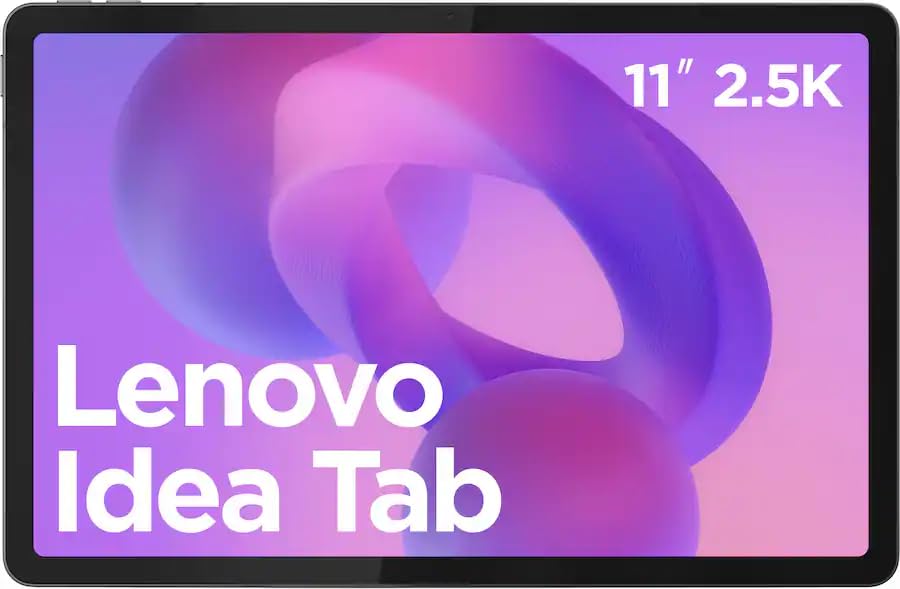
Image: The Lenovo Idea Tab 11 Tablet with its included pen, showcasing the 11-inch 2.5K display.
Konfigurazioa
1. Kutxatik ateratzea eta hasierako kargatzea
Carefully remove all components from the packaging. The box should contain the Lenovo Idea Tab 11 Tablet and the Lenovo Tab Pen. Before first use, fully charge the tablet using a compatible USB-C charger. The battery indicator on the screen will show charging status.
2. Piztu/Itzaltzea
- Pizteko: Sakatu eta eutsi pizteko botoia Lenovo logotipoa agertu arte.
- Itzaltzeko: Sakatu eta eutsi pizteko botoiari, eta ondoren hautatu 'Itzali' pantailan agertzen diren aukeren artean.
- Berrabiarazteko: Sakatu eta eutsi pizteko botoiari, eta hautatu 'Berrabiarazi' aukeren artean.
3. Hasierako konfigurazio morroia
Lehen aldiz piztean, tabletak hasierako konfigurazio prozesu batean zehar gidatuko zaitu. Jarraitu pantailan agertzen diren argibideei:
- Hautatu zure hizkuntza.
- Konektatu Wi-Fi sare batera.
- Hasi saioa zure Google kontuarekin edo sortu berri bat.
- Konfiguratu pantailaren blokeoa (PINa, eredua, pasahitza edo hatz-marka).
4. Lenovo Tab Pen Setup
The Lenovo Tab Pen is battery-powered. Ensure a fresh AAA battery is inserted correctly. The pen is designed to work immediately with the tablet for basic functions. For advanced features or pairing, refer to the tablet's Bluetooth settings or the dedicated pen application if available.
Funtzionamendu-argibideak
1. Oinarrizko nabigazioa
The Lenovo Idea Tab uses standard Android touch gestures:
- Sakatu: Hautatu elementu bat edo ireki aplikazio bat.
- Pasatu hatza: Joan orrialdeetan edo zerrendetan zehar.
- Zoom egiteko apur bat egin: Irudiak handitu edo txikitu eta web orrialdeak.
- Sakatu luzea: Sartu testuinguru-menuetara edo mugitu ikonoak.
2. Using the Lenovo Tab Pen
The Lenovo Tab Pen offers 4,096 levels of pressure sensitivity and tilt support for a natural writing and drawing experience. It is ideal for note-taking, sketching, and navigating the tablet interface.
- Idazketa/Marrazkia: Use the pen directly on the screen in compatible applications.
- Nabigazioa: Tap, swipe, and select items as you would with your finger.
- Botoiaren funtzioak: The pen may have programmable buttons for quick access to eraser, right-click, or other functions. Refer to the tablet's settings for customization.

Image: The Lenovo Idea Tab 11 Tablet being used with the Lenovo Tab Pen for note-taking and creative tasks.
3. Pantailaren ezarpenak
Your tablet features an 11-inch 2.5K (2560 x 1600 pixels) display with a 90 Hz refresh rate. You can adjust display settings such as brightness, color mode, and refresh rate in the tablet's 'Settings' menu under 'Display'.
4. Audioa
The tablet is equipped with Dolby Atmos speakers for enhanced audio experience. Adjust volume using the physical volume buttons or through the quick settings panel.
5. Konektibitatea
- Wi-Fi: Connect to wireless networks via 'Settings' > 'Network & internet' > 'Wi-Fi'. Supports 802.11ac and 802.11ax standards.
- Bluetootha: Pair with Bluetooth devices like headphones or keyboards via 'Settings' > 'Connected devices' > 'Bluetooth'.
6. Biltegiratze kudeaketa
The tablet comes with 128 GB of internal storage. To manage storage, go to 'Settings' > 'Storage'. You can view erabilitako espazioa, askatu espazioa eta kudeatu files.
Mantentzea
1. Gailua garbitzea
Erabili zapi leun eta lihorik gabeko bat tabletaren pantaila eta gorputza garbitzeko. Orban egoskorrak izanez gero, garbitu apur batampGarbitu zapia urarekin edo pantailarentzat segurua den garbiketa-soluzio batekin. Saihestu produktu kimiko gogorrak edo material urratzaileak.
2. Bateria zaintzea
- Saihestu tenperatura muturrekoak, bateriaren iraupena murriztu baitezakete.
- Ez utzi tableta denbora luzez guztiz kargatuta edo deskargatuta.
- Erabili onartutako kargagailuak eta kableak soilik.
3. Software eguneraketak
Regularly check for and install software updates to ensure optimal performance, security, and access to new features. Go to 'Settings' > 'System' > 'System update'.
4. Biltegiratze optimizazioa
Aldian behin berriroview eta beharrezkoak ez direnak ezabatu files, apps, and media to maintain sufficient free storage space for smooth operation.
Arazoak konpontzea
1. Gailua ez da pizten
- Ziurtatu bateria kargatuta dagoela. Konektatu tableta kargagailura gutxienez 30 minutuz.
- Berrabiarazte behartua egiteko, sakatu eta eutsi pizteko botoia 10-15 segundoz.
2. Pantailak ez du erantzuten
- Berrabiarazi tableta.
- Ziurtatu pantaila garbi eta hondakinik gabe dagoela.
3. Lenovo Tab Pen Not Working
- Check the pen's battery and replace it if necessary.
- Ensure the pen is within range of the tablet.
- Berrabiarazi tableta.
4. Wi-Fi konexio arazoak
- Toggle Wi-Fi off and on in 'Settings'.
- Berrabiarazi zure Wi-Fi bideratzailea.
- Ahaztu sarea eta konektatu berriro.
5. Fabrika berrezarri
Arazoak jarraitzen badute, baliteke fabrikako ezarpenetara berrezarri behar izatea. Abisua: Honek tabletako datu guztiak ezabatuko ditu. Jarraitu aurretik, egin datu garrantzitsuen babeskopia. Go to 'Settings' > 'System' > 'Reset options' > 'Erase all data (factory reset)'.
Zehaztapenak

Image: Visual representation of key specifications for the Lenovo Idea Tab 11 Tablet, highlighting the MediaTek Dimensity 6300 processor, 8GB LPDDR4 RAM, and 128GB UFS 2.2 Storage.
| Ezaugarri | Xehetasuna |
|---|---|
| Ereduaren izena | Lenovo Idea Tab 11 |
| Modelo zenbakia | ZAFR0928US |
| Bistaratzea | 11-inch 2.5K (2560 x 1600 pixels) LCD, 90 Hz Refresh Rate |
| Prozesadorea | MediaTek Dimensity 6300 |
| RAM | 8 GB LPDDR4X |
| Biltegiratzea | 128 GB UFS 2.2 |
| Sistema eragilea | Android 15 |
| Haririk gabeko konexioa | Wi-Fi (802.11ac, 802.11ax), Bluetooth |
| Audioa | Dolby Atmos bozgorailuak |
| Neurriak (LxWxH) | 8.31 x 4.91 x 0.33 hazbete |
| Pisua | 3 kilo |
| Osagarriak barne | Lenovo Tab boligrafoa |
Bermea eta Laguntza
Your Lenovo Idea Tab 11 Tablet with Pen is covered by a limited warranty. For detailed warranty information, please refer to the warranty card included with your product or visit the official Lenovo support website. For technical assistance, software updates, or service inquiries, please contact Lenovo customer support.
Lenovo laguntza Webgunea: support.lenovo.com