
1. Sarrera
Thank you for choosing the AULA F3018 Mechanical Keyboard. This keyboard is designed for high-level mechanical performance and robust construction, offering precision for gaming and comfort for typing. It features Blue switches for a tactile and audible click, an ABNT2 layout with 'Ç' for Brazilian Portuguese compatibility, and full RGB lighting with multiple customizable effects. The reinforced braided cable enhances durability and ensures a stable connection. This manual provides essential information for setup, operation, and maintenance of your keyboard.
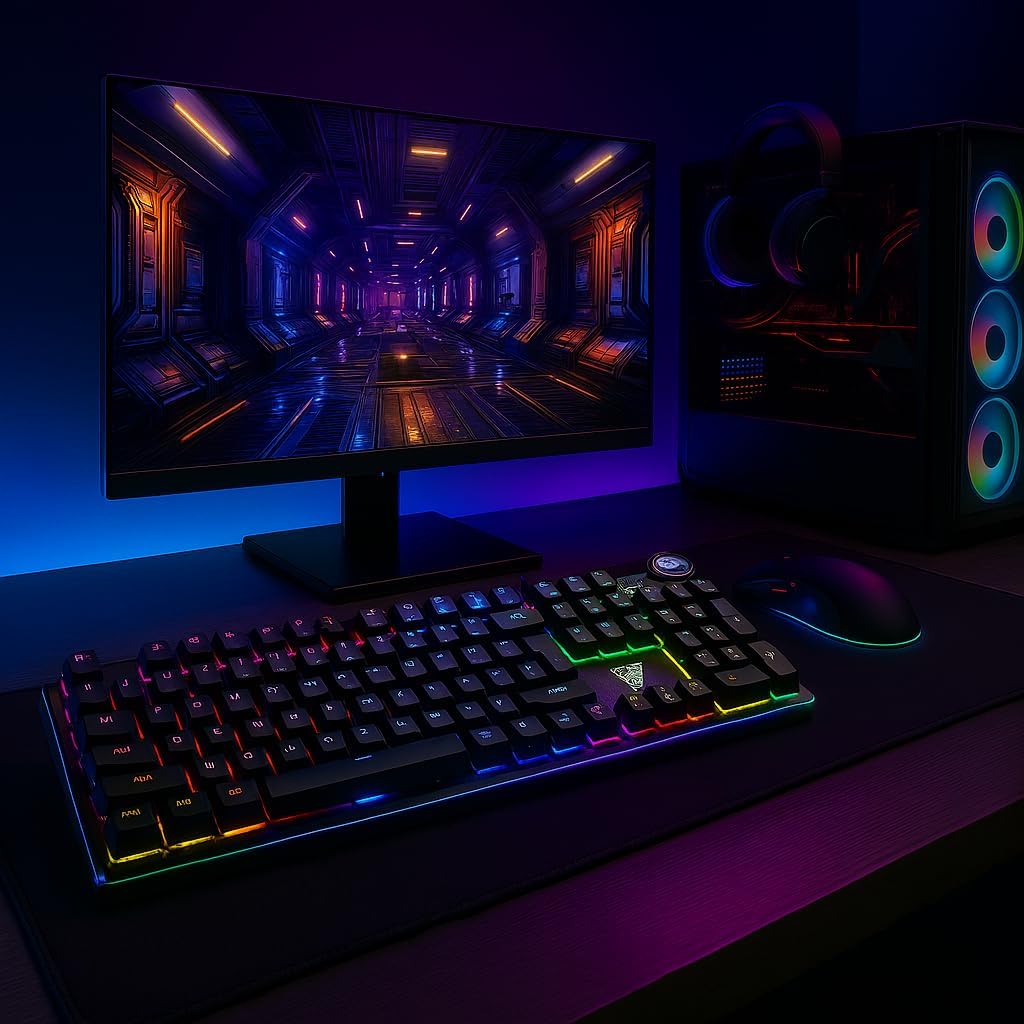
Image 1.1: AULA F3018 Mechanical Keyboard in a typical desktop setup, showcasing its RGB lighting and full-size design.
2. Paketearen edukia
Ziurtatu elementu guztiak paketean daudela:
- AULA F3018 Teklatu Mekanikoa
- USB kablea (erantsita)
- Erabiltzailearen eskuliburua (dokumentu hau)
3. Konfigurazioa
Follow these steps to connect your AULA F3018 Mechanical Keyboard:
- Deskonprimitu teklatua: Kontu handiz atera teklatua bere paketetik.
- Konektatu ordenagailura: Insert the USB connector of the keyboard's reinforced cable into an available USB port on your computer (PC, Notebook, or MacBook). The keyboard supports USB 2.0 and USB 3.0 ports.
- Gidariaren instalazioa: The keyboard is plug-and-play. Your operating system will automatically detect and install the necessary drivers. No additional software installation is required for basic functionality.
- Egiaztatu konexioa: Once connected, the keyboard's RGB lighting should illuminate, indicating a successful connection. You can now begin using your keyboard.

3.1. irudia: Angelua view of the AULA F3018 keyboard, highlighting the durable, reinforced USB cable for connection.
4. Funtzionamendu-argibideak
4.1. Oinarrizko funtzioak
The AULA F3018 is a full-size ABNT2 layout keyboard with 108 keys, providing all standard typing and navigation functions.
4.2. RGB argiztapenaren kontrola
The keyboard features full RGB backlighting with multiple effects. Use the following key combinations to control the lighting:
- Fn + [Tekla]: Specific keys may have secondary functions for lighting control. Refer to the keycaps for symbols indicating lighting adjustments.
- Argiztapen moduak: Cycle through various lighting effects and patterns.
- Distira doitzea: Increase or decrease the brightness of the backlighting.
- Abiadura doitzea: Change the speed of dynamic lighting effects.

Image 4.1: The AULA F3018 keyboard illuminated with vibrant RGB lighting, demonstrating customizable visual effects.
4.3. Multimedia Controls
The keyboard includes dedicated multimedia keys and a volume control knob for convenient media management:
- Bolumen-eskulekua: Rotate the knob clockwise to increase volume, counter-clockwise to decrease volume. Press the knob to mute/unmute audio.
- Dedicated Multimedia Keys: Located above the numeric keypad, these keys provide quick access to functions like Play/Pause, Stop, Previous Track, and Next Track.

4.2 irudia: Xehetasun zehatza view of the volume control knob and adjacent multimedia keys on the AULA F3018 keyboard.
5. Mantentzea
Mantentze egokiak zure teklatuaren iraupena eta errendimendu optimoa bermatzen ditu:
- Garbiketa: Use a soft, dry cloth to wipe the surface of the keyboard. For dust and debris between keys, use compressed air. Avoid using harsh chemicals or abrasive materials.
- Isurien prebentzioa: While the keyboard is moisture-resistant, avoid direct liquid spills. In case of a spill, immediately disconnect the keyboard and allow it to dry completely before reconnecting.
- Kableen zainketa: Do not bend or twist the reinforced cable excessively. Store it neatly to prevent damage.
- Biltegiratzea: Denbora luzez erabiltzen ez duzunean, gorde teklatua leku garbi eta lehor batean, eguzki-argitik eta muturreko tenperaturetatik urrun.
6. Arazoak
AULA F3018 teklatuarekin arazoak badituzu, jo ezazu honako arazo eta irtenbide ohikoenei:
- Teklatuak ez du erantzuten:
- Ziurtatu USB kablea ondo konektatuta dagoela bai teklatura bai ordenagailura.
- Saiatu teklatua ordenagailuko beste USB ataka batera konektatzen.
- Berrabiarazi ordenagailua.
- Probatu teklatua beste ordenagailu batean ordenagailuaren arazo espezifiko bat baztertzeko.
- RGB argia ez dabil:
- Check if the lighting is turned off or set to minimum brightness using the keyboard's lighting control functions (e.g., Fn + [Key]).
- Ziurtatu teklatua behar bezala konektatuta dagoela eta energia jasotzen duela.
- Giltzak ez dira erregistratzen edo bi aldiz idazten ari dira:
- Clean the affected key(s) with compressed air to remove any debris.
- If the issue persists, it might indicate a hardware fault. Contact customer support.
- Multimedia Keys Not Functioning:
- Ensure your operating system's media player is active and in focus.
- Check for any conflicting software or drivers.
7. Zehaztapenak
| Ezaugarri | Deskribapena |
|---|---|
| Ereduaren izena | AULA F3018 Teklatu Mekanikoa |
| Modelo zenbakia | F3018 |
| Marka | AULA (Generic) |
| Aldatu mota | Tactile Blue Switch |
| Teklatuaren diseinua | ABNT2 (Portuguese) |
| Gako kopurua | 108 |
| Konektibitatea | Wired (USB, USB 2.0, USB 3.0) |
| Atzeko argia | Full RGB, Adjustable |
| Gailu bateragarriak | MacBook, Notebook, PC |
| Materiala | Akrilonitrilo Butadieno Estirenoa (ABS) |
| Kolorea | Beltza |
| Neurriak (L x W x H) | 44 cm x 14 cm x 3 cm |
| Uraren Erresistentzia Maila | Hezetasunarekiko erresistentea |
| Gomendatutako Erabilerak | Gaming, Personal, Programming |
| Dakarten osagaiak | USB kablea |
| Jatorrizko Herrialdea | Txina |

Image 7.1: Dimensions of the AULA F3018 Mechanical Keyboard, showing its length, width, and height.

Image 7.2: Key features of the AULA F3018 keyboard, including switch type, layout, and connectivity.
8. Bermea eta Laguntza
The AULA F3018 Mechanical Keyboard comes with a 30-day seller warranty erosketa-datatik aurrera. Berme honek erabilera normalaren ondoriozko fabrikazio-akatsak estaltzen ditu.
For technical support, warranty claims, or any questions regarding your product, please contact your retailer or the seller directly. Please retain your proof of purchase for warranty validation.