
1. Sarrera
This manual provides detailed instructions for the setup, operation, and maintenance of your SUNKTA Smartwatch EF18-B. This smartwatch is designed for active individuals and offers a range of features including Bluetooth calling, comprehensive health monitoring, multiple sports modes, and a powerful LED flashlight. It is compatible with smartphones running Android 5.1 or higher, and iOS 9.0 or higher.
2. Zer dago kutxan
- Smartwatch (EF18-B)
- Watch Strap (x3: 2 silicone, 1 stainless steel)
- Kargatzeko kablea (x2)
- Erabiltzailearen eskuliburua
3. Konfigurazio gida
3.1 Erloju adimenduna kargatzea
Before initial use, fully charge your smartwatch. The EF18-B features a 1000 mAh high-capacity battery. A full charge takes approximately 2 hours and provides 7-10 days of continuous use or up to 50 days of standby time, depending on activity levels. Use one of the two provided magnetic charging cables by aligning it with the charging points on the back of the watch.

Image: Smartwatch battery capacity and charging information.
Video: Demonstrates charging the smartwatch.
3.2 Aplikazioaren instalazioa eta parekatzea
To unlock the full potential of your smartwatch, download the 'FitCloudPro' application on your smartphone.
- Deskargatu aplikazioa: Scan the QR code in the user manual or search for 'FitCloudPro' in the App Store (iOS) or Google Play Store (Android).
- Gaitu Bluetootha: Ziurtatu Bluetootha gaituta dagoela zure telefonoan.
- Parekatu gailua: Open the 'FitCloudPro' app, navigate to the device section, and search for 'EF18-B'. Tap to connect. Alternatively, you can scan the QR code displayed on the watch screen.
- Baimenak baimendu: Grant necessary permissions for notifications and other features when prompted by the app and your phone.

Image: Visual guide for connecting the smartwatch to your phone.
Video: Demonstrates the pairing process between the smartwatch and a smartphone.
4. Funtzionamendu-argibideak
4.1 Oinarrizko nabigazioa
The smartwatch features a 1.7-inch HD touchscreen and physical buttons for navigation.
- Pasatu hatza: Swipe left/right or up/down to navigate through menus and features.
- Sakatu: Tap to select an option or open an application.
- Botoiak: Use the side buttons for power on/off, screen wake, and quick access to certain functions.
Video: Demonstrates basic UI navigation and feature access on the smartwatch.
4.2 Bluetooth Calls and Voice Assistant
The EF18-B supports Bluetooth calls, allowing you to make and receive calls directly from your wrist. It also includes an integrated AI voice assistant.
- Deiak egitea: Access the 'Call' function on the watch to dial numbers or select from synced contacts.
- Deiak jasotzea: Erantzun edo ukatu sarrerako deiak zuzenean erlojutik.
- Ahots laguntzailea: Activate the AI voice assistant for hands-free operations like making calls or playing music.

Image: Bluetooth call and voice assistant features.
Video: Shows the smartwatch's call functions and voice assistant.
4.3 Jakinarazpenak
Receive essential notifications from your smartphone directly on your watch. This includes SMS, emails, and alerts from social media applications (Facebook, WhatsApp, LinkedIn, Instagram, Twitter, etab.).
- Aurreview: Lift your wrist to preview notification content.
- Oharra: The watch cannot directly reply to messages.

Image: Smartwatch displaying various app notifications.
4.4 Osasunaren Zaintza
Erloju adimendunak osasunaren jarraipen funtzio integralak eskaintzen ditu.
- Bihotz-taupadak: Dynamic 24-hour heart rate tracking.
- Odoleko oxigenoaren monitore (SpO2): Measures blood oxygen saturation.
- Loaren monitorea: Automatically tracks sleep patterns and evaluates sleep quality.
- Estresaren jarraipena: Includes breathing exercises to help manage stress.
Note: Health data is for reference only and should not be considered medical advice.

Image: Smart health monitoring overview.
Video: Demonstrates heart rate, blood oxygen, and sleep monitoring features.
4.5 Kirol Modu
The smartwatch supports a wide range of sports activities to track your fitness progress.
- Built-in Modes: Includes walking, running, hiking, cycling, and more.
- Extended Modes: Over 100 additional activities like tennis, rugby, golf, yoga, indoor training, dancing, baseball, elliptical, rowing, trail running, skiing, bowling, dumbbell exercises, sit-ups, and free training can be added via the app.
- Denbora errealeko datuak: Displays steps, calories burned, and distance covered in real-time.
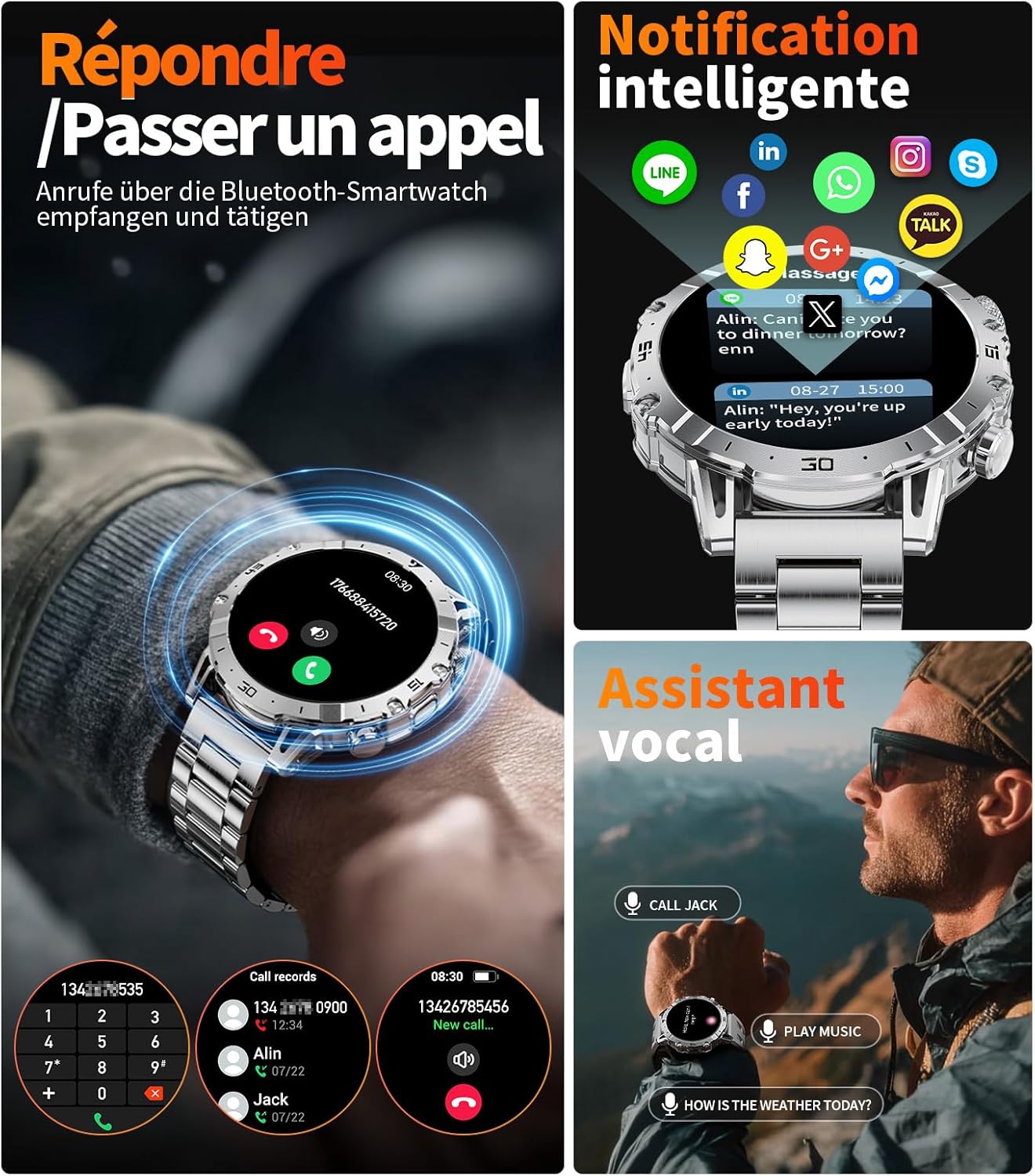
Image: Smartwatch displaying various sports modes and activity tracking.
Video: Shows the smartwatch's sports tracking features and various activity modes.
4.6 Linterna funtzioa
The smartwatch is equipped with a high-power LED flashlight for convenience in various situations.
- Aktibazioa: A dedicated LIGHT button is located on the left side of the dial for easy activation.
- Erabilerak: Ideal for night activities, power outages, finding objects, or as a high-luminosity floodlight.

Image: Smartwatch flashlight feature in action.
4.7 Erlojuaren aurpegiaren pertsonalizazioa
Personalize your smartwatch with a variety of watch faces.
- Online Dials: Choose from over 200 online watch faces available through the 'FitCloudPro' app.
- Atzeko plano pertsonalizatuak: Upload your own images to create personalized watch faces.

Irudia: Adibamperloju-esfera pertsonalizagarri gutxiago.
Video: Demonstrates how to customize watch faces.
4.8 Beste ezaugarri batzuk
The smartwatch includes additional functional details for daily convenience:
- Remote Photo Control: Use your watch to remotely trigger your phone's camera.
- Kronometroa eta tenporizadorea: Integrated tools for timing activities.
- Kalkulagailua: Basic arithmetic functions on your wrist.
- Eguraldiaren iragarpenak: Lortu eguraldiaren eguneraketak denbora errealean.
5. Mantentzea
5.1 Garbiketa
Erlojuaren itxura eta funtzionaltasuna mantentzen laguntzen du aldizka garbitzeak.
- Wipe the watch and straps with a soft, dry cloth.
- Saihestu produktu kimiko gogorrak, disolbatzaileak edo garbitzaile urratzaileak erabiltzea.
- For silicone straps, mild soap and water can be used, then rinse thoroughly and dry.
5.2 Urarekiko erresistentzia
The EF18-B smartwatch has a 5ATM water resistance rating, making it suitable for swimming and showering. However, it is not recommended for diving or high-pressure water activities.
Video: Demonstrates the smartwatch's water resistance.
5.3 Bateria zaintzea
- Saihestu erlojua muturreko tenperaturetan (oso beroa edo oso hotza) jartzea.
- Ez utzi erlojua kargatu gabe denbora luzez.
6. Arazoak
Zure erloju adimendunarekin arazoak badituzu, jo ezazu honako ohiko irtenbide hauetara:
- Erlojua ez da pizten: Ensure the watch is fully charged. Connect it to a charger and wait a few minutes before attempting to power it on.
- Connection issues with phone:
- Verify Bluetooth is enabled on both your phone and watch.
- Ensure the 'FitCloudPro' app has all necessary permissions.
- Restart both your smartwatch and smartphone, then attempt to pair again.
- Ziurtatu erlojua telefonoaren Bluetooth-aren eremuan dagoela.
- Jaso ez diren jakinarazpenak:
- Check that the watch is properly connected via Bluetooth.
- In the 'FitCloudPro' app, verify that notification permissions are enabled for the desired applications.
- Ensure your phone's notification settings allow the 'FitCloudPro' app to display alerts.
- Osasun-datu okerrak: Ensure the watch is worn snugly on your wrist, but not too tight. Clean the sensor on the back of the watch. For any health concerns, consult a medical professional.
7. Zehaztapenak
| Ezaugarri | Xehetasuna |
|---|---|
| Marka | SUNKTA |
| Ereduaren izena | EF18-B |
| Pantailaren tamaina | 1.7 hazbete |
| Konektibitate Teknologia | Bluetootha |
| Haririk gabeko komunikazio estandarra | Bluetootha |
| Bateria mota | Litio-polimeroa |
| Bateria Edukiera | 1000 mAh |
| Memoria Biltegiratzeko Ahalmena | 128 MB |
| Gailu bateragarriak | Smartphone (Android 5.1+, iOS 9.0+) |
| Ezaugarri bereziak | Phone Call, Voice Control, Music Player, Activity Tracker, Touch Screen, LED Lamp |
| GPSa | GPS via smartphone |
| Forma | Biribila |
| Uraren Erresistentzia | 5ATM |
8. Bermea eta Laguntza
Your SUNKTA Smartwatch EF18-B comes with a manufacturer's warranty.
- Berme Epea: 2 urte erosten direnetik.
- Laguntza: For technical assistance or warranty claims, please refer to the contact information provided in the packaging or on the official SUNKTA webgunea.